
1. ምርት አብቅቷልview
The ODK 48-inch L-Shaped Desk is designed for home office, gaming, and general computer use. It features a reversible storage shelf configuration, an elevated monitor stand, and a dedicated PC stand area. The desk is constructed from solid particle board with a rustic brown finish and a sturdy metal frame.
- የምርት ስም፡ ኦዲኬ
- ሞዴል፡ 48 inch L Shaped Desk
- መጠኖች፡- 31.5" ዲ x 48" ዋ x 34.5" ኤች
- ክብደት፡ 38.4 ፓውንድ £
- ቁሳቁስ፡ የተቀረጸ እንጨት (የጠረጴዛ ጫፍ)፣ ብረት (ፍሬም)
- ቀለም፡ Rustic Brown

Figure 1: Fully assembled ODK 48-inch L-Shaped Desk with monitor stand and storage shelves.
2. ቁልፍ ባህሪያት
- Ergonomic Monitor Stand: Features a 4.5-inch elevated monitor stand shelf, promoting a comfortable viewing position to reduce neck strain. The 7.8-inch wide shelf can accommodate two monitors.
- Reversible L-Shaped Design with Storage: The side storage shelves can be installed on either the left or right side to suit your space. Includes a bottom shelf designed as a PC stand, offering ample room for a computer tower.
- Space-Saving Corner Design: The L-shape is ideal for small spaces, providing two desktop areas (Main top: 37''W x 19.7''D, Side top: 31.5''D x 10.2''W) for various electronic devices and work.
- ዘላቂ ግንባታ; The tabletop is made of high-quality particle board, resistant to scratches, collisions, and water. A thick metal frame ensures stability and sturdiness. Desk foot pads protect flooring.
- ሁለገብ አጠቃቀም፡- Suitable for use as a home office desk, gaming desk, corner computer desk, or writing desk. Includes two headphone hooks for convenience.
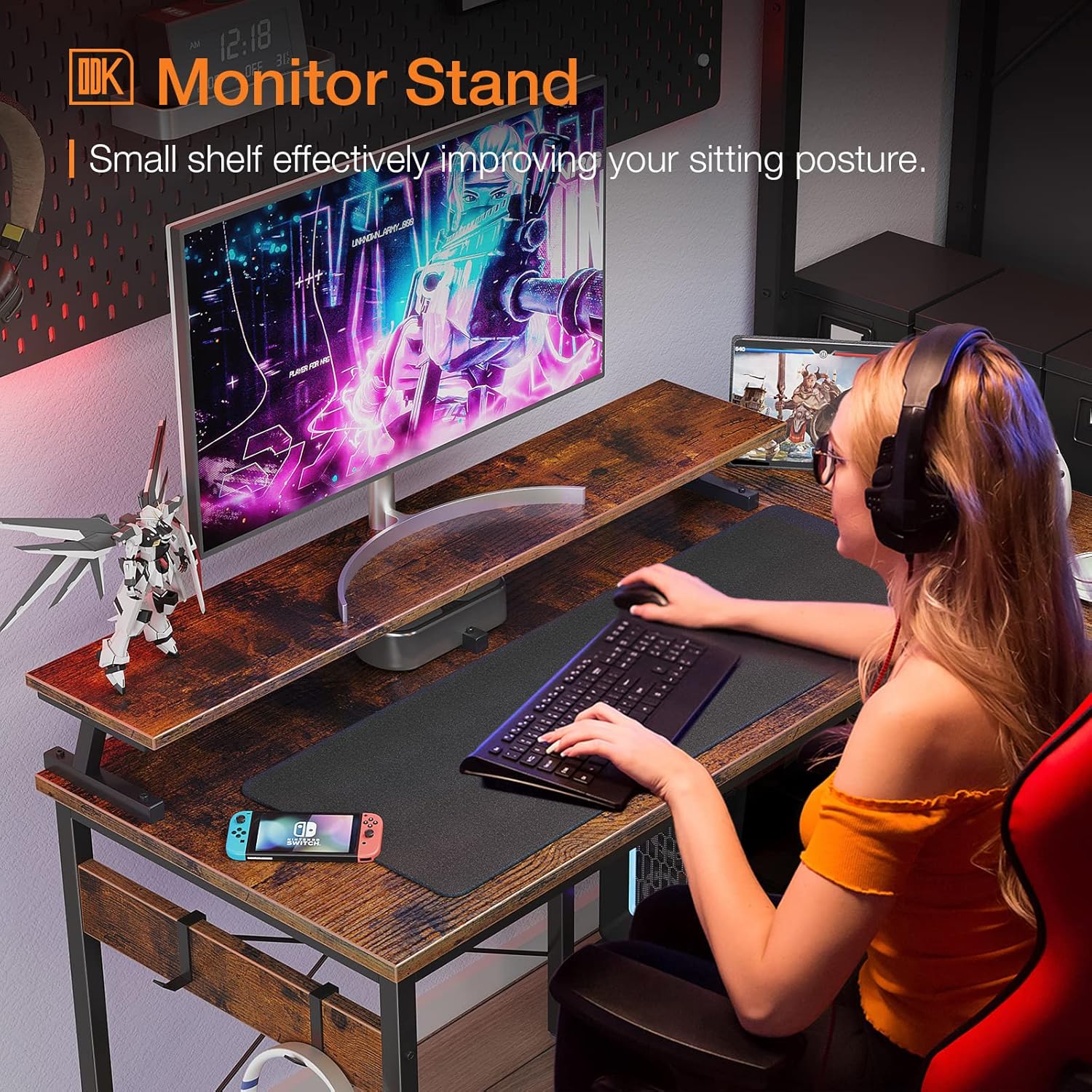
ምስል 2፡ የተሻሻለ ergonomicsን የሚያሳይ ከፍ ያለ የማሳያ ማቆሚያ።

Figure 3: Dedicated PC stand area within the storage shelves.
3. የመሰብሰቢያ መመሪያዎች
For ease and safety, it is recommended that two people assemble this desk. All necessary hardware, tools, and an instruction manual are included in the package. Please refer to the detailed steps below and the accompanying assembly video for guidance.
Video 1: Detailed assembly guide for the ODK Small L Shaped Desk.
የመሰብሰቢያ ደረጃዎች
- Step 1: Prepare Components. Unpack all components and verify against the parts list in the included manual. Ensure all parts are present and undamaged.
- Step 2: Assemble the Side Frame. Attach the adjustable feet (part 7) to the bottom of the side frame components (parts K and H) using screws (part 2).
- Step 3: Attach Support Fittings. Connect the support fittings (parts I and M) to the side frames (K and H) using screws (parts 2 and 3). Pay attention to the direction of parts I and M as indicated in the manual.
- Step 4: Install Bottom Shelves. Secure the bottom shelves (parts O and N) to the assembled side frame using screws (part 3).
- Step 5: Install Top Shelf. Install the top shelf (part L) onto the side frame using screws (part 3).
- Step 6: Connect Side Frames. Use the connection rod (part J) and screws (part 2) to link the two main side frames (K and H) together.
- Step 7: Assemble Main Desk Frame. Install adjustable feet (part 7) on the bottom of the main desk frame (part C) and use screws (part 2) to install part E.
- Step 8: Connect Main Desk Frame. Use part F and screws (part 2) to connect the main desk frame (part C) to the previously assembled side frame (part J).
- Step 9: Attach Desktop Panels. Fix the desktop panels (parts A and B) onto the corresponding positions of the assembled frame using screws (part 4). Ensure the 6 holes for the desktop and X bracket align on the same sides.
- Step 10: Install X-Shaped Bar. Install the X-shaped support bar (part S) using screws (parts 1 and 6) to enhance stability.
- Step 11: Assemble Monitor Shelf. Install the support parts (part R) onto the monitor shelf (part Q) using screws (part 1). Ensure all three support stands are in the same direction.
- Step 12: Final Attachments. Install the assembled monitor shelf (part Q) onto the main desktop using screws (part 1). Attach the cable management grommet (part 8) and the headphone hooks (part 5) to part D as desired.
Once all steps are completed, gently lift and place the desk in its desired location. Verify all screws are tightened for stability.
4. የአሠራር መመሪያዎች
The ODK L-Shaped Desk is designed for versatile use in various settings. Here are some guidelines for optimal operation:
- አቀማመጥ፡- Position the desk on a flat, stable surface. Use the adjustable feet to level the desk and prevent wobbling.
- የክብደት አቅም; The desk has a maximum weight recommendation of 220 pounds. Avoid exceeding this limit to ensure stability and longevity.
- መቆሚያ መከታተል፡ Utilize the elevated monitor stand to position your screen(s) at eye level, promoting ergonomic posture.
- የማከማቻ መደርደሪያዎች; Organize books, documents, and other office supplies on the two-tier storage shelves. The bottom shelf is specifically designed for a PC tower.
- የኬብል አስተዳደር Use the integrated cable hole on the side tabletop to route and organize cables, keeping your workspace tidy.
- Headphone Hooks: Hang headphones or other accessories on the provided hooks for easy access and to keep the desktop clear.
5. እንክብካቤ እና ጥገና
Proper care and maintenance will extend the life and appearance of your ODK L-Shaped Desk.
- ማጽዳት፡ ንጣፎችን ለስላሳ, መamp ጨርቅ. ጨረራውን ሊጎዳ የሚችል ኃይለኛ ኬሚካሎችን ወይም ሻካራ ማጽጃዎችን ያስወግዱ።
- መፍሰስ Immediately wipe up any spills to prevent water damage to the particle board.
- የሙቀት መከላከያ; Use coasters or protective pads under hot items to prevent marks on the desktop.
- የፀሐይ ብርሃን መጋለጥ; Avoid prolonged direct sunlight exposure, which can cause fading or discoloration of the wood finish.
- ማሰሪያዎችን ማሰር; Periodically check and tighten all screws and fasteners to maintain the desk's stability.
- ዴስክ ማንቀሳቀስ; When moving the desk, lift it rather than dragging it to prevent damage to the frame and flooring.
6. መላ መፈለግ
If you encounter any issues with your ODK L-Shaped Desk, refer to the following common solutions:
| ችግር | ሊሆን የሚችል ምክንያት | መፍትሄ |
|---|---|---|
| ጠረጴዛው ተንኮለኛ ነው። | ያልተስተካከለ ወለል ወይም ልቅ ማያያዣዎች። | Adjust the leveling feet on the bottom of the desk. Ensure all screws are securely tightened. |
| ክፍሎች በሚሰበሰቡበት ጊዜ አይስተካከሉም። | Incorrect orientation of parts or overtightened screws. | Loosen screws slightly, re-align parts, then tighten. Refer to the assembly video and manual for correct orientation. |
| የጎደሉ ወይም የተበላሹ ክፍሎች. | የማምረቻ ጉድለት ወይም የመርከብ ጉዳት። | Contact ODK customer support immediately for assistance. |
| Difficulty installing X-shaped bar. | Frame not perfectly square or screws not aligned. | Ensure the main frame is square before attempting to install the X-bar. Loosen other screws if necessary to allow for slight adjustment. |
7. ዝርዝሮች
| ዝርዝር መግለጫ | ዝርዝር |
|---|---|
| የምርት ስም | ኦዲኬ |
| ቅርጽ | L-ቅርጽ |
| የጠረጴዛ ንድፍ | የኮምፒውተር ዴስክ |
| የምርት ልኬቶች (D x W x H) | 31.5" ዲ x 48" ዋ x 34.5" ኤች |
| ቀለም | Rustic Brown |
| ቅጥ | ዘመናዊ |
| የመሠረት ቁሳቁስ | የምህንድስና እንጨት |
| ከፍተኛ የቁስ አይነት | የምህንድስና እንጨት |
| የማጠናቀቂያ ዓይነት | የታሸገ |
| ልዩ ባህሪ | ሊቀለበስ የሚችል |
| የእቃው ክብደት | 38.4 ፓውንድ £ |
| መጠን | 48 ኢንች |
| Minimum Height (Monitor Shelf) | 4.5 ኢንች |
| Maximum Height (Desk Surface) | 34.5 ኢንች |
| የሚመከር አጠቃቀሞች | ጨዋታ, ስራ, መጻፍ |
| የተካተቱ አካላት | Two-tier storage shelves, two headphone hooks, assembly hardware and tools, instruction manual |
| አስፈላጊ ስብሰባ | አዎ |
| ለስብሰባ የሚመከር ሰዎች | 2 |
| ከፍተኛው የክብደት ምክር | 220 ፓውንድ £ |
8. ዋስትና እና ድጋፍ
ODK is committed to providing quality products and customer satisfaction. If you encounter any product problems, such as damaged or missing parts, or require assistance with assembly, please do not hesitate to contact our customer support team.
- የደንበኛ አገልግሎት፡ We guarantee a solution within 24 hours for any product issues.
- የእውቂያ መረጃ፡- Please refer to the contact details provided in your product packaging or on the official ODK webበጣም ወቅታዊ ለሆኑ የድጋፍ ሰርጦች ጣቢያ።
- ዋስትና፡- Specific warranty details are typically included with your purchase documentation. Please retain your proof of purchase for warranty claims.
Video 2: ODK L-shaped desk product overview፣ ትርኢትasing ባህሪያት እና ንድፍ.