
1. መግቢያ
The OWON SDS1102 is a 2-channel digital storage oscilloscope designed for a wide range of electronic measurement and analysis tasks. It features a 100 MHz bandwidth, a 1 GSa/s real-time sampling rate, and a clear 7-inch TFT-LCD display. This manual provides essential information for setting up, operating, maintaining, and troubleshooting your device, ensuring optimal performance and longevity.

Figure 1: OWON SDS1102 Digital Oscilloscope
2. የደህንነት መረጃ
Please read and understand all safety instructions before operating the device. Failure to comply with these instructions may result in electric shock, fire, or damage to the product.
- ከመሳሪያው ጋር አብሮ የሚመጣውን የኃይል ገመድ ብቻ ይጠቀሙ።
- የኤሌክትሪክ ንዝረትን ለመከላከል መሳሪያው በትክክል መሬት ላይ መቀመጡን ያረጋግጡ።
- መሳሪያውን በእርጥብ ወይም መamp ሁኔታዎች.
- መሳሪያውን በቀጥታ ለፀሀይ ብርሀን ወይም ለከፍተኛ ሙቀት ከማጋለጥ ይቆጠቡ።
- መሣሪያውን አይክፈቱ ሐasinሰ; ሁሉንም አገልግሎቶች ብቁ ለሆኑ ሠራተኞች ያመልክቱ።
- Verify probe attenuation settings match the oscilloscope's input settings.
3. የጥቅል ይዘቶች
ከዚህ በታች የተዘረዘሩት ሁሉም እቃዎች በጥቅልዎ ውስጥ መካተታቸውን ያረጋግጡ፡-
- OWON SDS1102 Digital Oscilloscope
- የኃይል ገመድ
- ሲዲ-ሮም (ሶፍትዌር እና ሰነዶችን የያዘ)
- የዩኤስቢ ገመድ
- Oscilloscope Probes (2 units)
- Probe Adjustment Tool (screwdriver)
- የተጠቃሚ መመሪያ (ይህ ሰነድ)
4. ምርት አብቅቷልview
The SDS1102 is designed for efficiency and accuracy in various applications, from electronic circuit debugging to automotive maintenance.
ቁልፍ ባህሪዎች
- ኤችዲ LCD ስክሪን፡ A 7-inch color TFT-LCD with 65535 colors and 800 x 480 pixel resolution provides clear and concise waveform readings. It supports four automatic cursor modes for precise voltagየኢ እና የጊዜ ልዩነት መለኪያዎች።
- ከፍተኛ ኤስampየሊንግ ተመን ፦ Equipped with a 1 GSa/s sampling rate, the device allows for detailed waveform capture and analysis. It includes single waveform recording and playback, and supports plug-and-play USB storage devices.
- Powerful System: Features an auto-range function and supports horizontal, vertical, single/multi-waveform tracking. Probe attenuation settings include 1x, 10x, 100x, and 1000x. It offers 30 types of automatic measurement functions and supports LABVIEW communication for secondary development.
- ተንቀሳቃሽነት፡- With ultra-thin body design (301 x 152 x 70 mm) and a weight of 1.1 kg, the oscilloscope is highly portable, saving desktop space and operating quietly.

Figure 2: Key features of the SDS1102 Oscilloscope

Figure 3: Compact design and dimensions for portability

Figure 4: Diverse applications of the SDS1102 Oscilloscope
5. ማዋቀር
5.1 የመጀመሪያ ኃይል-አፕ
- Connect the power cord to the oscilloscope and a suitable power outlet.
- መሣሪያውን ለማብራት የኃይል አዝራሩን ይጫኑ.
- The 7-inch TFT-LCD display will illuminate, showing the OWON logo and then the main waveform interface.
5.2 የመመርመሪያ መለኪያ
Before taking measurements, it is crucial to calibrate the oscilloscope probes for accurate readings. This process compensates for any slight variations in the probes as supplied.
- Connect a probe to one of the BNC input connectors (e.g., CH1).
- Ensure the probe's attenuation switch (usually on the probe body) is set to 10x.
- Connect the probe tip to the test point, which is a small metal loop located on the bottom right of the oscilloscope's front panel.
- Attach the black grounding alligator clip of the probe to the lower metal loop, which serves as the ground test point.
- የሚለውን ይጫኑ አውቶማቲክ button on the oscilloscope. The device will automatically adjust settings to display the test signal. The test point outputs a 1 kHz, 5V square wave.
- Observe the waveform on the screen. If it does not appear as a perfect square wave (e.g., rounded corners or overshoot), use the supplied probe adjustment tool (small screwdriver).
- Carefully insert the screwdriver into the compensation screw on the BNC connector of the probe and adjust it until the displayed square wave is clean and flat on top and bottom, with sharp corners. A slight turn (approximately 1/8th) may be sufficient.
- Repeat this process for all probes you intend to use.
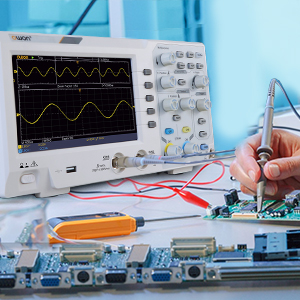
Figure 5: Oscilloscope probe connected to a circuit for testing
6. የአሠራር መመሪያዎች
6.1 መሰረታዊ የሞገድ ቅርፅ ማሳያ
- በሙከራ ላይ ያለውን ወረዳ ወደ ወረዳው ያገናኙት።
- አስተካክል። Vertical Scale (VOLTS/DIV) እና Horizontal Scale (SEC/DIV) knobs to get a stable and viewable waveform on the screen.
- የሚለውን ተጠቀም አቀማመጥ የሞገድ ቅርጹን በአቀባዊ ወይም በአግድም ለማንቀሳቀስ የሚረዱ ቁልፎች።
- የሚለውን ይጫኑ አውቶማቲክ button for automatic waveform optimization.

Figure 6: Auto-range function in action
6.2 Cursor Measurements
The SDS1102 supports four automatic cursor modes for precise measurements.
- የሚለውን ይጫኑ ጠቋሚ አዝራር።
- Select the desired cursor type (e.g., Voltage, Time) using the menu options.
- Adjust the cursor positions using the multipurpose knob to measure specific points on the waveform.
- The measured values (e.g., ◊V, ◊T) will be displayed on the screen.

Figure 7: Performing cursor measurements
6.3 አውቶማቲክ መለኪያዎች
The oscilloscope offers 30 types of automatic measurements for quick analysis.
- የሚለውን ይጫኑ ለካ አዝራር።
- Navigate through the menu to select the desired automatic measurements (e.g., Frequency, Peak-to-Peak Voltage, RMS).
- The selected measurements will be displayed on the screen, updating in real-time.

Figure 8: Automatic measurement display
6.4 Waveform Recording and Playback
The device allows for recording and replaying single waveforms.
- የሚለውን ይጫኑ አስቀምጥ/አስታውስ button (or similar function).
- Select the option to record a waveform.
- To replay, select the playback option and choose the desired stored waveform.
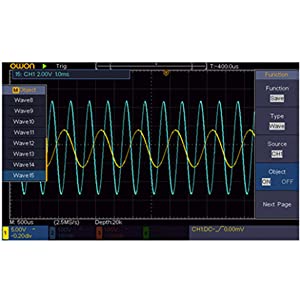
Figure 9: Waveform save and recall menu
6.5 USB Connectivity and PC Control
The SDS1102 supports plug-and-play USB storage devices for saving data and configurations. It also allows for remote communication and control via a computer using the USB interface, with support for LABVIEW and SCPI commands.

Figure 10: USB connection for PC communication and data transfer
7. ጥገና
The OWON SDS1102 is designed for continuous, maintenance-free use under normal operating conditions. However, proper care ensures its longevity and performance.
- ማጽዳት፡ Use a soft, dry cloth to clean the exterior of the oscilloscope. For stubborn dirt, a slightly damp መለስተኛ ሳሙና ያለው ጨርቅ መጠቀም ይቻላል፣ ይህም ምንም አይነት ፈሳሽ ወደ መሳሪያው እንዳይገባ ያረጋግጣል። ሻካራ ማጽጃዎችን ወይም መሟሟቶችን አይጠቀሙ።
- ማከማቻ፡ When not in use, store the oscilloscope in a clean, dry environment, away from extreme temperatures and humidity.
- የመርማሪ እንክብካቤ፡- Handle probes carefully. Avoid bending or stressing the cables. Keep probe tips clean.
- የውስጥ ጥገና; The device does not require user-performed internal maintenance. Do not attempt to open the casing፣ ምክንያቱም ይህ ዋስትናውን ሊያሳጣዎት እና ለኤሌክትሪክ አደጋዎች ሊያጋልጥዎት ይችላል።
8. መላ መፈለግ
If you encounter issues with your OWON SDS1102, refer to the following common troubleshooting steps:
| ችግር | ሊሆን የሚችል ምክንያት | መፍትሄ |
|---|---|---|
| መሣሪያው አይበራም። | Power cord not connected; power outlet faulty; device fault. | Check power cord connection. Test power outlet with another device. If problem persists, contact support. |
| የሞገድ ቅርጽ አልታየም። | Probe not connected; probe faulty; input signal too small/large; incorrect vertical/horizontal settings. | Ensure probes are securely connected. Check probe functionality. Adjust VOLTS/DIV and SEC/DIV. Use Autoset. |
| Waveform is distorted or noisy. | Uncalibrated probe; poor grounding; external interference. | Perform probe calibration (Section 5.2). Ensure proper grounding. Minimize external electromagnetic interference. |
| USB storage not recognized. | USB device format incompatible; faulty USB device/port. | Ensure USB device is formatted correctly (e.g., FAT32). Try a different USB device or port. |
For issues not covered here, please refer to the full manual on the provided CD-ROM or contact OWON customer support.
9. ዝርዝሮች
| ባህሪ | ዝርዝር መግለጫ |
|---|---|
| አምራች | ኦዎን |
| የሞዴል ቁጥር | OWON-SDS1102 |
| ልኬቶች (L x W x H) | 30.1 x 15.2 x 7 ሴ.ሜ |
| ክብደት | 1.67 ኪ.ግ |
| ማሳያ | 7-inch Color TFT-LCD, 800 x 480 pixels |
| ቻናሎች | 2 |
| የመተላለፊያ ይዘት | 100 ሜኸ |
| Sampደረጃ ይስጡ | 1 GSa/s |
| የመዝገብ ርዝመት | 10K points |
| ጊዜ መነሳት | ≤1.7 ns |
| የመርማሪ Attenuation | 1x ፣ 10x ፣ 100x ፣ 1000x |
| አውቶማቲክ መለኪያዎች | 30 ዓይነቶች |
| ግንኙነት | USB (for storage, PC communication) |
| የሶፍትዌር ድጋፍ | ላብVIEW, SCPI |
| ባትሪዎች ተካትተዋል። | አይ |
| የመጀመሪያ ቀን ይገኛል። | ሰኔ 23፣ 2022 |

Figure 11: Summary of key technical specifications
10. ዋስትና እና ድጋፍ
OWON products are designed for reliability and performance. For warranty information, please refer to the documentation included on the CD-ROM or visit the official OWON website. Information regarding the availability of spare parts is currently unavailable.
For technical support, product inquiries, or service requests, please contact OWON customer service through their official channels. Keep your purchase receipt and product model number (OWON-SDS1102) handy when contacting support.