
ORIA Bluetooth Receiver 5.0 User Manual
Model: Bluetooth Receiver 5.0
1. መግቢያ
The ORIA Bluetooth Receiver 5.0 is a versatile audio adapter designed to add Bluetooth functionality to non-Bluetooth devices. It supports both receiving (RX) and transmitting (TX) modes, allowing you to wirelessly stream audio from your smartphone to a car stereo or speaker, or from your TV to Bluetooth headphones. Featuring Bluetooth 5.0 technology and CVC noise reduction, it provides stable connections and clear audio quality for music and hands-free calls.
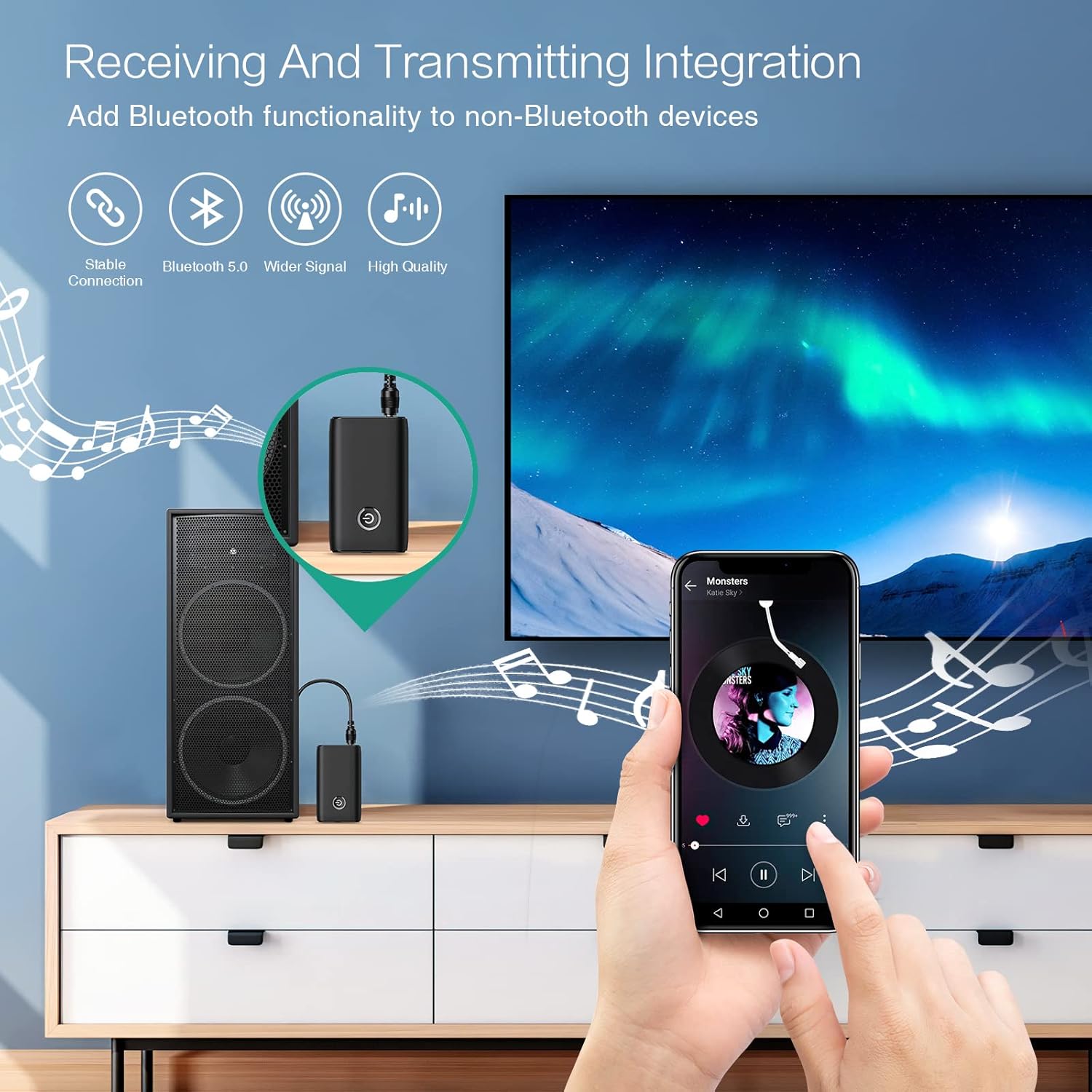
Figure 1.1: The ORIA Bluetooth Receiver 5.0 integrating with various audio systems, showcasing its dual receiving and transmitting functions.
2. የጥቅል ይዘቶች
እባክዎን ጥቅሉን ለሚከተሉት ነገሮች ያረጋግጡ፡
- ORIA Bluetooth Receiver 5.0 Unit
- 3.5 ሚሜ የድምጽ ገመድ
- የዩኤስቢ ባትሪ መሙያ ገመድ (አይነት-ሲ)
- የተጠቃሚ መመሪያ

Figure 2.1: All items included in the ORIA Bluetooth Receiver 5.0 package.
3. ምርት አብቅቷልview
Familiarize yourself with the device's components and indicators:

Figure 3.1: Detailed diagram of the ORIA Bluetooth Receiver 5.0, highlighting its ports, buttons, and LED indicator meanings.
- 3.5ሚሜ የድምጽ ወደብ፡ Connects to audio input/output devices.
- የማይክሮ ዩኤስቢ ኃይል መሙያ ወደብ; መሣሪያውን ለመሙላት.
- RX/TX Switch: Toggles between Receiver (RX) and Transmitter (TX) modes.
- ባለብዙ ተግባር አዝራር; ማብራት/ማጥፋት፣ ማጫወት/አቁም፣ ጥሪዎችን መመለስ/ማብቃት
- Connection Indicator Light:
- Red & Blue flashing: Pairing State
- Red flashing: Low Battery Warning
- Blue solid: Connected
4. ባህሪያት
- ብሉቱዝ 5.0: Provides a stable wireless connection up to 10 meters for music streaming and audio calls.
- Intelligent Noise Reduction (CVC): Enhances audio clarity by reducing background noise, supporting A2DP, AVRCP, HFP, HSP protocols.
- Dual Mode (TX/RX): Converts non-Bluetooth devices into Bluetooth-enabled devices for both transmitting and receiving audio.
- ረጅም የባትሪ ህይወት; Up to 8 hours of play/talk time, 60 days standby, with a 2-hour full charge time.
- የዩኤስቢ ባትሪ መሙላት፡ Allows use while charging without interrupting calls or music.
- ቀላል አሰራር; Simple one-button control for power, play/pause, and call management.
- ተንቀሳቃሽ ንድፍ; Small and lightweight for convenient transport and use anywhere.
5. ማዋቀር እና አሠራር
5.1 መሳሪያውን መሙላት
Before first use, fully charge the device. Connect the provided USB charging cable to the Micro USB Charging Port on the receiver and the other end to a USB power source (e.g., car charger, wall adapter, computer USB port). The indicator light will show charging status.

Figure 5.1: Battery life and charging duration of the ORIA Bluetooth Receiver 5.0.
5.2 Switching Between Receiver (RX) and Transmitter (TX) Modes
The device features a physical switch to change between RX and TX modes. ጠቃሚ፡- Always power off the device before switching modes to ensure proper functionality.

Figure 5.2: Instructions for switching between Transmitter (TX) and Receiver (RX) modes.
5.3 የመቀበያ ሁነታ (RX) ማዋቀር
Use RX mode to receive audio from a Bluetooth-enabled device (e.g., smartphone, tablet) and play it through a non-Bluetooth audio system (e.g., car stereo, home speaker, wired headphones).
- Switch to RX: Ensure the device is powered off, then slide the switch to the "RX" position.
- ከድምጽ ስርዓት ጋር ይገናኙ፡ Plug one end of the 3.5mm audio cable into the receiver's 3.5mm Audio Port and the other end into the AUX input of your car stereo, home speaker, or wired headphones.
- አብራ፡ Press and hold the Multi-function Button to power on the receiver. The indicator light will flash red and blue, indicating pairing mode.
- ከስልክ ጋር አጣምር፡ On your smartphone or other Bluetooth device, enable Bluetooth and search for "ORIA-B6" (or similar name). Select it to pair. Once connected, the indicator light will turn solid blue.
- ሙዚቃ አጫውት፡ Start playing audio on your paired device. The sound will now be transmitted wirelessly to your connected audio system.

Figure 5.3: Easy setup steps for Receiver (RX) mode, typically used in a car.
5.4 የማስተላለፊያ ሁነታ (TX) ማዋቀር
Use TX mode to transmit audio from a non-Bluetooth device (e.g., TV, PC, MP3 player) to a Bluetooth-enabled audio output (e.g., Bluetooth headphones, Bluetooth speaker).
- Switch to TX: Ensure the device is powered off, then slide the switch to the "TX" position.
- ከድምጽ ምንጭ ጋር ይገናኙ፡ Plug one end of the 3.5mm audio cable into the receiver's 3.5mm Audio Port and the other end into the audio output (e.g., headphone jack) of your TV, PC, or MP3 player.
- አብራ፡ Press and hold the Multi-function Button to power on the transmitter. The indicator light will flash red and blue, indicating pairing mode.
- Pair with Bluetooth Headphones/Speaker: Put your Bluetooth headphones or speaker into pairing mode. The receiver will automatically search for and connect to nearby Bluetooth audio devices. Once connected, the indicator light will turn solid blue.
- ኦዲዮ ይደሰቱ፡ Play audio from your connected source device. The sound will now be transmitted wirelessly to your Bluetooth headphones or speaker.

Figure 5.4: Easy setup steps for Transmitter (TX) mode, typically used with a TV.
5.5 ሁለንተናዊ ተኳኋኝነት
The ORIA Bluetooth Receiver 5.0 is designed for broad compatibility with various devices in both TX and RX modes.
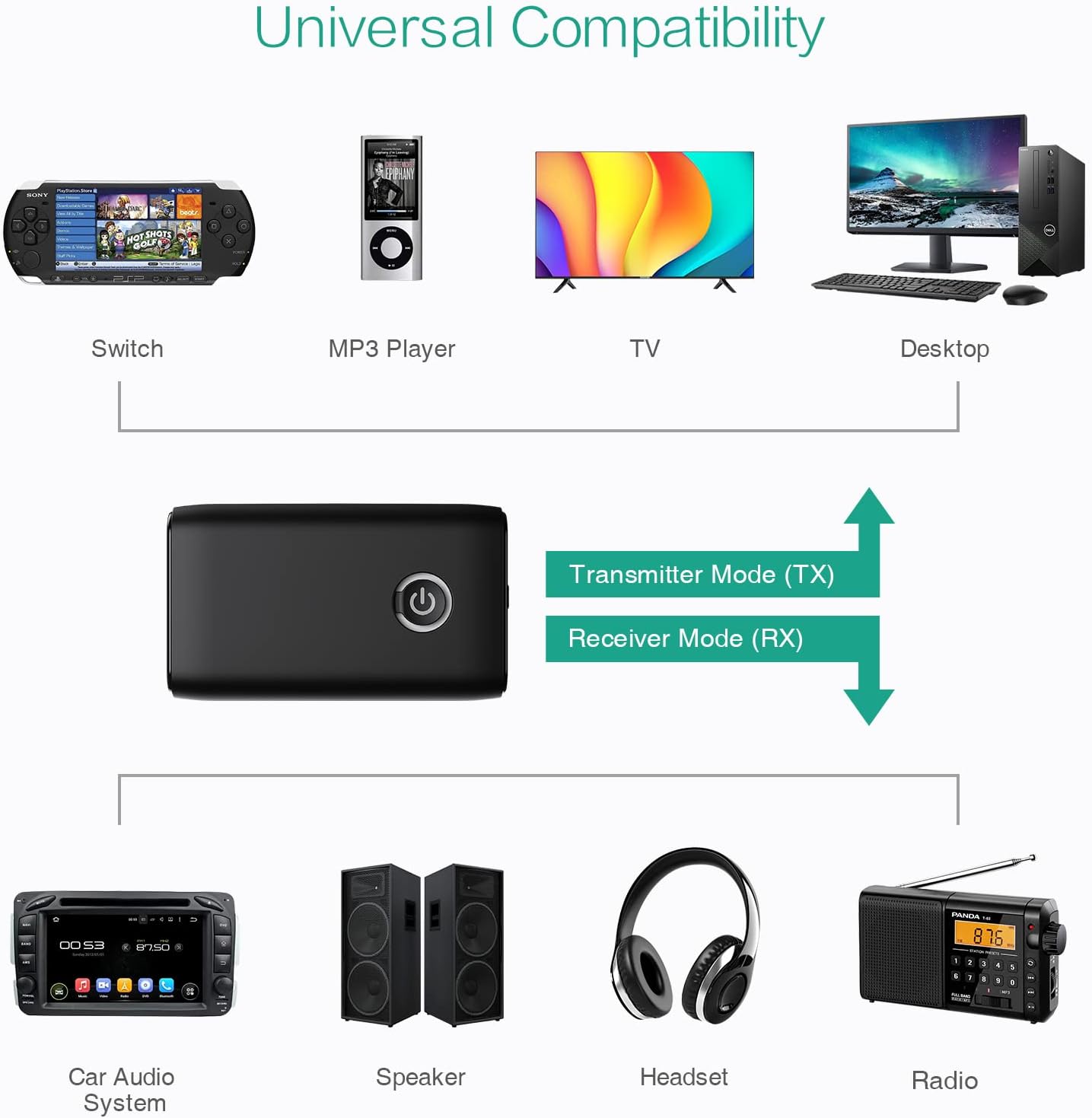
ምስል 5.5: ዘፀamples of devices compatible with the ORIA Bluetooth Receiver 5.0 in both TX and RX modes.
6. የአሠራር መመሪያዎች
6.1 የሙዚቃ መልሶ ማጫወት ቁጥጥር
- አጫውት/ ለአፍታ አቁም፡ ባለብዙ ተግባር ቁልፍን በአጭሩ ይጫኑ።
- ቀጣይ ትራክ፡ (Functionality may vary depending on connected device and mode. Typically controlled via the source device.)
- ቀዳሚ ትራክ (Functionality may vary depending on connected device and mode. Typically controlled via the source device.)
- የድምጽ መቆጣጠሪያ፡- Adjust volume directly on your paired device (smartphone, TV, etc.) or the connected audio system.
6.2 Hands-Free Calling (RX Mode Only)
When in Receiver (RX) mode and paired with a smartphone:
- ጥሪ መልስ፡- ጥሪ ሲመጣ መልቲ-ተግባር የሚለውን ቁልፍ ይጫኑ።
- ጥሪን ጨርስ፡ በጥሪ ጊዜ ባለብዙ ተግባር ቁልፍን አጭር ይጫኑ።
- ጥሪን ውድቅ አድርግ፡ Press and hold the Multi-function Button for 2 seconds when a call comes in.
- የመጨረሻ ቁጥር ባለብዙ ተግባር ቁልፍን ሁለቴ ተጫን።
7. ጥገና
- መሳሪያውን ደረቅ አድርገው ያስቀምጡት። እርጥበት ወይም ፈሳሽ እንዳይጋለጥ ያድርጉ።
- መሣሪያውን ለመበተን ወይም ለማሻሻል አይሞክሩ. ይህ ዋስትናውን ያጣል።
- መሳሪያውን ለስላሳ እና ደረቅ ጨርቅ ያጽዱ. ኃይለኛ ኬሚካሎችን ወይም ሻካራ ማጽጃዎችን አይጠቀሙ.
- ለረጅም ጊዜ ጥቅም ላይ በማይውልበት ጊዜ መሳሪያውን በቀዝቃዛና ደረቅ ቦታ ያከማቹ.
8. መላ መፈለግ
If you encounter issues with your ORIA Bluetooth Receiver 5.0, please refer to the following common solutions:
| ችግር | መፍትሄ |
|---|---|
| መሣሪያው አይበራም። | መሳሪያው ሙሉ በሙሉ መሙላቱን ያረጋግጡ። የዩኤስቢ ኃይል መሙያ ገመድ በመጠቀም ከኃይል ምንጭ ጋር ያገናኙት። |
| ከብሉቱዝ መሳሪያ ጋር ማጣመር አይቻልም። |
|
| ምንም የድምጽ ወይም ደካማ የድምጽ ጥራት የለም። |
|
| መሣሪያው በተደጋጋሚ ይቋረጣል። |
|
9. ዝርዝሮች
| ባህሪ | ዝርዝር |
|---|---|
| የምርት ስም | ኦሪአ |
| የግንኙነት ቴክኖሎጂ | ብሉቱዝ ፣ ዩኤስቢ |
| ሽቦ አልባ የግንኙነት ደረጃ | ብሉቱዝ 5.0 |
| የኃይል ምንጭ | በባትሪ የተጎላበተ፣ ባለገመድ ኤሌክትሪክ |
| ልዩ ባህሪ | Bluetooth Receiver, Portable |
| የመጫኛ ዓይነት | መሰካት |
| የሃርድዌር በይነገጽ | ብሉቱዝ ፣ ዩኤስቢ |
| የድምፅ ቅነሳ | CVC ቴክኖሎጂ |
| Battery Life (Play/Talk) | እስከ 8 ሰዓታት ድረስ |
| የመጠባበቂያ ጊዜ | 60 ቀናት |
| የኃይል መሙያ ጊዜ | በግምት 2 ሰዓታት |
10. ዋስትና እና ድጋፍ
This ORIA Bluetooth Receiver 5.0 comes with a የ 1 ዓመት ዋስትና ከተገዛበት ቀን ጀምሮ.
If you experience any problems with the product's use or function, or if the product is defective or damaged, please contact the seller directly for assistance. They will provide support and solutions to resolve your issue.