
1. ምርት አብቅቷልview
The Topsung K10 Rechargeable Walkie Talkies are designed for reliable and clear communication across various environments. These two-way radios feature a robust build, long-lasting rechargeable batteries, and essential functions like NOAA weather alerts and iVOX hands-free operation. They are suitable for family use, outdoor activities, and professional settings requiring consistent communication.

ምስል 1፡ ፊት view of the Topsung K10 Walkie Talkie, highlighting its compact design and display.
2. በሳጥኑ ውስጥ ያለው
Your Topsung K10 package includes everything needed for immediate use and convenient charging:
- 6 x Rechargeable Walkie Talkies
- 6 x Li-Polymer Batteries
- 6 x Earphones with Mic
- 6 x Adjustable Lanyards
- 2 x USB Charging Cables (each charges 3 devices)
- 2 x USB Wall Adapters
- 1 x የተጠቃሚ መመሪያ
- 1 x የማከማቻ ሳጥን
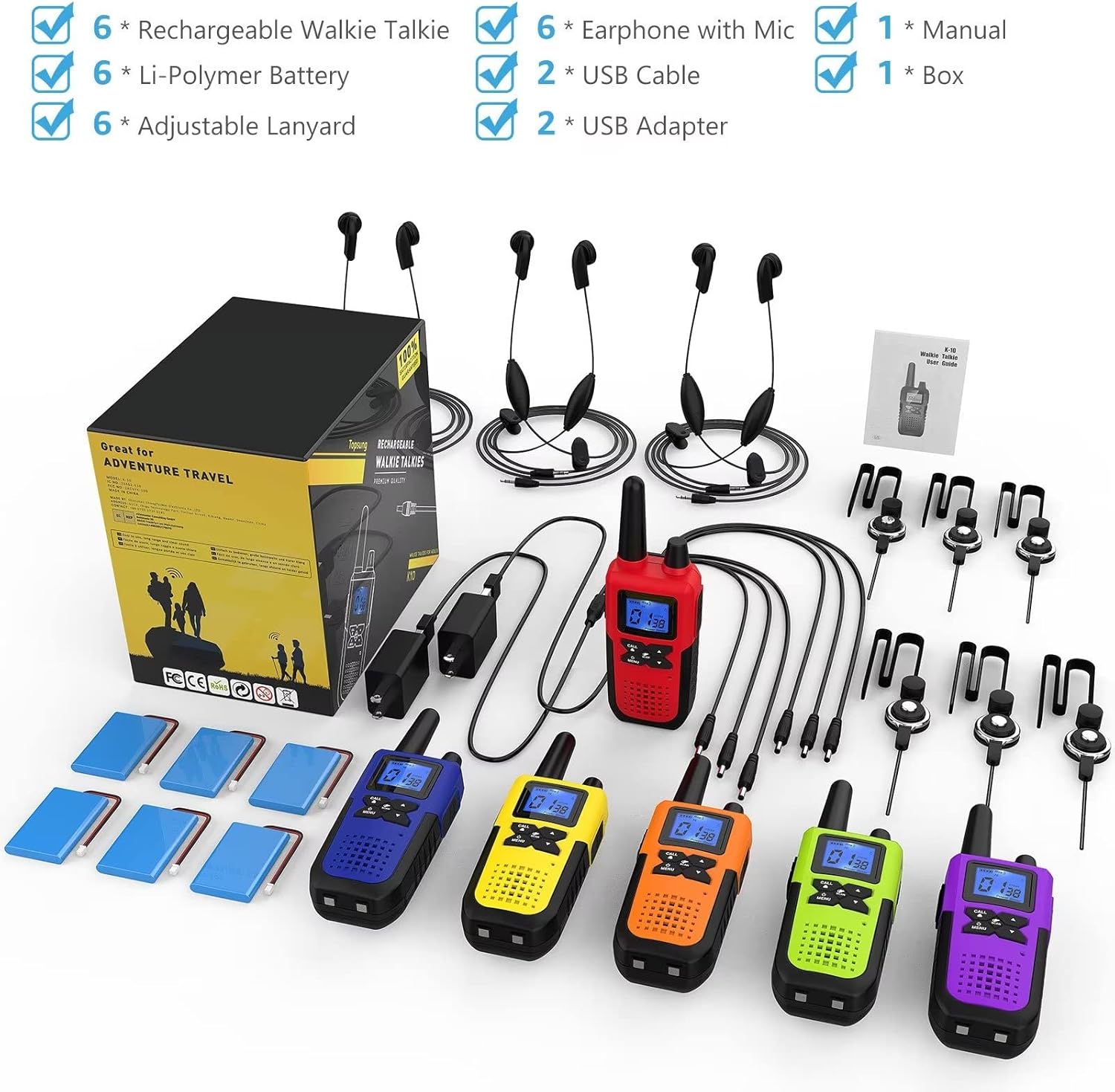
Image 2: All components included in the Topsung K10 Walkie Talkie 6-pack, neatly arranged.
3. የማዋቀር መመሪያ
3.1. የባትሪ ጭነት
To install the rechargeable battery:
- Remove the belt clip by pulling the latch upwards and sliding the clip off.
- Open the battery compartment cover on the back of the walkie talkie.
- Connect the battery's small white connector to the corresponding port inside the compartment. Ensure correct orientation (a small line on the connector aligns with the port).
- Carefully place the battery into the compartment, ensuring the wires are not pinched.
- የባትሪውን ክፍል ሽፋን ይቀይሩት እና ቀበቶውን እንደገና ያያይዙት.
Video 1: Demonstrates how to remove the belt clip, open the battery compartment, connect the battery, and close the compartment.
3.2. ባትሪዎችን መሙላት
The walkie talkies come with dual USB charging cables, allowing you to charge up to three units simultaneously per cable. Each cable connects to a USB wall adapter.
- Connect the USB charging cable to the USB wall adapter.
- የግድግዳውን አስማሚ በኃይል መሰኪያ ውስጥ ይሰኩት።
- Insert the small charging plugs from the cable into the charging ports on the side of each walkie talkie.
- A full charge typically takes approximately 3 hours and provides up to 48 hours of battery life.
Video 2: Illustrates the charging process for multiple walkie talkies using the provided dual USB charging cables and wall adapters.
3.3. Attaching Lanyards and Earpieces
For convenience and hands-free operation:
- ላንደርድ Thread the thin loop of the lanyard through the small hole located at the top-rear of the walkie talkie, near the antenna. Secure the lanyard by passing the larger end through the loop.
- Earpiece with Mic: Plug the earpiece connector into the 2.5mm earpiece jack located on the side of the walkie talkie, beneath the protective cover. The integrated microphone allows for hands-free communication.
4. የአሠራር መመሪያዎች
4.1. ማብራት / ማጥፋት
To power on or off, press and hold the 'MENU/Power' button located at the bottom of the keypad until the LCD screen illuminates or turns off.
4.2. የድምጽ መጠን ማስተካከል
Rotate the volume knob located at the top of the walkie talkie, next to the antenna, to increase or decrease the listening volume.
4.3. Selecting Channels and Privacy Codes
The K10 walkie talkies offer 22 FRS channels, each with 121 privacy codes (38 CTCSS codes and 83 DCS codes) for secure communication.
- Press the 'MENU' button once to enter channel selection mode. The channel number will flash.
- Use the 'UP' or 'DOWN' arrow buttons to select your desired channel (1-22).
- Press 'MENU' again to enter privacy code selection mode. The privacy code will flash.
- Use the 'UP' or 'DOWN' arrow buttons to select your desired privacy code (0-121).
- Press 'MENU' a third time or wait a few seconds for the setting to be saved. All walkie talkies intended to communicate must be on the same channel and privacy code.
4.4. የግፊት-ወደ-ንግግር (PTT) ግንኙነት
ድምጽዎን ለማስተላለፍ፦
- Press and hold the 'PTT' button located on the left side of the walkie talkie.
- Speak clearly into the microphone (located at the bottom-front of the device or on the earpiece mic).
- Release the 'PTT' button when you are finished speaking to allow others to respond.
Video 3: Demonstrates basic operation including PTT, channel selection, and keypad lock.
4.5. የቁልፍ ሰሌዳ መቆለፊያ
To prevent accidental changes to your settings, you can lock the keypad:
- Press and hold the 'CALL/LOCK' button for approximately 2 seconds until a key icon appears on the LCD screen.
- To unlock, press and hold the 'CALL/LOCK' button again for 2 seconds until the key icon disappears.
4.6. የNOAA የአየር ሁኔታ ማንቂያዎች
Stay informed about weather conditions:
- Press and hold the 'NOAA/SCAN' button to activate NOAA weather scan. The walkie talkie will scan for available weather channels and alerts.
- Press the 'NOAA/SCAN' button again to exit weather mode.

Image 3: The Topsung K10 Walkie Talkie displaying NOAA weather service functionality.
4.7. iVOX Hands-Free Operation
The iVOX feature allows for voice-activated transmission without pressing the PTT button. This is ideal for activities where your hands are occupied.
- Press the 'MENU' button multiple times until the iVOX icon appears and flashes on the LCD screen.
- Use the 'UP' or 'DOWN' arrow buttons to select the desired iVOX sensitivity level (1-3, with 3 being the most sensitive).
- Press 'MENU' again or wait for the setting to be saved. When iVOX is active, the walkie talkie will automatically transmit when it detects your voice.
5. ባህሪያት
The Topsung K10 Walkie Talkies are equipped with a range of features to enhance your communication experience:
- ኤችዲ ድምጽ፡ Ensures crystal-clear audio quality.
- የቁልፍ ሰሌዳ መቆለፊያ; ድንገተኛ የቅንብሮች ለውጦችን ይከላከላል።
- Antiskid Design & Drop-Protection: Durable construction for outdoor use.
- Auto Power Saver: Extends battery life during periods of inactivity.
- Auto Squelch System: Automatically mutes weak signals or unwanted noise.
- Auto Scan FRS Channels: Quickly finds active channels.
- Auto Low Battery Alert: Notifies you when the battery is running low.
- ራስ-ማህደረ ትውስታ ተግባር; Remembers your last settings.
- Robust Material (ABS): High-quality, impact-resistant casing.
- Voice Activated (iVOX): Hands-free communication.
- Belt Clip with Lanyard Hole: Multiple carrying options.
- Large LCD Screen with Backlight: Easy readability in various lighting conditions.
- One-to-One/Many Communication: Versatile communication modes.
- 1800mAh ዳግም ሊሞላ የሚችል ባትሪ; የተራዘመ የአጠቃቀም ጊዜን ይሰጣል።
- 22 FRS Channels with 121 Privacy Codes: Wide range of communication options with enhanced privacy.
- 10 Call Tones / Keypad Tone / Talk Confirmation Tone: Customizable alerts.
- ተኳኋኝነት Can be compatible with most brands' FRS 2-way radios.
- በርካታ የኃይል መሙያ አማራጮች፡- Can be charged by USB charger, PC, car charger, or power bank.
- NOAA All Hazards Weather Channels and Alerts: የእውነተኛ ጊዜ የአየር ሁኔታ መረጃ።

Image 4: Individuals using Topsung K10 Walkie Talkies during a hiking trip, demonstrating outdoor usability.
6. ዝርዝሮች
| ባህሪ | ዝርዝር |
|---|---|
| የእቃው ክብደት | 2.86 ፓውንድ (ለጥቅሉ) |
| የምርት ልኬቶች | 1.3 x 2.2 x 6.3 ኢንች (በአንድ አሃድ) |
| የማሳያ ዓይነት | LCD |
| የሰርጦች ብዛት | 22 FRS ቻናሎች |
| የግላዊነት ኮዶች | 121 (38 CTCSS፣ 83 DCS) |
| የድግግሞሽ ክልል | 462-467 ሜኸ |
| ከፍተኛ የንግግር ክልል | Up to 20 Miles (conditions apply) |
| የውሃ መቋቋም ደረጃ | ውሃ የማይገባ (IP65) |
| የባትሪ ህይወት | Up to 48 Hours (standby) |
| የባትሪ አቅም | 1800mAh (ሊ-ፖሊመር) |
| ተስማሚ መሣሪያዎች | Topsung FRS two-way radios, earpieces, and mic sets; potentially other FRS two-way radios |
7. ጥገና
To ensure the longevity and optimal performance of your Topsung K10 Walkie Talkies:
- ማጽዳት፡ ለስላሳ ይጠቀሙ, መamp የዎኪ ንግግርን ውጫዊ ገጽታ ለማጽዳት ጨርቅ. ኃይለኛ ኬሚካሎችን ወይም ሻካራ ማጽጃዎችን ከመጠቀም ይቆጠቡ።
- የባትሪ እንክብካቤ Fully charge batteries before first use. For long-term storage, charge batteries to about 50% and store in a cool, dry place. Avoid overcharging or completely draining the battery frequently.
- ማከማቻ፡ Store the walkie talkies in a dry environment, away from extreme temperatures and direct sunlight.
- የውሃ መቋቋም; While rated IP65 waterproof, avoid submerging the device in water for extended periods. Ensure all port covers are securely closed when exposed to moisture.
8. መላ መፈለግ
If you encounter issues with your Topsung K10 Walkie Talkies, try the following:
- ኃይል የለም፡ ባትሪው በትክክል መጫኑን እና ሙሉ በሙሉ መሙላቱን ያረጋግጡ።
- መግባባት አልተቻለም፡- Verify that all units are on the same channel and privacy code. Check the volume level. Ensure the PTT button is fully pressed during transmission.
- ደካማ የድምጽ ጥራት/ቋሚ፡ Move closer to the other communicating unit. Check for obstructions (e.g., buildings, dense foliage). Ensure the antenna is not obstructed. Adjust the squelch level if available (refer to advanced menu settings in the full user guide).
- አጭር ክልል፡ Range can be significantly affected by terrain, weather, and electromagnetic interference. Try moving to an open area.
- የቁልፍ ሰሌዳ ምላሽ የማይሰጥ፡ Check if the keypad lock is activated (key icon on display). Unlock it by pressing and holding the 'CALL/LOCK' button.
For further assistance, please refer to the full user guide or contact Topsung customer support.
9. ዋስትና እና ድጋፍ
Specific warranty details are not provided in the available product information. Please refer to the warranty card included in your product packaging or visit the official Topsung website for the most up-to-date warranty information and customer support contacts.
For technical support, troubleshooting, or service inquiries, please contact Topsung customer service through the channels provided in your product documentation.