
1. መግቢያ
This manual provides essential information and instructions for the safe and efficient use of your Blackview BV7200 Rugged Smartphone. The BV7200 is designed for durability and performance in challenging environments, featuring advanced water and dust resistance, a powerful processor, and a high-capacity battery.
ቁልፍ ባህሪያት የሚከተሉትን ያካትታሉ:
- IP68 & IP69K Certification: Advanced water and dust resistance for outdoor and demanding conditions.
- MediaTek Helio G85 Processor: Ensures smooth performance for gaming, multitasking, and general use.
- 50MP Dual Camera: Capture high-quality photos, even in low-light conditions.
- 5180mAh ባትሪ; Long-lasting power with 18W fast charging support.
- 6.1-inch HD+ Display: Durable screen with Corning Gorilla Glass 3, optimized for comfortable viewing
- የእጅ ጓንት ሁነታ: Allows screen operation even when wearing gloves.

ምስል፡ አልቋልview የጥቁሩview BV7200 Rugged Smartphone, highlighting its MediaTek Helio G85 processor, 50MP camera, IP68/IP69K ratings, 5180mAh battery, 6.1-inch display, and Glove Mode.
2. ማዋቀር
2.1. ሲም ካርድ እና ማይክሮ ኤስዲ ካርድ መጫን
የእርስዎን ሲም ካርድ(ዎች) እና/ወይም ማይክሮ ኤስዲ ካርድ ለመጫን፡-
- የሲም ትሪውን ከመሳሪያው ጎን ያግኙት።
- ትሪውን ለመክፈት የቀረበውን የሲም ማስወጫ መሳሪያ ይጠቀሙ።
- Carefully place your Nano-SIM card(s) and/or MicroSD card into the designated slots, ensuring correct orientation.
- ትሪውን ወደ ቦታው ጠቅ እስኪያደርጉ ድረስ ቀስ ብለው ወደ መሳሪያው ይግፉት።
2.2. የመጀመሪያ ደረጃ መሙላት እና ማብራት
ከመጠቀምዎ በፊት መሳሪያዎን ሙሉ በሙሉ መሙላት ይመከራል.
- Connect the USB Type-C cable to the charging port at the bottom of the phone. Ensure the port cap is securely opened before inserting the cable and closed after charging to maintain water resistance.
- የኬብሉን ሌላኛውን ጫፍ ወደ ተኳሃኝ የኃይል አስማሚ ያገናኙ እና ከግድግድ ሶኬት ጋር ይሰኩት.
- Once sufficiently charged, press and hold the Power button (usually on the right side) for a few seconds until the Blackview አርማ ይታያል።
- የቋንቋ ምርጫን፣ የዋይ ፋይ ግንኙነትን እና የጉግል መለያ ማዋቀርን ጨምሮ የመጀመሪያውን ማዋቀር ለማጠናቀቅ የማያ ገጽ ላይ ጥያቄዎችን ይከተሉ።
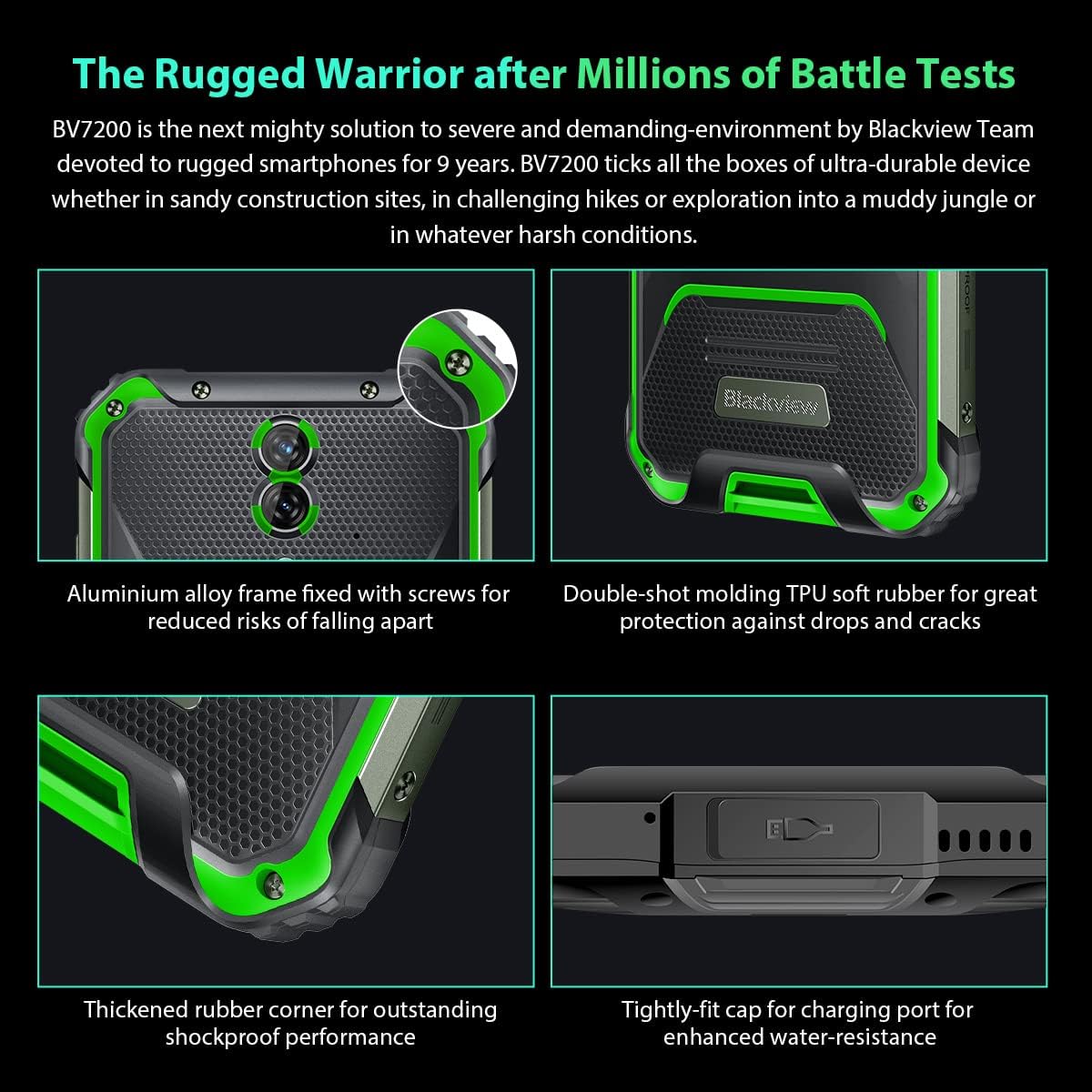
ምስል፡ መቀራረብ views of the Blackview BV7200's rugged construction, including aluminum alloy frame, double-shot molding TPU rubber, thickened rubber corners, and the tightly-fit cap for the charging port, emphasizing its durability and water resistance.
3. የአሠራር መመሪያዎች
3.1. መሰረታዊ ዳሰሳ
ጥቁሩview BV7200 operates on Doke OS 3.0, based on Android 12. Use touch gestures for navigation:
- መታ ያድርጉ፡ አንድ ንጥል ይምረጡ ወይም መተግበሪያ ይክፈቱ።
- ያንሸራትቱ በስክሪኖች ወይም ዝርዝሮች ውስጥ ይሸብልሉ.
- መቆንጠጥ ምስሎችን አሳንስ ወይም አሳንስ እና web ገጾች.
- ሎንግ ፕሬስ የአውድ ምናሌዎችን ይድረሱ ወይም የመተግበሪያ አዶዎችን ያንቀሳቅሱ።
3.2. የካሜራ አጠቃቀም
The BV7200 features a 50MP main rear camera and an 8MP ultra-wide/macro rear camera.
- የካሜራ መተግበሪያውን ከመነሻ ስክሪን ወይም ከመተግበሪያ መሳቢያ ይክፈቱ።
- የሚፈልጉትን ሁነታ ይምረጡ (ፎቶ፣ ቪዲዮ፣ ቁም ነገር፣ ፕሮ፣ ወዘተ)።
- Tap the screen to focus on a specific area.
- ፎቶ ለመቅረጽ ወይም የቪዲዮ ቀረጻ ለመጀመር/ለማቆም የመዝጊያ አዝራሩን ይጫኑ።

Image: Diagram illustrating the Blackview BV7200's 50MP Samsung ISOCELL JN1 main rear camera, 8MP ultra-wide and ultra-macro rear camera, and rear flash, highlighting its photographic capabilities.
3.3. የእጅ ጓንት ሁነታ
The BV7200 supports Glove Mode, allowing you to operate the touchscreen while wearing gloves.
- To activate/deactivate Glove Mode, navigate to Settings > Smart Assistant > Glove Mode.
- Ensure this mode is enabled when using gloves for optimal touch responsiveness.

Image: Collage demonstrating the Blackview BV7200's Glove Mode in various scenarios, showing users operating the phone while wearing different types of gloves, emphasizing its utility in cold or industrial environments.
3.4. Water and Dust Resistance (IP68 & IP69K)
The BV7200 is certified IP68 and IP69K, making it resistant to water immersion and high-pressure water jets. This allows for use in aquatic sports or dusty environments.
- Always ensure all port caps (charging port, SIM tray) are securely closed before exposing the device to water or dust.
- Rinse the phone with clean water after exposure to saltwater or chemicals.
- Do not charge the phone if the charging port is wet. Allow it to dry completely.
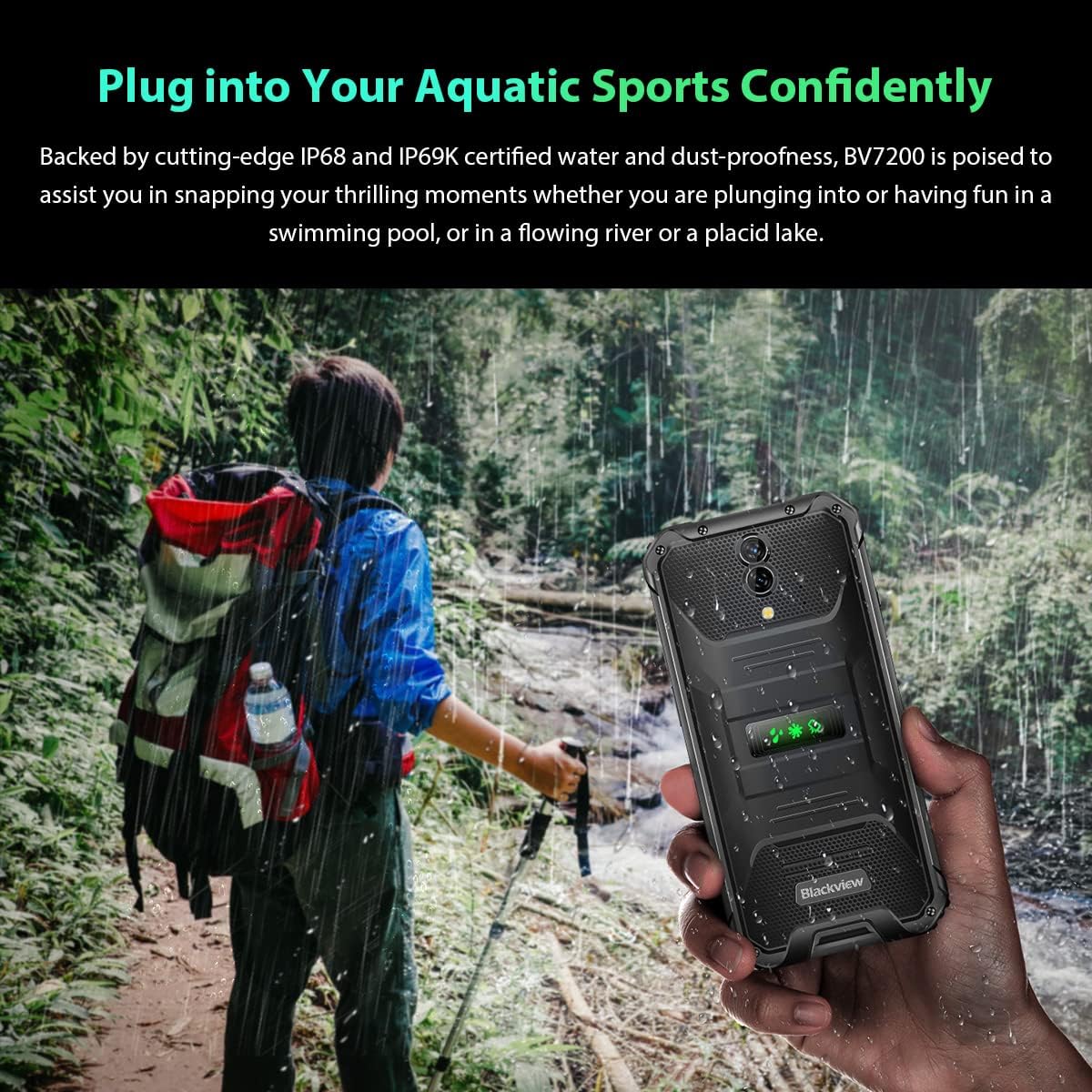
Image: A person holding the Blackview BV7200 near a stream or waterfall, illustrating its water resistance and suitability for outdoor and aquatic activities.
3.5. የባትሪ አስተዳደር
The 5180mAh battery provides extended usage. The device supports 18W fast charging.
- ለተሻለ የኃይል መሙያ ፍጥነት እና ደህንነት የመጀመሪያውን ቻርጀር እና ገመድ ይጠቀሙ።
- The battery is designed to withstand temperatures down to -10°C.
- To prolong battery life, avoid extreme temperatures and fully discharging the battery regularly.
3.6. የማህደረ ትውስታ መስፋፋት
The BV7200 features 6GB of RAM with an additional 4GB virtual memory expansion, totaling 10GB, for enhanced multitasking and performance.

Image: Graphic illustrating the memory expansion feature of the Blackview BV7200, showing 6GB of physical RAM and an additional 4GB of virtual RAM, combining for a total of 10GB for improved performance.
4. ጥገና
4.1. መሳሪያዎን ማጽዳት
ጥቁርዎን ለማጽዳትview BV7200:
- ስክሪኑን እና ገላውን ለስላሳ፣ ከተሸፈነ ጨርቅ ይጥረጉ።
- ለጠንካራ ቆሻሻ በትንሹ መamp ለስላሳ ሳሙና ይልበሱ, ከዚያም ደረቅ ያብሱ.
- ኃይለኛ ኬሚካሎችን፣ ፈሳሾችን ወይም ሻካራ ማጽጃዎችን አይጠቀሙ።
- Ensure all port caps are closed before cleaning with liquids.
4.2. የሶፍትዌር ዝመናዎች
ጥሩ አፈጻጸምን፣ ደህንነትን እና የአዳዲስ ባህሪያትን ተደራሽነት ለማረጋገጥ የሶፍትዌር ማሻሻያዎችን በመደበኛነት ያረጋግጡ እና ይጫኑ።
- ወደ ሂድ ቅንብሮች > ስርዓት > የስርዓት ማሻሻያ ያሉትን ዝመናዎች ለመፈተሽ።
- ዝማኔ ከመጀመርዎ በፊት መሳሪያዎ በቂ ባትሪ እና የተረጋጋ የዋይ ፋይ ግንኙነት እንዳለው ያረጋግጡ።
5. መላ መፈለግ
5.1. የተለመዱ ጉዳዮች እና መፍትሄዎች
- መሳሪያ አይበራም ባትሪው መሙላቱን ያረጋግጡ። ቢያንስ ለ15 ደቂቃ ከኃይል መሙያ ጋር ይገናኙ፣ ከዚያ እንደገና ለማብራት ይሞክሩ።
- ማያ ገጽ ምላሽ የማይሰጥ፡ Restart the device by holding the Power button for about 10-15 seconds. If the issue persists, try a factory reset (data will be lost).
- የግንኙነት ችግሮች (Wi-Fi/ብሉቱዝ/ሞባይል ዳታ)
- Toggle Wi-Fi/Bluetooth/Mobile Data off and on.
- መሣሪያውን እንደገና ያስጀምሩ.
- Check router/network settings.
- For mobile data, ensure SIM card is correctly inserted and activated.
- የሚበላሹ መተግበሪያዎች የመተግበሪያውን መሸጎጫ እና ውሂብ ያጽዱ (ቅንብሮች > መተግበሪያዎች > [የመተግበሪያ ስም] > ማከማቻ > መሸጎጫ አጽዳ/ውሂብ አጽዳ). If the problem continues, uninstall and reinstall the app.
5.2. የፋብሪካ ዳግም ማስጀመር
የፋብሪካ ዳግም ማስጀመር ሁሉንም ውሂብ ከስልክዎ ይሰርዛል እና ወደ መጀመሪያው የፋብሪካ ቅንብሮች ይመልሰዋል። ከመቀጠልዎ በፊት አስፈላጊ ውሂብ ምትኬ ያስቀምጡ።
- ወደ ሂድ ቅንብሮች > ስርዓት > አማራጮችን ዳግም አስጀምር > ሁሉንም ውሂብ ደምስስ (የፋብሪካ ዳግም ማስጀመር).
- Confirm your decision. The device will restart and perform the reset.
6. ዝርዝሮች
ከዚህ በታች ለጥቁር ቀለም ቴክኒካዊ ዝርዝሮች አሉview BV7200:
| ባህሪ | ዝርዝር መግለጫ |
|---|---|
| የምርት ስም | ጥቁርview |
| የ RAM መጠን | 6 ጊባ (በምናባዊ ራም ወደ 10 ጊባ ሊሰፋ ይችላል) |
| የሲፒዩ ሞዴል | MediaTek Helio G85 |
| የማከማቻ አቅም | 128 ጊባ (እስከ 1 ቴባ ድረስ በTF ካርድ ሊሰፋ ይችላል) |
| የስክሪን መጠን | 6.1 ኢንች |
| ጥራት | 720 x 1560 HD+ |
| ሴሉላር ቴክኖሎጂ | 4G |
| የገመድ አልባ የኔትወርክ ቴክኖሎጂ | ጂኤስኤም፣ ኤልቲኢ፣ ዋይፋይ |
| የባትሪ አቅም | 5180 ሚአሰ |
| ስርዓተ ክወና | አንድሮይድ 12 (Doke OS 3.0) |
| የውሃ / አቧራ መቋቋም | IP68፣ IP69K |

ምስል፡ ዝርዝር view of the MediaTek Helio G85 processor, highlighting its specifications including RAM, ROM, GPU, and expandable storage, emphasizing its strong performance capabilities.

Image: Graphic detailing the Blackview BV7200's 6.1-inch HD+ display specifications, including resolution (720x1560), screen-to-body ratio (83%), brightness (380cd/cm2), and PPI (283), emphasizing its visual quality and durability with Corning Gorilla Glass 3.
7. ዋስትና እና ድጋፍ
For warranty information and technical support, please refer to the warranty card included with your product or visit the official Blackview webጣቢያ. ለዋስትና ጥያቄዎች የግዢ ማረጋገጫዎን ያስቀምጡ።
ለተጨማሪ እርዳታ፣ ጥቁርን ማነጋገር ይችላሉview የደንበኞች አገልግሎት በይፋዊ ቻናሎቻቸው በኩል።