
ALONEFIRE PL500
ALONEFIRE PL500 Clip-on Light Instruction Manual
Model: PL500 | Brand: ALONEFIRE
መግቢያ
Thank you for choosing the ALONEFIRE PL500 Clip-on Light. This versatile and compact light is designed for convenience and hands-free illumination in various situations. With its strong magnetic attachment and multiple light modes, it's an essential accessory for professionals, outdoor enthusiasts, and anyone needing reliable portable lighting.

The ALONEFIRE PL500 Clip-on Light, showcasing የታመቀ እና ergonomic ንድፍ።
የምርት ባህሪያት
- Strong Magnetic Ends: Equipped with two powerful magnetic ends, the light securely attaches to metal surfaces or thin fabrics, ensuring it stays in place during use.
- ባለብዙ ብርሃን ሁነታዎች; Easily switch between three distinct modes: warm light, red light, and flashing red light, to suit different needs and environments.
- ዩኤስቢ ዳግም ሊሞላ የሚችል፡ Conveniently recharge the built-in battery using any standard USB port from a computer, power adapter, laptop, or car charger.
- Optimal Brightness: Provides 20 lumens of bright white light, suitable for dark environments without being overly intense.
- ሁለገብ መተግበሪያ፡ Ideal for use as nurse badge accessories, for night shifts, or clipped onto shirts, pants, caps, backpacks, dog collars, and more.
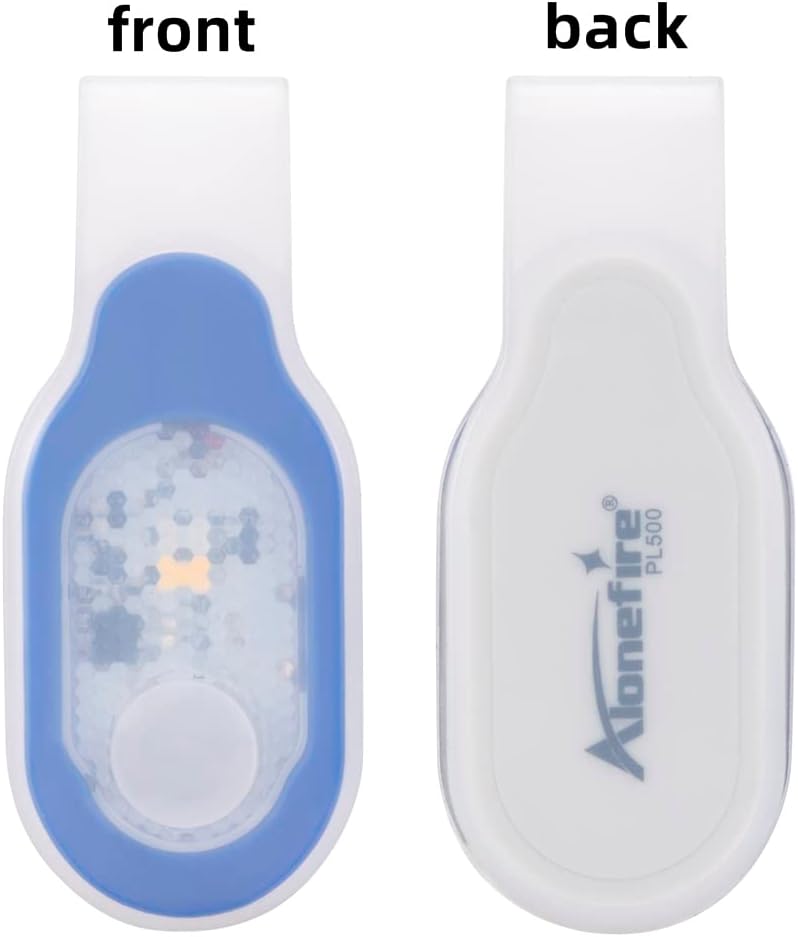
ከፊት እና ከኋላ view of the ALONEFIRE PL500, highlighting the magnetic attachment point on the back.

The ALONEFIRE PL500 demonstrating its white and red light modes in different usage scenarios.

The ALONEFIRE PL500 securely clipped onto a denim jacket, demonstrating its hands-free utility.
በሣጥኑ ውስጥ ያለው
Upon opening your ALONEFIRE PL500 package, you will find the following items:
- ALONEFIRE PL500 Clip-on Light
- የዩኤስቢ ኃይል መሙያ ገመድ
- Keychain Light (Bonus Item)

The complete contents of the ALONEFIRE PL500 package, including the light, charging cable, and bonus keychain light.
ማዋቀር
Before first use, it is recommended to fully charge your ALONEFIRE PL500 Clip-on Light. To do this, you will need to remove the light unit from its silicone outer shell. This process is straightforward:
- Gently peel back the silicone shell from one end of the light unit.
- Slide the light unit completely out of the silicone casing.
- Locate the micro-USB charging port on the side of the light unit.
- Connect the provided USB charging cable to the light unit and a power source.
Once charged, reinsert the light unit into the silicone shell, ensuring it is properly seated and protected.
የአሠራር መመሪያዎች
The ALONEFIRE PL500 features a simple one-hand operation push button switch to control its functions.
- ማብራት/ማጥፋት፡ Press the button once to turn the light on. Press and hold the button for a few seconds to turn the light off.
- ሁነቶችን መለወጥ While the light is on, press the button repeatedly to cycle through the three available modes: warm light, red light, and flashing red light.

A hand demonstrating how to press the button on the ALONEFIRE PL500 to cycle through light modes.

A visual comparison showing the difference between warm light and white light emitted by the ALONEFIRE PL500.
መሣሪያውን በመሙላት ላይ
The ALONEFIRE PL500 is equipped with a rechargeable battery for extended use. Follow these steps to charge your device:
- Remove the light unit from its silicone shell. This is crucial for accessing the charging port.
- Insert the micro-USB end of the provided charging cable into the charging port on the light unit.
- Connect the USB-A end of the cable to a compatible power source (e.g., computer USB port, wall adapter, power bank).
- The indicator light on the unit will turn red while charging and will turn off or change color (depending on the model) when fully charged.
- Once charging is complete, disconnect the cable and carefully reinsert the light unit into its silicone shell.

The ALONEFIRE PL500 light unit detached from its silicone casing, ready for USB charging.
Note: There are no official seller videos available for embedding that demonstrate the charging process. The instructions above provide a detailed guide.
ጥገና
To ensure the longevity and optimal performance of your ALONEFIRE PL500 Clip-on Light, follow these maintenance guidelines:
- ማጽዳት፡ Wipe the light and its silicone shell with a soft, damp ጨርቅ. ፊቱን ሊጎዱ የሚችሉ ኃይለኛ ኬሚካሎችን ወይም ገላጭ ቁሳቁሶችን ከመጠቀም ይቆጠቡ።
- የባትሪ እንክብካቤ To extend battery life, charge the light promptly when its brightness diminishes. Avoid completely draining the battery before recharging.
- ማከማቻ፡ Store the light in a cool, dry place away from direct sunlight and extreme temperatures when not in use for extended periods.
መላ መፈለግ
If you encounter any issues with your ALONEFIRE PL500, refer to the following common troubleshooting tips:
- መብራት የማይበራ;
- Ensure the battery is charged. Connect it to a power source and check the charging indicator.
- የኃይል ቁልፉን ለጥቂት ሰከንዶች ተጭነው ይያዙት፤ ይህም ፈጣን መጫን ብቻ እንዳልሆነ ያረጋግጡ።
- መብራት ኃይል እየሞላ አይደለም፦
- Verify that the light unit is fully removed from the silicone shell before attempting to charge.
- Check the USB cable for any damage and ensure it's securely connected to both the light and the power source.
- የተለየ የዩኤስቢ ወደብ ወይም የኃይል አስማሚ ይሞክሩ።
- ብርሃን ደብዛዛ ነው;
- The battery level is likely low. Recharge the device fully.
ዝርዝሮች
| ባህሪ | ዝርዝር |
|---|---|
| የሞዴል ቁጥር | PL500 |
| ቀለም | Blue_White Light |
| የኃይል ምንጭ | በባትሪ የተጎላበተ |
| የብርሃን ምንጭ ዓይነት | LED |
| ቁሳቁስ | ኤቢኤስ |
| ነጭ ብሩህነት | 20 Lumens |
| የባትሪ ሕዋስ ቅንብር | ሊቲየም አዮን |
| የሩጫ ጊዜ | 5 ሰዓታት |
| የምርት ልኬቶች (L x W x H) | 3.15" x 0.78" x 1.38" (79 ሚሜ x 19 ሚሜ x 34 ሚሜ) |
| የእቃው ክብደት | 0.634 አውንስ (0.02 ኪሎ ግራም) |
| የውሃ መቋቋም ደረጃ | የውሃ መቋቋም አይደለም |
| ልዩ ባህሪያት | Adjustable Light Modes, Durable, Lightweight, Magnetic, Rechargeable |

Detailed dimensions of the ALONEFIRE PL500 for reference.
ዋስትና እና ድጋፍ
The ALONEFIRE PL500 Clip-on Light comes with a Full Warranty, ensuring peace of mind regarding your purchase. For any questions, technical support, or warranty claims, please refer to the contact information provided with your product packaging or visit the official ALONEFIRE website. Keeping your purchase receipt is recommended for warranty purposes.
ተዛማጅ ሰነዶች - PL500
 |
Alonefire PL500 Wearable LED Flashlight Specifications Technical specifications and usage guide for the Alonefire PL500, a compact, USB-rechargeable wearable LED flashlight with magnetic closure. |
 |
Alonefire X93 Mini Swivel Head LED Flashlight Specifications Technical specifications and usage guide for the Alonefire X93, a compact, 90-degree swivel head LED flashlight featuring a magnetic base and Type-C charging. |
 |
Alonefire X101 LED Flashlight Specifications and User Guide Technical specifications and usage guide for the Alonefire X101 5000-lumen rechargeable LED flashlight, featuring zoom, magnetic base, and 3 light modes. |
 |
Alonefire H60 High-Power LED Flashlight User Manual User manual for the Alonefire H60 LED flashlight, featuring 1800 lumens, USB-C charging, magnetic base, and 6 lighting modes. |
 |
Alonefire X67/X77 Zoom Flashlight Specifications and User Guide Technical specifications and features for the Alonefire X67/X77 rechargeable zoom flashlight. Includes battery, charging, modes, and usage information. |
 |
Alonefire X52 LED Flashlight Specifications and User Guide Comprehensive specifications and usage guide for the Alonefire X52 portable LED flashlight, featuring 3x P35 LEDs, Type-C charging, and a magnetic tail. |
Ask a question about this manual
Ask about setup, troubleshooting, compatibility, parts, safety, or missing instructions. Manuals+ will review the question and use this page’s manual context to help answer it.