
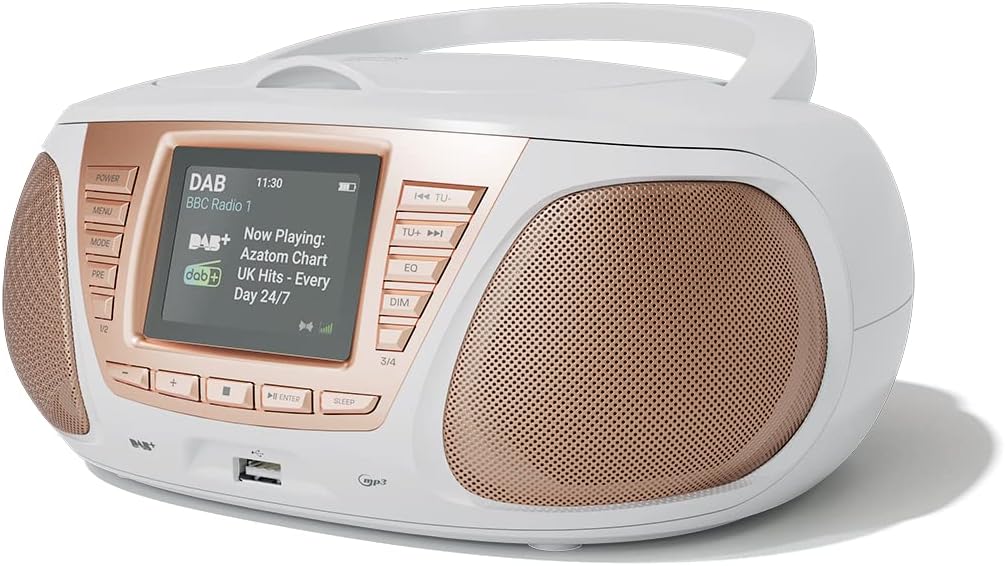
1. መግቢያ
ስለገዙ እናመሰግናለንasing the AZATOM Zenith Z4. This portable audio system combines DAB/DAB+ and FM radio, a CD player, Bluetooth connectivity, USB playback, and an alarm clock function. This manual provides essential information for setting up, operating, and maintaining your device. Please read it thoroughly before use and retain it for future reference.
2. የሳጥን ይዘት
Carefully unpack your Zenith Z4 and ensure all items listed below are present:
- AZATOM Zenith Z4 Unit
- ዋና የኃይል አስማሚ
- የተጠቃሚ መመሪያ (ይህ ሰነድ)
- የምዝገባ ካርድ

Image showing the AZATOM Zenith Z4 unit, its power adapter, user manual, and registration card as included in the box.
3. ምርት አብቅቷልview፦ መቆጣጠሪያዎች እና ባህሪያት
3.1 የፊት ፓነል መቆጣጠሪያዎች

ዝርዝር view of the AZATOM Zenith Z4's front panel, highlighting the color LCD display and various control buttons.
- ማብሪያ ማጥፊያ: ክፍሉን ያበራል ወይም ያጠፋል.
- የምናሌ አዝራር፡- የስርዓት ምናሌውን ይደርስበታል።
- MODE አዝራር፡- Switches between DAB, FM, CD, Bluetooth, USB, and AUX modes.
- PRE Button (Presets): Accesses stored radio station presets.
- 1/2, 3/4 Buttons: Direct access to specific presets or navigation.
- +, - Buttons: የድምጽ መጠንን ያስተካክላል፣ ምናሌዎችን ያስሳል ወይም የሬዲዮ ፍሪኩዌንሲዎችን ያስተካክላል።
- የገባ አዝራር ፦ ምርጫዎችን ያረጋግጣል።
- የእንቅልፍ ቁልፍ፡- የእንቅልፍ ቆጣሪውን ያዘጋጃል።
- TU- / TU+ Buttons: Tunes radio frequencies down/up or skips tracks.
- ኢኩኪ ቁልፍ አመጣጣኝ ቅንብሮችን ያስተካክላል።
- DIM አዝራር፡- የማሳያ ብሩህነትን ያስተካክላል።
- የዩኤስቢ ወደብ፡ የዩኤስቢ ማከማቻ መሳሪያዎችን ለማገናኘት ለMP3 መልሶ ማጫወት።
- የጆሮ ማዳመጫ ጃክ ለግል ማዳመጥ 3.5ሚሜ ውፅዓት።
3.2 የኋላ ፓነል ግንኙነቶች
The rear panel typically includes the power input and auxiliary input.
- ዲሲ IN የኃይል አስማሚ ግንኙነት.
- ዐውደ ውስጥ: 3.5mm input for connecting external audio sources.
4. ማዋቀር
4.1 በማብራት ላይ
The Zenith Z4 can be powered by the included AC adapter or by batteries for portability.
- የኤሲ ኃይል Connect the mains power adapter to the DC IN socket on the rear of the unit and plug it into a wall outlet.
- የባትሪ ሃይል፡- Open the battery compartment (usually on the bottom or rear) and insert the required batteries (type and quantity specified in the compartment).

The AZATOM Zenith Z4 is designed for portability, allowing use with batteries or the supplied mains power adapter.
4.2 የመጀመሪያ ማዋቀር (የመጀመሪያ አጠቃቀም)
Upon first power-on, the unit may automatically perform an initial setup:
- The display will typically show a welcome message.
- The unit may automatically scan for available DAB/DAB+ and FM radio stations. This process can take a few minutes.
- The clock will usually set itself automatically via DAB signal. If not, refer to the menu settings to manually set the time and date.
5. የአሠራር መመሪያዎች
5.1 DAB / DAB + ሬዲዮ
To access digital radio stations:
- የሚለውን ይጫኑ MODE button until 'DAB' is displayed.
- The unit will automatically scan for stations if it hasn't already. To perform a full scan manually, navigate to the 'Full Scan' option in the DAB menu.
- የሚለውን ተጠቀም TU- or TU+ buttons to browse the list of available stations.
- ተጫን አስገባ ጣቢያ ለመምረጥ.

The Zenith Z4 features leading British DAB and FM technology for optimal digital radio performance.
5.2 ኤፍኤም ሬዲዮ
To listen to FM radio stations:
- የሚለውን ይጫኑ MODE 'FM' እስኪታይ ድረስ አዝራሩን ይጫኑ።
- ተጭነው ይያዙ TU- or TU+ to auto-scan for the next available station. Briefly press to fine-tune the frequency.
- ተጫን አስገባ to confirm a station.
5.3 Storing and Recalling Presets (DAB/FM)
The Zenith Z4 allows you to store up to 60 preset stations (30 DAB, 30 FM).
- Tune to your desired DAB or FM station.
- ተጭነው ይያዙት። ቅድመ 'Preset Store' በማሳያው ላይ እስኪታይ ድረስ አዝራሩን ይጫኑ።
- የሚለውን ተጠቀም +/- buttons to select a preset number (1-30 for DAB, 1-30 for FM).
- ተጫን አስገባ ጣቢያውን ለማዳን.
- ቅድመ-ቅምጥን ለማስታወስ፣ በአጭሩ ይጫኑ ቅድመ አዝራር, ከዚያ ይጠቀሙ +/- or the numbered buttons (1/2, 3/4) to select and press አስገባ.

The Zenith Z4 allows storing up to 60 presets (30 DAB and 30 FM) for quick access to your favorite stations.
5.4 ሲዲ ማጫወቻ
የድምጽ ሲዲዎችን ለማጫወት ፦
- የሚለውን ይጫኑ MODE button until 'CD' is displayed.
- በመሳሪያው አናት ላይ የሚገኘውን የሲዲ ክፍል ክዳን ይክፈቱ።
- Place a CD (CD, CD-R, CD-RW compatible) with the label side facing up.
- Close the CD compartment lid. The unit will begin reading the disc and playback will start automatically.
- የሚለውን ተጠቀም TU- እና TU+ buttons to skip tracks. Use አስገባ ለጨዋታ/ለአፍታ አቁም።

The Zenith Z4 features a top-loading CD player, compatible with various CD formats, to enjoy your music collection.
5.5 የብሉቱዝ ግንኙነት
Stream audio wirelessly from your compatible devices:
- የሚለውን ይጫኑ MODE button until 'Bluetooth' is displayed. The unit will enter pairing mode, indicated by a flashing Bluetooth icon or message.
- በተንቀሳቃሽ መሳሪያዎ (ስማርትፎን ፣ ታብሌት ፣ ላፕቶፕ) ላይ ብሉቱዝን ያንቁ እና የሚገኙ መሳሪያዎችን ይፈልጉ።
- Select 'AZATOM Zenith Z4' from the list. Once paired, the unit will confirm the connection.
- You can now play audio from your device, and it will stream through the Zenith Z4.

Connect your Bluetooth device to the Zenith Z4 to enjoy streaming services like Spotify and Apple Music.
5.6 የዩኤስቢ መልሶ ማጫወት
MP3 ለማጫወት fileከዩኤስቢ ድራይቭ:
- Insert a USB flash drive (formatted to FAT32) containing MP3 audio fileበፊት ፓነል ላይ ባለው የዩኤስቢ ወደብ ውስጥ.
- የሚለውን ይጫኑ MODE button until 'USB' is displayed.
- ክፍሉ ያነባል files, and playback should begin automatically. Use the TU- እና TU+ ትራኮችን ለማሰስ አዝራሮች።
5.7 ረዳት ግቤት
Connect external audio devices using the AUX IN port:
- Connect one end of a 3.5mm audio cable (not included) to the AUX IN port on the rear of the Zenith Z4.
- Connect the other end to the headphone jack or audio output of your external device (e.g., MP3 player, older smartphone).
- የሚለውን ይጫኑ MODE 'AUX' እስኪታይ ድረስ አዝራሩን ይጫኑ።
- ከውጫዊ መሣሪያዎ መልሶ ማጫወትን ይቆጣጠሩ።
5.8 የጆሮ ማዳመጫ አጠቃቀም
For private listening:
- Plug your 3.5mm headphones into the headphone jack on the front panel.
- The sound from the speakers will automatically mute.
- በመጠቀም ድምጹን ያስተካክሉ +/- አዝራሮች.
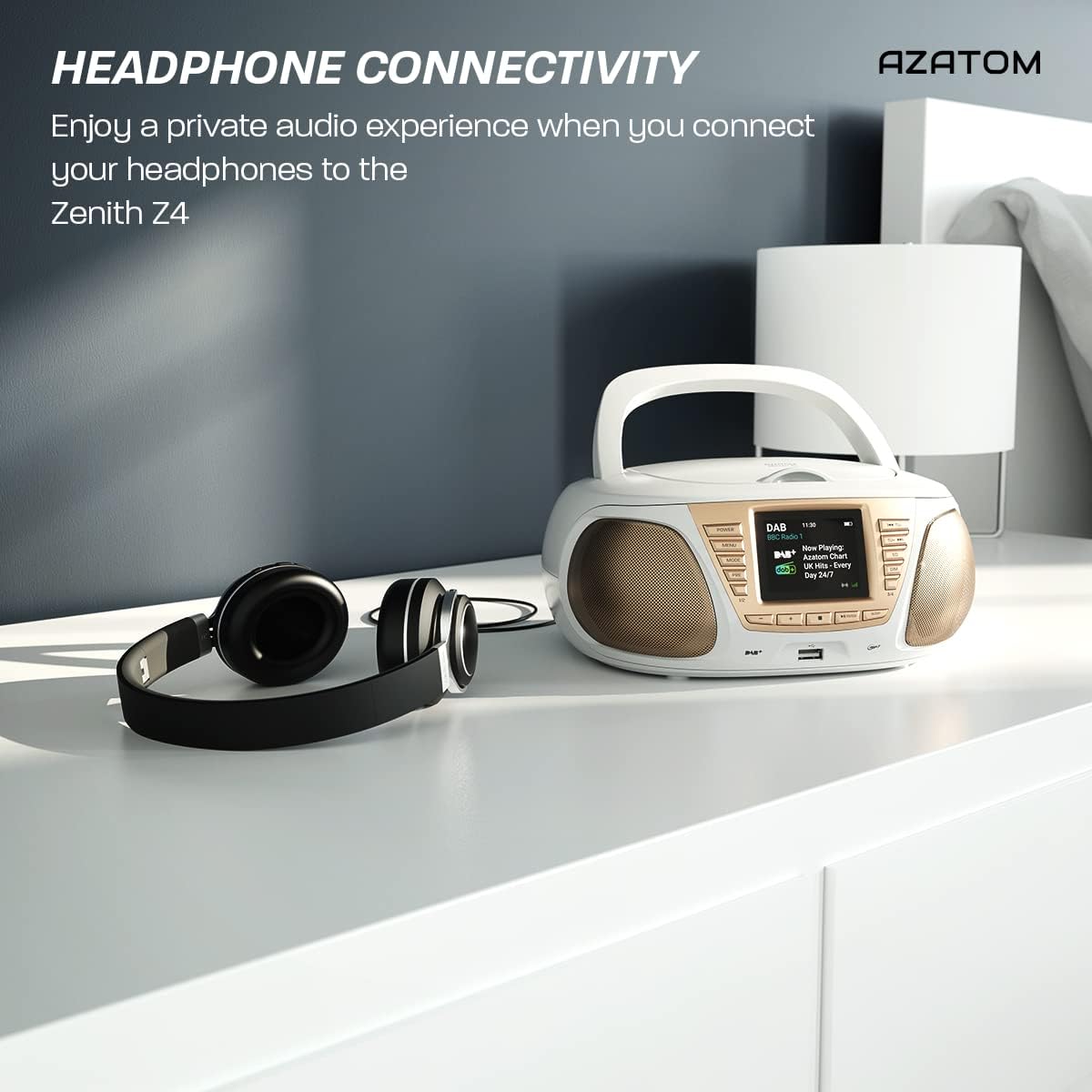
Enjoy a private audio experience by connecting your headphones to the Zenith Z4.
5.9 የማንቂያ ሰዓት ተግባር
The Zenith Z4 includes an alarm clock feature:
- የማንቂያ ቅንብሮችን በ በኩል ይድረሱባቸው MENU አዝራር።
- Follow the on-screen prompts to set the alarm time, source (e.g., buzzer, DAB, FM), and volume.
- Ensure the unit is powered on or in standby mode for the alarm to activate.
6. ጥገና
To ensure the longevity and optimal performance of your Zenith Z4:
- ማጽዳት፡ Use a soft, dry cloth to clean the unit's exterior. Do not use abrasive cleaners, waxes, or solvents.
- ሲዲ ማጫወቻ፡ If the CD player experiences issues, use a specialized CD lens cleaner disc.
- የአየር ማናፈሻ; Ensure the unit has adequate ventilation and is not covered during operation.
- ማከማቻ፡ When not in use for extended periods, disconnect from power and remove batteries. Store in a cool, dry place.
7. መላ መፈለግ
If you encounter issues with your Zenith Z4, please refer to the table below for common problems and solutions:
| ችግር | ሊሆን የሚችል ምክንያት | መፍትሄ |
|---|---|---|
| ክፍል አይበራም። | No power supply; flat batteries | Check AC adapter connection; replace batteries. |
| ድምጽ የለም። | Volume too low; headphones connected; incorrect mode | Increase volume; disconnect headphones; select correct mode (DAB, FM, CD, BT, USB, AUX). |
| ደካማ የሬዲዮ አቀባበል | አንቴና አልተራዘመም; ደካማ ምልክት | Fully extend the telescopic antenna; reposition the unit for better signal. |
| ሲዲ አይጫወትም። | CD dirty/scratched; incorrect disc type; CD not inserted correctly | Clean CD; ensure CD is compatible (CD, CD-R, CD-RW); reinsert CD label-side up. |
| ብሉቱዝ አይገናኝም። | Unit not in pairing mode; device too far; already connected to another device | Ensure unit is in Bluetooth mode and pairing; move device closer; disconnect from other devices. |
8. ዝርዝሮች
Key technical specifications for the AZATOM Zenith Z4:
- የምርት ስም፡ አዛቶም
- የሞዴል ቁጥር፡- Z4SLV
- ቀለም፡ ነጭ
- የግንኙነት ቴክኖሎጂ; Auxiliary, DAB+, DAB, Bluetooth, USB
- ጠቅላላ የዩኤስቢ ወደቦች፡ 1
- ተስማሚ መሣሪያዎች Smartphone, Tablet, MP3 Player, Personal Computer
- የንጥል መጠኖች (LxWxH)፦ 23 x 20 x 10 ሴንቲሜትር
- የኃይል ምንጭ፡- Wired Electric, Battery
- የድምጽ ማጉያ አይነት፡ ቡምቦክስ
- የእቃው ክብደት፡ 1.3 ኪ
- የኃይል ውፅዓት፡- 20 ዋት
9. ዋስትና እና ድጋፍ
AZATOM products are engineered in the UK and come with comprehensive support:
- ዋስትና፡- The Zenith Z4 includes a 3-year premium warranty. Online registration is required to activate this warranty.
- የደንበኛ ድጋፍ፡ AZATOM offers lifetime customer service based in the UK for setup and installation advice. Please refer to the registration card or AZATOM's official webየእውቂያ ዝርዝሮች ጣቢያ።
AZATOM provides a 3-year warranty (registration required) and dedicated UK customer support for their products.