
1. ምርት አብቅቷልview
The Phanteks Eclipse G500A DRGB is a high-performance mid-tower chassis designed to accommodate modern PC components with excellent airflow and integrated D-RGB lighting. It features an Ultra-fine Performance Mesh on both the front and top panels, ensuring optimal cooling and dust filtration.

Figure 1: Phanteks Eclipse G500A DRGB Mid Tower Case, Matte White.
ቁልፍ ባህሪዎች
- ከፍተኛ የአየር ፍሰት ዲዛይን; Ultra-fine Performance Mesh on front and top panels for superior cooling and dust filtration.
- የተዋሃደ D-RGB መብራት፡- Built-in D-RGB lighting on the front and side, controllable via manual buttons or motherboard synchronization.
- አስቀድመው የተጫኑ አድናቂዎች; Includes three high-performance M25-140 D-RGB fans.
- ሰፊ የማቀዝቀዣ ድጋፍ; Supports up to 420mm radiators in the front and 360mm in the top.
- ሰፊ የውስጥ ክፍል; Accommodates full-length GPUs and offers vertical GPU mounting options (with optional bracket).
- ተለዋዋጭ ማከማቻ፡ Multiple HDD and SSD locations, including dedicated SSD brackets and stackable HDD bays.
- Modern Front I/O: Features 10Gbps USB-C, 2x USB 3.0, Microphone/Headphone Combo, Power button, and D-RGB controls.
2. ማዋቀር እና መጫን
This section provides general guidelines for installing components into your Phanteks Eclipse G500A DRGB chassis. Always refer to your component manuals for specific installation instructions.
2.1 ሻሲውን ማዘጋጀት
Before installing components, ensure the chassis is placed on a stable, flat surface. Remove the side panels by gently pulling them open (they are hinged) to access the interior.
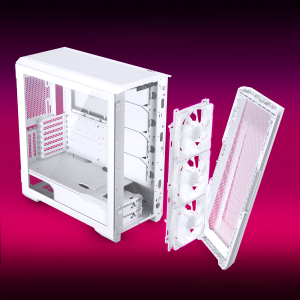
Figure 2: The removable front panel allows for easy installation of fans and radiators.
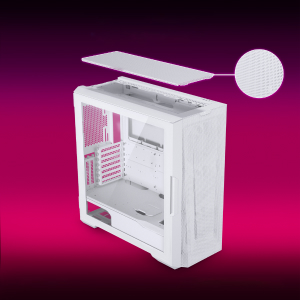
Figure 3: The removable top mesh panel facilitates fan and radiator installation.
2.2 የማዘርቦርድ ጭነት
The G500A supports ATX, micro-ATX, mini-ITX, and E-ATX motherboards (up to 280mm wide). Install the necessary standoffs for your motherboard form factor, then secure the motherboard with screws.
2.3 የኃይል አቅርቦት አሃድ (PSU) መጫኛ
Install the PSU at the bottom rear of the chassis. The G500A supports PSUs up to 250mm in length (195mm if all 4 bottom HDD positions are used).
2.4 የማከማቻ መሣሪያ ጭነት
The case offers extensive storage options:
- 2.5 ኢንች ኤስኤስዲዎች፡ Up to 9 dedicated 2.5" drive bays are included.
- 3.5 ኢንች ኤችዲዲዎች፡ Two stackable 3.5" HDD bays are included, expandable up to a total of 10 HDD bays.

Figure 4: Multiple storage options for 2.5" and 3.5" drives.
2.5 የግራፊክስ ካርድ (ጂፒዩ) ጭነት
The G500A supports graphics cards up to 435mm in length. For vertical GPU mounting, an optional bracket (PH-VGPUKT4.0_03) or riser cable is required.
2.6 የማቀዝቀዣ ስርዓት መጫኛ
The chassis supports various fan and radiator configurations:
- የደጋፊ ድጋፍ፡
- Front: 3x 120mm or 3x 140mm (3x 140mm pre-installed)
- ከላይ፡ 3x 120ሚሜ ወይም 3x 140ሚሜ
- የኋላ፡ 1 x 120 ሚሜ ወይም 1 x 140 ሚሜ
- Liquid Cooling Radiator Support:
- Front: Up to 360mm (120mm radiator) or 420mm (140mm radiator)
- Top: Up to 360mm (120mm radiator) or 280mm (140mm radiator)
- የኋላ: 120 ሚሜ
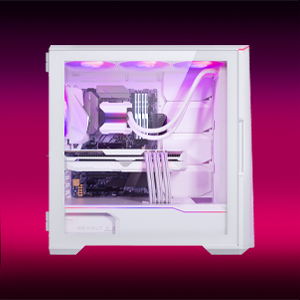
Figure 5: High-end cooling compatibility with various fan and radiator sizes.
2.7 የኬብል አስተዳደር
The G500A provides ample space and Velcro ties for efficient cable management, ensuring a clean interior and optimal airflow. Cover doors help to conceal cables on the backside of the motherboard tray.
2.8 የመጫኛ ቪዲዮዎች
Video 1: Detailed PC Build Guide in the Phanteks Eclipse G500A (13:33).
Video 2: Another comprehensive PC assembly guide featuring the Phanteks Eclipse G500A (14:01).
3. የአሠራር መመሪያዎች
3.1 የፊት I / O ፓነል
የፊት I/O ፓነል ለአስፈላጊ ወደቦች እና መቆጣጠሪያዎች ምቹ መዳረሻ ይሰጣል፡
- የኃይል ቁልፍ፡- ስርዓትዎን ለማብራት/ለማጥፋት።
- ዩኤስቢ 3.0 ወደቦች (x2) የዩኤስቢ 3.0 መሳሪያዎችን ለማገናኘት።
- USB-C Gen2 Port (x1): For high-speed USB-C connectivity.
- ማይክሮፎን/የጆሮ ማዳመጫ ጥምር ጃክ፡ ለድምጽ ግብአት እና ውፅዓት።
- D-RGB Mode Button: Cycles through pre-programmed D-RGB lighting effects.
- D-RGB Color Button: Changes the color of the D-RGB lighting.

Figure 6: Front I/O panel with USB-C, USB 3.0, audio, and D-RGB controls.
3.2 የዲ-አርጂቢ የመብራት መቆጣጠሪያ
The integrated D-RGB lighting can be controlled in two ways:
- በእጅ ቁጥጥር Use the D-RGB Mode and Color buttons on the front I/O panel to cycle through effects and colors without software.
- የእናትቦርድ ማመሳሰል፡ Connect the D-RGB controller to a compatible motherboard's D-RGB header to enable software control and synchronization with other D-RGB components.

Figure 7: Integrated D-RGB lighting with included M25-140 D-RGB fans.
4. ጥገና
መደበኛ ጥገና የፒሲዎን ክፍሎች ጥሩ አፈፃፀም እና ረጅም ጊዜ እንዲኖር ይረዳል።
- የአቧራ ማጣሪያ; The Ultra-fine Performance Mesh on the front and top panels acts as a dust filter. Periodically remove these panels and clean the mesh to maintain optimal airflow.
- የቤት ውስጥ ጽዳት: Use compressed air to remove dust from inside the chassis, especially from fans, heatsinks, and other components. Ensure the system is powered off and unplugged before cleaning.
- የውጭ ጽዳት; ውጫዊ ገጽታዎችን ለስላሳ, መamp ጨርቅ. ገላጭ ማጽጃዎችን ወይም ፈሳሾችን ያስወግዱ።
5. መላ መፈለግ
ይህ ክፍል በእርስዎ ፒሲ ጉዳይ ላይ ሊያጋጥሟቸው የሚችሏቸውን የተለመዱ ጉዳዮችን ይመለከታል።
5.1 የኃይል ጉዳዮች
- ስርዓቱ እየበራ አይደለም፦
- Ensure all power cables (24-pin ATX, 8-pin CPU, GPU power) are securely connected to the motherboard and components.
- Verify the PSU switch is in the 'ON' position.
- Check that the front panel power switch cable is correctly connected to the motherboard's F_PANEL header.
5.2 D-RGB Lighting Issues
- D-RGB not lighting up or incorrect colors:
- Ensure the D-RGB cables from the fans and LED strips are correctly connected to the integrated D-RGB controller.
- If using motherboard synchronization, ensure the D-RGB controller is connected to the motherboard's D-RGB header and that the motherboard's lighting software is configured correctly.
- Verify the D-RGB controller is receiving power (e.g., via SATA power connector).
- Try cycling through modes and colors using the front I/O buttons to rule out software issues.
5.3 Fan Noise or Malfunction
- ከመጠን በላይ የአድናቂዎች ድምጽ;
- Check for dust buildup on fan blades and clean if necessary.
- Ensure fans are securely mounted and not vibrating against the chassis.
- Verify fan speeds are controlled appropriately by the motherboard or fan controller.
- ደጋፊ የማይሽከረከር፡
- Check fan power connections to the motherboard or fan hub.
- Ensure fan headers are enabled in the BIOS/UEFI settings.
6. ዝርዝሮች
Detailed technical specifications for the Phanteks Eclipse G500A DRGB Mid Tower Case.
| ባህሪ | ዝርዝር መግለጫ |
|---|---|
| የሞዴል ስም | Eclipse G500A DRGB, White |
| የንጥል ሞዴል ቁጥር | PH-EC500GA_DMW01A |
| የቅጽ ምክንያት | ማዕከላዊ ማማ |
| ልኬቶች (LxWxH) | 19.69 x 9.45 x 20.28 ኢንች (500 x 240 x 515 ሚሜ) |
| የእቃው ክብደት | 23.2 ፓውንድ |
| ቁሳቁስ | Steel Chassis, Tempered Glass |
| Motherboard ድጋፍ | ATX, micro-ATX, mini-ITX, E-ATX (up to 280mm wide) |
| የማስፋፊያ ቦታዎች | 7 |
| አቀባዊ የጂፒዩ ድጋፍ | Yes (with optional bracket PH-VGPUKT4.0_03 or riser cable) |
| የውስጥ 3.5 ኢንች ድራይቭ ቤይ | 10 (2x included, expandable) |
| የውስጥ 2.5 ኢንች ድራይቭ ቤይ | 9 (9x ተካትቷል) |
| የፊት I/O | 2x USB 3.0, USB-C Gen2, Microphone/Headphone Combo, Power Button, D-RGB Mode, D-RGB Color |
| ቀድሞ የተጫኑ አድናቂዎች | 3x M25-140 D-RGB (Front) |
| ከፍተኛው የጂፒዩ ርዝመት | 435 ሚሜ / 17.2 ኢንች |
| ከፍተኛው የሲፒዩ ማቀዝቀዣ ቁመት | 185 ሚ.ሜ |
| ከፍተኛው የ PSU ርዝመት | 195mm (if all 4 bottom HDD positions used) / 250mm (if 2 bottom HDD used) |
| የማቀዝቀዣ ዘዴ | ማራገቢያ፣ ውሃ |
7. ዋስትና እና ድጋፍ
Phanteks products are manufactured with high-quality standards. For warranty information and technical support, please refer to the official Phanteks webጣቢያ ወይም የደንበኛ አገልግሎታቸውን ያነጋግሩ።
የእውቂያ መረጃ፡-
- Webጣቢያ፡ www.phanteks.com
- Phanteks Taiwan Inc.: 11ኤፍ.፣ ቁጥር 150፣ ጂያን 1 ኛ መንገድ፣ ዞንግሄ ዲስት አዲስ ታይፔ ከተማ 235
- Importer EU (Axpertec Int B.V.): Sydneystraat 33, 3047 BP Rotterdam, The Netherlands
- Importer US (Axpertec Inc.): 20465 E Walnut Dr. N, City of Industry, California 91789, United States

Figure 8: Phanteks company and importer details, along with compliance markings (CE, UKCA, RoHS).