
Sharp RP-TT70
Sharp RP-TT70 Vinyl Record Player Turntable User Manual
ሞዴል: RP-TT70
1. ምርት አብቅቷልview
The Sharp RP-TT70 is a 12-inch vinyl record player turntable designed to deliver a rich audio experience with modern convenience. It features a classic wooden cabinet and comes with stereo bookshelf speakers. This belt-drive turntable supports multiple playback speeds and offers versatile connectivity options, including dual Bluetooth functionality.

Figure 1.1: Sharp RP-TT70 Turntable and Speakers. The turntable features a stylish wooden finish and a clear dust cover, flanked by two matching stereo bookshelf speakers.
2. ምን ይካተታል
ሁሉም እቃዎች መኖራቸውን ለማረጋገጥ እባክዎ የጥቅል ይዘቱን ያረጋግጡ፡-
- Sharp RP-TT70 Turntable Unit
- የስቲሪዮ የመጽሐፍት መደርደሪያ ድምጽ ማጉያዎች (2 ክፍሎች)
- የአቧራ ሽፋን
- የኃይል አስማሚ
- የተጠቃሚ መመሪያ (ይህ ሰነድ)
3. የማዋቀር መመሪያዎች
Follow these steps to set up your Sharp RP-TT70 turntable:
- አቀማመጥ፡- ማዞሪያውን ከቀጥታ የፀሐይ ብርሃን፣ ከሙቀት ምንጮች እና ከመጠን በላይ አቧራ ርቆ በተረጋጋና ደረጃ ባለው ቦታ ላይ ያድርጉት። በመሳሪያው ዙሪያ በቂ የአየር ዝውውር ያረጋግጡ።
- የድምጽ ማጉያ ግንኙነት፡- Connect the included stereo bookshelf speakers to the "SPEAKER OUT" terminals on the rear of the turntable. Ensure correct polarity (positive to positive, negative to negative).
- የኃይል ግንኙነት; Connect the power adapter to the "POWER IN DC 12V" port on the rear of the turntable, then plug the adapter into a wall outlet.
- የአቧራ ሽፋን; የአቧራ ሽፋኑን በማዞሪያው ጀርባ ላይ ባሉት ማጠፊያዎች ላይ በጥንቃቄ ያያይዙት።

Figure 3.1: Rear Panel Connections. This image highlights the AUX-IN Jack, RCL (R&L) Speaker Out, Pitch (+)(-) Speed Calibration, and Power In DC 12V ports, crucial for proper setup.
4. የአሠራር መመሪያዎች
4.1 የቪኒል ሪከርድ መጫወት
- አብራ፡ የማዞሪያ ሰንጠረዡን ለማግበር የኃይል ቁልፉን ያዙሩት።
- ፍጥነት ይምረጡ፡ Adjust the speed selector to match the record's RPM (33 1/3, 45, or 78 RPM). For 45 RPM records, place the included 45 RPM adapter on the spindle.
- የቦታ መዝገብ፡- የቪኒል ሪከርድዎን በጥንቃቄ በተርንቴብል ሳህኑ ላይ ያስቀምጡ።
- ሊፍት ቶኔርም፦ የቃና ክንዱን ቀስ ብለው በማንሳት የቃናውን ማንሻ (cueing lever) ይጠቀሙ።
- የአቀማመጥ ስታይለስ፦ የቶና ክንዱን በሚፈለገው የመዝገቡ የመጀመሪያ ጎድጎድ ላይ ያንቀሳቅሱት።
- የታችኛው ቶን አርም፦ የቃና ክንዱን ቀስ ብለው ዝቅ ያድርጉት። ስታይሉ ከቀረጻው ጋር ይገናኛል፣ እና መልሶ ማጫወት ይጀምራል።
- የድምጽ ማስተካከያ; Adjust the volume using the volume knob on the turntable.
- ራስ-አቁም ባህሪ፡ The turntable features an auto-stop function that will automatically stop the platter rotation when the record reaches its end.
4.2 የብሉቱዝ ግንኙነት
The Sharp RP-TT70 supports dual Bluetooth connectivity, allowing you to stream music in two ways:
- Streaming Vinyl to External Bluetooth Device:
- ማዞሪያው መብራቱን ያረጋግጡ።
- Activate Bluetooth pairing mode on your external Bluetooth speaker or headphones.
- The turntable will automatically search for and connect to nearby Bluetooth devices. The Bluetooth indicator light will illuminate when connected.
- Once connected, audio from your vinyl record will play through the external Bluetooth device.
- Streaming Music from Your Phone to Turntable Speakers:
- ማዞሪያው መብራቱን ያረጋግጡ።
- On your smartphone or other Bluetooth-enabled device, search for "Sharp RP-TT70" in the Bluetooth settings.
- Select the turntable to pair. The Bluetooth indicator light will illuminate when connected.
- Once connected, audio from your phone will play through the turntable's included stereo speakers.
4.3 ረዳት ግብዓት (ኤክስ-ኢን)
Connect external audio devices such as smartphones, tablets, or MP3 players using a 3.5mm audio cable (not included) to the AUX-IN jack on the rear of the turntable. Switch the input mode to AUX to play audio through the turntable's speakers.
4.4 የጆሮ ማዳመጫ ጃክ
For private listening, connect headphones to the headphone jack located on the front panel of the turntable.
5. ጥገና
Proper maintenance ensures the longevity and optimal performance of your turntable:
- የአቧራ ሽፋን; Always keep the dust cover closed when the turntable is not in use to prevent dust accumulation on the platter and stylus.
- ስታይለስን ማጽዳት፦ Gently clean the stylus regularly using a soft brush designed for turntable styli. Brush from back to front.
- የማዞሪያ ጠረጴዛውን ማጽዳት; ማዞሪያውን እና ድምጽ ማጉያዎቹን ለስላሳ እና ደረቅ ጨርቅ ይጥረጉ። የማጽጃ ማጽጃዎችን ወይም ማሟሟቶችን አይጠቀሙ።
- Cartridge and Stylus Replacement: The RP-TT70 uses a changeable ceramic cartridge and stylus. If sound quality degrades or the stylus is damaged, replace it with a compatible Sharp replacement part.
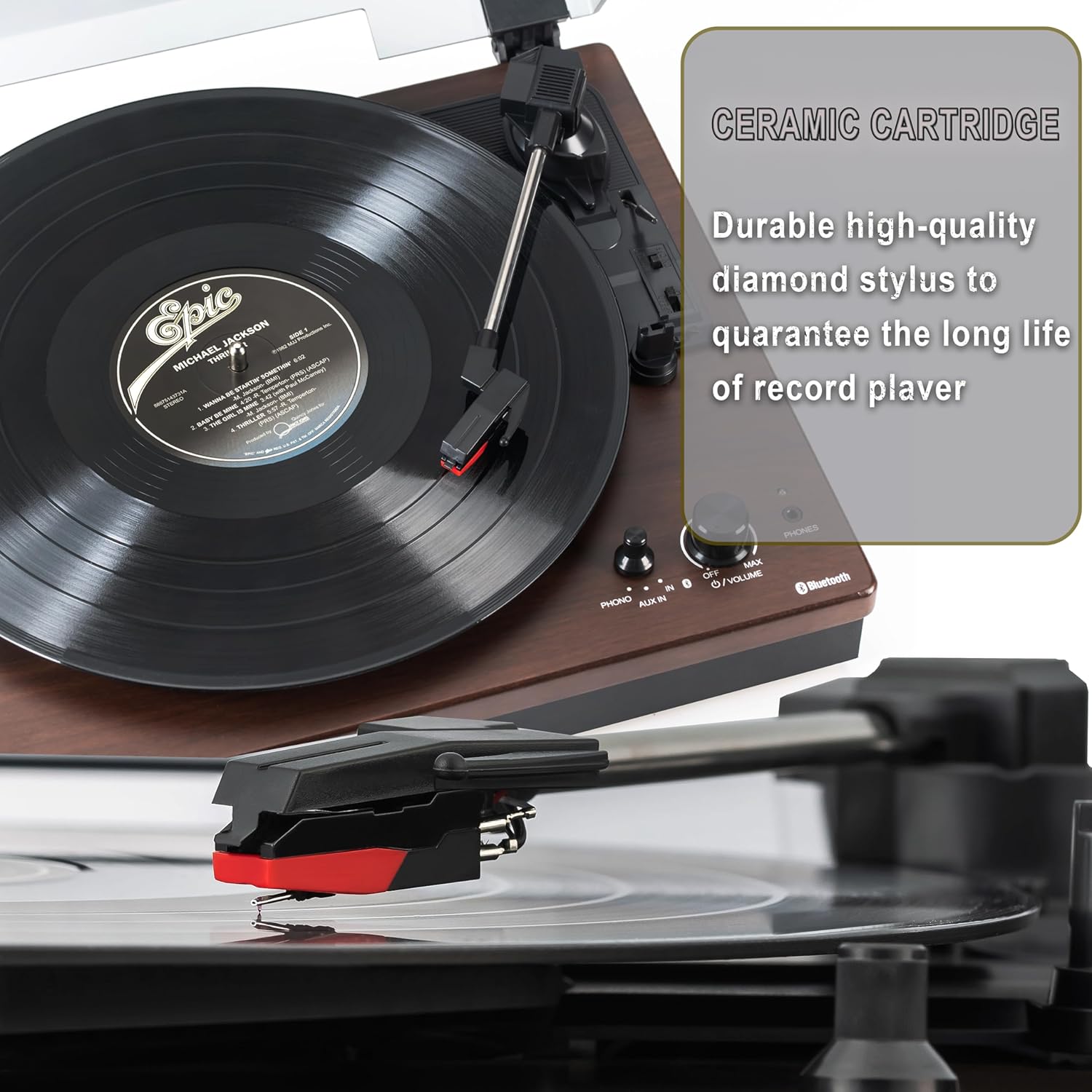
Figure 5.1: Ceramic Cartridge. The turntable is equipped with a durable high-quality diamond stylus designed for extended record playback life.
6. መላ መፈለግ
If you encounter issues with your Sharp RP-TT70, refer to the following common problems and solutions:
| ችግር | ሊሆን የሚችል ምክንያት | መፍትሄ |
|---|---|---|
| ኃይል የለም | የኃይል አስማሚ አልተገናኘም ወይም መውጫው ንቁ አይደለም። | Ensure power adapter is securely plugged into the turntable and a working wall outlet. |
| ከድምጽ ማጉያዎች ምንም ድምፅ የለም። | Speakers not connected correctly; Volume too low; Incorrect input mode. | Check speaker cable connections and polarity. Increase volume. Ensure turntable is in PHONO or AUX mode as appropriate. |
| Poor Sound Quality / Skipping | Dirty or worn stylus; Dirty record; Turntable not level. | Clean the stylus and record. Ensure the turntable is on a stable, level surface. Consider replacing the stylus if worn. |
| የብሉቱዝ ማጣመሪያ ጉዳዮች | Device too far; Bluetooth not enabled on external device; Interference. | Ensure devices are within range (approx. 30 ft). Confirm Bluetooth is enabled on the external device. Try restarting both devices. |
| Platter Not Spinning | Belt dislodged; Auto-stop engaged prematurely. | Check if the drive belt is properly seated around the platter and motor pulley. If auto-stop is causing issues, ensure the record is placed correctly. |
7. ዝርዝሮች
| ባህሪ | ዝርዝር |
|---|---|
| የሞዴል ቁጥር | RP-TT70 |
| የምርት ስም | ስለታም |
| የምርት ልኬቶች | 16.8 x 13.5 x 2.8 ኢንች |
| የእቃው ክብደት | 18.6 ፓውንድ |
| የግንኙነት ቴክኖሎጂ | Bluetooth (Bi-directional) |
| የሚደገፉ ፍጥነቶች | 33 1/3፣ 45፣ 78 RPM |
| የተካተቱ አካላት | Turntable, Stereo Bookshelf Speakers |
| ቁሳቁስ | ፕላስቲክ ፣ እንጨት |
| ቀለም | Black (with wooden finish) |
| የካርቶን አይነት | Changeable Ceramic Cartridge and Stylus |
| ባህሪያት | Belt-drive, Auto-return, Pitch control, Dust cover |
8. ዋስትና እና ድጋፍ
For warranty information and technical support, please refer to the official Sharp webጣቢያ ወይም በቀጥታ የደንበኛ አገልግሎታቸውን ያግኙ። ለዋስትና ጥያቄዎች የግዢ ደረሰኝዎን እንደ ግዢ ማረጋገጫ ያቆዩት።
Ask a question about this manual
Ask about setup, troubleshooting, compatibility, parts, safety, or missing instructions. Manuals+ will review the question and use this page’s manual context to help answer it.