
1. መግቢያ
This manual provides essential instructions for the safe and efficient operation of your Rigol DHO1074 Digital Oscilloscope. The DHO1074 is a 4-channel, 70 MHz digital oscilloscope featuring a 12-bit resolution and a 2 GSa/s real-time sample rate, designed for precise signal analysis in various applications. Please read this manual thoroughly before using the device to ensure proper functionality and to prevent damage.
2. የደህንነት መረጃ
የመሳሪያውን ጉዳት እና ጉዳት ለመከላከል የሚከተሉትን የደህንነት ጥንቃቄዎች ይከተሉ፡
- Use only the power cord specified for this instrument.
- የኤሌክትሪክ ንዝረትን ለመከላከል መሳሪያው በትክክል መሬት ላይ መቀመጡን ያረጋግጡ።
- መሳሪያውን እርጥብ ወይም ቀዝቃዛ በሆነ ቦታ ላይ አያንቀሳቅሱትamp ሁኔታዎች.
- በሚፈነዳ አየር ውስጥ መሥራትን ያስወግዱ።
- Do not remove the instrument cover. Refer servicing to qualified personnel.
- Use appropriate probes and accessories.
- ከማጽዳትዎ በፊት ኃይልን ያላቅቁ.
3. የጥቅል ይዘቶች
ከዚህ በታች የተዘረዘሩት ሁሉም እቃዎች በጥቅልዎ ውስጥ መካተታቸውን ያረጋግጡ፡-
- Rigol DHO1074 Digital Oscilloscope (1 unit)
- የኃይል ገመድ (1 ክፍል)
- Passive Probes (4 units, one for each channel)
- የዩኤስቢ ገመድ (1 ክፍል)
- ፈጣን መመሪያ (1 አሃድ)
- Resource CD (1 unit)
4. ማዋቀር
4.1 የማገናኘት ኃይል
- Ensure the oscilloscope's power switch is in the OFF position.
- የቀረበውን የኃይል ገመድ ከኦሲሎስኮፕ የኋላ ፓነል ላይ ካለው የኤሲ የኃይል ግብዓት ጋር ያገናኙ።
- የኤሌትሪክ ገመዱን ሌላኛውን ጫፍ ወደ መሰረተ የኤሲ ሃይል ሶኬት ይሰኩት።
4.2 የመገናኛ መመርመሪያዎች
- Connect the BNC connector of a passive probe to one of the input channels (CH1, CH2, CH3, or CH4) on the front panel.
- Attach the probe ground clip to a common ground point in your circuit.
- Connect the probe tip to the test point in your circuit.
- For accurate measurements, compensate the probe before use. Refer to the "Probe Compensation" section in the full user manual for detailed instructions.
4.3 የመጀመሪያ ኃይል-በ
- Press the power switch on the front panel to turn on the oscilloscope.
- The instrument will perform a self-test and display the startup screen.
- Once the main interface appears, the oscilloscope is ready for use.
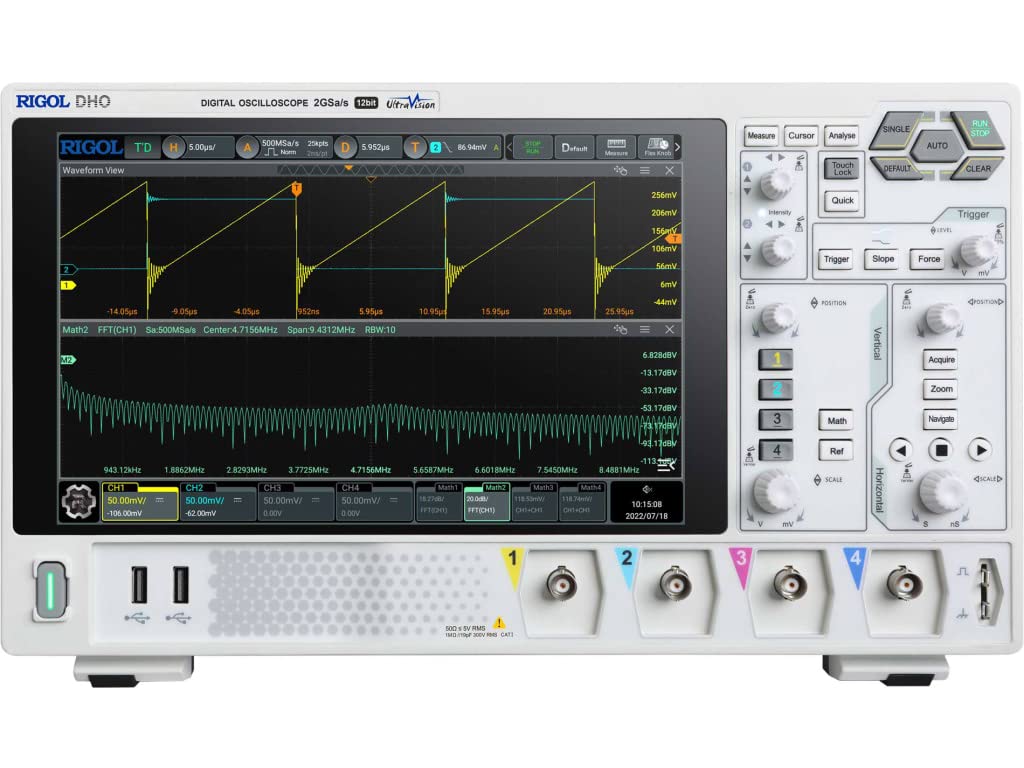
ምስል 4.1: የፊት view of the Rigol DHO1074 Digital Oscilloscope, showing the display, control panel, and input channels.
5. ኦሲሎስኮፕን በማስኬድ ላይ
The Rigol DHO1074 offers a user-friendly interface for capturing and analyzing waveforms. Key features include 4 analog channels, 70 MHz bandwidth, and a 12-bit vertical resolution for enhanced signal fidelity.
5.1 መሰረታዊ የሞገድ ቅርፅ ማግኛ
- አብራ፡ Ensure the oscilloscope is powered on as described in Section 4.3.
- Connect Signal: Connect your signal source to an input channel using a compensated probe.
- ራስ-ሰር ማዋቀር; የሚለውን ይጫኑ አውቶማቲክ button on the front panel. The oscilloscope will automatically adjust vertical, horizontal, and trigger settings to display a stable waveform.
- በእጅ ማስተካከያ;
- የሚለውን ተጠቀም ጊዜያዊ knobs (VOLTS/DIV) to adjust the vertical scale (voltage per division) for each channel.
- የሚለውን ተጠቀም አግድም knob (SEC/DIV) to adjust the horizontal scale (time per division).
- የሚለውን ተጠቀም ቀስቅሴ controls to set the trigger level and mode for stable waveform capture.
5.2 የላቁ ባህሪያት
- ከፍተኛ ጥራት፡ Benefit from the 12-bit vertical resolution, providing 16 times more quantization levels than standard 8-bit oscilloscopes, which improves measurement accuracy and reduces quantization noise.
- ጥልቅ ማህደረ ትውስታ፦ The DHO1074 features a 50 Mpts maximum memory depth (expandable to 100 Mpts with option DHO1000-RLU-01), allowing for longer waveform captures at high sample ተመኖች።
- Serial Decoding: Standard serial decoding capabilities include SPI, I2C, RS232/UART, CAN, and LIN, simplifying the analysis of common serial bus communications.
- የመለኪያ ተግባራት፡- Access various automatic measurement functions (e.g., Vpp, Vrms, Frequency, Period) via the ለካ ምናሌ.
- የሂሳብ ተግባራት፡- Utilize built-in math functions (e.g., Add, Subtract, Multiply, Divide, FFT) to perform waveform analysis.
6. ጥገና
6.1 መሳሪያውን ማጽዳት
- ከማፅዳትዎ በፊት ሁል ጊዜ የኃይል ገመዱን ያላቅቁ።
- ለስላሳ ጨርቅ ይጠቀሙ መampened with a mild detergent solution to clean the exterior surfaces.
- Do not use abrasive cleaners or solvents that could damage the plastic parts.
- Avoid spraying liquids directly onto the instrument.
6.2 ማከማቻ
- Store the oscilloscope in a clean, dry environment, away from direct sunlight and extreme temperatures.
- ማያ ገጹን ከጭረቶች ይጠብቁ።
6.3 ልኬት
For optimal performance and measurement accuracy, periodic calibration by qualified service personnel is recommended. Refer to Rigol's official support channels for calibration services.
7. መላ መፈለግ
| ችግር | ሊሆን የሚችል ምክንያት | መፍትሄ |
|---|---|---|
| No power when turned on. | Power cord not connected; power outlet faulty; instrument fuse blown. | Check power cord connection; test power outlet; contact service for fuse replacement. |
| የሞገድ ቅርጽ አልታየም። | Probe not connected; signal source off; vertical/horizontal scale incorrect; trigger not set correctly. | Verify probe connection; check signal source; adjust VOLTS/DIV and SEC/DIV; adjust trigger level or use AUTO button. |
| ያልተረጋጋ የሞገድ ቅርፅ። | Trigger settings incorrect; noisy signal. | Adjust trigger mode, source, and level; ensure proper grounding of the probe. |
| Incorrect measurements. | Probe compensation incorrect; wrong measurement settings. | Compensate probes; verify measurement parameters. |
If the problem persists after attempting these solutions, please contact Rigol customer support.
8. ዝርዝሮች
| መለኪያ | ዋጋ |
|---|---|
| ሞዴል | ዲኤችኦ1074 |
| የመተላለፊያ ይዘት | 70 ሜኸ |
| አናሎግ ቻናሎች | 4 |
| አቀባዊ ጥራት | 12-ቢት |
| ማክስ ኤስampደረጃ ይስጡ | 2 GSa/s (real-time) |
| የማስታወስ ጥልቀት | 50 Mpts (100 Mpts with DHO1000-RLU-01 option) |
| Serial Decoding | SPI, I2C, RS232/UART, CAN, LIN |
| የምርት ልኬቶች | 18 x 11 x 12 ኢንች |
| የእቃው ክብደት | 12 ፓውንድ |
| አምራች | RIGOL TECHNOLOGIES USA INC |
9. ዋስትና እና ድጋፍ
Rigol products are designed for reliability and performance. This instrument is covered by a standard manufacturer's warranty. For specific warranty terms and conditions, please refer to the warranty card included with your product or visit the official Rigol webጣቢያ.
For technical support, service, or inquiries regarding your Rigol DHO1074 Digital Oscilloscope, please contact Rigol Technologies USA Inc. customer service through their official webበምርት ሰነድዎ ውስጥ የቀረበው ጣቢያ ወይም የእውቂያ መረጃ።
የመስመር ላይ ሀብቶች እና ተጨማሪ ሰነዶች በድረ-ገጹ ላይ ሊገኙ ይችላሉ ሪጎል webጣቢያ.


