
1. ምርት አብቅቷልview
The YiBiChin AN-MR21GC is a universal magic remote control designed for various 2021 LG Smart TV models. It features magic pointer and intelligent voice control functions, allowing for quick and intuitive navigation and command execution. This remote enhances your TV viewing experience with convenient access to features and content.
1.1 ተኳኋኝነት
This remote control is compatible with the following 2021 LG TV series:
- LG OLED TVs: G1, C1, A1 series
- LG Mini-LED QNED TVs: QNED99, QNED90 series
- LG NanoCell TVs: NANO99, NANO90, NANO85, NANO80, NANO75 series
- LG UHD TVs: UP80, UP75 series
Note: This remote control does not feature NFC functionality.

ምስል 1: የፊት, ጎን እና ጀርባ views of the YiBiChin AN-MR21GC Magic Remote.

Figure 2: The remote control highlighting its universal compatibility with 2021 LG Smart TVs.
2. ማዋቀር
2.1 የባትሪ ጭነት
The remote control requires two AA batteries (not included) for operation. Follow these steps to install them:
- የባትሪውን ክፍል ከርቀት መቆጣጠሪያው ጀርባ ላይ ያግኙት።
- ክፍሉን ለመክፈት ሽፋኑን ወደ ታች ያንሸራትቱ.
- ሁለት የ AA ባትሪዎችን አስገባ, አወንታዊ (+) እና አሉታዊ (-) ተርሚናሎች በክፍሉ ውስጥ ካሉት አመልካቾች ጋር በትክክል እንዲጣጣሙ ያረጋግጡ.
- ደህንነቱ በተጠበቀ ሁኔታ ጠቅ እስኪያደርግ ድረስ የባትሪውን ክፍል ሽፋን ወደ ቦታው ያንሸራትቱት።

Figure 3: Correct installation of AA batteries into the remote control.
2.2 የማጣመሪያ ዘዴ
To enable the magic pointer and voice functions, the remote control must be paired with your LG Smart TV. Ensure your TV is connected to a WiFi network for these functions to work correctly. If you are replacing an original remote, it is recommended to disconnect it and remove its batteries before pairing the new remote, as only one smart remote can be paired at a TV at a time.
Follow these steps to pair your remote:
- Manually turn on your LG Smart TV using the power button on the TV itself.
- Point the YiBiChin AN-MR21GC remote control directly towards your TV from a close distance.
- ተጭነው ይያዙት። Scroll Wheel (OK button) on the remote control for a few seconds until the pairing process is complete. A confirmation message should appear on your TV screen.
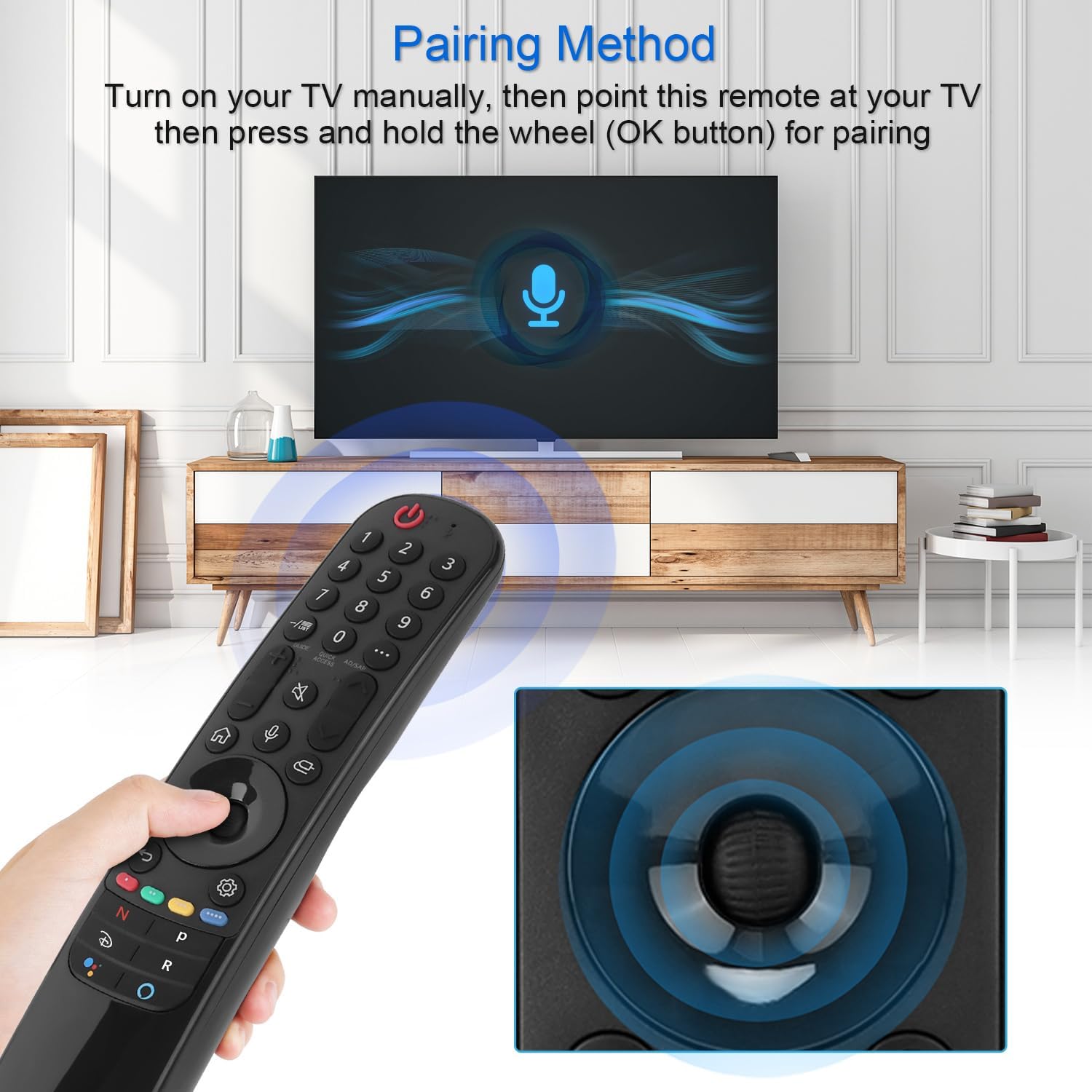
Figure 4: Demonstrating the pairing process by holding the OK button while pointing at the TV.
3. የአሠራር መመሪያዎች
The YiBiChin AN-MR21GC remote control offers multiple ways to interact with your LG Smart TV, including traditional button presses, a magic pointer, and voice commands.
3.1 መሰረታዊ ተግባራት
- የኃይል ቁልፍ፡- ቴሌቪዥኑን ያበራል ወይም ያጠፋል።
- የቁጥር አዝራሮች (0-9): በቀጥታ ቻናሎችን ይምረጡ።
- ድምጽ ወደ ላይ/ወደታች፡ የቲቪውን መጠን ያስተካክላል።
- ቻናል ወደ ላይ/ታች፡ የቲቪ ጣቢያዎችን ይለውጣል።
- ድምጸ-ከል ያድርጉ- የቴሌቭዥን ኦዲዮውን ድምጸ-ከል ያደርገዋል ወይም ያጠፋል።
- መነሻ አዝራር፡- Accesses the TV's main smart interface.
- ተመለስ አዝራር፡- ወደ ቀዳሚው ማያ ገጽ ወይም ምናሌ ይመለሳል።
3.2 Magic Pointer Function
Once paired, the remote acts as a pointer, allowing you to move a cursor on the TV screen by simply moving the remote in the air. This provides an intuitive way to select items, scroll through menus, and interact with applications.
3.3 የድምጽ መቆጣጠሪያ
የሚለውን ይጫኑ የማይክሮፎን ቁልፍ to activate voice control. Speak clearly into the remote to issue commands, search for content, or control smart home devices connected to your TV. Voice commands allow for rapid access to desired programs and videos, with a response time of approximately 0.2 seconds.
3.4 ፈጣን የመዳረሻ አዝራሮች
The remote includes dedicated shortcut buttons for popular streaming services, providing instant access to your favorite entertainment platforms.
3.5 የረጅም ርቀት መቆጣጠሪያ
The remote utilizes stable infrared and Bluetooth signals, offering a control distance of up to 33 feet (10 meters), ensuring reliable operation from various positions within your room.

Figure 5: The remote's effective operating range and quick response time.
4. ጥገና
4.1 የባትሪ መተካት
When the remote control's performance degrades (e.g., unresponsive buttons, weak signal), it is likely time to replace the batteries. Follow the battery installation steps in Section 2.1 to replace the two AA batteries.
4.2 ጽዳት
የርቀት መቆጣጠሪያውን ለማጽዳት, ለስላሳ እና ደረቅ ጨርቅ ይጠቀሙ. ለግትር ቆሻሻ፣ በትንሹ መampጨርቁን በውሃ ወይም መለስተኛ፣ የማይበላሽ ማጽጃ ይጠቀሙ። ይህ የርቀት መቆጣጠሪያውን ኤሌክትሮኒክስ ሊጎዳ ስለሚችል ኃይለኛ ኬሚካሎችን ወይም ከመጠን በላይ እርጥበትን ከመጠቀም ይቆጠቡ።
5. መላ መፈለግ
5.1 የርቀት መቆጣጠሪያ ምላሽ አይሰጥም
- ባትሪዎችን ይፈትሹ፡ ባትሪዎቹ በትክክል መጫኑን እና አለመሞላቸውን ያረጋግጡ። አስፈላጊ ከሆነ ይተኩዋቸው።
- የርቀት መቆጣጠሪያውን እንደገና ያጣምሩ፦ If the remote becomes unresponsive, try re-pairing it with your TV by following the steps in Section 2.2.
- እንቅፋቶች፡- በርቀት መቆጣጠሪያው እና በቴሌቪዥኑ IR መቀበያ መካከል ምንም እንቅፋት አለመኖሩን ያረጋግጡ።
5.2 Pointer or Voice Function Not Working
- የ WiFi ግንኙነት; Verify that your LG Smart TV is connected to a stable WiFi network. The pointer and voice functions rely on this connection.
- የርቀት መቆጣጠሪያውን እንደገና ያጣምሩ፦ Re-pairing the remote (Section 2.2) can often resolve issues with these advanced functions.
- Original Remote Interference: Ensure no other smart remote is actively paired with the TV, or that the original remote's batteries have been removed.
6. ዝርዝሮች
| የምርት ስም | YiBiChin |
| የሞዴል ስም | AN-MR21GC |
| ተስማሚ መሣሪያዎች | 2021 LG Smart TVs (OLED, QNED, NanoCell, UHD series) |
| የግንኙነት ቴክኖሎጂ | Wi-Fi, Infrared, Bluetooth |
| የመቆጣጠሪያ አይነት | Voice Control, Pointer |
| የኃይል ምንጭ | በባትሪ የተጎላበተ |
| የባትሪ ዓይነት | 2 x AA (አልተካተተም) |
| ከፍተኛው ክልል | 10 ሜትር (33 ጫማ) |
| የምላሽ ጊዜ | 0.2 seconds (for voice commands) |
| ልኬቶች (L x W x H) | 19.2 x 5.7 x 3.1 ሴሜ (7.6 x 2.2 x 1.2 ኢንች) |
| የእቃው ክብደት | 110 ግ (3.88 አውንስ) |
| ቀለም | ጥቁር |

Figure 6: Product dimensions of the remote control.
7. ዋስትና እና ድጋፍ
YiBiChin is committed to providing quality replacement remote controls and excellent customer service. While specific warranty details are not provided in this manual, we offer dedicated support for our products.
7.1 የደንበኛ ድጋፍ
If you have any questions, encounter issues, or require assistance with your YiBiChin AN-MR21GC Magic Remote, please do not hesitate to contact our customer support team. We aim to respond to all inquiries within 24 hours.
For support, please refer to the contact information provided with your purchase or visit the official YiBiChin store page on Amazon.
Thank you for choosing YiBiChin.