
1. መግቢያ
Thank you for choosing the Goshyda Portable Multimedia 1080P Projector. This compact and versatile device is designed to provide a personal cinema experience, supporting various multimedia inputs for entertainment, presentations, and more. Please read this manual carefully before using the projector to ensure proper operation and to maximize its lifespan.

Image 1.1: The Goshyda YG300 Mini Portable Projector in a home entertainment setting.
2. የደህንነት መረጃ
- የኃይል አቅርቦት; Use only the specified 5V 2A power adapter or a compatible power bank. Incorrect voltagሠ መሳሪያውን ሊጎዳ ይችላል.
- የአየር ማናፈሻ; የአየር ማናፈሻ ክፍተቶችን አይዝጉ። ከመጠን በላይ ሙቀትን ለመከላከል በፕሮጀክተሩ ዙሪያ በቂ የአየር ዝውውር ያረጋግጡ።
- አካባቢ፡ Avoid exposing the projector to water, moisture, dust, or extreme temperatures. Operate in a clean, dry environment.
- ማጽዳት፡ ከማጽዳትዎ በፊት ኃይልን ያላቅቁ. ለስላሳ እና ደረቅ ጨርቅ ይጠቀሙ. ፈሳሽ ወይም ኤሮሶል ማጽጃዎችን አይጠቀሙ.
- ማስወገጃ- ፕሮጀክተሩን እራስዎ ለመበተን ወይም ለመጠገን አይሞክሩ. ሁሉንም አገልግሎቶች ብቁ ለሆኑ ባለሙያዎች ያመልክቱ።
- የዓይን መከላከያ; l ጊዜ በቀጥታ ወደ ፕሮጀክተር ሌንስን አይመልከቱamp በርቷል ።
3. የጥቅል ይዘቶች
የጥቅሉን ይዘቶች ከሳጥኑ ሲያወጡ ያረጋግጡ። ማንኛውም እቃ ከጠፋ ወይም ከተበላሸ፣ ቸርቻሪዎን ያነጋግሩ።
- Goshyda Portable Projector
- የርቀት መቆጣጠሪያ
- ኤቪ ገመድ
- የኃይል አስማሚ
- የተጠቃሚ መመሪያ (ይህ ሰነድ)

Image 3.1: Included accessories with the Goshyda Portable Projector.
4. ምርት አብቅቷልview
4.1. የፕሮጀክተር ባህሪያት
- 1080P Resolution Support: ግልጽ እና ዝርዝር ምስሎችን ያቀርባል።
- የታመቀ እና ተንቀሳቃሽ ንድፍ; Weighing approximately 290g, it is easy to carry.
- Multi-Port Connectivity: Includes USB, HDMI, AV, memory card slot, and audio output.
- አብሮ የተሰሩ ስፒከሮች፡- ለምቾት የተቀናጀ ድምጽ ያቀርባል።
- ተለዋዋጭ ኃይል፡ Can be powered by a 5V 2A wall charger or power bank.

Image 4.1: Visual representation of the projector's main features.
4.2. Projector Ports and Controls
Familiarize yourself with the various ports and controls on your projector.
- መነፅር የፊት ለፊት ያለው የፕሮጀክሽን ሌንስ።
- የትኩረት ቀለበት የምስል ግልጽነትን ያስተካክላል።
- የኃይል ግብዓት (ዲሲ ኢን)፡ ከ5V 2A የኃይል አስማሚ ጋር ይገናኛል።
- የኤችዲኤምአይ ወደብ መሳሪያዎችን በኤችዲኤምአይ ገመድ ለማገናኘት።
- የዩኤስቢ ወደብ፡ የዩኤስቢ ማከማቻ መሳሪያዎችን ለማገናኘት.
- የኤቪ ወደብ፡ For connecting devices via AV cable.
- የማይክሮ ኤስዲ ካርድ ማስገቢያ; ማህደረ ትውስታ ካርድ ለማስገባት.
- የድምጽ ውፅዓት፡- ውጫዊ ድምጽ ማጉያዎችን ወይም የጆሮ ማዳመጫዎችን ለማገናኘት.
- የመቆጣጠሪያ አዝራሮች; On the top panel for basic navigation and selection.

ምስል 4.2፡ ጎን view of the projector highlighting its connectivity ports.

Image 4.3: Close-up of the projector lens.
5. ማዋቀር
5.1. የኃይል ግንኙነት
- የቀረበውን የኃይል አስማሚ በፕሮጀክተሩ ላይ ካለው የዲሲ ኢን ወደብ ጋር ያገናኙ።
- የኃይል አስማሚውን ወደ መደበኛ የኤሌክትሪክ ሶኬት ይሰኩት።
- Alternatively, for portable use, connect a 5V 2A power bank to the DC IN port.

Image 5.1: Powering the projector via wall adapter or power bank.
5.2. አቀማመጥ እና ትንበያ
Place the projector on a stable, flat surface. The optimal projection distance is between 1 to 2.5 meters, allowing for a screen size of up to 60 inches.
- For a 24-inch screen, place the projector approximately 0.8 meters away.
- For a 47-inch screen, place the projector approximately 1.2 meters away.
- For a 60-inch screen, place the projector approximately 1.6 meters away.
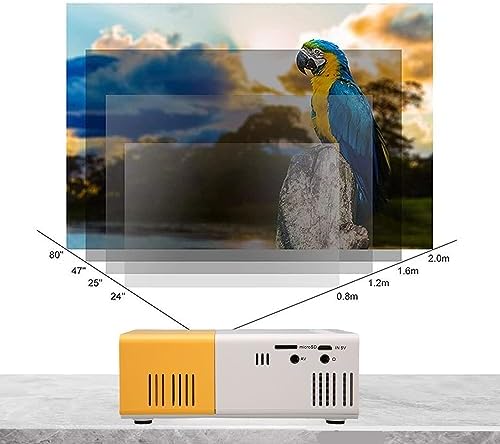
Image 5.2: Projection distance guidelines for various screen sizes. Note: Maximum recommended projection size is 60 inches.
5.3. የትኩረት ማስተካከያ
After placing the projector and powering it on, rotate the focus ring located around the lens until the projected image appears clear and sharp.
6. የአሠራር መመሪያዎች
6.1. ማብራት / ማጥፋት
- አብራ፡ በፕሮጀክተሩ ወይም በርቀት መቆጣጠሪያው ላይ የኃይል አዝራሩን ይጫኑ.
- ኃይል ዝጋ: የኃይል አዝራሩን እንደገና ይጫኑ። ፕሮጀክተሩ ይዘጋል።
6.2. የግቤት ምንጭ ምርጫ
Use the 'Source' button on the remote control or the projector's control panel to cycle through available input sources (HDMI, USB, AV, MicroSD).
6.3. የምናሌ ዳሰሳ
Use the arrow buttons on the remote control or projector to navigate through menus. Press 'OK' or 'Enter' to confirm selections. Use the 'Return' or 'Back' button to go back to the previous menu.
7. ግንኙነት
ፕሮጀክተሩ ለተለያዩ መሳሪያዎች የተለያዩ የግንኙነት አማራጮችን ይሰጣል።

Image 7.1: Connectivity options for the Goshyda projector.
7.1. የኤችዲኤምአይ ግንኙነት
Connect devices such as laptops, TV Sticks, game consoles (e.g., for Xbox One), or Blu-ray players using an HDMI cable. Select 'HDMI' as the input source.
7.2. የዩኤስቢ ግንኙነት
ሚዲያ ለማጫወት የዩኤስቢ ፍላሽ አንፃፊን ወደ ዩኤስቢ ወደብ ያስገቡ files directly. Select 'USB' as the input source and navigate through your files.
7.3. AV Connection
Use the provided AV cable to connect older devices like DVD players. Select 'AV' as the input source.
7.4. Smartphone/Tablet Connection
To connect directly to your smartphone or tablet, you will need an appropriate adapter (e.g., Micro USB to HDMI, Type-C to HDMI, or a dedicated HD multimedia interface device), depending on your device's operating system (OS X or Android) and available ports. These adapters are sold separately.
7.5. የኦዲዮ ውፅዓት
ለተሻሻለ ድምጽ ውጫዊ ድምጽ ማጉያዎችን ወይም የጆሮ ማዳመጫዎችን ከድምጽ ውፅዓት ወደብ ጋር ያገናኙ።
8. ጥገና
- የሌንስ ማጽዳት; Use a soft, lint-free cloth specifically designed for optical lenses to gently wipe the projector lens. Do not use abrasive materials or harsh chemicals.
- የውጭ ጽዳት; የፕሮጀክተሩን ውጫዊ ክፍል ለስላሳና ደረቅ ጨርቅ ይጥረጉ።
- ማከማቻ፡ ለረጅም ጊዜ ጥቅም ላይ በማይውሉበት ጊዜ፣ ፕሮጀክተሩን ቀዝቃዛና ደረቅ ቦታ፣ ከፀሐይ ብርሃን እና ከአቧራ ርቆ ያስቀምጡት።
9. መላ መፈለግ
| ችግር | ሊሆን የሚችል ምክንያት | መፍትሄ |
|---|---|---|
| ኃይል የለም | Power adapter not connected or faulty; insufficient power supply. | Ensure the 5V 2A power adapter is securely connected and plugged into a working outlet. Try a different power source or power bank. |
| ምስል የለም። | Incorrect input source selected; cable not connected properly; device not outputting signal. | Select the correct input source (HDMI, USB, AV). Check all cable connections. Ensure the connected device is powered on and outputting a signal. |
| ምስሉ ደብዛዛ ነው | ትኩረት አልተስተካከለም፤ ፕሮጀክተር ከማያ ገጹ በጣም የቀረበ/በጣም የራቀ። | Rotate the focus ring to sharpen the image. Adjust the projection distance within the recommended range (1-2.5m). |
| ድምጽ የለም። | Volume too low or muted; external speakers not connected; audio format not supported. | Increase the volume on the projector and the source device. Check if external speakers are properly connected. Ensure the audio format is supported. |
10. ዝርዝሮች
| ባህሪ | ዝርዝር |
|---|---|
| የምርት ስም | ጎሺዳ |
| የሞዴል ቁጥር | Goshyda89pkbg17g0 |
| የማሳያ ጥራት | 1920 x 1080 (1080P Support) |
| ብሩህነት | 200 Lumens |
| ምጥጥነ ገጽታ | 4፡3 |
| የፕሮጀክት ርቀት | 1 - 2.5 ሜትር |
| የፕሮጀክሽን መጠን | እስከ 60 ኢንች |
| የግንኙነት ቴክኖሎጂ | HDMI, USB, AV, MicroSD, Audio Out |
| የኃይል ግቤት | 5V 2A |
| የማሳያ ዓይነት | LCD |
| የምርት ልኬቶች | 12L x 8.5W x 4.6H cm (Approx. 4.7 x 3.3 x 1.8 inches) |
| የቅጽ ምክንያት | ተንቀሳቃሽ |
| የመጫኛ አይነት | የጠረጴዛ ተራራ |
11. ዋስትና እና ድጋፍ
For warranty information and customer support, please refer to the documentation provided with your purchase or contact your retailer directly. Keep your proof of purchase for warranty claims.