
መግቢያ
This manual provides essential information for the safe and efficient use of your ONN 42-Inch Full HD LED Smart TV, Model 100018254. Please read these instructions thoroughly before operating your television and retain them for future reference.
በሣጥኑ ውስጥ ያለው
ማዋቀሩን ከመቀጠልዎ በፊት ሁሉም አካላት መኖራቸውን ያረጋግጡ።
- ONN 42-Inch Full HD LED Smart TV
- የርቀት መቆጣጠሪያ
- የቲቪ ማቆሚያ (2 ቁርጥራጮች)
- ለቲቪ ማቆሚያ ብሎኖች
- የኃይል ገመድ
- ፈጣን ጅምር መመሪያ (በዚህ መመሪያ ውስጥ አልተካተተም)

ምስል፡ ፊት ለፊት view of the ONN 42-inch Smart TV displaying the Roku TV home screen with various streaming app icons like Netflix, Disney+, Apple TV, Hulu, Peacock, and Roku Channel. The TV is black with slim bezels and two stand feet.
ማዋቀር
1. የቲቪ መቆሚያውን ማያያዝ
- ጉዳት እንዳይደርስበት በጥንቃቄ የቴሌቪዥኑን ስክሪን ወደ ታች ለስላሳ እና ንጹህ ቦታ ያድርጉት።
- እያንዳንዱን የመቆሚያ ክፍል በቴሌቪዥኑ ግርጌ ላይ ካሉት የሾላ ቀዳዳዎች ጋር ያስተካክሉ።
- እያንዳንዱን የቆመ ክፍል በተሰጡት ዊንጮች ያስጠብቁ። በጥብቅ መጠናከራቸውን ያረጋግጡ።

Image: A diagram illustrating the dimensions of the ONN 42-inch TV, showing its width as 43 inches and height as 37 inches when placed on its stand.
2. ግድግዳ መለጠፍ (አማራጭ)
This TV is compatible with VESA standard wall mounts. Refer to your wall mount's instructions for proper installation. Ensure the wall mount can support the weight of the television.

ምስል: የኋላ view of the ONN 42-inch TV, highlighting the VESA mounting screw holes in a square pattern and various input ports on the side and bottom right.
3. መሣሪያዎችን ማገናኘት
Connect your external devices such as cable boxes, gaming consoles, or Blu-ray players to the TV's input ports.
- ኤችዲኤምአይ: For high-definition audio and video. Use an HDMI cable to connect devices like set-top boxes, game consoles, or streaming sticks.
- ዩኤስቢ፡ ሚዲያ ለማጫወት የUSB ማከማቻ መሳሪያዎችን ለማገናኘት files.
- ዋይ ፋይ፡ For internet connectivity to access smart TV features and streaming services.
4. የመነሻ ኃይል ማብራት እና ማዋቀር አዋቂ
- የኃይል ገመዱን በቴሌቪዥኑ ውስጥ ይሰኩት እና ከዚያ ወደ ግድግዳ መውጫ ውስጥ ያስገቡ።
- የኃይል አዝራሩን በርቀት መቆጣጠሪያው ላይ ወይም በቴሌቪዥኑ ራሱ ላይ ይጫኑ።
- Follow the on-screen instructions to complete the initial setup, including language selection, network connection (Wi-Fi), channel scanning, and linking to your Roku account (if applicable).
ቴሌቪዥኑን በመስራት ላይ
1. የርቀት መቆጣጠሪያ በላይview
The remote control allows you to navigate the TV's interface and control various functions.
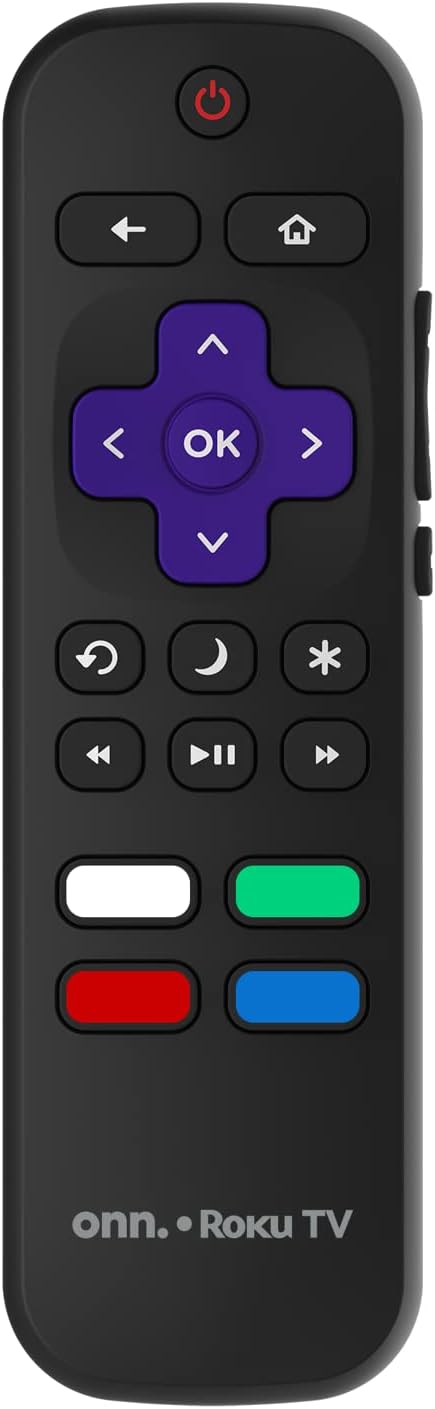
Image: The ONN Roku TV remote control, featuring a power button, directional pad, OK button, home button, back button, volume controls, and dedicated buttons for popular streaming services.
- የኃይል ቁልፍ፡- ቴሌቪዥኑን ያበራል ወይም ያጠፋል።
- Directional Pad (D-Pad) & OK: ምናሌዎችን ይዳስሳል እና ምርጫዎችን ያረጋግጣል።
- መነሻ አዝራር፡- ወደ Roku TV መነሻ ማያ ገጽ ይመለሳል።
- ተመለስ አዝራር፡- ወደ ቀዳሚው ማያ ገጽ ወይም ምናሌ ይመለሳል።
- ድምጽ ወደ ላይ/ወደታች፡ የድምጽ መጠኑን ያስተካክላል።
- ድምጸ-ከል ያድርጉ- የኦዲዮውን ድምጸ-ከል ያደርገዋል ወይም ያጠፋል።
- ቻናል ወደ ላይ/ታች፡ ሰርጦችን ይቀይራል (ለአንቴና/ገመድ ግብዓቶች)።
- የወሰኑ የመተግበሪያ አዝራሮች፡- Quick access to popular streaming services like Netflix, Hulu, etc.
2. የስማርት ቲቪ ባህሪያት
Your ONN Smart TV provides access to a wide range of streaming content and smart functionalities.
- የዥረት አገልግሎቶች፡ Access pre-installed apps like Netflix, YouTube, and many more through the Roku Channel Store.
- የድምጽ ቁጥጥር፡- Compatible with Alexa and Google Assistant for hands-free control (requires a separate compatible voice assistant device).
- ራስ-ሰር የሶፍትዌር ዝመናዎች፡ The TV will automatically update its software when connected to the internet, ensuring you have the latest features and security.
3. የግብዓት ምርጫ
To switch between connected devices (e.g., cable box, game console), use the ግቤት button on your remote or select the desired input from the Roku TV home screen.
4. የምስል እና የድምጽ ቅንጅቶች
Access the TV's settings menu to customize picture and sound preferences. Navigate to ቅንብሮች > የቴሌቪዥን ስዕል ቅንብሮች or ቅንብሮች> ኦዲዮ to adjust options like brightness, contrast, color, sound mode, and equalizer settings.
ጥገና
1. ማያ ገጹን ማጽዳት
- ከማጽዳትዎ በፊት ሁልጊዜ ቴሌቪዥኑን ያጥፉ እና ይንቀሉት።
- ለስላሳ፣ ከቆሸሸ ነጻ የሆነ ጨርቅ ተጠቀም፣ በትንሹ መampበውሃ ወይም በልዩ ማያ ገጽ ማጽጃ የታሸገ።
- ማጽጃውን በቀጥታ በስክሪኑ ላይ አይረጩ። በመጀመሪያ በጨርቅ ላይ ይተግብሩ.
- ስክሪኑን ሊጎዱ ስለሚችሉ ሻካራ ማጽጃዎችን፣ አልኮሆልን፣ ቤንዚንን ወይም ቀጠን ያሉ ማጽጃዎችን ከመጠቀም ይቆጠቡ።
2. የሶፍትዌር ዝመናዎች
Ensure your TV is connected to the internet to receive automatic software updates. These updates improve performance, add features, and enhance security. You can manually check for updates in the ቅንብሮች > ስርዓት > የስርዓት ማሻሻያ ምናሌ.
መላ መፈለግ
በቲቪዎ ላይ ችግሮች ካጋጠሙዎት የሚከተሉትን የተለመዱ መፍትሄዎች ይመልከቱ፡
ኃይል የለም
- የኤሌክትሪክ ገመዱ በቴሌቪዥኑ እና በግድግዳው መውጫው ላይ ደህንነቱ በተጠበቀ ሁኔታ መያያዙን ያረጋግጡ።
- ሌላ መሳሪያ በመክተት የግድግዳ መውጫው እየሰራ መሆኑን ያረጋግጡ።
- የርቀት መቆጣጠሪያውን ብቻ ሳይሆን የኃይል አዝራሩን በራሱ ቴሌቪዥኑ ላይ ለመጫን ይሞክሩ።
ሥዕል/የተዛባ ሥዕል የለም።
- ትክክለኛው የግቤት ምንጭ መመረጡን ያረጋግጡ (ለምሳሌ፣ HDMI 1፣ HDMI 2)።
- በቴሌቪዥኑ እና በውጫዊ መሳሪያዎች መካከል ያሉትን ሁሉንም የኬብል ግንኙነቶች ይፈትሹ.
- ከተቻለ የተለየ የኤችዲኤምአይ ገመድ ይሞክሩ።
- Adjust picture settings (brightness, contrast) in the TV menu.
ምንም ድምጽ / ዝቅተኛ ድምጽ የለም
- Check if the TV is muted or if the volume is turned down.
- Ensure external audio devices (soundbars, receivers) are properly connected and powered on.
- የድምጽ ቅንብሮችን በቴሌቪዥን ምናሌ ውስጥ ያረጋግጡ።
የአውታረ መረብ ግንኙነት ጉዳዮች
- Verify your Wi-Fi router is powered on and functioning.
- የእርስዎን ራውተር እና ሞደም እንደገና ያስጀምሩ።
- ወደ ሂድ መቼቶች > አውታረ መረብ > ግንኙነትን ያረጋግጡ on your TV to diagnose the issue.
- ትክክለኛውን የWi-Fi ይለፍ ቃል እያስገባህ መሆንህን አረጋግጥ።
ዝርዝሮች
| ባህሪ | ዝርዝር |
|---|---|
| የሞዴል ቁጥር | 100018254 |
| የስክሪን መጠን | 42 ኢንች |
| የማሳያ ቴክኖሎጂ | LED |
| ጥራት | 1080 ፒ (ሙሉ ኤችዲ) |
| የማደስ ደረጃ | 60 Hz |
| ግንኙነት | ዩኤስቢ፣ ዋይ ፋይ |
| የሚደገፉ የበይነመረብ አገልግሎቶች | Netflix, YouTube (and others via Roku platform) |
| የመቆጣጠሪያ ዘዴ | Voice (via Alexa & Google Assistant compatible devices), Remote Control |
| የመጫኛ አይነት | የግድግዳ ተራራ (VESA ተኳሃኝ) |
| ቀለም | ጥቁር |
| ዩፒሲ | 671227025567 |

Image: Energy Guide label for Television Model 100018254, indicating an estimated yearly energy cost of $11 based on 12 cents per kWh and 5 hours use per day.
ዋስትና እና ድጋፍ
For warranty information and technical support, please refer to the documentation included with your purchase or visit the official ONN support webጣቢያ. ለዋስትና ጥያቄዎች የግዢ ደረሰኝዎን ያስቀምጡ።