
Roidmi XCQ06RM
የሮድሚ X20S XCQ06RM ገመድ አልባ ባለ 2-በ-1 የቫኩም እና የሞፕ አጠቃቀም መመሪያ
Model: XCQ06RM
1. መግቢያ
Thank you for choosing the Roidmi X20S XCQ06RM Cordless 2-in-1 Vacuum and Mop. This appliance is designed to provide efficient and convenient cleaning for various floor types in your home. This manual contains important information regarding the safe use, operation, and maintenance of your device. Please read it thoroughly before first use and keep it for future reference.
2. የደህንነት መመሪያዎች
የእሳት፣ የኤሌትሪክ ንዝረት ወይም የመቁሰል አደጋን ለመቀነስ እባክዎ የሚከተሉትን የደህንነት ጥንቃቄዎች ይከተሉ።
- መሳሪያውን ከመጠቀምዎ በፊት ሁሉንም መመሪያዎች ያንብቡ.
- ከቤት ውጭ ወይም እርጥብ በሆኑ ቦታዎች ላይ አይጠቀሙ.
- እንደ አሻንጉሊት መጠቀም አትፍቀድ. በልጆች ወይም በአቅራቢያው በሚጠቀሙበት ጊዜ የቅርብ ትኩረት አስፈላጊ ነው.
- በዚህ ማኑዋል ውስጥ እንደተገለፀው ብቻ ይጠቀሙ። የአምራቹን የሚመከሩ አባሪዎችን ብቻ ይጠቀሙ።
- በተበላሸ ገመድ ወይም መሰኪያ አይጠቀሙ. መገልገያው በሚፈለገው መልኩ የማይሰራ ከሆነ፣ ከተጣለ፣ ከተበላሸ፣ ከቤት ውጭ ከወጣ ወይም ወደ ውሃ ከተጣለ ወደ አገልግሎት ማዕከል ይመልሱት።
- በገመድ አይጎትቱ ወይም አይያዙ ፣ ገመዱን እንደ እጀታ አይጠቀሙ ፣ በገመድ ላይ በር አይዝጉ ፣ ወይም ገመድ በሹል ጠርዞች ወይም ማዕዘኖች አይጎትቱ ። መሣሪያውን በገመድ ላይ አያሂዱ። ገመዱን ከተሞቁ ቦታዎች ያርቁ.
- ገመዱን በማንሳት አይንቀሉት። ሶኬቱን ለመንቀል ገመዱን ሳይሆን መሰኪያውን ይያዙ።
- ሶኬቱን ወይም ዕቃውን በእርጥብ እጆች አይያዙ።
- ማንኛውንም ዕቃ ወደ ክፍት ቦታዎች አታስቀምጡ. በማንኛውም ክፍት የታገደ አይጠቀሙ; ከአቧራ፣ ከጥጥ፣ ከፀጉር እና የአየር ፍሰት ሊቀንስ ከሚችል ከማንኛውም ነገር ይርቁ።
- ፀጉርን፣ ልቅ ልብሶችን፣ ጣቶችን እና ሁሉንም የሰውነት ክፍሎችን ከመክፈትና ከሚንቀሳቀሱ ክፍሎች ያርቁ።
- ከመንቀልዎ በፊት ሁሉንም መቆጣጠሪያዎች ያጥፉ።
- በደረጃዎች ላይ ሲያጸዱ ተጨማሪ ጥንቃቄ ይጠቀሙ.
- እንደ ነዳጅ ያሉ ተቀጣጣይ ወይም ተቀጣጣይ ፈሳሾችን ለማንሳት አይጠቀሙ ወይም በሚገኙባቸው ቦታዎች አይጠቀሙ።
- የሚቃጠል ወይም የሚያጨስ ማንኛውንም ነገር እንደ ሲጋራ፣ ክብሪት ወይም ትኩስ አመድ አይውሰዱ።
- ያለ አቧራ ስኒ እና/ወይም ማጣሪያዎች በቦታ አይጠቀሙ።
- ሳይታሰብ መጀመርን ይከላከሉ. ከባትሪ ጥቅል ጋር ከመገናኘትዎ፣ መሳሪያውን ከማንሳትዎ ወይም ከመያዙ በፊት ማብሪያው ከቦታው ውጪ መሆኑን ያረጋግጡ።
- በአምራቹ በተጠቀሰው ባትሪ መሙያ ብቻ ይሙሉ.
3. የጥቅል ይዘቶች
ሁሉም እቃዎች መኖራቸውን ለማረጋገጥ የጥቅሉን ይዘቶች ሲከፍቱ ያረጋግጡ፡
- የቫኩም ማጽጃ ዋና ክፍል
- ባለብዙ ተግባር ብሩሽ
- Mite removal brush
- Washing brush (mop attachment)
- የኤሌክትሪክ ፍራሽ ብሩሽ
- ገመድ አልባ ባትሪ መሙያ
- አጣራ
- የክሪቪስ መሣሪያ
- የጽዳት ጣቢያ
- የቫኩም ቱቦ
- Mop heads x2
4. ምርት አብቅቷልview
The Roidmi X20S XCQ06RM is a powerful and versatile cleaning solution, combining vacuuming and mopping capabilities. Its lightweight design and advanced features make home cleaning efficient.

ምስል 1፡ The Roidmi X20S XCQ06RM cordless vacuum cleaner in its upright configuration.
ቁልፍ ባህሪዎች
- ባለ 2-በ-1 የቫኩም እና ሞፕ፡ Easily switch between vacuuming and mopping functions by attaching the appropriate head. The mop brush rotates at approximately 200 RPM for deep cleaning.
- ኃይለኛ መምጠጥ; Features a new generation Engine-x brushless digital motor (up to 120,000 rpm) delivering 138 watts of suction power and 25,000 Pa air intake pressure. Air-x technology ensures consistent suction by separating dust from air.
- ባለ 6-ደረጃ የማጣሪያ ስርዓት፡ A multi-level system effectively separates dust, filtering impurities as small as 0.3 µm with a 99% purification rate. The device includes a safety mechanism that prevents operation if filters are not correctly installed.
- የሞባይል መተግበሪያ ግንኙነት፡ Connects via Bluetooth to your smartphone. The app allows monitoring of remaining operating time, cleaning time, and provides notifications for dustbin full or filter replacement.
- የተራዘመ የባትሪ ህይወት፡ Optimized by the BMS-X system, the 8 LG/Samsung lithium batteries provide approximately 65 minutes of runtime. The app displays battery status and alerts.
- መግነጢሳዊ ገመድ አልባ ባትሪ መሙላት; Convenient and cable-free charging.
- ለተጠቃሚ ምቹ ንድፍ፡ Operates at a reduced noise level of approximately 72 dB (A). The electric brush includes an LED light for improved visibility in dark areas. Weighing 1.5 kg, it is lightweight for easy handling.

ምስል 2፡ The Roidmi X20S main unit shown with both the vacuum brush head and the mop attachment.

ምስል 3፡ A user operating the Roidmi X20S to vacuum a rug in a living room setting.

ምስል 4፡ The mop attachment of the Roidmi X20S cleaning a wet spill on a tiled kitchen floor.
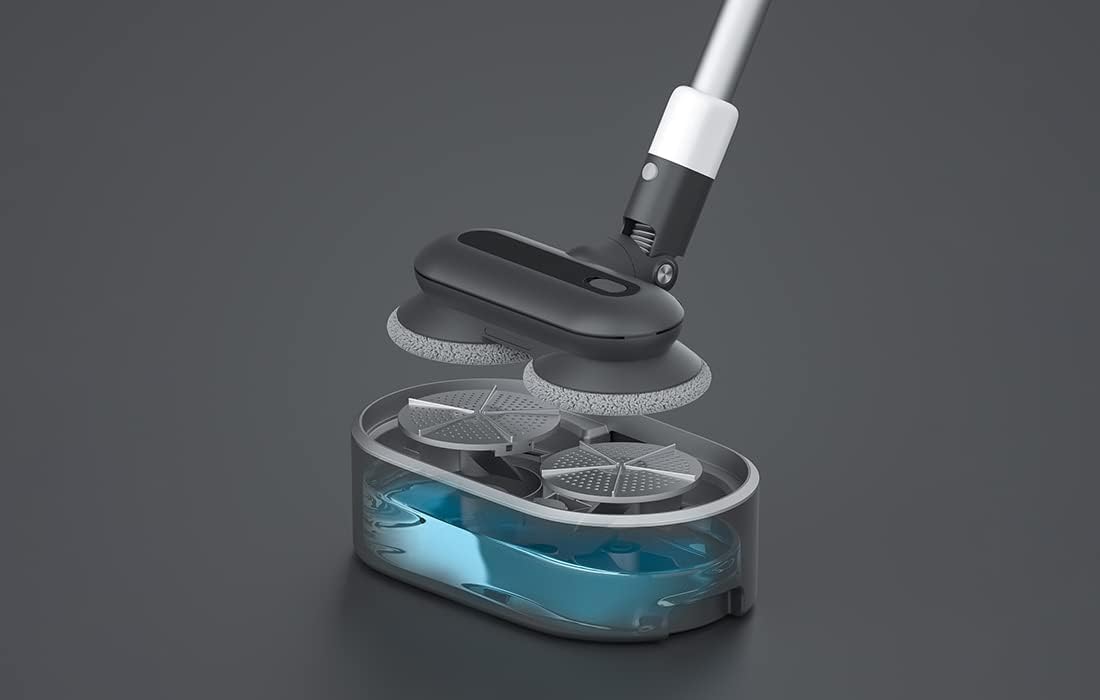
ምስል 5፡ አንድ ፈነዳ view showing the internal components of the Roidmi X20S mop attachment, including the water tank.
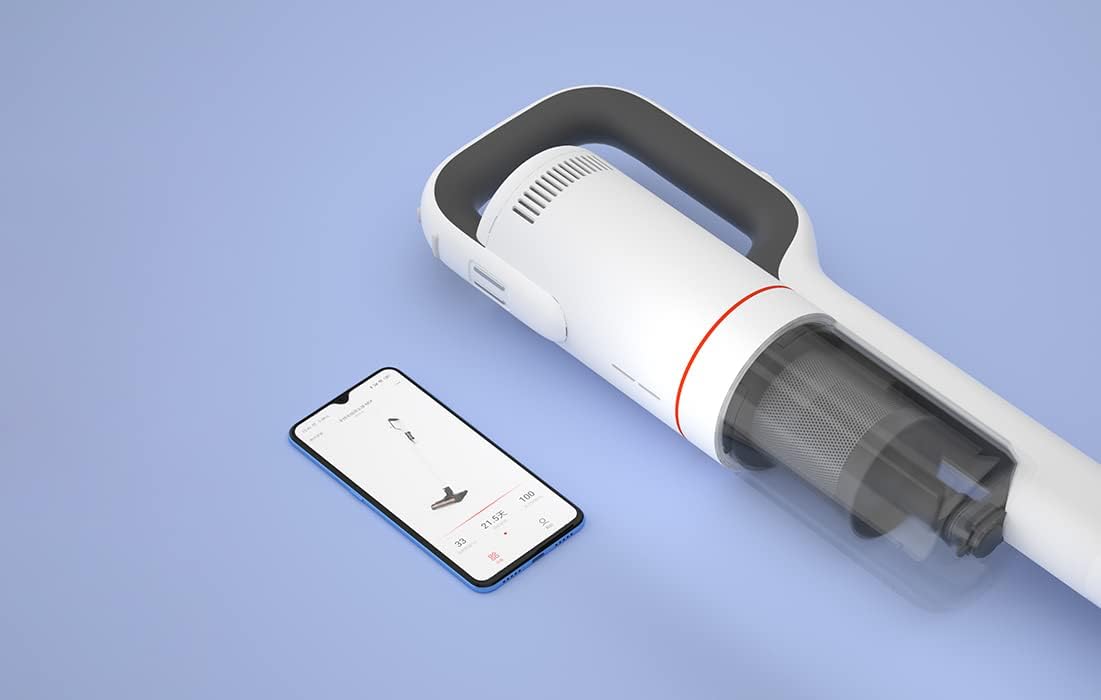
ምስል 6፡ The Roidmi X20S main unit positioned next to a smartphone, illustrating its connectivity with the Roidmi mobile application.

ምስል 7፡ A user demonstrating the Roidmi X20S in handheld mode, cleaning a sofa with an attachment.
5. ማዋቀር
5.1 ስብሰባ
- Connect the Vacuum Tube: Insert the vacuum tube into the main unit until it clicks into place.
- የጽዳት ኃላፊን ያያይዙ; Select the desired cleaning head (multi-function brush for vacuuming, or washing brush for mopping) and attach it to the end of the vacuum tube until it clicks.
- Install Mop Pads (for mopping): If using the washing brush, attach the mop pads to the bottom of the mop attachment.
5.2 በመሙላት ላይ
Before first use, fully charge the appliance. The Roidmi X20S uses magnetic wireless charging.
- Mount the cleaning station to a wall in a convenient location, ensuring it is near a power outlet.
- Connect the wireless charger to the cleaning station and plug it into a power outlet (220 Volts).
- Place the Roidmi X20S onto the cleaning station. The magnetic connection will secure it, and charging will begin automatically.
- Monitor the battery status via the indicator lights on the device or through the Roidmi mobile application.
6. የአሠራር መመሪያዎች
6.1 ቫክዩምሚንግ
- Ensure the multi-function brush or appropriate vacuum attachment is securely installed.
- ቫክዩም ለማብራት የኃይል ቁልፉን ይጫኑ።
- Select the desired suction mode (if applicable) using the mode selection button.
- Begin vacuuming the desired surface. The LED light on the brush head will illuminate dark areas.
- After use, press the power button to turn off the vacuum.
6.2 ማጠብ
- Detach the vacuum brush head and attach the washing brush (mop attachment) with mop pads installed.
- Fill the water tank on the mop attachment with clean water. Do not use corrosive liquids or hot water.
- Press the power button to turn on the device. The mop pads will begin to rotate.
- Gently guide the mop attachment over the floor surface to clean.
- After use, press the power button to turn off the device. Empty any remaining water from the tank and clean the mop pads.
6.3 Mobile Application Usage
- Download the Roidmi app from your smartphone's app store (compatible with Android and iOS).
- Enable Bluetooth on your smartphone and open the Roidmi app.
- Follow the in-app instructions to pair your Roidmi X20S with your smartphone.
- አንዴ ከተገናኙ በኋላ ይችላሉ view battery status, remaining operating time, cleaning history, and receive notifications for dustbin full or filter replacement.
7. ጥገና
Regular maintenance ensures optimal performance and extends the lifespan of your Roidmi X20S.
7.1 Dustbinን ባዶ ማድረግ
- When the dustbin full notification appears on the app or when visibly full, detach the dustbin from the main unit.
- የቆሻሻ መጣያውን ይክፈቱ እና ይዘቱን ወደ ቆሻሻ መጣያ ውስጥ ያስወግዱት።
- Close the dustbin and reattach it to the main unit.
7.2 ማጣሪያዎችን ማጽዳት/መተካት
- The Roidmi X20S features a washable filter. When the app notifies you to clean or replace the filter, remove the filter from the dustbin.
- Rinse the filter under running water until clean. Ensure it is completely dry before reinserting.
- ማጣሪያው ከተበላሸ ወይም ከመጠን በላይ ከተበላሸ ይተኩ።
7.3 Cleaning Brushes and Mop Pads
- Regularly remove hair and debris from the multi-function brush and electric mattress brush. Use the crevice tool or scissors if necessary.
- After mopping, detach the mop pads from the washing brush and rinse them thoroughly. Allow them to air dry completely before storing or reusing.
8. መላ መፈለግ
If you encounter issues with your Roidmi X20S, refer to the following common problems and solutions:
| ችግር | ሊሆን የሚችል ምክንያት | መፍትሄ |
|---|---|---|
| ኃይል የለም/አይበራም | ባትሪ አልቋል Device not properly assembled | ባትሪውን ሙሉ በሙሉ ይሙሉት። Ensure all parts are clicked into place |
| ዝቅተኛ የመሳብ ኃይል | Dustbin ሞልቷል። ማጣሪያ ተዘግቷል። የብሩሽ ጭንቅላት ታግዷል | ቆሻሻ መጣያውን ባዶ ያድርጉት ማጣሪያውን ያጽዱ ወይም ይተኩ Remove any obstructions from the brush head |
| Mop function not effective | የውሃ ማጠራቀሚያ ባዶ ነው Mop pads are dirty or worn | የውሃ ማጠራቀሚያውን እንደገና ይሙሉ Clean or replace mop pads |
| መሳሪያው ሳይታሰብ ይቆማል | ባትሪ ዝቅተኛ ነው። Filtration system parts not installed correctly | ባትሪውን እንደገና ይሙሉ Check all filter components are securely in place |
| የመተግበሪያ ግንኙነት ችግሮች | ብሉቱዝ ጠፍቷል መሣሪያ አልተጣመረም | Ensure Bluetooth is enabled on your phone Follow app instructions to re-pair the device |
If the problem persists after attempting these solutions, please contact Roidmi customer support.
9. ዝርዝሮች
| ባህሪ | ዝርዝር መግለጫ |
|---|---|
| የምርት ስም | ROIDMI |
| የሞዴል ቁጥር | XCQ06RM |
| ቀለም | ነጭ |
| ኃይል | 34.2 ዋት |
| ጥራዝtage | 220 ቮልት |
| የድምጽ ደረጃ | 72 Decibels (A) |
| የባትሪ ህይወት | በግምት. 65 ደቂቃዎች |
| የእቃው ክብደት | 3.95 ኪ |
| የማጣሪያ ዓይነት | Cartridge (Washable, HEPA) |
| የኃይል ምንጭ | ባትሪ የተጎላበተ (1 ሊቲየም-አዮን ባትሪ ተካትቷል) |
| ተኳኋኝነት | Android, iOS (via Roidmi App) |
| ልዩ ባህሪያት | Compact, Lightweight, Portable, Bagless, Wet/Dry (mop function) |
| አምራች | Wuxi Roidmi Information Technology Co., Ltd. |
10. ዋስትና እና ድጋፍ
For warranty information, please refer to the warranty card included with your product or contact Roidmi customer service directly. Information regarding the availability of spare parts is not provided in the product details.
For technical support or service inquiries, please visit the official Roidmi webጣቢያ ወይም የደንበኛ ድጋፍ ቻናሎቻቸውን ያነጋግሩ።
Ask a question about this manual
Ask about setup, troubleshooting, compatibility, parts, safety, or missing instructions. Manuals+ will review the question and use this page’s manual context to help answer it.