
1. መግቢያ
This manual provides detailed instructions for the setup, operation, maintenance, and troubleshooting of your Cosmic Byte ARES Wired Controller for PC. Designed for an enhanced gaming experience, this controller features Hall Effect joysticks and triggers, dual vibration, and customizable Turbo functions.
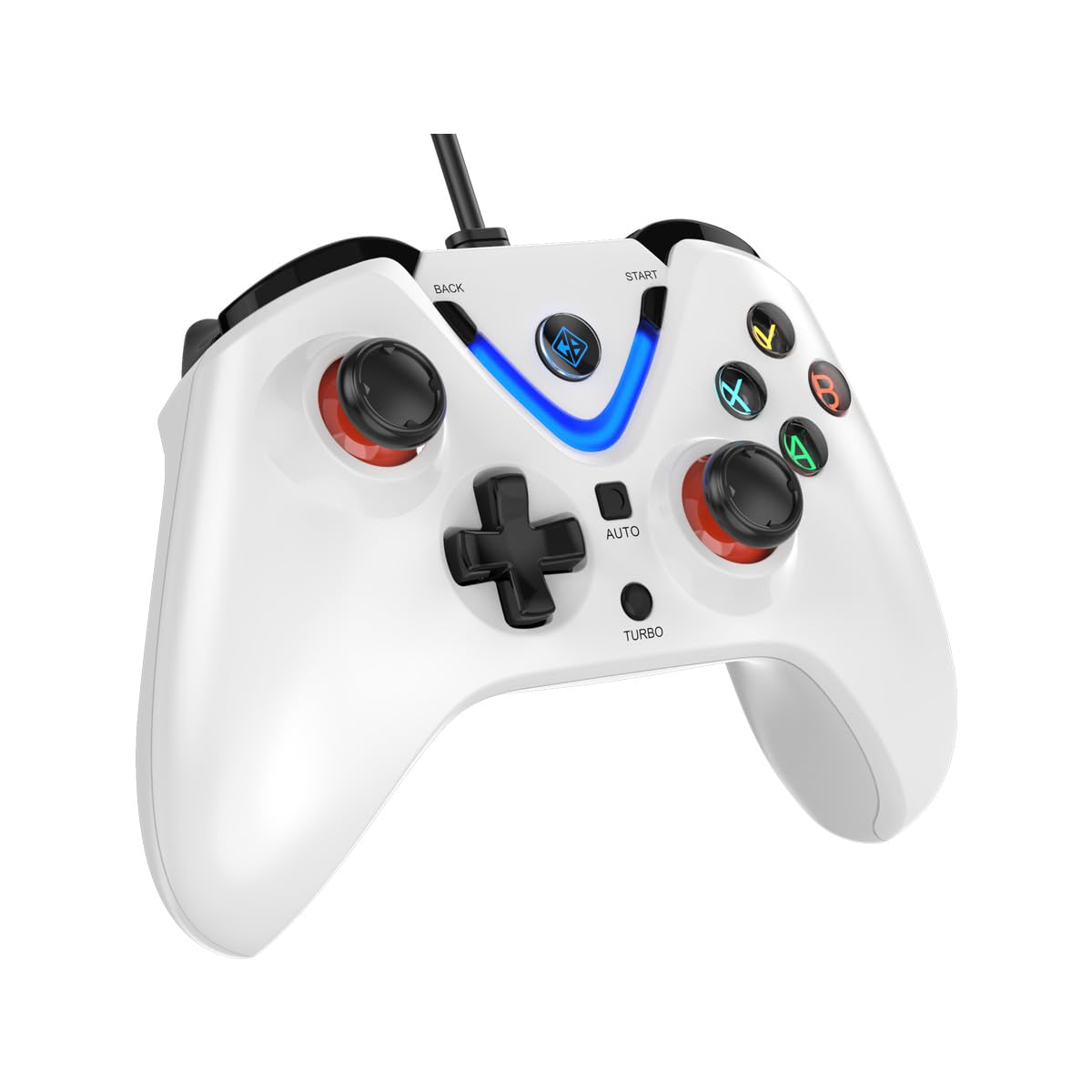
Image 1: The Cosmic Byte ARES Wired Controller in white, showcasing የእሱ ergonomic ንድፍ.
2. የማዋቀር መመሪያዎች
2.1 ከፒሲ ጋር መገናኘት
- ፒሲዎ መብራቱን ያረጋግጡ።
- በኮምፒተርዎ ላይ የሚገኝ የዩኤስቢ ወደብ ያግኙ።
- Plug the USB connector of the Cosmic Byte ARES Wired Controller into the USB port.
- የስርዓተ ክወናው አስፈላጊ የሆኑትን አሽከርካሪዎች በራስ-ሰር ያገኝና ይጭናል. ይህ ሂደት ጥቂት ጊዜ ሊወስድ ይችላል።
- መጫኑ ከተጠናቀቀ በኋላ መቆጣጠሪያው ለአገልግሎት ዝግጁ ነው።

Image 2: The controller connected via its wired USB connection, ensuring fast response.
3. የአሠራር መመሪያዎች
3.1 መሰረታዊ ቁጥጥሮች
The Cosmic Byte ARES controller features standard gamepad layouts, including:
- Left and Right Analog Joysticks: ለትክክለኛ እንቅስቃሴ እና የካሜራ ቁጥጥር።
- ዲ-ፓድ፡ ለአቅጣጫ ግብዓት፣ ብዙውን ጊዜ በምናሌዎች ውስጥ ወይም ለተወሰኑ የጨዋታ እርምጃዎች ጥቅም ላይ ይውላል።
- የተግባር አዝራሮች (A፣ B፣ X፣ Y)፦ For primary game interactions.
- የትከሻ አዝራሮች (L1፣ R1) እና ቀስቅሴዎች (L2፣ R2): For various in-game functions like shooting, aiming, or accelerating.
- የመነሻ እና የኋላ አዝራሮች; For pausing games, accessing menus, or specific in-game commands.
- ቱርቦ አዝራር፡- For activating rapid-fire functions.
- ራስ -ሰር አዝራር; For activating automatic rapid-fire functions.
3.2 የሆል ተፅዕኖ ጆይስቲክስ እና ቀስቅሴዎች
The controller is equipped with Hall Effect joysticks and triggers, which use magnetic sensors instead of physical contacts. This technology provides:
- የተሻሻለ ትክክለኛነት; More accurate and responsive input.
- ዘላቂነት መጨመር; Reduces wear and tear, preventing stick drift over time.
- ለስላሳ አሠራር; Consistent and linear response for triggers, allowing for nuanced control in games.

ምስል 3፡ የፈነዳ view illustrating the Hall Effect joystick mechanism and the Hall Effect triggers.
3.3 Dual Vibration Feedback
The controller features dual vibration motors that provide tactile feedback during gameplay, enhancing immersion by simulating in-game events such as impacts, explosions, or engine rumbling.
3.4 Backlit LED Buttons
The action buttons (A, B, X, Y) and the central V-shaped indicator feature LED backlighting, providing visibility in low-light conditions and adding to the controller's aesthetic.

Image 4: The controller with its LED buttons illuminated and visual representation of vibration effects.
3.5 Turbo and Auto Turbo Functions
The Turbo and Auto Turbo functions allow for rapid, repeated input of a button press without continuously pressing the button.
- ቱርቦን በማንቃት ላይ Press and hold the desired action button (e.g., A) and then press the ቱርቦ button. The button will now rapidly repeat its input as long as you hold it down.
- Activating Auto Turbo: Press and hold the desired action button (e.g., A) and then press the መኪና button. The button will now rapidly repeat its input automatically without needing to be held down.
- Deactivating Turbo/Auto Turbo: To deactivate, repeat the activation steps for the specific button, or press the ግልጽ button (if available) or disconnect and reconnect the controller.

Image 5: Close-up of the controller showing the Turbo and Auto function buttons.
4. ጥገና
- ማጽዳት፡ መቆጣጠሪያውን ለማጽዳት ለስላሳ እና ደረቅ ጨርቅ ይጠቀሙ። ለጠንካራ ቆሻሻ፣ ትንሽ ደርቋልamp cloth can be used, ensuring no liquid enters the controller. Avoid harsh chemicals or abrasive cleaners.
- ማከማቻ፡ መቆጣጠሪያውን ከቀጥታ የፀሐይ ብርሃን እና ከፍተኛ የሙቀት መጠን ራቅ ባለ ቀዝቃዛና ደረቅ ቦታ ያስቀምጡ። ከባድ ነገሮችን በመቆጣጠሪያው ላይ ከማስቀመጥ ይቆጠቡ።
- የኬብል እንክብካቤ; Do not sharply bend or pull the USB cable. Always grasp the plug when disconnecting from the PC.
5. መላ መፈለግ
- መቆጣጠሪያው አልታወቀም፦
- የዩኤስቢ ገመድ ከመቆጣጠሪያው እና ከፒሲው ጋር ደህንነቱ በተጠበቀ ሁኔታ መገናኘቱን ያረጋግጡ።
- መቆጣጠሪያውን ወደተለየ የዩኤስቢ ወደብ ለማገናኘት ይሞክሩ።
- ኮምፒተርዎን እንደገና ያስጀምሩ.
- Check Device Manager on Windows to see if the controller is listed and if there are any driver issues.
- አዝራሮች/ጆይስቲክ ምላሽ የማይሰጡ፦
- Verify the controller is recognized by your PC (see above).
- Test the controller in a different game or a controller testing utility to rule out game-specific issues.
- ሌሎች የግቤት መሳሪያዎች ጣልቃ እየገቡ አለመሆናቸውን ያረጋግጡ።
- ንዝረት አይሰራም፡
- የንዝረት ግብረመልስ መንቃቱን ለማረጋገጥ የጨዋታ ውስጥ ቅንብሮችን ያረጋግጡ።
- Some games may not support vibration or may have limited vibration effects.
6. ዝርዝሮች
| ባህሪ | ዝርዝር |
|---|---|
| የምርት ስም | ኮስሚክ ባይት |
| የሞዴል ስም | አረስ |
| ተስማሚ መሣሪያዎች | PC |
| የመቆጣጠሪያ አይነት | የጨዋታ ሰሌዳ |
| የግንኙነት ቴክኖሎጂ | ዩኤስቢ |
| የምርት ባህሪያት | Ergonomic |
| የአዝራር ብዛት | 16 |
| የሃርድዌር መድረክ | PC |
| የኃይል ምንጭ ዓይነት | ባለገመድ ኤሌክትሪክ ፣ የዩኤስቢ ገመድ |
| የእቃው ክብደት | 220 ግራም |
| የንጥል መጠኖች | 6 x 10 x 4 ሴንቲሜትር |
| ቀለም | ነጭ |
| የትውልድ ሀገር | ቻይና |

Image 6: A comparison table highlighting features of different ARES controller models.
7. ዋስትና እና ድጋፍ
7.1 የዋስትና መረጃ
The Cosmic Byte ARES Wired Controller comes with a የማምረት ጉድለቶችን ለመከላከል የ 1 ዓመት ዋስትና ከተገዛበት ቀን ጀምሮ. ለዋስትና ጥያቄዎች እባክዎ የግዢ ማረጋገጫዎን ያቆዩ።
7.2 የአምራች አድራሻ መረጃ
For support, service, or warranty inquiries, please contact:
ኮስሚክ ባይትPrakash Warehousing, S. No.163, Hissa No 1-2-3-4-5A-5B/2/1,
Phursungi, Pune 412308, Maharashtra, India
For further assistance, please visit the official Cosmic Byte webጣቢያ ወይም የደንበኛ አገልግሎታቸውን ያነጋግሩ።