
1. ምርት አብቅቷልview
The GATEXPERT GT1100DC is an automatic sliding gate opener designed for gates weighing up to 1100 pounds and with a length of up to 39 feet. It utilizes a sprocket and chain transmission system for reliable operation. This kit provides enhanced security and convenience for driveway gates.
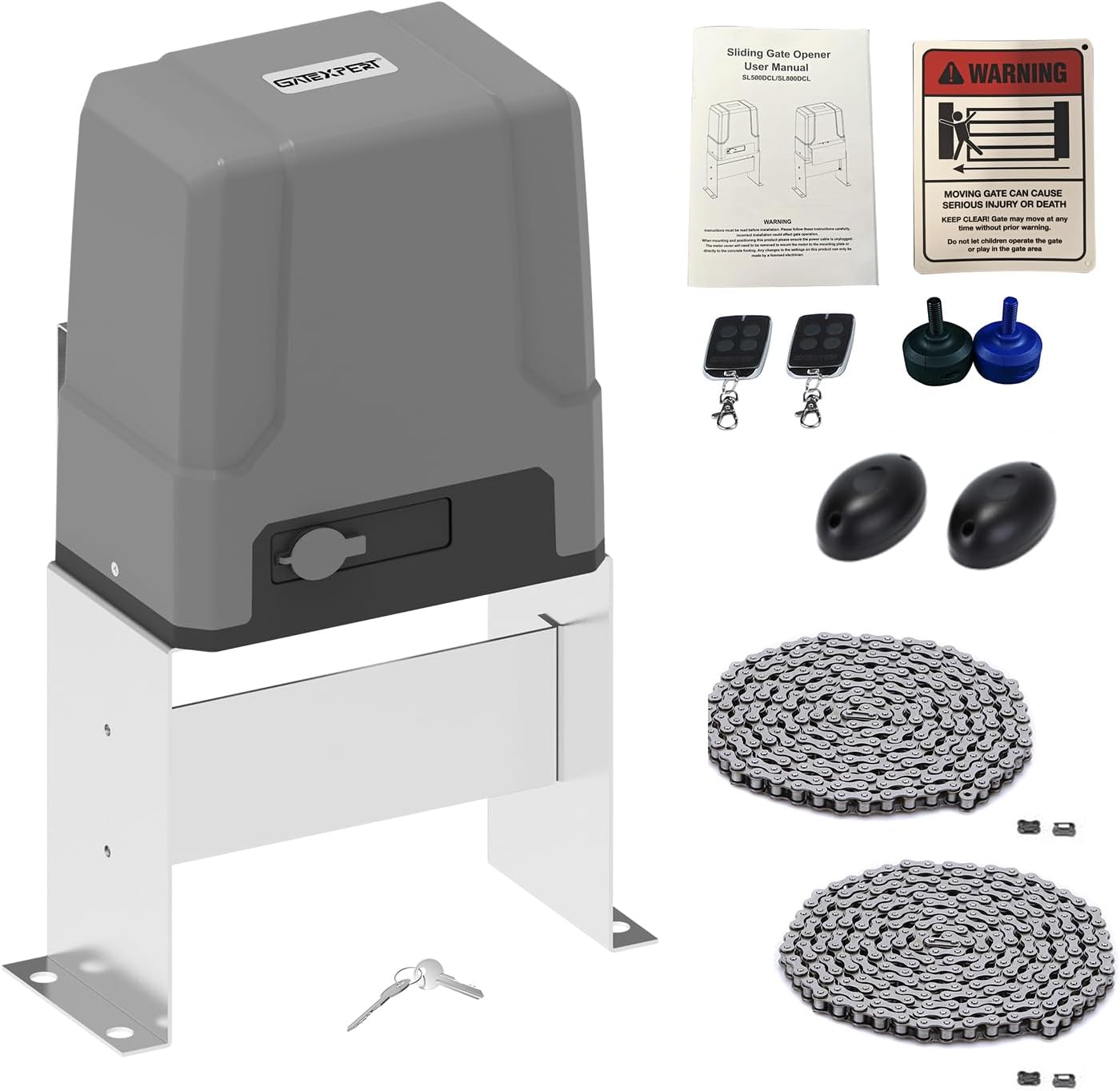
Image 1.1: GATEXPERT GT1100DC Automatic Sliding Gate Opener Kit, showing the main motor unit, remote controls, infrared sensors, manual release keys, and chains.
2. የደህንነት መረጃ
ጠቃሚ፡- Read all safety instructions carefully before installation and operation. Failure to follow these instructions may result in serious injury or property damage.
- የመጫኛ ቦታው ከጉዳቶች እና ሊከሰቱ ከሚችሉ አደጋዎች የጸዳ መሆኑን ያረጋግጡ።
- በሚሰሩበት ጊዜ ልጆችን እና የቤት እንስሳትን ከመግቢያው አካባቢ ያርቁ።
- Never attempt to stop a moving gate with your hands or body.
- In case of power failure or remote control loss, use the provided manual release keys to operate the gate.
- The system includes reliable electronic limit switches for safety. Ensure they are correctly adjusted.
- Professional installation is recommended for electrical connections.
Image 2.1: A warning sign indicating caution around a moving gate, emphasizing safety, as included in the kit.
3. የጥቅል ይዘቶች
ከዚህ በታች የተዘረዘሩት ሁሉም ክፍሎች በጥቅልዎ ውስጥ መካተታቸውን ያረጋግጡ፡-
- 1 x የሞተር ክፍል
- 1 x መለዋወጫዎች ሳጥን
- 1 x Set of Infrared Sensors
- 2 x የርቀት መቆጣጠሪያዎች
- 2 x በእጅ የሚለቀቁ ቁልፎች
- 2 x Chains (10ft/pc)
- 1 x የእንግሊዝኛ የተጠቃሚ መመሪያ
- Complete Installation Hardware

Image 3.1: A visual representation of all items included in the GATEXPERT GT1100DC kit, laid out for verification.
4. ዝርዝሮች
| ባህሪ | ዝርዝር መግለጫ |
|---|---|
| የሞዴል ቁጥር | GT1100DC |
| ከፍተኛ የጌት ክብደት | 1100 ፓውንድ |
| ከፍተኛው የበር ርዝመት | 39 ጫማ |
| የመንዳት ሁነታ | Sprocket and Chain Transmission |
| የኃይል አቅርቦት | 110V/60Hz |
| የሞተር ኃይል | 150 ዋ (24VDC) |
| የምርት ልኬቶች | 12.76 x 9.21 x 19.69 ኢንች |
| የእቃው ክብደት | 38.4 ፓውንድ |
| ባትሪዎች ተካትተዋል። | No (Storage battery not included) |

Image 4.1: Technical drawing illustrating the dimensions of the GATEXPERT GT1100DC gate opener in millimeters and inches.
5. ማዋቀር እና መጫን
The GATEXPERT GT1100DC is designed for easy DIY installation using commonly available tools. No welding or high-voltage electrical connections are required. The complete installation process typically takes a few hours.
5.1 አጠቃላይ የመጫኛ ደረጃዎች፡
- የሞተር ክፍሉን ይጫኑ; Securely mount the motor unit to a stable base next to your sliding gate.
- ሰንሰለቱን ይጫኑ: Attach the provided chains to the gate and connect them to the motor's sprocket. Ensure proper tension.
- የግንኙነት ኃይል; Connect the gate opener to a 110V/60Hz power source.
- የኢንፍራሬድ ዳሳሾችን ይጫኑ፡ Position the infrared sensors to detect obstructions in the gate's path.
- Wire Accessories: Connect any optional accessories such as solar panels, wireless keypads, or alarm lamps.
- Perform Initial Setup: Follow the operating instructions for remote control learning and travel learning.

ምስል 5.1፡ ዘጸamples of the GATEXPERT GT1100DC gate opener installed on different types of sliding gates, demonstrating typical setup scenarios.
5.2 ቁጥጥር ቦርድ በላይview:
The control board manages all functions of the gate opener. Familiarize yourself with its layout for programming and troubleshooting.
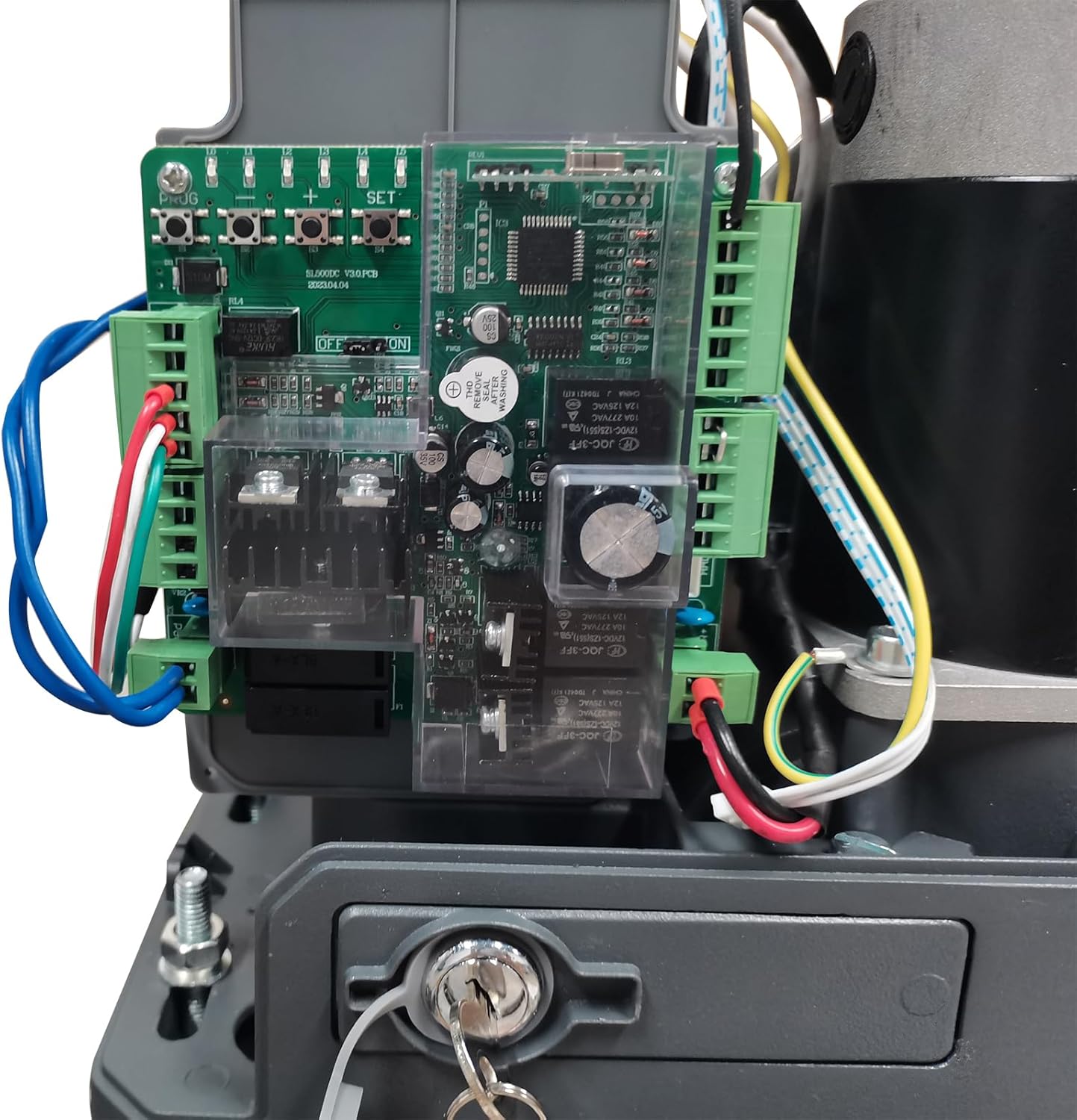
ምስል 5.2፡ ዝርዝር view of the control board inside the GATEXPERT GT1100DC, showing wiring terminals and programming buttons.
6. የአሠራር መመሪያዎች
This section details how to program and operate your GATEXPERT GT1100DC gate opener.
6.1 የርቀት መቆጣጠሪያ ትምህርት
Follow these steps to program your remote controls to the gate opener:
- Press and hold the "+" button on the control board for 3 seconds until L1 illuminates.
- Press the "SET" button once. L1 and L5 will flicker alternately.
- Press the desired button on your remote control. L1-L5 will illuminate for 1 second, indicating successful learning.
- Press the "PROGRAM" button to exit learning mode.
Video 6.1: Demonstration of how to program a remote control to the GATEXPERT GT1100DC gate opener, showing the button presses on the control board and remote.
6.2 Travel Learning (Limit Setting)
The gate opener needs to learn the full travel distance of your gate. This sets the open and close limits.
Video 6.2: A comprehensive video demonstrating the setup and travel learning process for the GATEXPERT sliding gate opener, including clearing remote controls, single-button learning, and slow stop travel setting.
Refer to the full video above for detailed steps on Travel Learning and Slow Stop Travel Setting. Setting a slow stop distance ensures smoother gate operation and extends the lifespan of the opener.
6.3 Automatic Close Time Setting
You can configure the gate to automatically close after a set period. The automatic closing time can be set to 10s, 20s, 30s, 40s, or 50s.
Consult the full instruction manual for specific button sequences to adjust this setting.
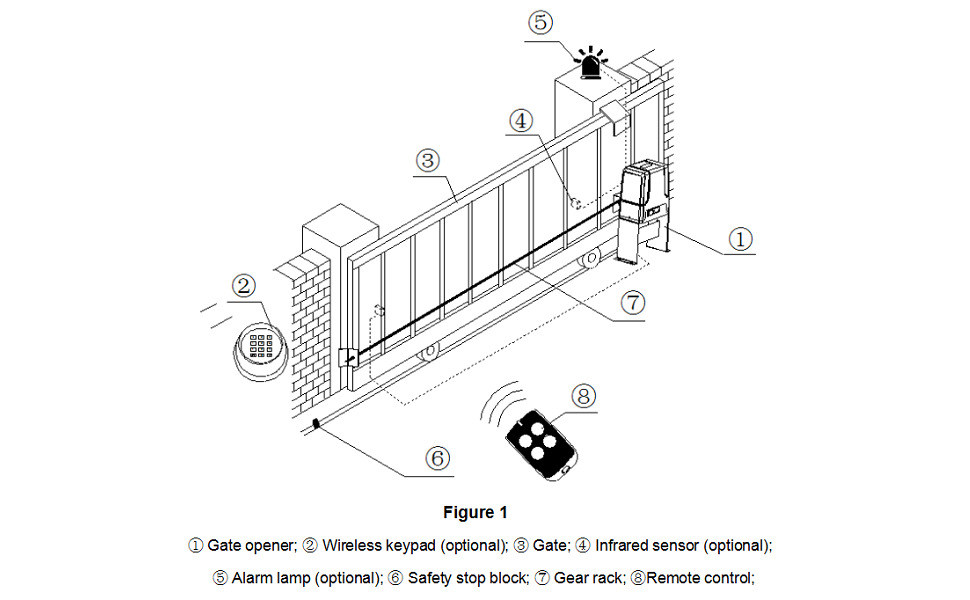
Image 6.3: Diagram illustrating a typical sliding gate setup, labeling the gate opener, wireless keypad, gate, infrared sensor, alarm lamp, safety stop block, gear rack, and remote control.
7. ጥገና
መደበኛ ጥገና የበሩን መክፈቻ ረጅም ዕድሜ እና ጥሩ አፈፃፀም ያረጋግጣል።
- Inspect Chains: Periodically check the chains for proper tension and lubrication. Adjust if necessary.
- ንጹህ ዳሳሾች; Ensure infrared sensors are clean and free from obstructions to maintain proper safety function.
- እንቅፋቶችን ይፈትሹ፡ Regularly clear the gate's path of any debris, plants, or other objects.
- የሙከራ ደህንነት ባህሪያት Periodically test the auto-reverse function and infrared sensors to ensure they are working correctly.
- በእጅ የሚለቀቅ Familiarize yourself with the manual release mechanism and test it occasionally.
8. መላ መፈለግ
If you encounter issues with your gate opener, refer to the following common troubleshooting tips:
- የማይንቀሳቀስ በር;
- የኃይል አቅርቦትን ያረጋግጡ.
- Ensure manual release is engaged (if applicable).
- Verify remote control battery and programming.
- Check for obstructions in the gate's path.
- በሩ ሳይታሰብ ይቆማል፡-
- Inspect infrared sensors for obstructions or misalignment.
- Check for physical obstructions along the gate's travel path.
- የርቀት መቆጣጠሪያ አይሰራም;
- የርቀት መቆጣጠሪያ ባትሪ ይተኩ።
- Re-program the remote control following the "Remote Control Learning" section.
For more detailed troubleshooting, please consult the comprehensive user manual included with your product or contact customer support.
9. ዋስትና እና ድጋፍ
The GATEXPERT GT1100DC Automatic Sliding Gate Opener Kit comes with a የ 12-ወር ዋስትና from the date of purchase. Additionally, a free product return and exchange service is available within 30 days of purchase.
For any issues during product installation, operation, or for comprehensive system solutions, please contact GATEXPERT customer service via the service email provided in your product packaging or on the official GATEXPERT webጣቢያ.