
1. መግቢያ
Thank you for choosing the Aigo AC SE 360 Rainbow 360mm Water Cooler. This all-in-one liquid cooling solution is designed to provide efficient thermal management for your high-performance CPU, featuring a 360mm triple radiator and vibrant ARGB lighting. This manual provides essential information for proper installation, operation, and maintenance to ensure optimal performance and longevity of your product.

Image 1.1: Aigo AC SE 360 Rainbow 360mm Water Cooler assembled view.
2. የደህንነት መረጃ
- ከመጫንዎ ወይም ከጥገናዎ በፊት ሁልጊዜ ከኮምፒዩተርዎ ኃይል ያላቅቁ።
- ጉዳት እንዳይደርስባቸው ክፍሎችን በጥንቃቄ ይያዙ።
- የኤሌክትሪክ አደጋዎችን ለመከላከል ትክክለኛውን መሬት ማረጋገጥ.
- ምርቱን ከእርጥበት እና ከፍተኛ የሙቀት መጠን ያርቁ.
- Do not attempt to open the pump or radiator, as this may void the warranty and cause leaks.
- ልጆች በማይደርሱበት ቦታ ያስቀምጡ.
3. የጥቅል ይዘቶች
ከዚህ በታች የተዘረዘሩት ሁሉም ክፍሎች በጥቅልዎ ውስጥ መኖራቸውን ያረጋግጡ፡
- 1x Aigo AC SE 360 Water Cooler Unit (Radiator, Pump/CPU Block, Tubing)
- 3x 120ሚሜ የARGB አድናቂዎች
- Mounting Hardware for Intel Sockets (LGA 115X, 1200, 1700, 2011, 2066)
- Mounting Hardware for AMD Sockets (AM2, AM3, AM4, AM5)
- የሙቀት ለጥፍ
- የማራገቢያ ዊንጮች እና የራዲያተር ዊንጮች
- ARGB Controller (if included with your specific model)
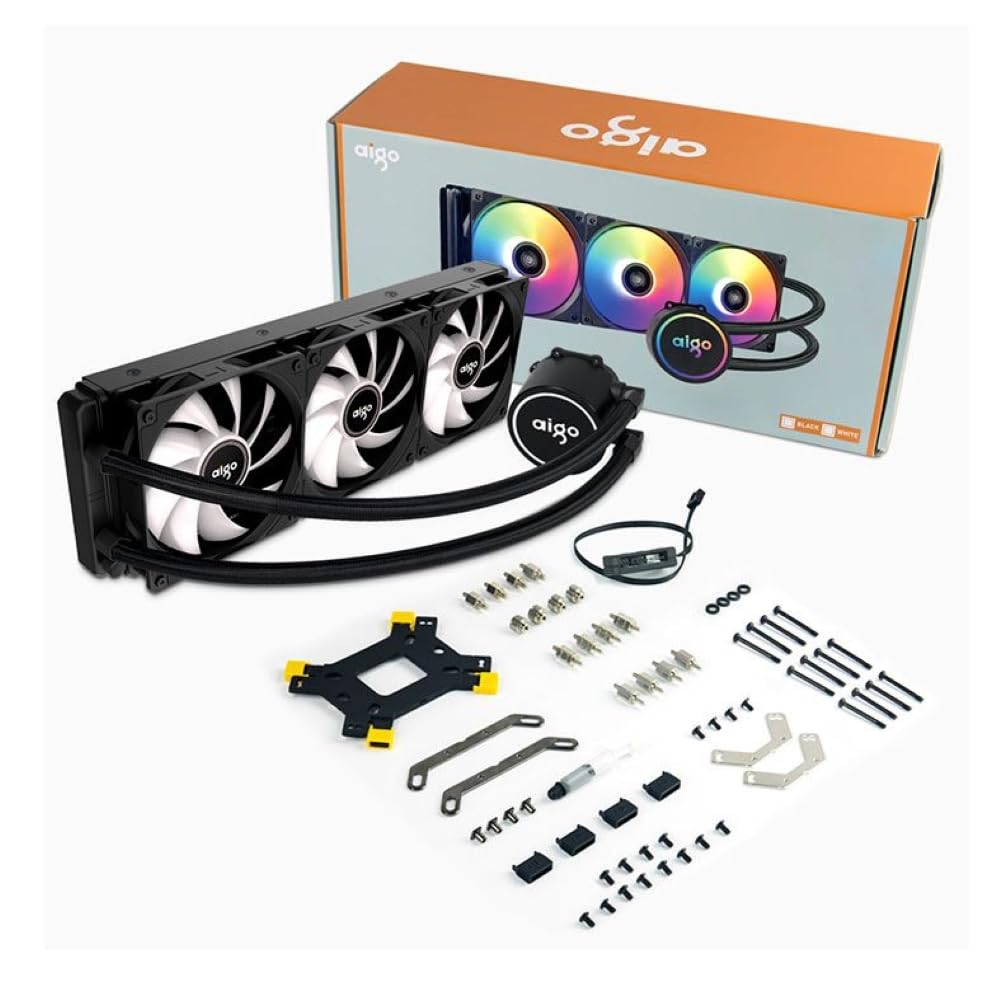
Image 3.1: All components included in the Aigo AC SE 360 package.
4. ማዋቀር እና መጫን
Follow these steps for proper installation of your Aigo AC SE 360 Water Cooler:
- ማዘርቦርዱን አዘጋጁ፡- Install the appropriate backplate and standoffs for your CPU socket (Intel: 115X, 1200, 1700, 2011, 2066; AMD: AM2, AM3, AM4, AM5). Refer to your motherboard manual for specific instructions.
- የሙቀት ለጥፍ ይተግብሩ; Clean the CPU surface. Apply a small amount of thermal paste to the center of the CPU IHS (Integrated Heat Spreader).
- Mount the CPU Block/Pump: Carefully place the CPU block onto the CPU, aligning it with the standoffs. Secure it with the provided screws, tightening them in a diagonal pattern until snug. The magnetic block design allows for easy rotation to align the logo or tubing as desired.
- በራዲያተሩ ላይ የአየር ማራገቢያዎችን መትከል; Attach the three 120mm ARGB fans to the radiator using the longer screws provided. Ensure the fan airflow direction is correct for your case configuration (typically blowing air through the radiator).
- የማውጫ ራዲያተር፡ Install the radiator assembly into your PC case. The 360mm radiator is compatible with most ATX cases that support this size. Secure it with the appropriate screws.
- Connect Fans (Daisy Chain): The fans feature a daisy chain connection system. Connect the fans to each other in series, then connect the final fan's cable to the motherboard's fan header or an ARGB controller. This simplifies cable management by reducing the number of cables.
- የኤአርጂቢ መብራትን ያገናኙ፡ Connect the ARGB cables from the fans and pump to a 3-pin, 5V ARGB header on your motherboard or a dedicated ARGB controller. Ensure the voltage is correct (5V) to prevent damage.
- Connect Pump Power: Connect the pump's 4-pin power connector to a dedicated AIO_PUMP or CPU_FAN header on your motherboard.
- የኬብል አስተዳደር Organize all cables neatly to ensure proper airflow and a clean build.
5. የአሠራር መመሪያዎች
Once installed, the Aigo AC SE 360 Water Cooler operates automatically to maintain optimal CPU temperatures. Here are key operational aspects:
- Automatic Cooling: The pump and fans will adjust their speed based on CPU temperature, ensuring efficient cooling. The pump operates at 12V with 3200 RPM, and fans operate between 800-1800 RPM.
- የ ARGB ብርሃን መቆጣጠሪያ; The Rainbow ARGB lighting can be controlled via your motherboard's ARGB software (if connected to a compatible header) or through an included ARGB controller. This allows for various lighting effects and synchronization with other ARGB components.
- የድምጽ ደረጃ፡ The cooler is designed for quiet operation, with a noise level of approximately 30 dB.
6. ጥገና
Regular maintenance helps ensure the longevity and performance of your water cooler:
- አቧራ ማጽዳት; የአየር ፍሰትን እና የማቀዝቀዣ አፈፃፀምን ሊያደናቅፍ የሚችል የአቧራ ክምችትን ለመከላከል የራዲያተሩን ክንፎች እና የአየር ማራገቢያ ምላጮች በየጊዜው ያጽዱ። የተጨመቀ አየር ወይም ለስላሳ ብሩሽ ይጠቀሙ።
- ቱቦዎችን ይፈትሹ; Check the tubing for any signs of kinks, leaks, or damage.
- የሙቀት መጠኖችን ይቆጣጠሩ; Use monitoring software to keep an eye on your CPU temperatures. Significant increases may indicate a need for further inspection or cleaning.
- የሙቀት ለጥፍ; While not frequently required, reapplying thermal paste every few years can help maintain optimal thermal transfer.
7. መላ መፈለግ
If you encounter issues with your Aigo AC SE 360 Water Cooler, refer to the following common problems and solutions:
| ችግር | ሊሆን የሚችል ምክንያት | መፍትሄ |
|---|---|---|
| ከፍተኛ የሲፒዩ የሙቀት መጠኖች | Insufficient thermal paste, poor contact, dust buildup, pump failure, fan failure. | Reapply thermal paste, ensure CPU block is securely mounted, clean radiator and fans, check pump/fan connections. |
| አድናቂዎች አይሽከረከሩም | Loose fan connection, incorrect fan header, faulty fan. | Check fan cables and connections, ensure connected to appropriate motherboard header, test fans individually if possible. |
| No ARGB Lighting | Loose ARGB connection, incorrect ARGB header (e.g., 12V instead of 5V), faulty ARGB component. | Verify ARGB cables are securely connected to a 3-pin, 5V ARGB header. Check motherboard manual for correct header. |
| ያልተለመዱ ድምፆች | Air bubbles in loop, fan rubbing, pump issue. | Gently tilt the PC case to help dislodge air bubbles. Check for obstructions around fans. If pump noise persists, contact support. |
8. ዝርዝሮች
| ባህሪ | ዝርዝር |
|---|---|
| ሞዴል | AC SE 360 |
| የራዲያተር መጠን | 360 mm (394 x 120 x 27 mm) |
| የደጋፊዎች መጠን | 120 ሚ.ሜ |
| የደጋፊ ፍጥነት | 800-1800 ራፒኤም |
| የአየር ፍሰት | 64.05 ሲኤፍኤም |
| የማይንቀሳቀስ ግፊት | 1.85 mmH₂O |
| የድምጽ ደረጃ | 30 ዲቢቢ |
| የፓምፕ ጥራዝtage | 12 ቮልት |
| የፓምፕ ፍጥነት | 3200 ራፒኤም |
| የኃይል ፍጆታ | 3.24 ዋት |
| የመሸከም አይነት | የሴራሚክ ድብ |
| TDP Supported | 280 ዋ |
| ተስማሚ ሶኬቶች | Intel (LGA 115X, 1200, 1700, 2011, 2066), AMD (AM2, AM3, AM4, AM5) |
| የኃይል ማገናኛ | 4-ሚስማር |
| ARGB አያያዥ | 3-ሚስማር፣ 5 ቪ |
9. ዋስትና እና ድጋፍ
The Aigo AC SE 360 Water Cooler comes with a የ 12-ወር ዋስትና ከተገዛበት ቀን ጀምሮ. ይህ ዋስትና በተለመደው የአጠቃቀም ሁኔታዎች ውስጥ የማምረቻ ጉድለቶችን ይሸፍናል.
For technical support, warranty claims, or any questions not covered in this manual, please contact your retailer or the Aigo customer support team. Please have your proof of purchase and product model number (ACSE360) ready when contacting support.