
1. መግቢያ
This manual provides detailed instructions for the installation, operation, and maintenance of your Rosewill CMG5 1000W Modular Power Supply. Please read this manual thoroughly before installation and retain it for future reference.
The Rosewill CMG5 1000W is a fully modular 80 PLUS Gold certified power supply designed for personal computers. It is compatible with ATX 3.0 & 3.1 standards and features a native 600W PCIe 5.0 / Gen 5 12+4 Pin 12V-2x6 cable, supporting modern high-performance graphics cards.
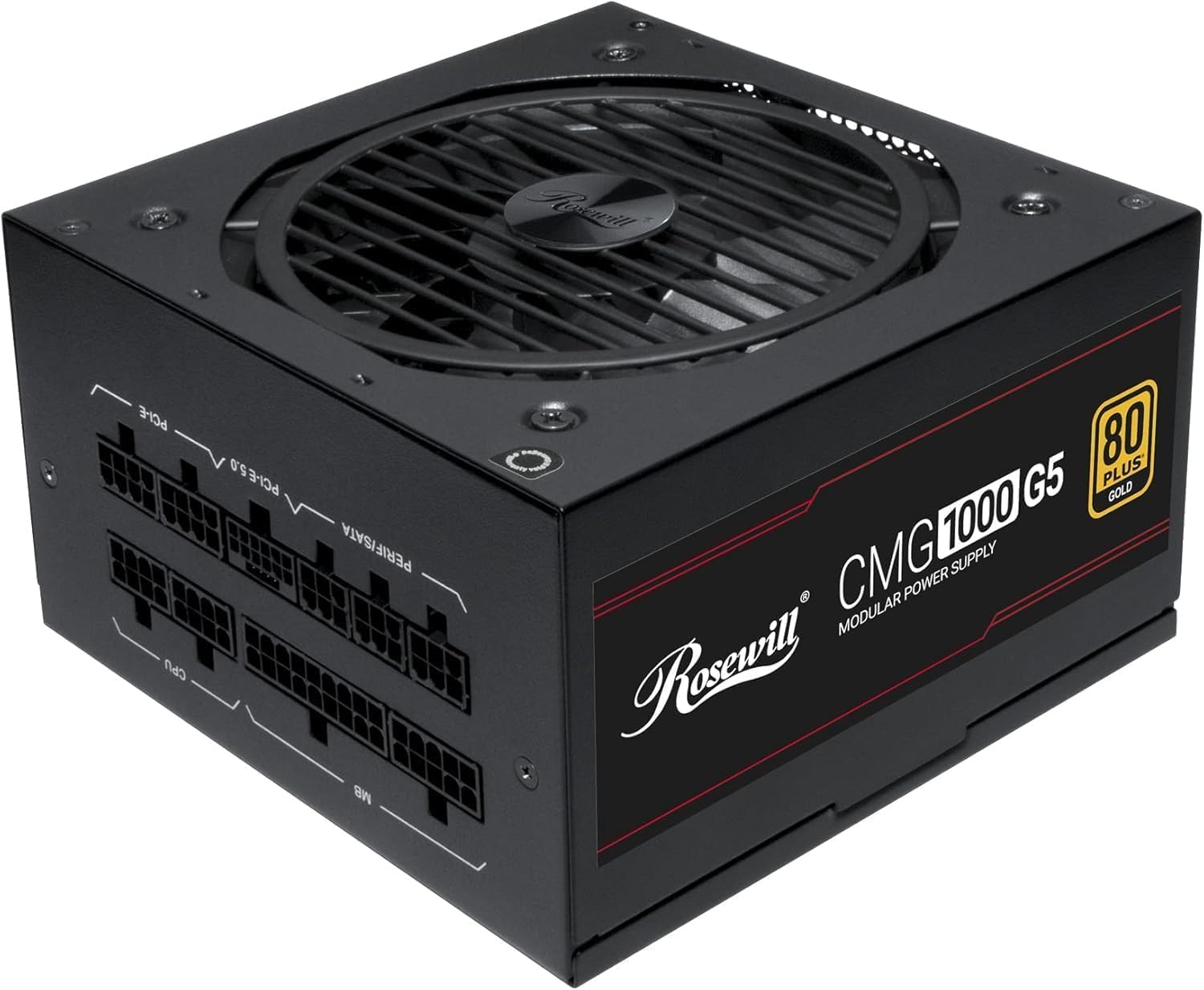
ምስል፡ ፊት ለፊት view of the Rosewill CMG5 1000W Modular Power Supply, showing the fan grille and branding.
2. የደህንነት መረጃ
WARNING: Improper installation or use can lead to serious injury or equipment damage. Always follow these safety guidelines:
- ከመጫንዎ ወይም ከማስተናገድዎ በፊት የኃይል አቅርቦቱ ከኤሲ የኃይል መውጫ መገናኘቱን ያረጋግጡ።
- የኃይል አቅርቦት ክፍሉን አይክፈቱ. ከፍተኛ መጠንtagበውስጡ ይገኛሉ፣ እና ለተጠቃሚ አገልግሎት የሚሰጡ ክፍሎች የሉም።
- Install the power supply in a well-ventilated area. Do not block any ventilation openings.
- Use only the modular cables provided with this power supply. Using incompatible cables can damage the PSU and connected components.
- Ensure all cable connections are secure and fully seated to prevent electrical shorts or overheating.
- የኃይል አቅርቦቱን ለእርጥበት ወይም ለከፍተኛ የሙቀት መጠን ከማጋለጥ ይቆጠቡ።
- If the power supply emits smoke, unusual odors, or loud noises, immediately disconnect it from the AC power and contact support.
3. የጥቅል ይዘቶች
ሁሉም እቃዎች በጥቅልዎ ውስጥ መኖራቸውን ያረጋግጡ፡-
- Rosewill CMG5 1000W Modular Power Supply Unit
- የ AC ኃይል ገመድ
- Modular Cable Set (see below for details)
- ማፈናጠጥ ብሎኖች
- የተጠቃሚ መመሪያ (ይህ ሰነድ)

Image: Rear panel of the Rosewill CMG5 1000W Power Supply showing the modular cable connection ports labeled for MB, CPU, PERIF/SATA, PCI-E 5.0, and PCI-E.
ሞዱላር የኬብል ስብስብ፡

Image: Diagram illustrating the types and lengths of modular cables included with the Rosewill CMG5 1000W Power Supply, including 24-pin Motherboard, 12+4-pin PCIe 5.0, 4+4-pin CPU, 6+2-pin PCIe, SATA, and 4-pin Molex connectors.
- 1x 24-pin Motherboard Cable (600mm)
- 1x 12+4-pin PCIe 5.0 Cable (600mm)
- 2x 4+4-pin CPU Cables (700mm each)
- 4x 6+2-pin PCIe Cables (500mm each, with two connectors per cable)
- 2x SATA Cables (500mm, with four SATA connectors per cable)
- 1x 4-pin Molex Cable (500mm, with four Molex connectors)
4. ማዋቀር እና መጫን
Follow these steps to install your Rosewill CMG5 1000W Power Supply:
- ስርዓትዎን ያዘጋጁ:
- ኮምፒተርዎን ያጥፉ እና የኤሲ ገመዱን ከግድግዳው መውጫ ያላቅቁት።
- የኮምፒተርዎን መያዣ ይክፈቱ።
- If replacing an existing power supply, disconnect all cables from the old PSU and remove it from the case.
- የኃይል አቅርቦቱን ይጫኑ;
- Carefully place the new Rosewill CMG5 1000W PSU into the power supply bay of your computer case.
- Secure the PSU to the case using the provided mounting screws. Ensure the fan is facing the correct direction for optimal airflow (typically facing down if there's a bottom vent, or up if not).
- ሞዱል ኬብሎችን ያገናኙ፡
- Identify the necessary cables for your components (Motherboard, CPU, PCIe, SATA, Molex). Refer to the "Package Contents" section for cable types.
- Connect the required modular cables to the corresponding ports on the power supply unit. Ensure they click firmly into place.
- Connect the other end of each cable to your motherboard, CPU, graphics card(s), storage drives, and other peripherals. Pay close attention to the orientation of each connector.
- For PCIe 5.0 graphics cards, use the dedicated 12+4-pin PCIe 5.0 cable. Ensure it is fully inserted into both the PSU and the graphics card.
- የመጨረሻ ቼኮች፡-
- Double-check all cable connections to ensure they are secure. Loose connections can cause system instability or damage.
- Organize cables to improve airflow within the case.
- የኮምፒተርዎን መያዣ ይዝጉ ፡፡
- አብራ፡
- የ AC የኤሌክትሪክ ገመዱን ከኃይል አቅርቦቱ ጋር እና ከዚያም ወደ ግድግዳ መውጫ ያገናኙ.
- Flip the main power switch on the back of the PSU to the "ON" position.
- በኮምፒተርዎ ላይ ያብሩት።

ምስል: የኋላ view of the Rosewill CMG5 1000W Power Supply, showing the AC power input, main power switch, and an "ECO" mode switch.
5. የአሠራር መመሪያዎች
The Rosewill CMG5 1000W Power Supply is designed for reliable and efficient operation.
Eco Silent Mode:
- The power supply features an "ECO" mode switch located on the rear panel.
- When the ECO mode is ON, the 120mm Fluid Dynamic Bearing (FDB) fan will operate in a semi-fanless mode. The fan will remain off under low to moderate loads, providing silent operation. It will automatically spin up when the load increases to maintain optimal temperatures.
- When the ECO mode is ጠፍቷል, the fan will operate continuously, adjusting its speed based on the internal temperature and load.
- Choose the mode that best suits your preference for noise levels and cooling performance.
Power Excursion Capabilities:
This power supply is designed to handle power excursions up to 235% and GPU power excursions up to 300%, ensuring stable power delivery during peak demands from high-performance components.
6. ጥገና
ትክክለኛው ጥገና የኃይል አቅርቦትዎን ረጅም ጊዜ እና ጥሩ አፈፃፀም ያረጋግጣል።
- ማጽዳት፡ Periodically clean the exterior of the power supply and its fan grille to prevent dust buildup. Use compressed air to gently clear dust from the fan blades and internal components. Ensure the PSU is powered off and unplugged before cleaning.
- የኬብል አስተዳደር Ensure cables are not obstructing airflow within your computer case. Re-route or tie cables as needed to maintain good ventilation.
- የአካባቢ ሁኔታዎች; የኃይል አቅርቦቱን በንጹህ እና ደረቅ አካባቢ እና በቂ የአየር ዝውውር ባለው ቦታ ያሂዱ። ከፍተኛ የሙቀት መጠን እና እርጥበት ያስወግዱ።
7. መላ መፈለግ
ከኃይል አቅርቦትዎ ጋር ችግር ካጋጠመዎት የሚከተሉትን የተለመዱ ችግሮች እና መፍትሄዎች ይመልከቱ፡
| ችግር | ሊሆን የሚችል ምክንያት | መፍትሄ |
|---|---|---|
| ኮምፒዩተሩ አይበራም። |
|
|
| System crashes or restarts randomly. |
|
|
| ከ PSU የሚመጡ ያልተለመዱ ድምፆች። |
|
|
| Cables appear melted or discolored. |
|
|
8. ዝርዝሮች
| ባህሪ | ዝርዝር |
|---|---|
| የሞዴል ስም | CMG1000G5 |
| የምርት ስም | ሮዝዊል |
| የውጤት ዋትtage | 1000 ዋት |
| የቅጽ ምክንያት | ATX |
| የማቀዝቀዣ ዘዴ | አየር (120ሚሜ FDB ማራገቢያ) |
| የንጥል መጠኖች (L x W x H) | 11.4 x 9 x 4.6 ኢንች (289.56 x 228.6 x 116.84 ሚሜ) |
| የእቃው ክብደት | 6.3 ፓውንድ (2.86 ኪ.ግ) |
| የኃይል አቅርቦት ንድፍ | ሙሉ ሞዱላር |
| የውጤታማነት ማረጋገጫ | 80 ፕላስ ወርቅ |
| ግብዓት Voltage | 100-240 Volts AC |
| የግቤት ድግግሞሽ | 50-60 Hz |
| ማገናኛዎች | ATX, PCIe (including 12V-2x6 for PCIe 5.0) |
| ATX መደበኛ | ATX 3.0 & 3.1 Compatible |
| Capacitors | 100% የጃፓን ኤሌክትሮሊቲክ መያዣዎች |
| ጥበቃዎች | OCP, OPP, OTP, OVP, SCP, UCP (Over Current, Over Power, Over Temperature, Over Voltage, Short Circuit, Under Current Protection) |

ምስል: ጎን view of the Rosewill CMG5 1000W Power Supply, displaying the electrical specifications label including AC input, DC output voltages, and total output power.
9. ዋስትና እና ድጋፍ
የዋስትና መረጃ፡-
The Rosewill CMG5 1000W Power Supply comes with a የ 5 ዓመት የአምራች ዋስትና. ይህ ዋስትና በመደበኛ አጠቃቀም ላይ የቁሳቁሶች እና የአሠራር ጉድለቶችን ይሸፍናል ። ለዋስትና ጥያቄዎች እባክዎ የግዢ ማረጋገጫዎን ያቆዩ።
For detailed warranty terms and conditions, please refer to the official Rosewill webጣቢያ ወይም የደንበኛ አገልግሎታቸውን ያነጋግሩ።
የደንበኛ ድጋፍ፡
If you have any questions, require technical assistance, or need to initiate a warranty claim, please contact Rosewill customer support:
- Webጣቢያ፡ ኦፊሴላዊውን ሮዝዊልን ይጎብኙ webጣቢያ ለድጋፍ ምንጮች፣ የሚጠየቁ ጥያቄዎች እና የእውቂያ መረጃ።
- ኢሜል/ስልክ፡ Refer to the Rosewill webበጣም ወቅታዊ የእውቂያ ዝርዝሮች ለማግኘት ጣቢያ.
When contacting support, please have your product model (CMG1000G5) and proof of purchase readily available.