
NexiGo D621
NexiGo 3 Channel Dash Cam D621 User Manual
ሞዴል: D621
1. መግቢያ
This manual provides detailed instructions for the installation, operation, and maintenance of your NexiGo 3 Channel Dash Cam D621. Please read this manual thoroughly before using the device to ensure proper functionality and safety. Keep this manual for future reference.
2. በሳጥኑ ውስጥ ያለው
Verify that all items are present and in good condition upon unboxing.
- NexiGo D621 Dash Cam
- 128 ጊባ ኤስዲ ካርድ
- የስበት ተራራ
- Auxiliary Power Cable (11.5 ft)
- Rear Camera with Extension Cable (21.3 ft)
- Pry መሣሪያ
- የጽዳት ጨርቅ
- የተጠቃሚ መመሪያ

Image: NexiGo D621 Dash Cam and its components, including the main unit, suction mount, cables, and SD card.
3. ምርት አብቅቷልview
The NexiGo D621 is a 3-channel dash cam designed to record front, interior, and rear views simultaneously. It features a rotatable interior/front camera for flexible recording options.
ቁልፍ ባህሪዎች
- Rotatable Interior/Front Camera: Allows the interior camera to be rotated to face forward, providing dual front-facing recording.
- High Resolution Recording: Front camera records in 4K/2K, interior and rear cameras in 1080P.
- Sony STARVIS Sensors: ለሊት ግልጽ የሆነ እይታን ለማሻሻል ዝቅተኛ የብርሃን አፈፃፀምን ያሻሽላል።
- አብሮ የተሰራ ዋይ ፋይ፡- Supports 5.0 GHz and 2.4 GHz for fast file transfer and app connectivity.
- የተዋሃደ ጂፒኤስ Records real-time trip data including location and speed.
- የ24 ሰዓት የመኪና ማቆሚያ ሁነታ፡ Monitors your vehicle when parked (requires hard-wire kit, sold separately).
- ጂ-ዳሳሽ፡- Automatically locks emergency footage upon impact detection.
- ሉፕ ቀረጻ፡ የድሮውን ፉ ይተካልtagሠ የ SD ካርዱ ሲሞላ.

Image: Diagram illustrating the three-channel recording capability of the NexiGo D621, showing simultaneous front, interior, and rear views.

Image: Visual representation of the optimized field of view for the front (88°) and interior (132°) cameras of the NexiGo D621.
4. ማዋቀር
4.1. የመጀመሪያ ጭነት
- የመምጠጥ መጫኛ ያያይዙ፡ Slide the suction cup mount into the slot on the top of the dash cam until it clicks securely into place.
- ኤስዲ ካርድ አስገባ፡ If not already inserted, gently push the provided 128GB Micro SD card into the TF slot on the side of the dash cam until it clicks. The dash cam supports up to 256GB.
- Mount Dash Cam: Clean the desired area on your windshield. Attach the suction mount firmly to the windshield, ensuring it does not obstruct your view.
- የግንኙነት ኃይል; Plug the auxiliary power cable into the dash cam and then into your vehicle's 12V auxiliary power outlet.
- የኋላ ካሜራ ይጫኑ፦ Connect the rear camera to the main unit using the extension cable. Route the cable neatly along the vehicle's interior trim using the pry tool. Mount the rear camera on the rear windshield or above the license plate.
Video: Official NexiGo D621 User Guide demonstrating the physical installation of the dash cam and its components.
4.2. Powering On and Initial Settings
- Once connected to power, the dash cam will automatically power on and begin recording.
- Use the physical buttons below the screen to navigate the menu.
- Access "Settings" (gear icon) to configure basic settings like date, time, and time zone.
- Ensure the date and time are correct for accurate timestamping of recordings.
5. የአሠራር መመሪያዎች
5.1. የመቅዳት ሁነታዎች
- መደበኛ ቀረጻ፦ Automatically starts when the vehicle is powered on. Footage በተከታታይ ዑደቶች ውስጥ ይቀመጣል።
- የአደጋ ጊዜ ቀረጻ፡ Activated by the G-sensor upon detecting an impact. This footage is locked and will not be overwritten.
- የመኪና ማቆሚያ ሁኔታ When connected to a hard-wire kit (ASIN: B0C5RYDBBD, sold separately), the dash cam can monitor your vehicle for impacts or motion while parked.
5.2. Adjusting Camera Views
The interior camera can be rotated to face forward, effectively providing two front-facing cameras. To do this:
- Physically rotate the interior camera lens until it faces forward.
- Navigate to "Camera Settings" in the menu.
- Toggle "Rear Camera: Flip Horizontally" to ON if needed to correct the image orientation.
- Set "Interior Camera Recording" to "Front" to ensure it records the forward view.
Video: Official NexiGo D621 User Guide demonstrating how to rotate the interior camera and adjust settings for dual front-facing recording.
5.3. Night Vision and Exposure
The D621 features Sony STARVIS sensors and infrared LED lights for enhanced night vision. You can adjust the exposure level for optimal clarity in low-light conditions, especially for capturing license plates.
- Press and hold the OK button to quickly access the front camera's special exposure settings.
- Use the up and down buttons to adjust the exposure level until license plates are clearly visible.
- To automate this, go to "Camera Settings" and select "Set special exposure time" to define a time range (e.g., sunset to sunrise) for automatic exposure adjustments.

Image: Comparison showing a default image versus an image with Manual Highlight Compensation (HLC) enabled, demonstrating improved readability of license plates at night.
6. Wi-Fi Connection and App Usage
The NexiGo D621 features built-in Wi-Fi (2.4 GHz and 5.0 GHz) for seamless connection to the NexiGo app on your iOS or Android device.
- መተግበሪያ ያውርዱ ፈልግ "NexiGo Dash Cam" in your device's app store and install it.
- በዳሽ ካሜራ ላይ Wi-Fiን ያንቁ፦ On the dash cam, navigate to "Settings" > "Wi-Fi Settings" > "Wi-Fi Information" to view the Wi-Fi SSID and password.
- Connect Phone to Dash Cam Wi-Fi: On your smartphone, go to Wi-Fi settings, find the NexiGo dash cam's SSID, and connect using the provided password.
- መተግበሪያውን ይጠቀሙ፡-
- ቀጥታ View: በእውነተኛ ጊዜ foo ይልቀቁtagከዳሽ ካሜራ ወደ ስልክዎ ኢ።
- Playback & Download: Access recorded videos and photos stored on the SD card. You can stream them directly or download them to your phone.
- ቅንብሮች፡- Adjust dash cam settings directly from the app, including video resolution, loop recording duration, G-sensor sensitivity, and Wi-Fi password.

Image: Illustration of the NexiGo D621 Dash Cam wirelessly transferring data to a smartphone via Wi-Fi, showing different transfer speeds for 5G and 2.4G Wi-Fi.
Video: Official NexiGo D621 User Guide demonstrating the process of connecting the dash cam to the mobile app and navigating its features.
7. ጥገና
- ንጹህ ሌንሶች; Regularly clean the camera lenses with the provided cleaning cloth to ensure clear recordings.
- የ SD ካርድ ቅርጸት Format the Micro SD card periodically (e.g., once a month) to prevent data corruption and ensure optimal performance. This can be done via the dash cam's settings menu.
- የጽኑዌር ዝማኔዎች ፦ Check the NexiGo webአፈጻጸምን ለማሻሻል እና አዳዲስ ባህሪያትን ለመጨመር የሚገኙ የጽኑዌር ዝማኔዎችን ለማግኘት ጣቢያ ወይም መተግበሪያ።
- የሙቀት መጠን፡ The dash cam is designed to operate in temperatures from -4°F (-20°C) to 158°F (70°C). Avoid prolonged exposure to extreme temperatures outside this range.
Video: Official NexiGo D621 User Guide demonstrating how to format the Micro SD card.
8. መላ መፈለግ
- ዳሽ ካም አልበራም፦
- Ensure the power cable is securely connected to both the dash cam and the vehicle's 12V outlet.
- Check the vehicle's 12V outlet for power.
- Try a different power cable or outlet if available.
- የቀረጻ ችግሮች (ለምሳሌ፣ ብዥ ያለ ፉtage, missing fileዎች):
- የካሜራ ሌንሶችን ያጽዱ።
- የ SD ካርዱን ቅርጸት ይስሩ።
- Ensure the SD card is properly inserted and not full. Replace the SD card if it's old or damaged.
- በምናሌው ውስጥ የቪዲዮ ጥራት ቅንብሮችን ያረጋግጡ።
- የWi-Fi ግንኙነት ችግሮች፡-
- በዳሽ ካሜራ እና በስማርትፎንዎ ላይ የ Wi-Fi መብራቱን ያረጋግጡ።
- ትክክለኛውን SSID እና የይለፍ ቃል እየተጠቀሙ መሆኑን ያረጋግጡ።
- Forget the dash cam's Wi-Fi network on your phone and reconnect.
- ዳሽ ካምዎን እና ስማርትፎንዎን እንደገና ያስጀምሩ።
- GPS Data Not Displaying Correctly:
- Ensure the GPS module is properly connected and has a clear view የሰማይ።
- Check time zone settings in the dash cam menu.
- For full GPS data, download the DVPlayer app from nexigo.com/dashcam እና view footagሠ በኮምፒውተር ላይ.
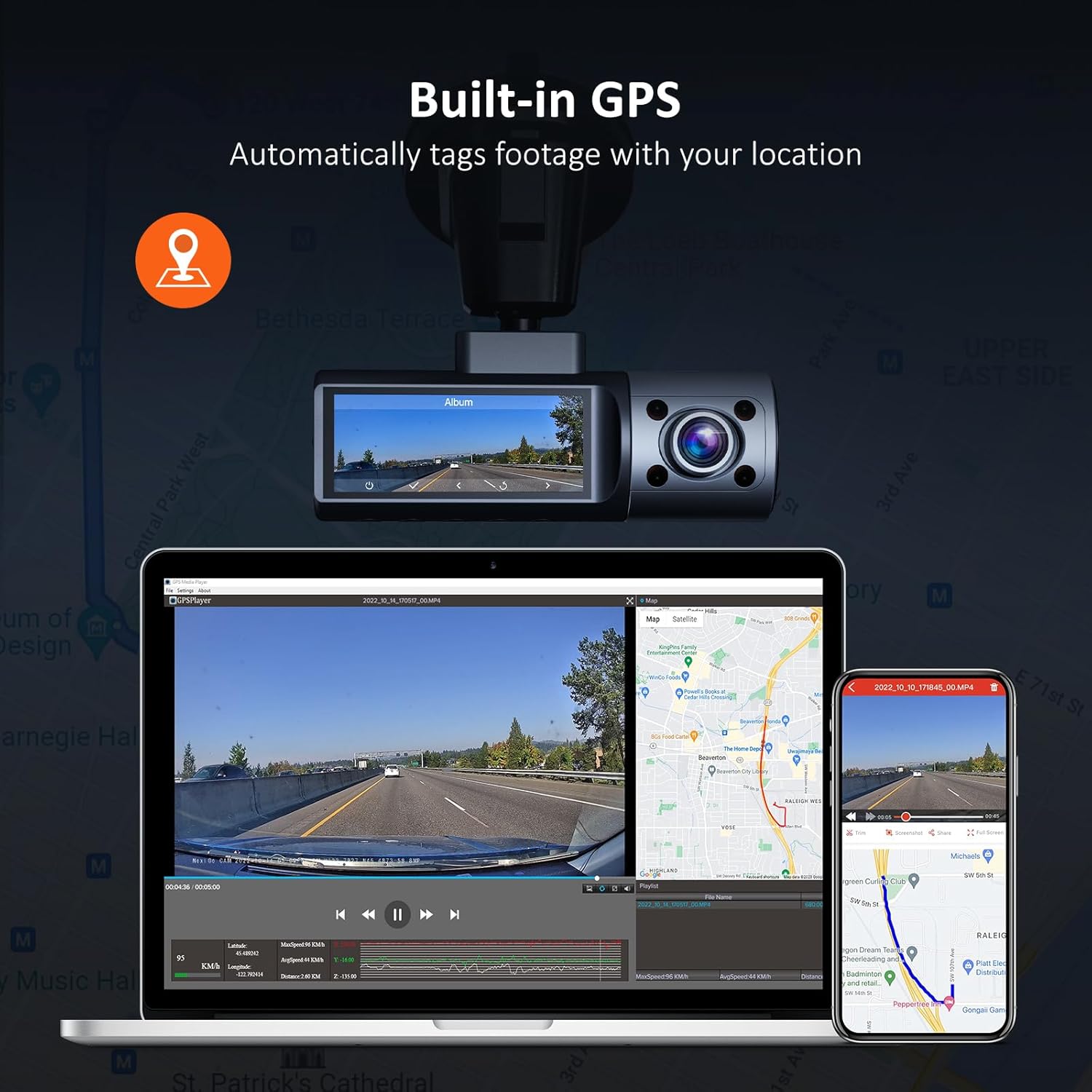
Image: Illustration of the NexiGo D621 Dash Cam's built-in GPS, showing how it tags footage with location data, viewable on a map via the app or desktop software.
9. ዝርዝሮች
| ሞዴል | ዲ621 |
| የቪዲዮ ጥራት | Front: 4K/2K (1440P), Interior: 1080P, Rear: 1080P |
| መስክ የ View (FOV) | Front: 88°, Interior: 132°, Rear: 132° |
| ዳሳሾች | Sony STARVIS IMX335 & IMX307 |
| ግንኙነት | Wi-Fi (2.4 GHz & 5.0 GHz), GPS |
| ማከማቻ | እስከ 256GB ማይክሮ ኤስዲ ካርድ ይደግፋል (128GB ተካትቷል) |
| የአሠራር ሙቀት | -4°F እስከ 158°F (-20°ሴ እስከ 70°ሴ) |
| የኃይል ምንጭ | ልዕለ Capacitor |
| መጠኖች | 5 x 4 x 2 ኢንች |
| ክብደት | 1.79 ፓውንድ |
10. ዋስትና እና ድጋፍ
NexiGo products come with a standard manufacturer's warranty. For specific warranty details, product registration, or technical support, please visit the official NexiGo webጣቢያ ወይም የደንበኛ አገልግሎታቸውን ያነጋግሩ።
- ኦፊሴላዊ Webጣቢያ፡ www.nexigo.com
- የድጋፍ ኢሜይል፡ የእርስዎን የምርት ማሸጊያ ወይም ኦፊሴላዊ ይመልከቱ webየእውቂያ መረጃ ለማግኘት ጣቢያ.
ለተጨማሪ ጥበቃ፣ ግዢውን ያስቡበትasing an extended protection plan. Options may include 2-Year or 3-Year Protection Plans, or a Complete Protect plan for broader coverage.
Ask a question about this manual
Ask about setup, troubleshooting, compatibility, parts, safety, or missing instructions. Manuals+ will review the question and use this page’s manual context to help answer it.