
DOOMAY 5293B
DOOMAY ዲጂታል የማንቂያ ሰዓት መመሪያ መመሪያ
ሞዴል፡ 5293ቢ
ብራንድ፡ ዱማይ
1. መግቢያ
Thank you for choosing the DOOMAY Digital Alarm Clock. This compact and modern alarm clock is designed for convenience and reliability, featuring an LCD display, adjustable volume, snooze function, weekend mode, and indoor temperature display. This manual provides detailed instructions to help you set up and operate your new alarm clock effectively.

ምስል 1: የፊት view of the DOOMAY Digital Alarm Clock.
2. የጥቅል ይዘቶች
- DOOMAY Digital Alarm Clock (1 unit)
- የኤኤኤ ባትሪዎች (2 አሃዶች)
- የትምህርት መመሪያ (ይህ ሰነድ)
3. ማዋቀር
3.1 የባትሪ ጭነት
The DOOMAY Digital Alarm Clock is powered by two AAA batteries. These batteries are included in the package.
- በማንቂያ ሰዓቱ ጀርባ ላይ የባትሪውን ክፍል ሽፋን ያግኙ።
- ክፍሉን ለመክፈት ሽፋኑን ወደ ታች ያንሸራትቱ.
- በክፍሉ ውስጥ እንደተመለከተው ትክክለኛውን ፖላሪቲ (+ እና -) በማረጋገጥ ሁለት የ AAA ባትሪዎችን ያስገቡ።
- ቦታው ላይ ጠቅ እስኪደረግ ድረስ የባትሪውን ክፍል ወደ ላይ በማንሸራተት ይቀይሩት.

ምስል 2፡ ተመለስ view with battery compartment and control buttons.
ማስታወሻ፡- When the display flashes '8888' and the clock beeps, it indicates that the batteries are low and need to be replaced.
4. የአሠራር መመሪያዎች
The DOOMAY Digital Alarm Clock offers various functions for timekeeping, alarming, and environmental monitoring. Refer to the buttons on the back of the clock for settings.
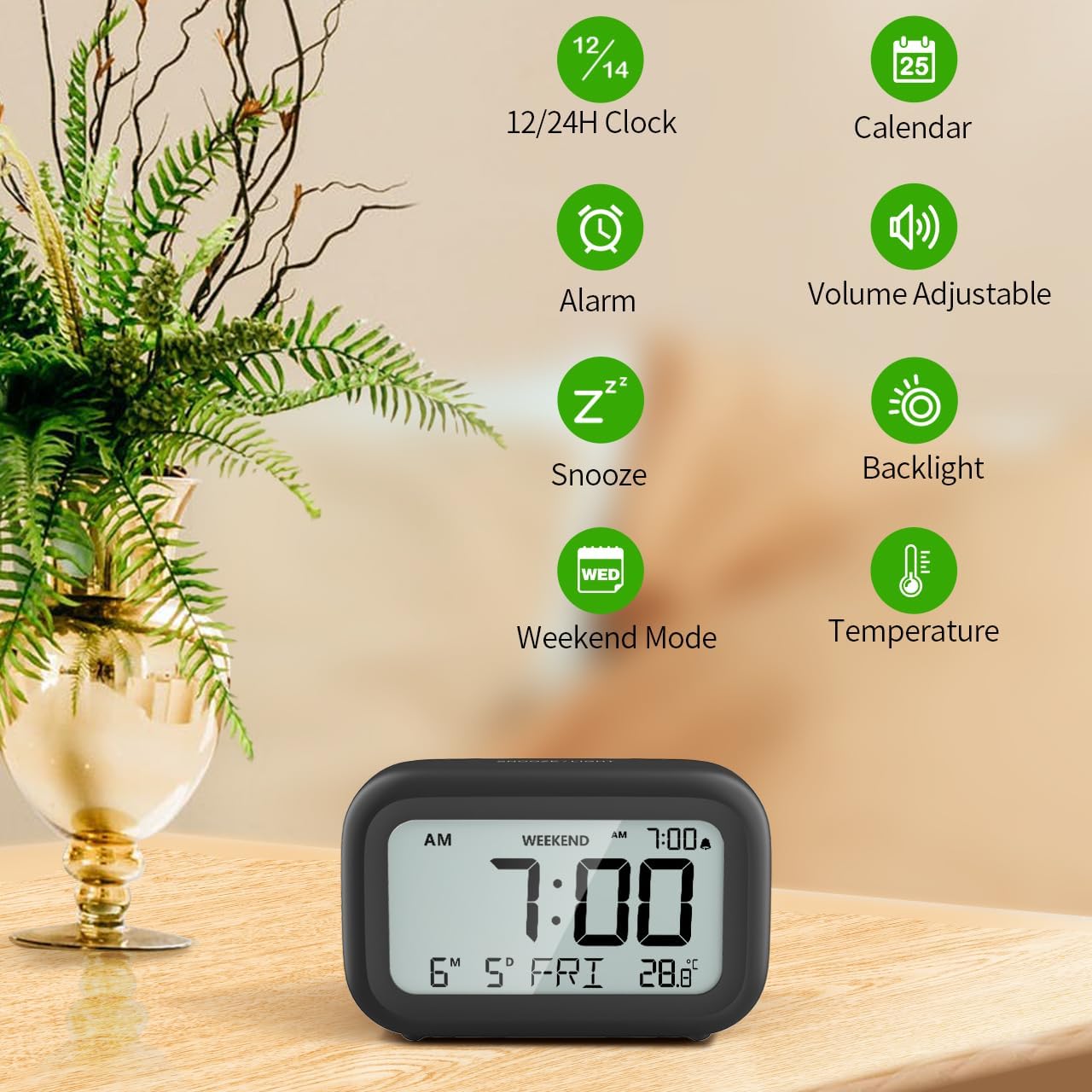
ምስል 3 - ተጠናቀቀview of clock features.
4.1 ሰዓት እና ቀን ማቀናበር
የአሁኑን ሰዓት እና ቀን ለማዘጋጀት፡
- ተጭነው ይያዙት። አዘጋጅ button (usually represented by a clock icon or '12/24H' button) on the back of the clock until the numbers on the display begin to flash.
- የሚለውን ተጠቀም + እና - buttons to adjust the flashing value (Year, Month, Day, Hour, Minute).
- የሚለውን ይጫኑ አዘጋጅ button again to confirm the setting and move to the next value.
- Once all values are set, the display will stop flashing. The day of the week will automatically update based on the date.
For a visual guide, refer to the video below, specifically from 0:18 for Date Setting እና 0:32 for Time Setting.
4.2 ማንቂያ ቅንብር
To set your alarm time:
- የሚለውን ይጫኑ ማንቂያ button (bell icon) on the back of the clock. The alarm time will appear and flash.
- የሚለውን ተጠቀም + እና - buttons to adjust the desired alarm hour and minute.
- የሚለውን ይጫኑ ማንቂያ button again to confirm the alarm setting.
- To turn the alarm ON or OFF, simply press the ማንቂያ አዝራር አንዴ. ማንቂያው በሚሠራበት ጊዜ የማንቂያ አዶ በማሳያው ላይ ይታያል።
For a visual guide, refer to the video below, specifically from 0:13 for turning alarm ON/OFF እና 0:37 for Alarm Setting.
4.3 የማሸለብ ተግባር
When the alarm sounds, gently touch the SNOOZE / LIGHT button located on the top of the clock. This will activate the snooze function, providing an additional 9 minutes of sleep before the alarm sounds again. You can repeat this process multiple times.

Figure 4: Activating the snooze function.
To turn off the alarm completely after it sounds, press any button on the back of the clock.
For a visual guide, refer to the video below, specifically from 0:46 for Snooze function.
4.4 Weekend Mode
The Weekend Mode allows you to set the alarm to only sound from Monday to Friday, preventing it from disturbing you on weekends.
- የሚለውን ይጫኑ የሳምንት መጨረሻ button (calendar icon) on the back of the clock to toggle Weekend Mode ON or OFF.
- When Weekend Mode is active, 'WEEKEND' will be displayed on the screen, and the alarm will be automatically disabled on Saturday and Sunday.

Figure 5: Weekend Mode and Alarm Volume Levels.
For a visual guide, refer to the video below, specifically from 0:50 for Weekend Mode ON/OFF.
4.5 የጀርባ ብርሃን ተግባር
The clock features a convenient 5-second on-demand backlight for viewበዝቅተኛ ብርሃን ሁኔታዎች ውስጥ ጊዜን ማሳለፍ።
- Simply touch the SNOOZE / LIGHT button on the top of the clock to activate the backlight.
- The backlight will illuminate for approximately 5 seconds and then automatically turn off to conserve battery life.

Figure 6: Backlight in use.
For a visual guide, refer to the video below, specifically from 0:54 for 5 Seconds Backlight.
4.6 የሙቀት ማሳያ
The clock displays the indoor temperature. You can switch between Celsius (°C) and Fahrenheit (°F) units.
- የሚለውን ይጫኑ ° ሴ / ° ፋ button on the back of the clock to toggle between Celsius and Fahrenheit.

Figure 7: Indoor Temperature Display.
4.7 12/24 Hour Time Format
You can switch the time display between 12-hour (with AM/PM indicator) and 24-hour formats.
- የሚለውን ይጫኑ 12/24H button on the back of the clock to switch between the two formats.
For a visual guide, refer to the video below, specifically from 0:58 for 12/24Hr Time Format Switchable.
4.8 የማንቂያ ድምጽ ማስተካከያ
The alarm clock offers two volume levels for the alarm sound: LOW (70dB) and HIGH (85dB).
- While setting the alarm, or when the alarm is sounding, you can cycle through the volume levels by pressing the appropriate button (often the + or - button, or a dedicated volume button if available). Refer to the icons on the back of your clock.
For a visual guide, refer to the video below, specifically from 0:42 for 2 Levels of Volume Adjustable.
Operating Instructions Video Guide
Video 1: Comprehensive guide on setting up and operating the DOOMAY Digital Alarm Clock. This video demonstrates battery installation, setting time and date, alarm functions, snooze, weekend mode, backlight, and volume adjustment.
5. ጥገና
- ማጽዳት፡ ሰዓቱን ለስላሳ እና ደረቅ ጨርቅ ይጥረጉ. ገላጭ ማጽጃዎችን ወይም ፈሳሾችን አይጠቀሙ.
- የባትሪ መተካት፡ Replace batteries when the low battery indicator appears (flashing '8888' and beeping). Always use new AAA batteries.
- ማከማቻ፡ ሰዓቱን ረዘም ላለ ጊዜ ካስቀመጠ, እንዳይፈስ ለመከላከል ባትሪዎቹን ያስወግዱ.
6. መላ መፈለግ
| ችግር | ሊሆን የሚችል ምክንያት | መፍትሄ |
|---|---|---|
| የሰዓት ማሳያ ባዶ ወይም ደብዛዛ ነው። | ባትሪዎች ሞተዋል ወይም በስህተት ተጭነዋል። | ባትሪዎችን በአዲስ የ AAA ባትሪዎች ይተኩ፣ ይህም ትክክለኛውን ፖሊነት ያረጋግጣል። |
| ማንቂያ አይሰማም። | Alarm is not activated or Weekend Mode is ON. | Press the ALARM button to activate. Check if Weekend Mode is active and disable if necessary. |
| ሰዓት/ቀን ትክክል አይደለም። | በትክክል አልተዘጋጀም ወይም ባትሪዎች ተወግደዋል። | Follow instructions in Section 4.1 to reset time and date. |
| Backlight does not stay on. | ይህ የተለመደ አሠራር ነው። | The backlight is designed to illuminate for 5 seconds to conserve battery life. It is not a continuous backlight. |
7. ዝርዝሮች
- ሞዴል፡ 5293 ቢ
- የማሳያ አይነት፡ ዲጂታል ኤል.ሲ.ዲ.
- የኃይል ምንጭ፡- 2 x AAA ባትሪዎች (ተጨምሯል)
- የምርት መጠኖች: 4.29"ወ x 2.72"ሰ (በግምት 10.9ሴሜ x 6.9ሴሜ)
- ቁሳቁስ፡ አሲሪሎኒትሪል ቡታዲየን ስቲሪን (ኤቢኤስ)
- ባህሪያት፡ Alarm, Snooze, Weekend Mode, Indoor Temperature (°C/°F), 12/24H Time Format, 5-second Backlight
- የማንቂያ ድምጽ: 2 levels (70dB, 85dB)
- የእቃው ክብደት፡ 4.48 አውንስ (127 ግ ገደማ)
8. ዋስትና እና ድጋፍ
DOOMAY products are manufactured with high-quality materials and craftsmanship. For any questions, concerns, or technical support regarding your DOOMAY Digital Alarm Clock, please contact the seller or refer to the product listing on the platform where it was purchased. Please retain your proof of purchase for warranty claims.
Ask a question about this manual
Ask about setup, troubleshooting, compatibility, parts, safety, or missing instructions. Manuals+ will review the question and use this page’s manual context to help answer it.