
Supermicro MBD-X10DRG-O+-CPU
Supermicro X10DRG-O+-CPU Motherboard User Manual
Model: MBD-X10DRG-O+-CPU
1. መግቢያ
This user manual provides comprehensive instructions for the installation, configuration, and maintenance of the Supermicro X10DRG-O+-CPU Motherboard. This motherboard is designed for high-performance computing environments, supporting dual Intel Xeon E5-2600 v3/v4 processors and extensive memory configurations.
Please read this manual thoroughly before beginning the installation process to ensure proper setup and operation.
2. የደህንነት መረጃ
ማዘርቦርድን እና ሌሎች የኮምፒውተር ክፍሎችን ሲይዙ የሚከተሉትን የደህንነት ጥንቃቄዎች ሁልጊዜ ይከተሉ፡
- ማንኛውንም ክፍል ከመጫንዎ ወይም ከማስወገድዎ በፊት የኃይል አቅርቦቱ ከግድግዳ ሶኬት ጋር መገናኘቱን ያረጋግጡ።
- የማይንቀሳቀስ ኤሌክትሪክን ለመልቀቅ ፀረ-ስታቲክ የእጅ አንጓ ማሰሪያ ይልበሱ ወይም በተደጋጋሚ መሬት ላይ ያለ የብረት ነገር ይንኩ።
- ስሱ ክፍሎችን ከመንካት ለመቆጠብ የእናትቦርዱን ጠርዝ በጠርዙ ይያዙት።
- ማዘርቦርዱን ከፈሳሽ እና ከከፍተኛ የሙቀት መጠን ያርቁ።
- Refer to the safety guidelines provided with other components (CPU, RAM, etc.) for additional precautions.
3. የጥቅል ይዘቶች
ሁሉም እቃዎች በጥቅሉ ውስጥ መኖራቸውን ያረጋግጡ. ማንኛውም ንጥል ከጠፋ ወይም ከተበላሸ ወዲያውኑ አቅራቢዎን ያነጋግሩ።
- Supermicro X10DRG-O+-CPU Motherboard
- I / O ሺልድ
- የSATA ኬብሎች (መጠኑ ሊለያይ ይችላል)
- ፈጣን የማጣቀሻ መመሪያ
- የሲዲ/ዲቪዲ አሽከርካሪ (ወይም ነጂዎችን ለማውረድ አገናኝ)
4. Motherboard አቀማመጥ
ከታች ያለቀ ነው።view of the Supermicro X10DRG-O+-CPU Motherboard, highlighting key components and connectors.
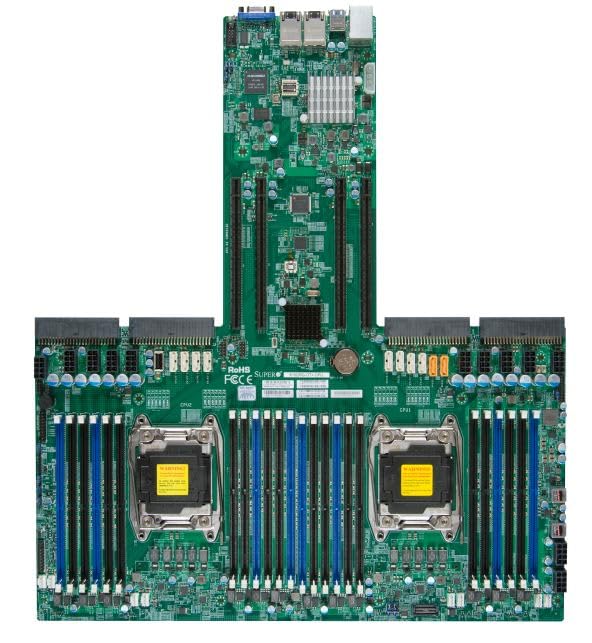
Figure 4.1: Supermicro X10DRG-O+-CPU Motherboard. This image displays the full motherboard, showing the dual CPU sockets, numerous DDR4 DIMM slots, PCIe expansion slots, and various I/O ports and connectors.
ቁልፍ አካላት፡-
- CPU Sockets (LGA 2011-3): Two sockets for Intel Xeon E5-2600 v3/v4 processors.
- DDR4 DIMM ማስገቢያዎች: Multiple slots supporting up to 3072 GB of ECC DDR4 memory.
- PCIe ማስፋፊያ ቦታዎች: Various PCIe 3.0 slots for graphics cards, network cards, and other expansion devices.
- SATA ወደቦች: Connectors for SATA 3.0 storage devices.
- የዩኤስቢ ወደቦች: USB 2.0 and USB 3.0 headers and rear panel ports.
- LAN ወደቦች: Ethernet ports for network connectivity.
- የኃይል ማገናኛዎች: ATX 24-pin, 8-pin EPS, and 4-pin power connectors.
5. ማዋቀር
Follow these steps for proper installation of the motherboard and its components.
5.1 ሲፒዩ መጫን
- Open the CPU socket retention levers.
- በሲፒዩ ላይ ያለው የሶስት ማዕዘን ምልክት በሶኬት ላይ ካለው ምልክት ጋር እንደሚመሳሰል በማረጋገጥ ሲፒዩን ከሶኬት ጋር በጥንቃቄ ያስተካክሉት።
- ሲፒዩውን ሳያስገድዱት በቀስታ ወደ ሶኬት ውስጥ ያስገቡት።
- Close the retention levers to secure the CPU.
- Apply thermal paste and install the CPU cooler according to the cooler manufacturer's instructions.
5.2 የማህደረ ትውስታ (ራም) ጭነት
- ክሊፖችን በሁለቱም የDIMM ማስገቢያ ጫፎች ላይ ይክፈቱ።
- በዲዲ4 ሜሞሪ ሞጁል ላይ ያለውን የዲኤምኤም ማስገቢያ ቁልፍ ካለው ቁልፍ ጋር አሰልፍ።
- ክሊፖቹ እስኪገቡ ድረስ ሞጁሉን በጥብቅ ወደ ማስገቢያው ውስጥ ያስገቡ።
- Repeat for all desired memory modules, following the motherboard's memory population guidelines for optimal performance.
5.3 የማከማቻ መሣሪያ ጭነት
- የSATA ዳታ ኬብሉን አንድ ጫፍ በማዘርቦርዱ ላይ ካለው የSATA ወደብ ጋር ያገናኙ።
- የ SATA ዳታ ገመድ ሌላኛውን ጫፍ ከእርስዎ SATA ሃርድ ድራይቭ ወይም ኤስኤስዲ ጋር ያገናኙ።
- የSATA የኃይል ገመድን ከኃይል አቅርቦትዎ ወደ ማከማቻ መሳሪያው ያገናኙ።
5.4 የማስፋፊያ ካርድ መጫኛ
- Select an appropriate PCIe slot for your expansion card (e.g., GPU, network card).
- ከፒሲዎ መያዣ ላይ ተገቢውን የስሎት ሽፋን ያስወግዱ።
- Align the expansion card with the slot and press down firmly until it is fully seated.
- Secure the card with a screw or retention clip to the PC case.
5.5 የኃይል ግንኙነቶች
- ባለ 24-ፒን ATX የኃይል ማገናኛን ከኃይል አቅርቦትዎ ወደ ማዘርቦርዱ ዋና የኃይል ራስጌ ያገናኙ።
- Connect the 8-pin EPS (CPU) power connector(s) to the corresponding headers near the CPU sockets.
- ሁሉም የኤሌክትሪክ ገመዶች ደህንነቱ በተጠበቀ ሁኔታ መገናኘታቸውን ያረጋግጡ.
5.6 የፊት ፓነል ግንኙነቶች
Connect the front panel cables (Power LED, HDD LED, Power Switch, Reset Switch, USB, Audio) from your PC case to the corresponding headers on the motherboard. Refer to the motherboard's silkscreen labels for correct pin assignments.
6. አሠራር
6.1 የባዮስ/UEFI ማዋቀር
Upon first boot, you may need to enter the BIOS/UEFI setup utility to configure system settings. Typically, you can access this by pressing ዲኤል or F2 during the POST (Power-On Self-Test) sequence. Common settings to configure include boot order, date/time, and enabling/disabling specific features.
6.2 የአሽከርካሪዎች መጫኛ
After installing your operating system, install the necessary drivers for the motherboard's chipsets, LAN, audio, and other integrated components. Drivers can be found on the included driver CD/DVD or downloaded from the Supermicro official webጣቢያ.
6.3 የስርዓተ ክወና ጭነት
Insert your operating system installation media (USB drive or DVD) and follow the on-screen prompts to install the OS. Ensure the boot order in BIOS/UEFI is set to prioritize your installation media.
7. ጥገና
7.1 ጽዳት
Regularly clean dust from the motherboard and components using compressed air. Ensure the system is powered off and unplugged before cleaning. Avoid using liquids or abrasive materials.
7.2 የጽኑ ዝማኔዎች
ሱፐርማይክሮን በየጊዜው ይፈትሹ website for updated BIOS/UEFI firmware. Firmware updates can improve stability, performance, and add support for new hardware. Follow the provided instructions carefully when performing a firmware update to avoid system damage.
8. መላ መፈለግ
ይህ ክፍል ሊያጋጥሙህ ለሚችሉ የተለመዱ ጉዳዮች መፍትሄዎችን ይሰጣል።
| ችግር | ሊሆን የሚችል ምክንያት | መፍትሄ |
|---|---|---|
| ስርዓቱ አይበራም። | የተበላሹ የኃይል ገመዶች፣ የተበላሹ የኃይል አቅርቦቶች፣ የተሳሳተ የፊት ፓነል ግንኙነቶች። | Check all power connections (24-pin, 8-pin EPS). Verify front panel power switch connection. Test power supply. |
| ምንም የማሳያ ውጤት የለም። | Incorrectly seated GPU, faulty monitor cable, no integrated graphics. | Reseat the graphics card. Check monitor cable connections. Ensure monitor is on correct input. |
| የስርዓት ድምጽ በተደጋጋሚ ይሰማል። | Memory (RAM) issue. | Reseat RAM modules. Try one module at a time. Refer to BIOS beep codes for specific diagnosis. |
| የስርዓተ ክወናው አልተገኘም። | Incorrect boot order, loose SATA cable, unformatted drive. | Check BIOS/UEFI boot order. Reseat SATA cables. Ensure drive is properly formatted and OS installed. |
9. ዝርዝሮች
Detailed technical specifications for the Supermicro X10DRG-O+-CPU Motherboard.
- የሞዴል ቁጥር: MBD-X10DRG-O+-CPU
- የምርት ስም: Supermicro
- የሲፒዩ ድጋፍ: Dual Intel Xeon E5-2600 v3/v4 Processors (LGA 2011-3)
- የራም ማህደረ ትውስታ ከፍተኛው መጠን: 3072 GB DDR4 ECC
- የስርዓት አውቶቡስ መደበኛ ድጋፍ: SATA 3
- S/PDIF Connector Type፡ ኦፕቲካል
- የጥቅል ልኬቶች: 25 x 25 x 4 ኢንች
- ዩፒሲ: 672042176427
- የመጀመሪያ ቀን ይገኛል።ሰኔ 21 ቀን 2023
10. ዋስትና እና ድጋፍ
For warranty information and technical support, please refer to the official Supermicro webየግዢ ቦታዎን ይጎብኙ ወይም ያነጋግሩ። የግዢ ማስረጃዎን ለዋስትና ጥያቄዎች ያስቀምጡ።
Supermicro Official Webጣቢያ: www.supermicro.com
Ask a question about this manual
Ask about setup, troubleshooting, compatibility, parts, safety, or missing instructions. Manuals+ will review the question and use this page’s manual context to help answer it.