
መግቢያ
This manual provides detailed instructions for the installation, operation, and maintenance of your EBTOOLS 4.3-inch 1080P Mirror Dash Cam. This device is designed to record video footage from both the front and rear of your vehicle, offering features such as parking monitoring and loop recording for enhanced driving safety and evidence collection. Please read this manual thoroughly before using the product to ensure proper functionality and to avoid any damage.
የምርት ባህሪያት
- ዘላቂ ግንባታ; Manufactured from high-quality ABS material for robustness and extended durability.
- ሰፊ-አንግል ሌንሶች፡ Equipped with wide-angle lenses to minimize blind spots and capture comprehensive road details.
- ሉፕ ቀረጻ፡ Ensures continuous recording by automatically overwriting the oldest video fileየማህደረ ትውስታ ካርዱ አቅሙ ላይ ሲደርስ።
- ሁለንተናዊ የአየር ሁኔታ አፈጻጸም፡ Capable of recording clear video footage even in adverse weather conditions such as rain or fog.
- ለተጠቃሚ ምቹ ንድፍ፡ Features a straightforward installation process and intuitive controls for ease of use.
የጥቅል ይዘቶች
እባካችሁ ሁሉም የሚከተሉት እቃዎች በጥቅልዎ ውስጥ መካተታቸውን ያረጋግጡ፡-
- EBTOOLS 4.3-inch Mirror Dash Cam Unit
- የኋላview ካሜራ
- የመኪና መሙያ
- የኋላ ካሜራ የግንኙነት ገመድ
- Mounting Straps/Adhesive
- የተጠቃሚ መመሪያ (ይህ ሰነድ)

ማዋቀር
1. ዳሽ ካሜራን መጫን
Secure the mirror dash cam over your vehicle's existing rearview mirror using the provided mounting straps. Ensure it is firmly attached and does not obstruct your view.
2. የኋላ ካሜራውን ማገናኘት
Route the rear camera cable from the dash cam to the desired mounting location at the rear of your vehicle. Connect the rear camera to the AV IN port on the main dash cam unit. For optimal performance, ensure the cable is neatly tucked away and secured.


3. የኃይል ግንኙነት
Connect the provided car charger to the dash cam's power input port and then plug the other end into your vehicle's 12V power outlet (cigarette lighter socket). The device will typically power on automatically with the vehicle's ignition.
4. የማህደረ ትውስታ ካርድ አስገባ
Insert a compatible Micro SD card (not included) into the TF CARD slot on the dash cam. Ensure the card is inserted correctly until it clicks into place. A high-speed Class 10 or higher card is recommended for reliable recording.

የአሠራር መመሪያዎች
ኃይል አብራ/ አጥፋ
- ራስ-ሰር The dash cam will power on and begin recording automatically when your vehicle's ignition is turned on.
- መመሪያ Press and hold the Power button (usually marked with a power symbol) to manually turn the device on or off.
ምናሌ አሰሳ
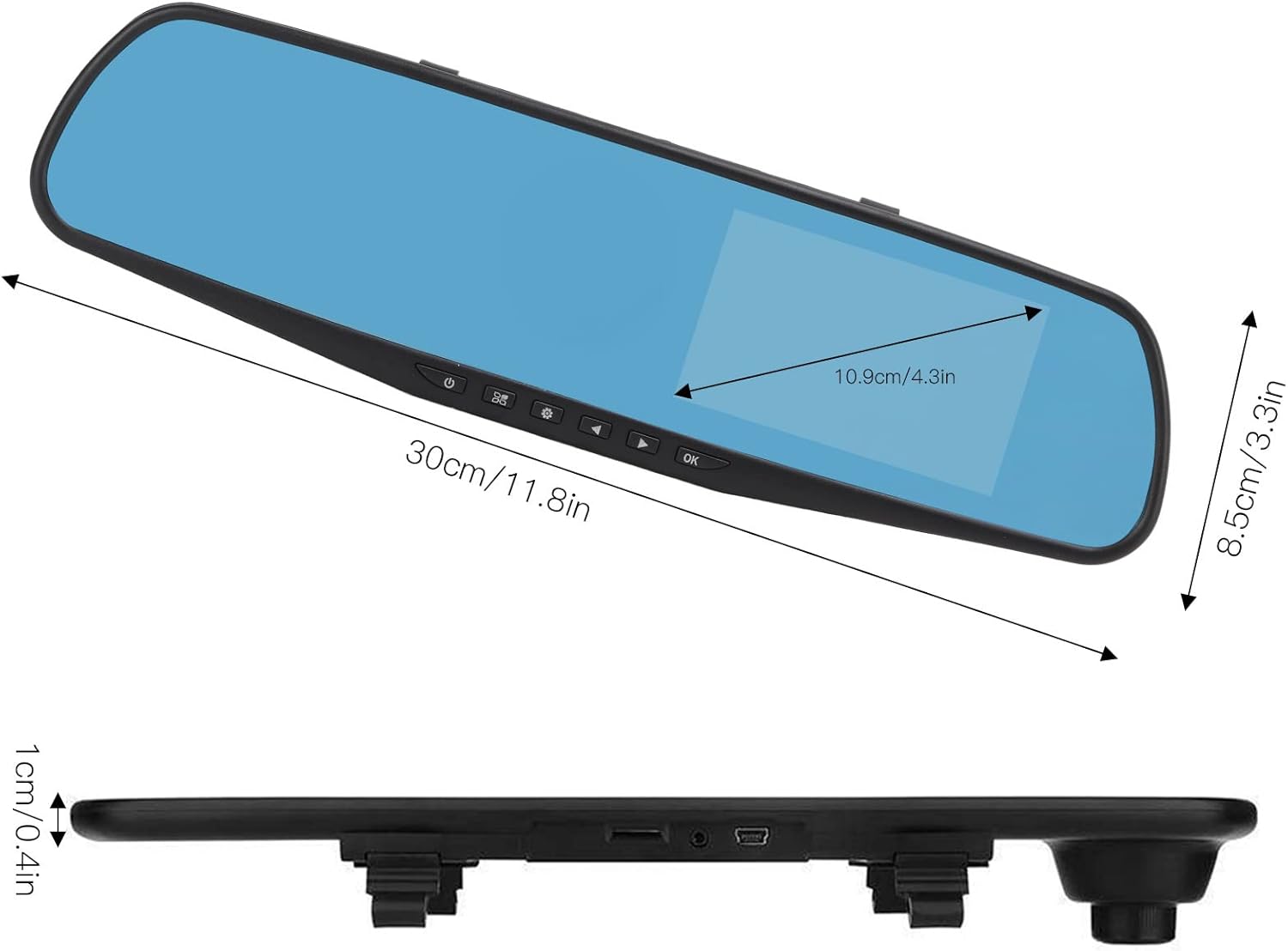
Use the physical buttons located on the bottom of the mirror unit to navigate through the menu options:
- የምናሌ አዝራር፡- የቅንብሮች ምናሌውን ለማስገባት ተጫን።
- የላይ/ታች አዝራሮች የምናሌ አማራጮችን ለማሸብለል ይጠቀሙ።
- እሺ አዝራር; Press to confirm a selection or setting.
የመቅዳት ሞዶች
- ሉፕ ቀረጻ፡ This feature records video in continuous segments (e.g., 1, 2, 3, or 5 minutes). When the memory card is full, the oldest fileዎች ለአዳዲስ ቅጂዎች ቦታ ለመፍጠር በራስ-ሰር ይተካሉ።
- እንቅስቃሴ ማወቂያ፡- When enabled, the dash cam will automatically start recording if it detects movement in front of the vehicle while parked. This feature is useful for parking surveillance.
የቪዲዮ ጥራት ቅንብሮች
You can adjust the video resolution for both front and rear cameras in the settings menu:
- የፊት ካሜራ፡ Select between 1080P (FHD 1400x1080) or 720P (HD 1280x720).
- የኋላ ካሜራ; Records at 720P resolution.
የቋንቋ ቅንብሮች
The device supports multiple languages. Navigate to the language settings in the menu to select your preferred language, including English, German, French, Italian, Japanese, Korean, and Simplified Chinese.

ጥገና
- ማጽዳት፡ Use a soft, dry cloth to clean the dash cam screen and lenses. Avoid using abrasive cleaners or solvents.
- ማህደረ ትውስታ ካርድ፡ ጥሩ አፈፃፀም ለማረጋገጥ እና የውሂብ ብልሽትን ለመከላከል የማይክሮ ኤስዲ ካርድዎን (ቢያንስ በወር አንድ ጊዜ) በመደበኛነት ቅርጸት ይስሩ። ማንኛውንም አስፈላጊ ነገር ምትኬ ያስቀምጡtagሠ ከመቅረጽ በፊት.
- የሙቀት መጠን፡ Avoid exposing the device to extreme temperatures, both hot and cold, as this can affect battery life and component integrity.
መላ መፈለግ
- መሣሪያው እየበራ አይደለም፡-
- Ensure the car charger is properly connected to both the dash cam and the vehicle's 12V power outlet. Check if the vehicle's ignition is on. Test the charger in another port or with another device if possible.
- Recording issues (e.g., stops recording, corrupted fileዎች):
- Verify that a compatible, high-speed Micro SD card (Class 10 or higher) is inserted correctly. Format the memory card through the dash cam's settings menu. If issues persist, try a different memory card.
- Screen display problems (e.g., black screen, distorted image):
- Check all cable connections, especially for the rear camera. Try resetting the device to factory settings via the menu. If the problem continues, contact customer support.
- የኋላ ካሜራ አይታይም;
- Ensure the rear camera cable is securely connected to both the rear camera and the AV IN port on the main unit. Check for any damage to the cable or connectors.
ዝርዝሮች
| የንጥል ዓይነት | 4.3-inch Mirror Dash Cam |
| ቁሳቁስ | ኤቢኤስ |
| የስክሪን መጠን | 4.3 ኢንች |
| የማሳያ ዓይነት | TFT LCD |
| የፊት ካሜራ አንግል | 110 ዲግሪ |
| የኋላ ካሜራ አንግል | 90-110 degrees (Adjustable) |
| የፊት ቪዲዮ ጥራት | 1080P (FHD 1400x1080), 720P (HD 1280x720) |
| የኋላ ቪዲዮ ጥራት | 720 ፒ |
| Loop Recording Intervals | 1 ደቂቃ 2 ደቂቃ 3 ደቂቃ 5 ደቂቃ |
| እንቅስቃሴ ማወቂያ | የሚደገፍ |
| የምስል ጥራት | 12MP ፣ 10MP ፣ 5MP ፣ 3MP ፣ 2MP ፣ 1.3MP |
| የቪዲዮ ቅርጸት | AVI |
| የምስል ቅርጸት | JPEG |
| የሌንስ አይነት | F2.78 glass resolution multi-layer filter wide-angle lens |
| የሚደገፉ ቋንቋዎች | English, German, French, Italian, Japanese, Korean, Simplified Chinese |
| የቪዲዮ ውፅዓት | የዩኤስቢ ካርድ አንባቢ |
| የመጫኛ ዘዴ | የማጣበቂያ ዓይነት |
| የምርት ልኬቶች | Approx. 30cm (11.8in) L x 8.5cm (3.3in) W x 1cm (0.4in) T |
| የጥቅል ልኬቶች | 34 x 12 x 6 ሴ.ሜ; 512 ግ |
ዋስትና እና ድጋፍ
For warranty information or technical assistance, please refer to the warranty card included with your product or contact EBTOOLS customer support through the retailer's platform where the product was purchased. Our support team is available to help with any questions or issues you may encounter.