
1. መግቢያ
This manual provides detailed instructions for the installation, operation, and maintenance of your Tiandy TC-C32QN 2MP Fixed IP Bullet Camera. Please read this manual thoroughly before using the product to ensure proper setup and functionality.
1.1 በሳጥኑ ውስጥ ያለው
- Tiandy TC-C32QN 2MP Fixed IP Bullet Camera
- የኃይል አስማሚ
2. የደህንነት መረጃ
በምርቱ ላይ ጉዳት እንዳይደርስ ወይም በራስዎ እና በሌሎች ላይ ጉዳት እንዳይደርስ ለመከላከል የሚከተሉትን የደህንነት ጥንቃቄዎች ያክብሩ።
- የኃይል አቅርቦት; Ensure the camera is connected to a stable Corded Electric power source using the provided adapter. The camera operates at 5 Watts.
- መጫን፡ Install the camera in a stable location, suitable for outdoor use. The mounting type is protruding.
- የአካባቢ ሁኔታዎች; Do not expose the camera to extreme temperatures, humidity, or corrosive environments. While rated IP65 for protection against dust and water jets, avoid submerging the camera in water.
- ማጽዳት፡ ከማጽዳትዎ በፊት ኃይልን ያላቅቁ. ለስላሳ እና ደረቅ ጨርቅ ይጠቀሙ. ፈሳሽ ወይም ኤሮሶል ማጽጃዎችን አይጠቀሙ.
- አገልግሎት መስጠት፡ ይህንን ምርት እራስዎ ለማቅረብ አይሞክሩ. ሁሉንም አገልግሎቶች ብቁ ለሆኑ ባለሙያዎች ያመልክቱ።
3. ምርት አብቅቷልview
The Tiandy TC-C32QN is a 2MP Fixed IP Bullet Camera designed for outdoor surveillance applications. It features a durable Metal+Plastic Housing and delivers high-resolution video capture for effective monitoring.
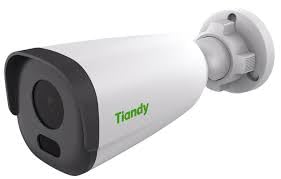
An image showing the Tiandy TC-C32QN 2MP Fixed IP Bullet Camera, typically a cylindrical camera with a mounting bracket.
3.1 ቁልፍ ባህሪያት
- 2MP Photo Sensor Resolution (Up to 1920x1080@25fps)
- S+265/H.265/H.264 Video Compression
- Smart IR Night Vision with 30m Range and Night Color capability
- Built-in Microphone for audio capture
- Designed for Outdoor Usage with IP65 Waterproof Rating
- Supports Wireless and Ethernet Connectivity
- 3x የጨረር ማጉላት
- Motion Only Alert Type
4. ማዋቀር
4.1 መጫን
The camera is designed for protruding mounting, suitable for secure installation on walls or ceilings. Ensure the mounting surface can support the camera's weight (500 Grams) and is free from vibrations. Use appropriate screws and anchors for installation.
4.2 የኃይል ግንኙነት
Connect the provided power adapter to the camera's power input port and then plug the adapter into a standard electrical outlet. Verify that the power indicator light on the camera (if present) illuminates, indicating power is supplied.
4.3 የአውታረ መረብ ግንኙነት
The camera supports both wired (Ethernet) and wireless network connections.
- የኤተርኔት ግንኙነት፡- Connect an Ethernet cable from the camera's network port to your network router or NVR.
- የገመድ አልባ ግንኙነት; For wireless setup, refer to the specific instructions provided with your NVR or the camera's dedicated Android controller application for pairing and network configuration.
5. የአሠራር መመሪያዎች
5.1 የመጀመሪያ ውቅር
After physical installation and power connection, use an Android device as the controller to access and configure the camera. Follow the instructions provided with your Network Video Recorder (NVR) or the camera's dedicated mobile application for initial network setup, device pairing, and password creation.
5.2 የምሽት ራዕይ
The camera is equipped with Smart IR Night Vision, providing clear surveillance up to 30 meters in low-light conditions. It also supports Night Color technology for enhanced visibility. Night vision mode typically activates automatically in dim lighting, but settings can be adjusted via the camera's interface.
5.3 የእንቅስቃሴ ማወቂያ
The camera features a motion-only alert type. To utilize this feature, configure motion detection zones and sensitivity settings through the camera's web interface or the connected NVR/application. This allows the camera to trigger alerts or recordings only when movement is detected within specified areas.
5.4 የቪዲዮ ቀረጻ
The camera captures video at 25 frames per second with a maximum resolution of 1920x1080. It utilizes S+265/H.265/H.264 video compression for efficient storage and supports MP4 video capture format. Recording settings, including continuous recording, scheduled recording, or event-triggered recording, can be configured via your NVR or management software.
6. ጥገና
6.1 ጽዳት
To maintain optimal image quality, regularly clean the camera lens and housing. Gently wipe surfaces with a soft, dry, lint-free cloth. Do not use harsh chemicals, abrasive cleaners, or solvents, as these can damage the camera's finish or lens coating. Ensure the camera is powered off before cleaning.
6.2 የአካባቢ ግምት
The Tiandy TC-C32QN camera is designed for outdoor use with an IP65 waterproof rating, providing protection against dust ingress and low-pressure water jets. While robust, avoid exposing the camera to extreme weather conditions beyond its operating specifications. Ensure proper ventilation if installed in an enclosed space to prevent overheating.
7. መላ መፈለግ
- ኃይል የለም፡ Check all power connections. Ensure the power adapter is securely plugged into both the camera and a working electrical outlet. Verify the outlet is supplying power.
- የቪዲዮ ምግብ የለም፡ Confirm that the camera is properly connected to the network (Ethernet or Wireless). Check your NVR or mobile application for correct camera registration and status. Ensure network cables are not damaged.
- ደካማ የምስል ጥራት፡ Clean the camera lens to remove any dust or smudges. Adjust the camera's position to avoid direct glare or strong backlighting. If using wireless, check Wi-Fi signal strength.
- የምሽት እይታ ጉዳዮች፡- Ensure there are no obstructions blocking the camera's infrared (IR) illuminators. Verify night vision settings in the camera's configuration interface.
- የእንቅስቃሴ ማወቂያ አይሰራም፡ Review the motion detection zone settings and sensitivity levels in the camera's software. Ensure the feature is enabled and configured correctly.
- Cannot Connect to App/NVR: Verify network settings on both the camera and the controlling device. Ensure the camera's firmware is up to date. Consult your NVR or app manual for specific connection procedures.
8. ዝርዝሮች
| ባህሪ | ዝርዝር መግለጫ |
|---|---|
| የምርት ስም | ቲያንዲ |
| የሞዴል ቁጥር | TC-C32QN |
| የፎቶ ዳሳሽ ጥራት | 2 ሜፒ |
| የቪዲዮ ቀረጻ ጥራት | Up to 1920x1080@25fps |
| የቪዲዮ መጭመቂያ | ኤስ + 265 / ኤች.265 / ኤች.264 |
| የግንኙነት ቴክኖሎጂ | ገመድ አልባ፣ ኤተርኔት |
| የኃይል ምንጭ | ባለገመድ ኤሌክትሪክ |
| ዋትtage | 5 ዋት |
| የቤት ውስጥ / የውጭ አጠቃቀም | ከቤት ውጭ |
| የውሃ መከላከያ ደረጃ | IP65 |
| የምሽት ራዕይ ክልል | 30 ሜትር |
| የምሽት ራዕይ ዓይነት | Smart IR, Night Color |
| አብሮ የተሰራ ሚዲያ | አስማሚ |
| አብሮገነብ ባህሪዎች | ማይክሮፎን |
| የጨረር ማጉላት | 3 x |
| የመቆጣጠሪያ አይነት | አንድሮይድ |
| የመጫኛ አይነት | ማባረር |
| የማቀፊያ ቁሳቁስ | Metal+Plastic Housing |
| የንጥል መጠኖች | 12 x 10 x 5 ሴንቲሜትር |
| የእቃው ክብደት | 500 ግራም |
| የማንቂያ ዓይነት | እንቅስቃሴ ብቻ |
9. ዋስትና እና ድጋፍ
9.1 የዋስትና መረጃ
This product may be eligible for a 1 Year Extended Warranty by Onsitego. Please refer to your purchase documentation or contact your retailer for specific warranty terms, conditions, and registration procedures.
9.2 የእውቂያ መረጃ
ለቴክኒካዊ ድጋፍ ወይም ጥያቄዎች እባክዎን ያነጋግሩ፡-
- አምራች፡ TIANDY, TIANDY TECHNOLOGIES CO LTD
- አስመጪ፡ HOTSPOT ELECTRONICS