
1. መግቢያ
This manual provides detailed instructions for the installation, setup, operation, and maintenance of your EUERTE Smart Fingerprint Door Knob, model S08T. Please read this manual thoroughly before installation and use to ensure proper functionality and safety.
2. ምርት አብቅቷልview
2.1 ቁልፍ ባህሪያት
- 3-in-1 Unlocking Methods: Fingerprint, App Control, and Physical Keys.
- Fast Biometric Access: Advanced 360° fingerprint sensor for 0.15s recognition with low false rejection rate.
- Smart App Control (TT Lock APP): የጣት አሻራዎችን ማስተዳደር፣ view unlock records, check battery status, set auto-lock, passage mode, and privacy mode.
- ቀላል መጫኛ; Designed for quick installation, typically under 15 minutes with a screwdriver.
- ዘላቂ ንድፍ; Premium metallic finish and sturdy Zinc Alloy construction, sweat & weatherproof (IP54 rated).
- የተሻሻለ ደህንነት; Stores up to 100 fingerprints locally, 5s auto-locking feature, and privacy mode.
2.2 የጥቅል ይዘቶች
ጥቅሉ የሚከተሉትን ክፍሎች ያካትታል:
- የፊት እጀታ
- የኋላ እጀታ
- ነጠላ መቀርቀሪያ
- የጭረት ሰሌዳ
- 2 ቁልፎች
- ካሬ ኮተር
- 1 Spiral tube
- ብሎኖች
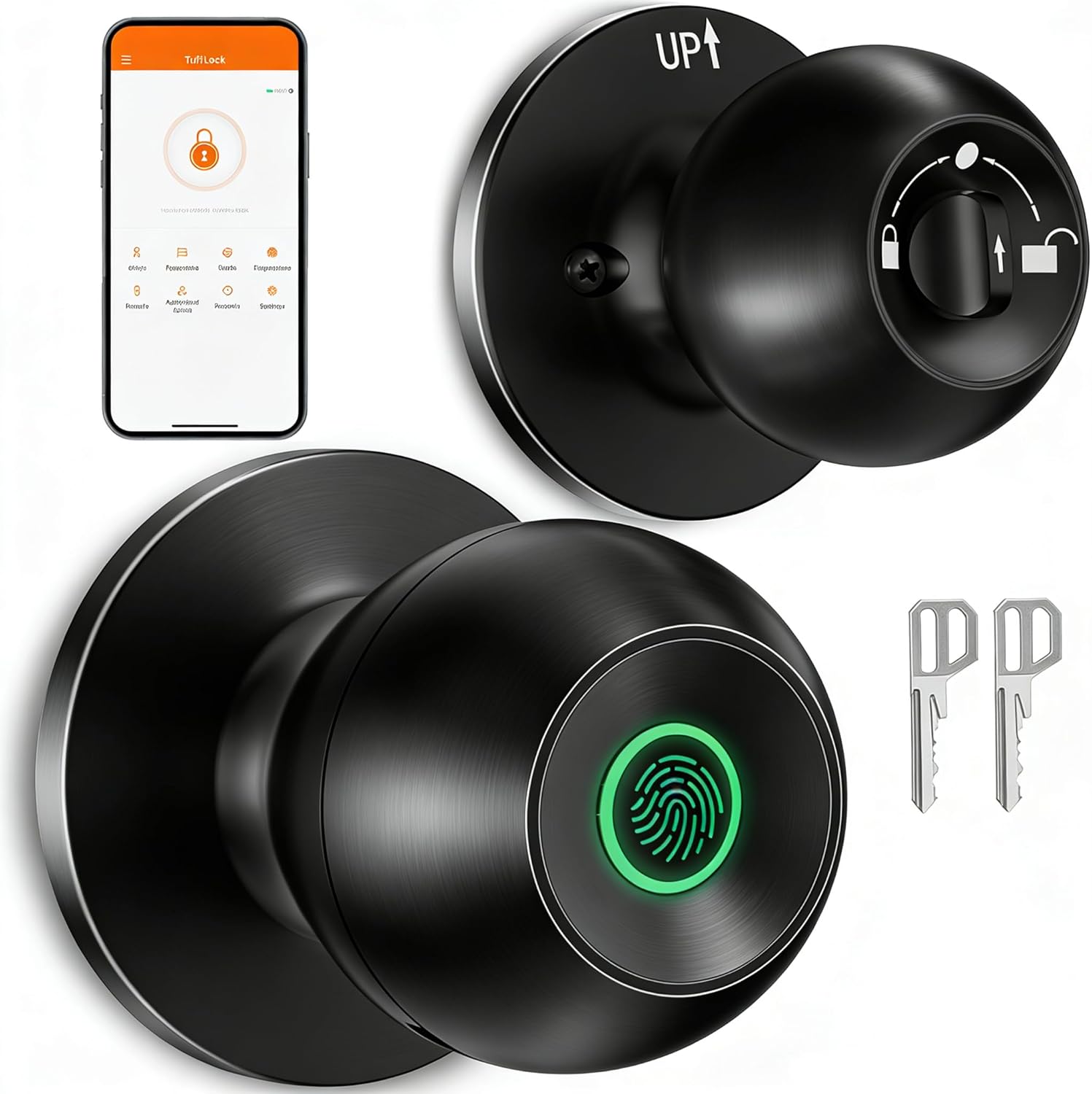
Image: EUERTE Smart Fingerprint Door Knob S08T with physical keys and a smartphone displaying the control app.

Image: Visual representation of the three unlocking methods: fingerprint, app, and traditional key.
3. ማዋቀር
3.1 መጫን
The EUERTE Smart Fingerprint Door Knob is designed for easy installation on standard doors. It fits door thicknesses between 1-3/8" to 2-1/8" (35mm-55mm) and requires a door hole diameter of 2-1/8" (55mm). The latch length is adjustable between 2-3/8" (60mm) or 2-3/4" (70mm).
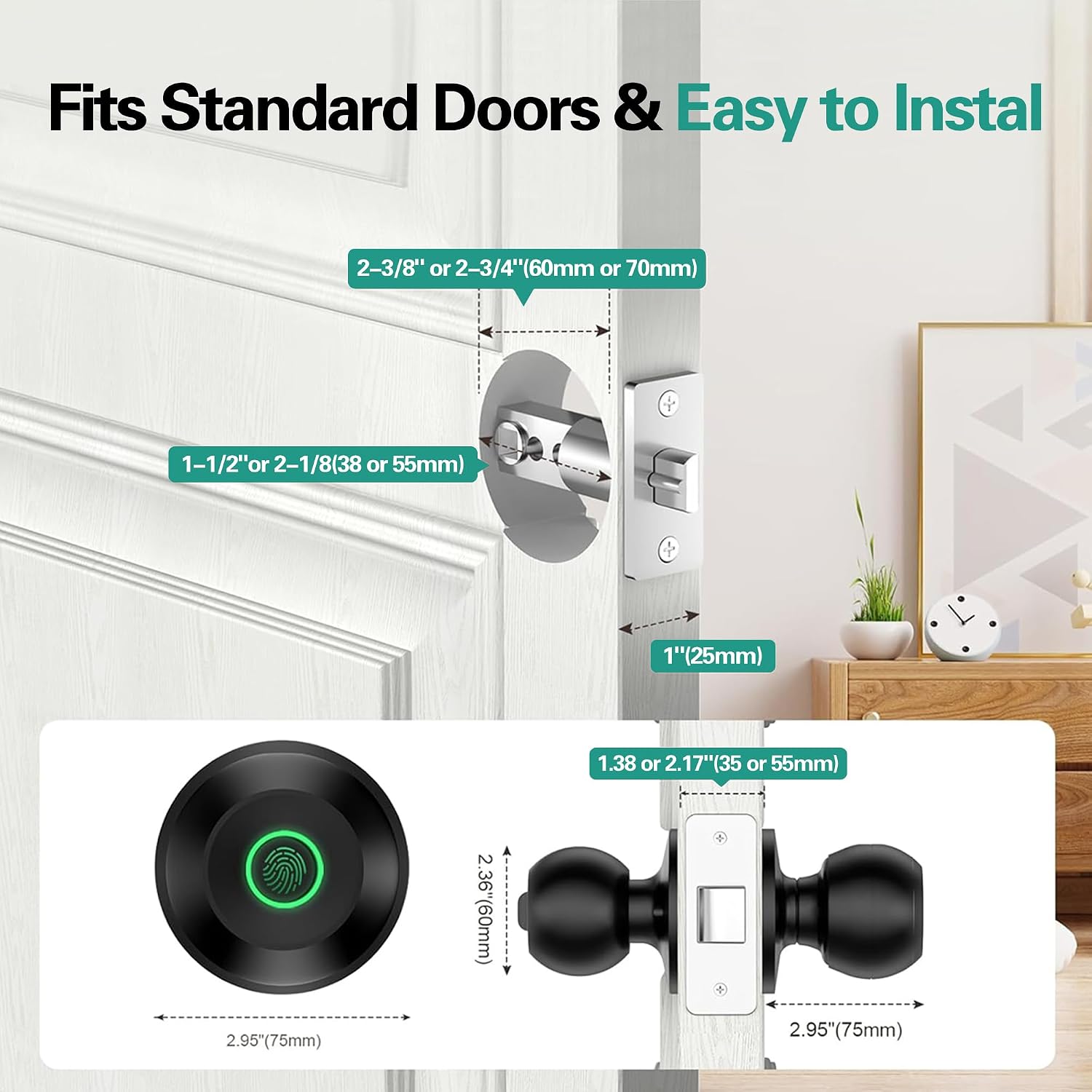
Image: Diagram illustrating standard door dimensions and lock components for installation.
ለእይታ መመሪያ፣ እባክዎን ኦፊሴላዊውን የመጫኛ ቪዲዮ ይመልከቱ፡
Video: Official installation guide for the S08Y Smart Door Knob, demonstrating step-by-step physical installation.
3.2 መተግበሪያ ማዋቀር
To utilize the smart features, download the TT Lock App from your device's app store. Follow the in-app instructions to register an account and add your S08T door knob as a device. Ensure Bluetooth is enabled on your smartphone during the pairing process.

Image: Illustration of Bluetooth app connection for controlling the smart door knob within 15 meters.
For a visual guide on app setup, please refer to the official setup video:
Video: Official setup guide for the S08Y Smart Door Knob, detailing app installation and initial device pairing.
3.3 የጣት አሻራ ምዝገባ
After pairing the device with the app, you can enroll administrator and family member fingerprints. The lock can store up to 100 unique fingerprints. Follow the in-app prompts to place and remove your finger on the sensor multiple times until enrollment is complete.

Image: Depiction of the fast fingerprint unlock feature, highlighting 0.1s identification and 100 local data storage.

Image: Illustrates how to grant access to various individuals like family, friends, roommates, housekeepers, and pet sitters.
4. የአሠራር መመሪያዎች
4.1 የመክፈቻ ዘዴዎች
- የጣት አሻራ መክፈቻ Place a registered finger on the sensor for instant access.
- የመተግበሪያ መክፈቻ፡- Use the TT Lock App on your smartphone to unlock the door remotely (within Bluetooth range or via Wi-Fi gateway, sold separately).
- አካላዊ ቁልፍ መክፈቻ፦ In case of battery depletion or emergency, use the provided physical keys.
4.2 የአሠራር ሁነታዎች
The door knob supports various modes to suit your needs:
- መደበኛ ሁነታ፡ All registered fingerprint users can access the space at any time.
- የማለፊያ ሁነታ፡ The lock remains unlocked for instant access, useful for high-traffic periods.
- የግል ሁነታ፡ Only the administrator can access, ensuring privacy.

Image: Visual explanation of Standard, Passage, and Private modes for the smart door knob.
4.3 App Features Overview
The TT Lock App provides comprehensive control and monitoring capabilities:
- የተጠቃሚ አስተዳደር፡- Add or remove users and their fingerprints.
- መዝገቦችን ክፈት፡ View a history log of all unlock events.
- Auto-Lock Setting: Configure the door to automatically lock after a set period (e.g., 5 seconds).
- አትረብሽ ሁነታ፡- Mute alerts and prevent unauthorized access during specific times.
- Door Lock Alarm: Receive notifications for incorrect fingerprint attempts or forced entry.
- Family Go Home: Set up smart scenes for family members' arrival.
Explore these features in detail with the official features video:
Video: Official video showcasing new features of the S08Y Smart Door Knob, including app functionalities like visitor logs, automatic locking, and alarm settings.
5. ጥገና
5.1 የባትሪ አስተዳደር
The door knob requires batteries for operation (not included). It features a low battery alarm to notify you when replacement is needed. In case of complete battery depletion, an external battery can be connected via the emergency port, or the physical keys can be used for access.

Image: Information on battery working time, low battery alarm, and emergency USB-C power input.
5.2 ጽዳት እና እንክብካቤ
The door knob has a sweat & weatherproof design (IP54 rated). To maintain optimal performance, regularly wipe the fingerprint sensor and the knob's surface with a soft, dry cloth. Avoid using abrasive cleaners or solvents that could damage the finish or electronic components.
6. መላ መፈለግ
- የጣት አሻራ አልታወቀም፡- Ensure your finger is clean and dry. Try re-enrolling your fingerprint if the issue persists. The sensor may be less effective with wet or wrinkled fingers.
- ምላሽ የማይሰጥ ቁልፍ፡ Check battery levels. If batteries are low or depleted, replace them or use the emergency power port.
- የመተግበሪያ ግንኙነት ችግሮች፡- Ensure Bluetooth is enabled on your phone and you are within range. If using a Wi-Fi gateway, verify its connection.
- Fingerprint data loss: Some users have reported that fingerprint recognition can become unreliable when battery levels drop below 80%. If this occurs, re-enroll your fingerprints after charging or replacing batteries.
- በሩ በራስ-ሰር አይቆለፍም; Verify that the auto-lock feature is enabled and configured correctly in the TT Lock App.
7. ዝርዝሮች
| ባህሪ | ዝርዝር |
|---|---|
| የሞዴል ቁጥር | S08T |
| ቁሳቁስ | አሉሚኒየም፣ ዚንክ አሎይ |
| ቀለም | ጥቁር |
| የምርት ልኬቶች | 9.29"ኤል x 3.3" ዋ |
| የመቆለፊያ ዓይነት | ባዮሜትሪክ |
| ልዩ ባህሪያት | Fingerprint, App, Keys Unlock, Auto Lock, Privacy/Normal/Passage Mode, Share/Add Members, View History Logs |
| የኃይል ምንጭ | Batteries Required (No Batteries Included) |
| የእጅ አቀማመጥ | ሁለንተናዊ |
| የቤት ውስጥ / የውጭ አጠቃቀም | የቤት ውስጥ |
| የእቃው ክብደት | 1.72 ፓውንድ £ |
8. ዋስትና እና ድጋፍ
8.1 የዋስትና መረጃ
The EUERTE Smart Fingerprint Door Knob S08T comes with a manufacturer warranty for 1 year from the date of purchase. Please retain your proof of purchase for warranty claims.
8.2 የደንበኛ ድጋፍ
If you have any questions or require assistance, please feel free to contact us:
- ኢሜይል፡- support@euerte.com
- የቴክኒክ ቡድን Webጣቢያ፡ www.euerte.com

Image: QR code for quick access to EUERTE support resources.