
1. መግቢያ
This instruction manual provides comprehensive guidance for the safe and proper installation, operation, and maintenance of your Neomounts AFP-875BL Floor Plate. This floor plate is designed to provide a stable base for compatible Neomounts display stands, specifically models FL55-875BL1 and WL55-875BL1. Please read this manual thoroughly before beginning installation and retain it for future reference.
2. የደህንነት መረጃ
Adherence to the following safety guidelines is crucial for preventing injury and damage to the product or property.
- ከመጫንዎ በፊት ሁሉም ክፍሎች መኖራቸውን እና ምንም ጉዳት እንዳልደረሰባቸው ያረጋግጡ። የጎደሉ ወይም ጉድለት ያለባቸው ክፍሎች ካሉ አይጠቀሙ።
- Installation should be performed by at least two people due to the weight and size of the components.
- Verify that the floor surface is level and capable of supporting the combined weight of the floor plate, display stand, and display.
- Use only the hardware supplied by Neomounts or specified in this manual.
- Do not exceed the maximum weight capacity of the compatible display stand.
- ልጆችን እና የቤት እንስሳትን ከመጫኛ ቦታ ያርቁ።
3. የጥቅል ይዘቶች
ሳጥኑን በጥንቃቄ ይክፈቱ እና ከዚህ በታች የተዘረዘሩት ሁሉም እቃዎች መኖራቸውን እና በጥሩ ሁኔታ ላይ መሆናቸውን ያረጋግጡ።
- Neomounts AFP-875BL Floor Plate (1x)
- Mounting Hardware Kit (e.g., screws, washers, nuts for attaching the stand) (1x) - Specific contents may vary; refer to the diagram in your stand's manual.
4. ማዋቀር እና መጫን
This section details the steps required to properly install the AFP-875BL Floor Plate with your compatible Neomounts display stand (FL55-875BL1 or WL55-875BL1).
4.1. ዝግጅት
- Identify the desired location for the display stand. Ensure it is a stable, level surface.
- Unpack all components of the floor plate and the display stand.
- Gather necessary tools (e.g., wrenches, screwdrivers) as specified in your display stand's manual.
4.2. የመሰብሰቢያ ደረጃዎች
- Position the Floor Plate: Carefully place the AFP-875BL floor plate on the chosen floor location. Ensure the orientation is correct for your display stand.
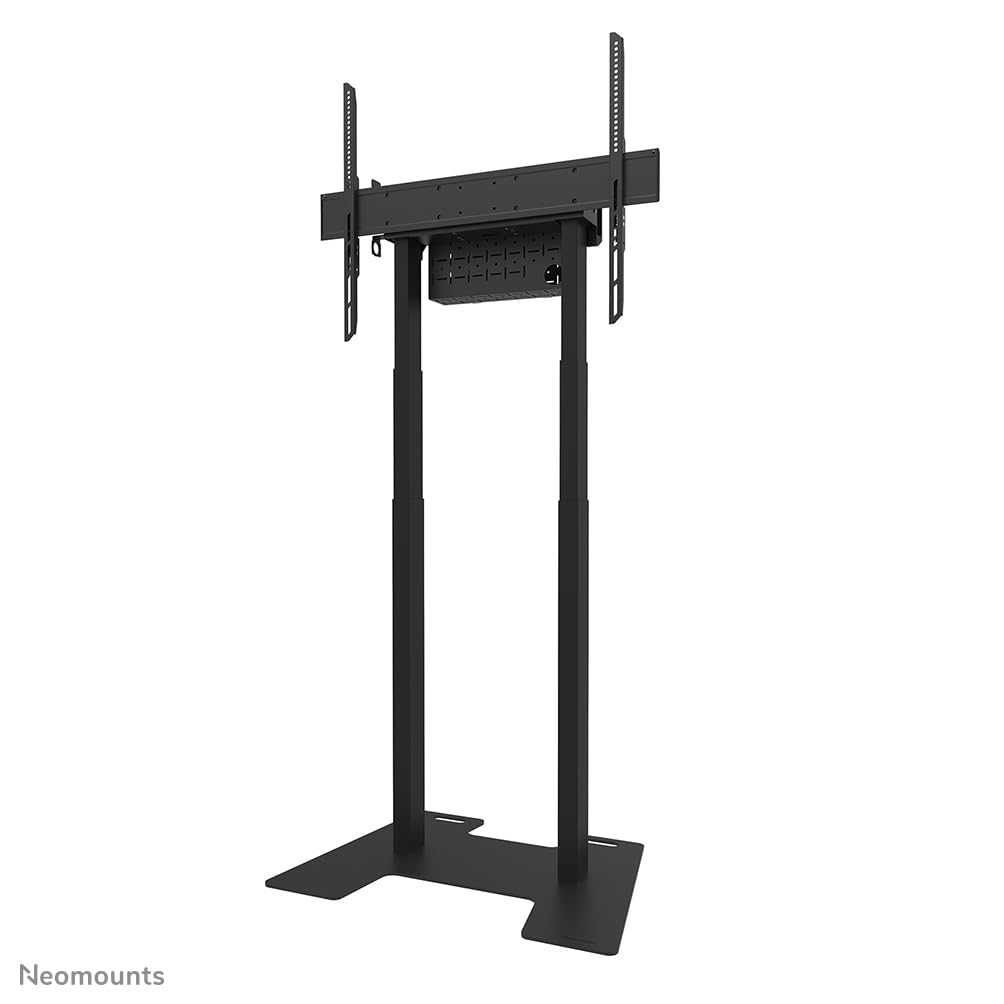
Image 1: The Neomounts AFP-875BL floor plate shown with a compatible display stand. This image illustrates the overall assembly.
- Attach the Display Stand Columns: Align the base columns of your FL55-875BL1 or WL55-875BL1 display stand with the designated mounting holes on the AFP-875BL floor plate.

ምስል 2፡ መቀራረብ view of the floor plate's base, showing the cutouts and mounting points for the display stand columns.
- Secure the Columns: Using the provided mounting hardware (screws, washers, nuts), securely fasten the display stand columns to the floor plate. Ensure all connections are tight to prevent wobbling. Refer to your display stand's manual for specific torque requirements.

Image 3: Another perspective of the floor plate base, highlighting the robust design and attachment points.
- የመጨረሻ ፍተሻ፡- After assembly, gently test the stability of the entire unit. Ensure there is no excessive movement or looseness.
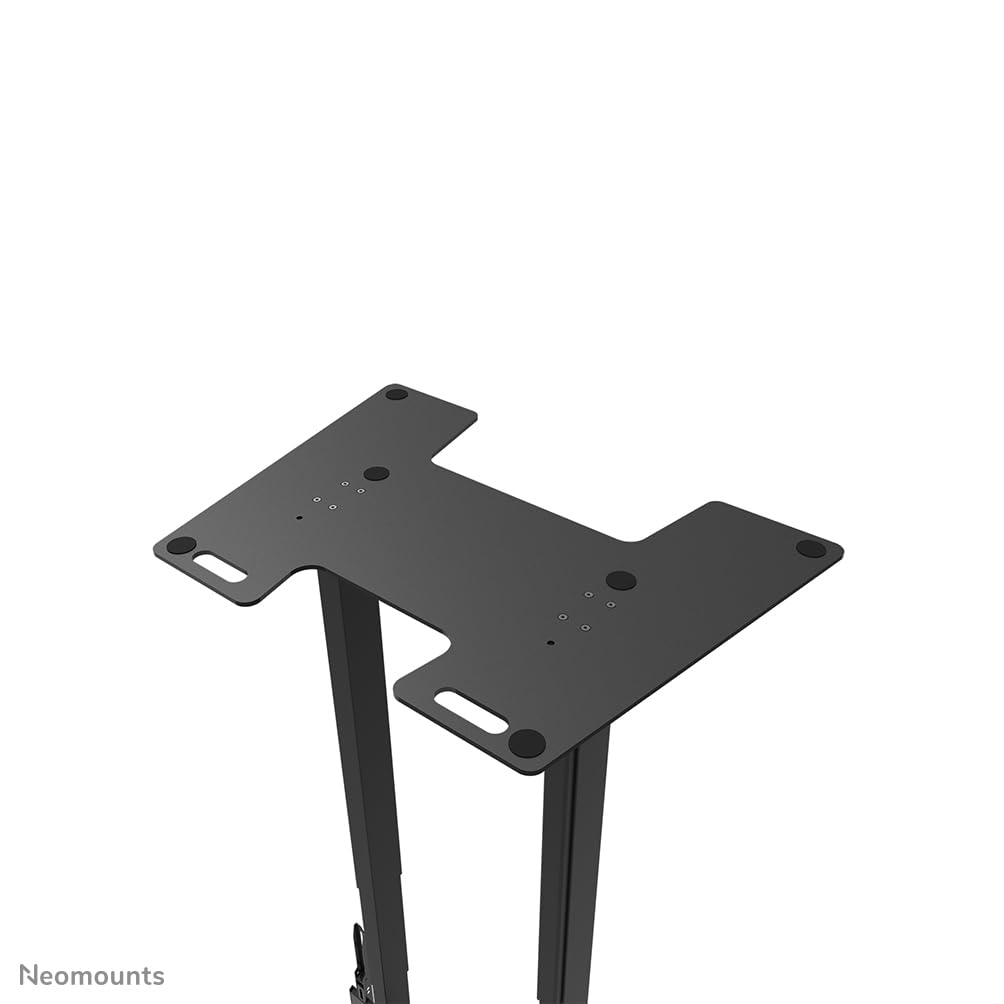
ምስል 4፡ ከላይ ወደ ታች view of the floor plate base, useful for verifying proper alignment and secure connections.
5. የአሠራር መመሪያዎች
The Neomounts AFP-875BL Floor Plate serves as a static base for your display stand. Once installed, its primary function is to provide stability. No active "operation" is required from the floor plate itself.
- የመረጋጋት ፍተሻ፡- Periodically check the stability of the entire display stand assembly. Ensure all connections between the floor plate and the stand columns remain tight.
- ማዛወር፡ If relocating the display stand, always lift the entire unit carefully. Avoid dragging the unit, as this can damage the floor plate, the floor, or compromise the integrity of the assembly.
6. ጥገና
Regular maintenance ensures the longevity and continued safe use of your floor plate.
- ማጽዳት፡ Clean the floor plate with a soft, damp ጨርቅ. ማጠናቀቂያውን ሊጎዱ የሚችሉ ማጽጃዎችን ወይም ፈሳሾችን ያስወግዱ።
- ምርመራ፡- Annually, or more frequently in high-traffic areas, inspect all mounting hardware for tightness. Retighten any loose screws or bolts. Check for any signs of wear, corrosion, or damage to the floor plate.
- ጉዳት፡ If the floor plate shows signs of significant damage or deformation, discontinue use immediately and contact Neomounts support.
7. መላ መፈለግ
ይህ ክፍል ሊያጋጥሙዎት የሚችሉ የተለመዱ ጉዳዮችን ይመለከታል።
- ጉዳይ፡- The display stand feels unstable or wobbly after installation.
መፍትሄ፡- Recheck all mounting hardware connecting the stand columns to the floor plate. Ensure they are fully tightened. Verify that the floor surface is level. - ጉዳይ፡- Difficulty aligning the stand columns with the floor plate.
መፍትሄ፡- Ensure the floor plate is correctly oriented. If necessary, temporarily loosen the stand column connections to allow for minor adjustments, then retighten. - ጉዳይ፡- ወለሉ ላይ ጭረቶች.
መፍትሄ፡- Ensure the floor plate is not dragged across the floor. If the floor plate has protective feet, ensure they are intact. Consider placing a protective mat under the floor plate.
8. ዝርዝሮች
Detailed technical specifications for the Neomounts AFP-875BL Floor Plate.
| ባህሪ | ዝርዝር መግለጫ |
|---|---|
| የሞዴል ቁጥር | AFP-875BL |
| የምርት ስም | Neomounts |
| የምርት ልኬቶች (W x D x H) | 864 ሚሜ x 600 ሚሜ x 9.5 ሚሜ (34.02 x 23.62 x 0.37 ኢንች) |
| የእቃው ክብደት | 24 ኪግ (52.9 ፓውንድ) |
| ተኳሃኝ ተራራዎች | FL55-875BL1, WL55-875BL1 |
| ቁሳቁስ | Steel (inferred from product type and weight) |
| ቀለም | Black (inferred from product title) |

Image 5: Technical drawing illustrating the dimensions of the AFP-875BL floor plate in millimeters.
9. ዋስትና እና ድጋፍ
Neomounts products are designed for durability and reliability.
- ዋስትና፡- This product is covered by a 2-year warranty against defects in materials and workmanship. Please retain your proof of purchase for warranty claims.
- የደንበኛ ድጋፍ፡ For technical assistance, missing parts, or warranty inquiries, please contact your local Neomounts dealer or visit the official Neomounts webየድጋፍ አድራሻ መረጃ ለማግኘት ጣቢያ.