
1. ምርት አብቅቷልview
The EBTOOLS 4-Inch SPI TFT LCD Display Module is a compact and versatile display solution featuring a 480x320 HD resolution. It is driven by the ILI9488 controller and utilizes a 14-pin Serial Peripheral Interface (SPI) for efficient communication. Designed for various DIY projects and embedded systems, this module includes a memory card slot for expanded functionality and operates with low energy consumption.

ምስል 1: የፊት view of the EBTOOLS 4-Inch SPI TFT LCD Display Module.
2. ቁልፍ ባህሪያት
- ከፍተኛ ጥራት ማሳያ; Features a 480x320 HD resolution with an ILI9488 driver for clear visuals.
- Efficient SPI Interface: Utilizes a Serial Peripheral Interface (SPI) bus, requiring minimal I/O pins for operation.
- Integrated Memory Card Slot: Equipped with a memory card slot for easy expansion of experiments and data storage.
- ሁለገብ መተግበሪያ፡ Suitable for various display functions in DIY projects and embedded applications.
- ኃይል ቆጣቢ፡ Compatible with 3.3V to 5V working voltage, ensuring low energy consumption.
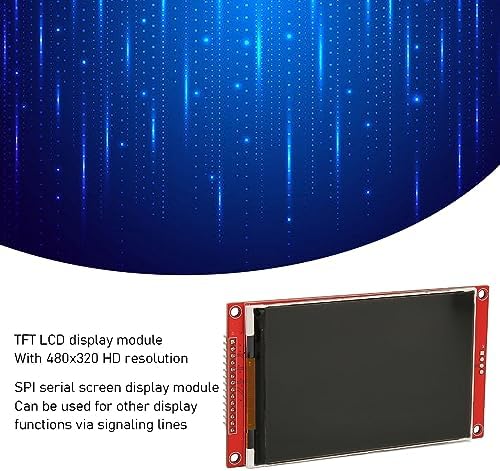
Figure 2: Display module illustrating its 480x320 HD resolution and SPI serial screen functionality.
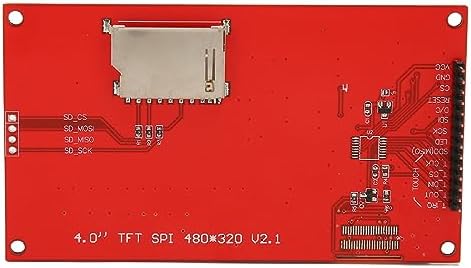
ምስል 3: የኋላ view of the display module, showing the integrated SD card slot and connection points.
3. ማዋቀር እና ግንኙነቶች
This section details the pin definitions and recommended connections for integrating the EBTOOLS 4-Inch SPI TFT LCD Display Module into your project. Ensure proper voltage and signal connections to prevent damage.
3.1 ፒን ፍቺዎች
The module features a 14-pin interface. Refer to the table below for a detailed description of each pin:
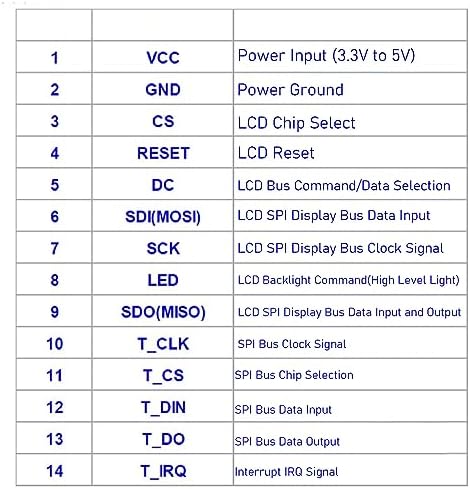
Figure 4: Pinout diagram and definitions for the display module.
| ፒን ቁጥር | ምልክት ማድረጊያ | መግለጫ |
|---|---|---|
| 1 | ቪሲሲ | Power Input (3.3V to 5V) |
| 2 | ጂኤንዲ | የኃይል መሬት |
| 3 | CS | LCD Chip Select |
| 4 | ዳግም አስጀምር | LCD Reset |
| 5 | DC | LCD Bus Command/Data Selection |
| 6 | SDI (MOSI) | LCD SPI Display Bus Data Input |
| 7 | ኤስ.ኤ.ኬ. | LCD SPI Display Bus Clock |
| 8 | LED | LCD Backlight Command (HighLight) |
| 9 | SDO (MISO) | LCD SPI Display Bus Data Input and Output |
| 10 | ቲ_CLK | TSPI Bus Clock |
| 11 | ቲ_ሲኤስ | SPI Bus Chip Selection |
| 12 | ቲ_ዲን | SPI Bus Data Input |
| 13 | ቲ_ዶ | SPI Bus Data Output |
| 14 | ቲ_IRQ | Interrupt IRQ Signal |
3.2 የግንኙነት መመሪያዎች
To connect the display module to your microcontroller or development board, follow these general guidelines:
- የኃይል አቅርቦት; Connect VCC to a 3.3V or 5V power source and GND to the ground of your system.
- SPI Bus: Connect SDI (MOSI), SCK, CS, and DC pins to the corresponding SPI pins on your microcontroller.
- Reset Pin: Connect the RESET pin to a digital I/O pin on your microcontroller, or to a reset circuit.
- የጀርባ ብርሃን መቆጣጠሪያ; The LED pin controls the backlight. Connect it to a digital I/O pin for software control, or directly to VCC for constant illumination.
- የኤስዲ ካርድ በይነገጽ፡ If using the memory card slot, connect the T_CLK, T_CS, T_DIN, T_DO, and T_IRQ pins to a separate SPI interface or dedicated I/O pins on your microcontroller.
Always consult your microcontroller's documentation for specific SPI pin assignments and voltagሠ ተኳሃኝነት።
4. የአሠራር መመሪያዎች
Operating the EBTOOLS 4-Inch SPI TFT LCD Display Module primarily involves programming your microcontroller to send display commands and data via the SPI interface. This module is designed for integration into custom electronic projects.
4.1 Initialization Sequence
Before displaying any content, the ILI9488 driver needs to be initialized. This typically involves a sequence of commands sent over the SPI bus, including:
- Software reset command.
- Power control settings.
- Display orientation and pixel format settings.
- Gamma curve settings.
- Display ON command.
Refer to the ILI9488 datasheet or available open-source libraries (e.g., Adafruit GFX library, TFT_eSPI library) for specific initialization routines compatible with your development environment (e.g., Arduino, Raspberry Pi).
4.2 ግራፊክስ እና ጽሑፍ ማሳየት
Once initialized, you can send commands to draw pixels, lines, shapes, and text. The SPI interface allows for high-speed data transfer to update the display efficiently. Libraries often provide functions for:
- Setting individual pixel colors.
- Drawing lines, rectangles, and circles.
- Displaying characters and strings using various fonts.
- Loading images from the integrated memory card (if utilized).
Ensure your code correctly manages the DC (Command/Data) pin to differentiate between commands and display data sent over the SPI bus.
5. ዝርዝሮች
- የማሳያ መጠን፡ 4.0 ኢንች
- ጥራት፡ 480x320 ፒክሰሎች
- ሹፌር አይሲ፡ ILI9488 እ.ኤ.አ.
- በይነገጽ፡ 14-pin SPI (Serial Peripheral Interface)
- የሥራ ጥራዝtage: ከ 3.3 ቪ እስከ 5 ቪ
- ማህደረ ትውስታ፡ Integrated memory card slot (for external storage)
- መጠኖች፡- በግምት 5.51 x 3.54 x 1.18 ኢንች (የጥቅል መጠኖች)
- ክብደት፡ በግምት 2.47 አውንስ (የእቃ ክብደት)
6. መላ መፈለግ
If you encounter issues with your EBTOOLS 4-Inch SPI TFT LCD Display Module, consider the following troubleshooting steps:
- ማሳያ/ባዶ ስክሪን የለም፡
- Verify power connections (VCC and GND) are correct and within the 3.3V-5V range.
- Check all SPI connections (SDI, SCK, CS, DC) for proper wiring and continuity.
- Ensure the backlight (LED pin) is correctly powered or controlled.
- Confirm the initialization sequence in your code matches the ILI9488 driver requirements.
- Check if the RESET pin is correctly toggled or held high after power-up.
- Garbled or Incorrect Display:
- Double-check your SPI communication protocol, including clock polarity and phase.
- Ensure the correct display orientation and pixel format are set in the initialization code.
- Verify that data is being sent to the correct memory addresses on the display controller.
- ኤስዲ ካርድ አልተገኘም፡-
- Ensure the SD card is properly inserted into the slot.
- Check the connections for the SD card SPI interface (T_CLK, T_CS, T_DIN, T_DO, T_IRQ).
- Verify your code includes the necessary libraries and initialization for SD card communication.
If problems persist, consult online forums, community resources, or the manufacturer's support channels for further assistance.
7. ዋስትና እና ድጋፍ
For warranty information and technical support regarding your EBTOOLS 4-Inch SPI TFT LCD Display Module, please refer to the documentation provided at the point of purchase or visit the official EBTOOLS website. Support resources may include FAQs, driver downloads, and contact information for customer service.