
EBTOOLS EBTOOLSpxvk7fmb38
EBTOOLS LGA 1155 Motherboard User Manual
Model: EBTOOLSpxvk7fmb38
ምርት አልቋልview
The EBTOOLS LGA 1155 Motherboard is designed for desktop PC systems, offering robust performance and extensive connectivity. It features a multiphase power chipset for stable CPU performance and supports 2nd/3rd generation LGA1155 Pin Series Processors. This Mini ITX motherboard provides a high-definition visual experience through its VGA and HD Multimedia Interface outputs.
ቁልፍ ባህሪያት የሚከተሉትን ያካትታሉ:
- LGA 1155 CPU Slot: Designed for stable performance with compatible processors.
- Multiphase Power: Ensures stable and accurate power delivery to the CPU.
- HD Interfaces: Equipped with VGA and HD Multimedia Interface for digital HD video output.
- Channel DDR3: Features a DDR3 memory slot to enhance motherboard performance.
- ሰፊ ግንኙነት; Includes 6 USB2.0 interfaces and 4 SATA2.0 interfaces for various peripherals and storage devices.
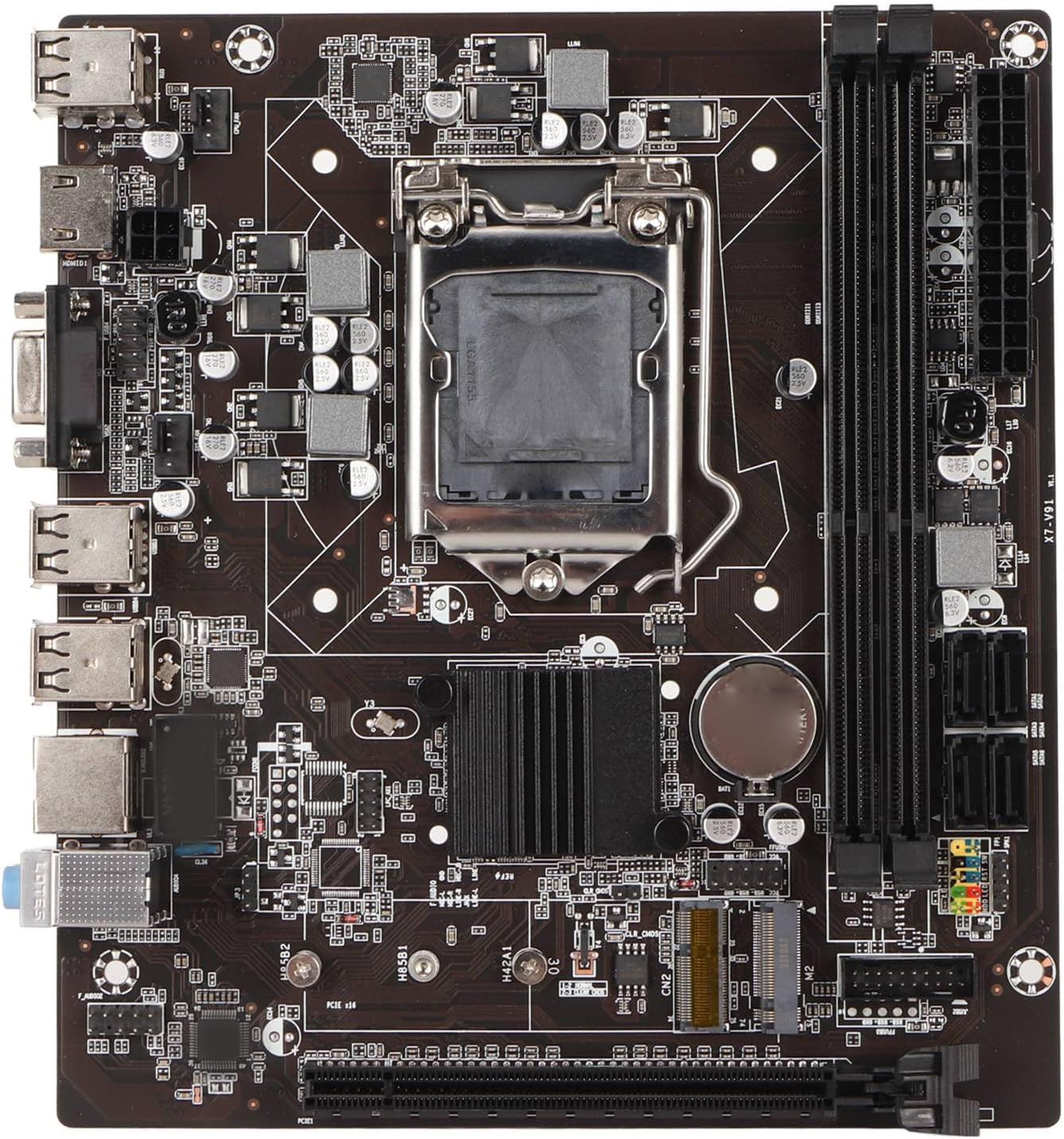
ምስል 1፡ ከላይ ወደ ታች view of the EBTOOLS LGA 1155 Motherboard, showing the CPU socket, RAM slots, and various ports.
ማዋቀር እና መጫን
This section provides instructions for installing your EBTOOLS LGA 1155 Motherboard into a compatible PC case and connecting essential components.
የጥቅል ይዘቶች
መጫኑን ከመጀመርዎ በፊት፣ ከዚህ በታች የተዘረዘሩት ሁሉም ክፍሎች በጥቅልዎ ውስጥ መኖራቸውን ያረጋግጡ፡
- 1 x LGA 1155 Motherboard
- 1 x Metal I/O Plate
- 1 x Connecting Wire (likely SATA data cable)

Figure 2: The motherboard alongside its included metal I/O plate and a connecting wire, typically a SATA data cable.
የመጫኛ ደረጃዎች
- ጉዳዩን ያዘጋጁ: Ensure your PC case is compatible with Mini ITX motherboards. Install the metal I/O plate into the designated slot at the rear of the case.
- ሲፒዩ ጫን፡- Carefully open the CPU socket retention arm. Align the triangular marker on your LGA 1155 processor with the corresponding marker on the motherboard's socket. Gently place the CPU into the socket, ensuring it sits flush. Close the retention arm to secure the CPU.
- የሲፒዩ ማቀዝቀዣውን ይጫኑ፡- Apply thermal paste to the CPU (if not pre-applied on the cooler). Mount your compatible LGA 1155 CPU cooler according to its manufacturer's instructions.
- RAM ጫን Open the clips on the DDR3 memory slots. Align the notch on your DDR3 RAM module with the key in the slot. Press firmly on both ends of the RAM module until the clips snap into place. This motherboard supports 2 x DDR3 slots.
- ማዘርቦርዱን ይጫኑ፡ Carefully place the motherboard into the PC case, aligning the screw holes on the motherboard with the standoffs in the case. Secure the motherboard with screws.
- የግንኙነት ኃይል; Connect the 24-pin ATX power connector from your power supply to the motherboard. Connect the 4-pin or 8-pin CPU power connector (if applicable) to the motherboard.
- የማጠራቀሚያ መሳሪያዎችን ያገናኙ; Use the provided connecting wire (SATA cable) to connect your SATA storage devices (HDD/SSD) to the SATA2.0 ports on the motherboard. This motherboard has 4 SATA2.0 interfaces.
- የፊት ፓነል ገመዶችን ያገናኙ; Connect the power button, reset button, USB ports, and audio jacks from your PC case's front panel to the corresponding headers on the motherboard. Refer to your case manual for specific pin layouts.
- የማስፋፊያ ካርዶችን ይጫኑ፡- If using a dedicated graphics card or other expansion cards, insert them into the PCIE X16 slot or other extended interfaces (1 x , 1 x M.2) as needed.
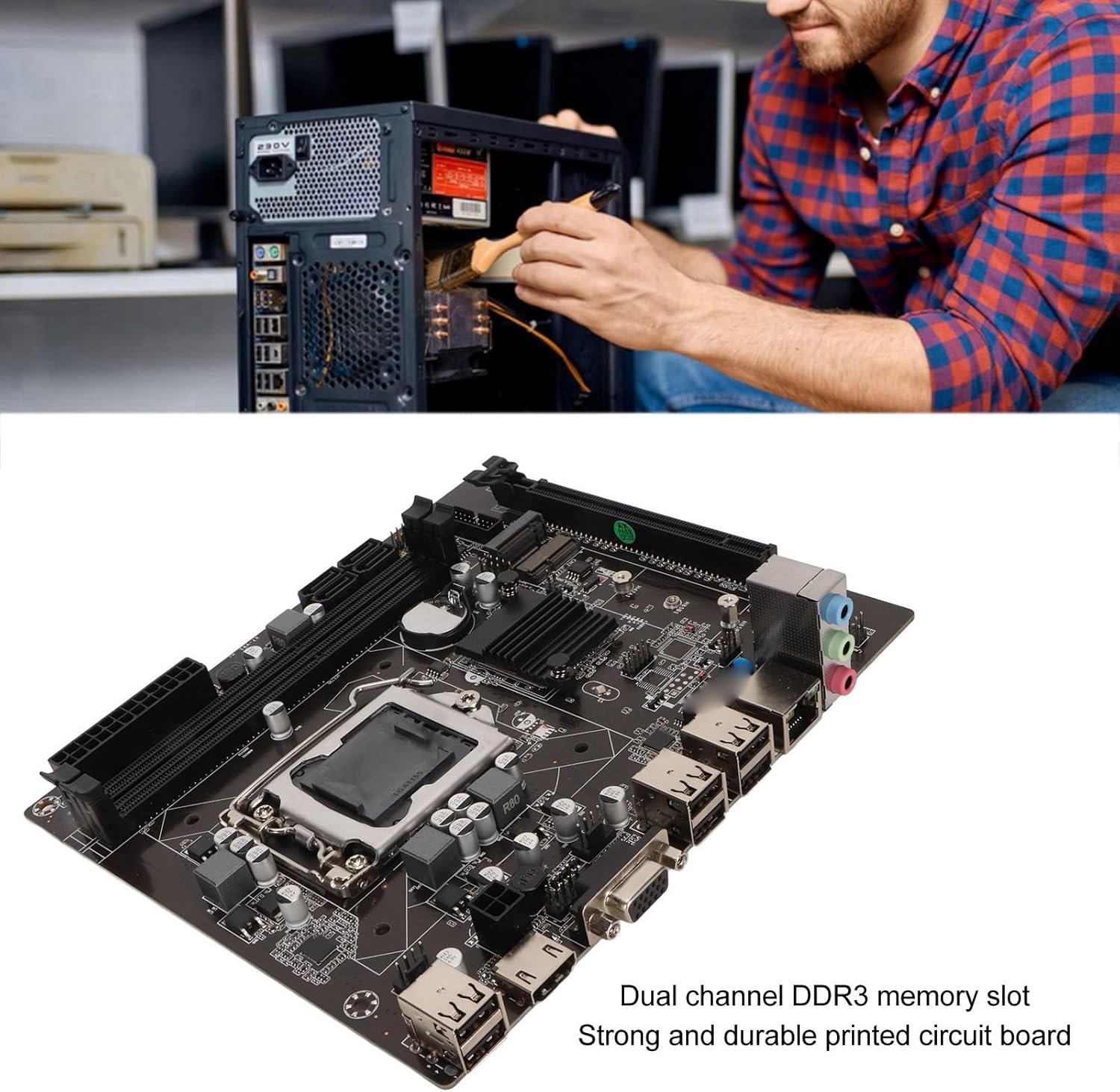
Figure 3: A user performing an installation within a PC case, demonstrating the typical environment for motherboard setup.

ምስል 4: ዝርዝር view of the LGA 1155 CPU socket and adjacent DDR3 memory slots, crucial areas for component installation.
የአሠራር መመሪያዎች
Once the motherboard and other components are installed, the system is ready for operation. This motherboard supports various operating systems compatible with 2nd/3rd Gen LGA1155 processors.
የባዮስ/UEFI ውቅር
Upon first boot, you may need to enter the BIOS/UEFI setup to configure boot order, system time, and other settings. Typically, you can access the BIOS by pressing ዲኤል or F2 during the initial boot screen.
የአሽከርካሪዎች መጫኛ
After installing your operating system, it is essential to install the necessary drivers for the motherboard's components, including chipset, network card, and integrated graphics (if used). These drivers are usually provided on a CD/DVD with the motherboard or can be downloaded from the manufacturer's webጣቢያ.
ግንኙነት
Utilize the available ports for your peripherals:
- የዩኤስቢ 2.0 ወደቦች; For connecting keyboards, mice, external drives, and other USB devices.
- VGA/HD Multimedia Interface: ለማገናኘት ማሳያዎች።
- የኢተርኔት ወደብ For wired network connectivity (100M Netword Card).
- ኦዲዮ ጃክስ፡ ለድምጽ ማጉያዎች፣ ለጆሮ ማዳመጫዎች እና ለማይክሮፎኖች።
ጥገና
Proper maintenance can extend the lifespan of your motherboard and ensure stable system performance.
- ንጽህናን አቆይ፡ Regularly clean dust from inside your PC case, especially from the motherboard and CPU cooler fins, using compressed air. Dust accumulation can lead to overheating.
- ትክክለኛውን የአየር ፍሰት ማረጋገጥ; Make sure your PC case has adequate ventilation and that fans are functioning correctly to prevent heat buildup.
- የ BIOS ዝመናዎች; በየጊዜው የአምራቹን ያረጋግጡ webየባዮስ/UEFI ዝመናዎች ጣቢያ። ዝማኔዎች ተኳሃኝነትን፣ መረጋጋትን እና አፈፃፀምን ሊያሻሽሉ ይችላሉ። የዝማኔ መመሪያዎችን በጥንቃቄ ይከተሉ።
- የአሽከርካሪ ማሻሻያ ከአዲሱ ሶፍትዌር እና ሃርድዌር ጋር ጥሩ አፈጻጸም እና ተኳሃኝነት ለማረጋገጥ የስርዓት ነጂዎችዎን ወቅታዊ ያድርጉት።
- CMOS ባትሪ፡ The motherboard uses a CR2032 battery for CMOS settings. If your system consistently loses time or BIOS settings, the battery may need replacement.
መላ መፈለግ
ይህ ክፍል ከእናትቦርድዎ ጋር ሊያጋጥሙዎት የሚችሉ የተለመዱ ችግሮችን ያብራራል።
- ምንም ኃይል የለም / ቡት የለም;
- ሁሉንም የኃይል ግንኙነቶች (24-ፒን ATX፣ የሲፒዩ ኃይል) ያረጋግጡ።
- የኃይል አቅርቦቱ ተግባራዊ እና መብራቱን ያረጋግጡ።
- የፊት ፓነል የኃይል አዝራሩን ከእናትቦርዱ ጋር ያለውን ግንኙነት ያረጋግጡ።
- ማሳያ የለም፡
- Ensure the monitor is connected to the correct video output (VGA or HD Multimedia Interface).
- Reseat RAM modules. Try booting with one RAM stick if you have multiple.
- Reseat the CPU and check for bent pins (handle with extreme care).
- If using a dedicated graphics card, ensure it is properly seated and has power.
- የስርዓት አለመረጋጋት/ብልሽቶች፡
- የሲፒዩ እና የጂፒዩ የሙቀት መጠኖችን ያረጋግጡ። በቂ ማቀዝቀዝን ያረጋግጡ።
- የተሳሳተ ራም ለመፈተሽ የማህደረ ትውስታ መመርመሪያ መሳሪያዎችን ያሂዱ።
- ሁሉም አሽከርካሪዎች በትክክል መጫኑን እና ወቅታዊ መሆናቸውን ያረጋግጡ።
- Check for loose connections or components.
- የዩኤስቢ መሣሪያዎች ያልታወቁ፡-
- Ensure USB drivers are installed.
- የተለያዩ የዩኤስቢ ወደቦችን ይሞክሩ።
- Check BIOS settings for USB controller enablement.
ዝርዝሮች
Detailed technical specifications for the EBTOOLS LGA 1155 Motherboard:
| ባህሪ | ዝርዝር መግለጫ |
|---|---|
| የንጥል ዓይነት | LGA 1155 Motherboard |
| ቁሳቁስ | Printed Circuit Board, Metal |
| አብሮ የተሰራ ባትሪ | CR2032 x 1 (240mAh) |
| የሲፒዩ ድጋፍ | 2nd/3rd Gen LGA1155 Pin Series Processors (for Celeron, for , for Core) |
| ቺፕሴት | H61 Chipset Series |
| ትውስታ ማስገቢያ | 2 x DDR3 |
| ከፍተኛው የማህደረ ትውስታ አቅም | 16 ጊባ |
| የዩኤስቢ በይነገጽ | 6 x USB2.0, USB Pin x 1 |
| የ SATA በይነገጽ | 4 x SATA2.0 |
| የአውታረ መረብ ካርድ | 100M Network Card |
| ግራፊክስ ካርድ ማስገቢያ | 1 x PCIE X16 |
| የተራዘመ በይነገጽ | 1 x , 1 x M.2 |
| የጥቅል ልኬቶች | 10.2 x 7.83 x 2.05 ኢንች |
| የእቃው ክብደት | 1.16 ፓውንድ |
| የሞዴል ቁጥር | EBTOOLSpxvk7fmb38 |
| ASIN | B0CKVL89BD |

Figure 5: An angled perspective of the motherboard, showcasing its compact Mini ITX form factor and port layout.
ዋስትና እና ድጋፍ
For warranty information and technical support, please refer to the official EBTOOLS webጣቢያ ወይም የደንበኛ አገልግሎታቸውን ያነጋግሩ። የግዢ ደረሰኝህን እንደ ግዢ ማረጋገጫ አቆይ።
While specific warranty details are not provided in this manual, general product warranties typically cover manufacturing defects for a limited period from the date of purchase.
For additional protection, consider the available protection plans:
- የ3-አመት ጥበቃ እቅድ
- የ4-አመት ጥበቃ እቅድ
- ሙሉ ጥበቃ (ወርሃዊ እቅድ)
These plans are offered separately and provide extended coverage beyond the standard manufacturer's warranty.
አምራች፡ ኢብቶልስ
መጀመሪያ የሚገኝ ቀን፡- ጥቅምት 11 ቀን 2023 ዓ.ም
ይፋዊ የምርት ቪዲዮዎች
በዚህ ጊዜ ከሻጩ የተላኩ ኦፊሴላዊ የምርት ቪዲዮዎች ለዚህ ምርት አይገኙም።
Ask a question about this manual
Ask about setup, troubleshooting, compatibility, parts, safety, or missing instructions. Manuals+ will review the question and use this page’s manual context to help answer it.