
1. መግቢያ
This manual provides detailed instructions for the installation, operation, maintenance, and troubleshooting of the Fydun ZL-7901A Incubator Controller. This device is designed for precise and automatic control of temperature and humidity in various incubation environments, ensuring optimal conditions for successful hatching.
2. ምርት አብቅቷልview
The Fydun ZL-7901A is a high-precision digital incubator controller capable of managing both temperature and humidity. It features a clear display and intuitive controls for easy programming and monitoring.
ቁልፍ ባህሪዎች
- ትክክለኛ ቁጥጥር፡- High-accuracy temperature and humidity regulation for stable incubator environments.
- Strong Anti-interference: Designed for reliable operation in various conditions.
- High Stability and Accuracy: Ensures consistent performance for critical incubation processes.
- ሰፊ መተግበሪያ፡ Suitable for a variety of eggs including chicken, duck, goose, pigeon, quail, parrot, and peacock.
- ራስ-ሰር አሠራር; Fully automatic control reduces manual intervention.
አካላት፡-

ምስል 2.1፡ ፊት ለፊት view of the Fydun ZL-7901A Incubator Controller, showing the display and control buttons.

ምስል 2.2፡ The ZL-7901A controller packaged with its temperature and humidity sensors and connecting cables.

ምስል 2.3፡ The ZL-7901A controller shown in an incubator environment, demonstrating its application for egg incubation.
3. የደህንነት መረጃ
- ከመጫንዎ እና ከመተግበሩ በፊት ሁሉንም መመሪያዎች በጥንቃቄ ያንብቡ.
- የኃይል አቅርቦቱን ጥራዝ ያረጋግጡtage matches the controller's requirements (100V-240V).
- All wiring should be performed by a qualified professional to prevent electrical hazards.
- መቆጣጠሪያውን በውሃ ወይም ከመጠን በላይ እርጥበት አያጋልጡ.
- መሳሪያውን ከሚቃጠሉ ቁሳቁሶች ያርቁ.
- ማናቸውንም የጥገና ወይም የሽቦ ለውጦችን ከማከናወንዎ በፊት ኃይልን ያላቅቁ።
- ይህ መሣሪያ መጫወቻ አይደለም ፡፡ የልጆች ተደራሽ እንዳይሆኑ ያድርጉ ፡፡
4. ማዋቀር እና መጫን
4.1 መቆጣጠሪያውን መትከል
The ZL-7901A controller is designed for panel mounting. Ensure a secure and stable location within your incubator setup.

ምስል 4.1፡ ጎን view illustrating the mounting bracket for panel installation.
4.2 የወልና ግንኙነቶች
Carefully connect the power supply, sensors, and output devices (heater, humidifier, fan, egg turner) to the appropriate terminals on the back of the controller. Refer to the wiring diagram provided with your product for specific connections. Ensure all connections are tight and secure.

ምስል 4.2፡ የኋላ view of the controller, showing the terminal blocks for electrical connections.
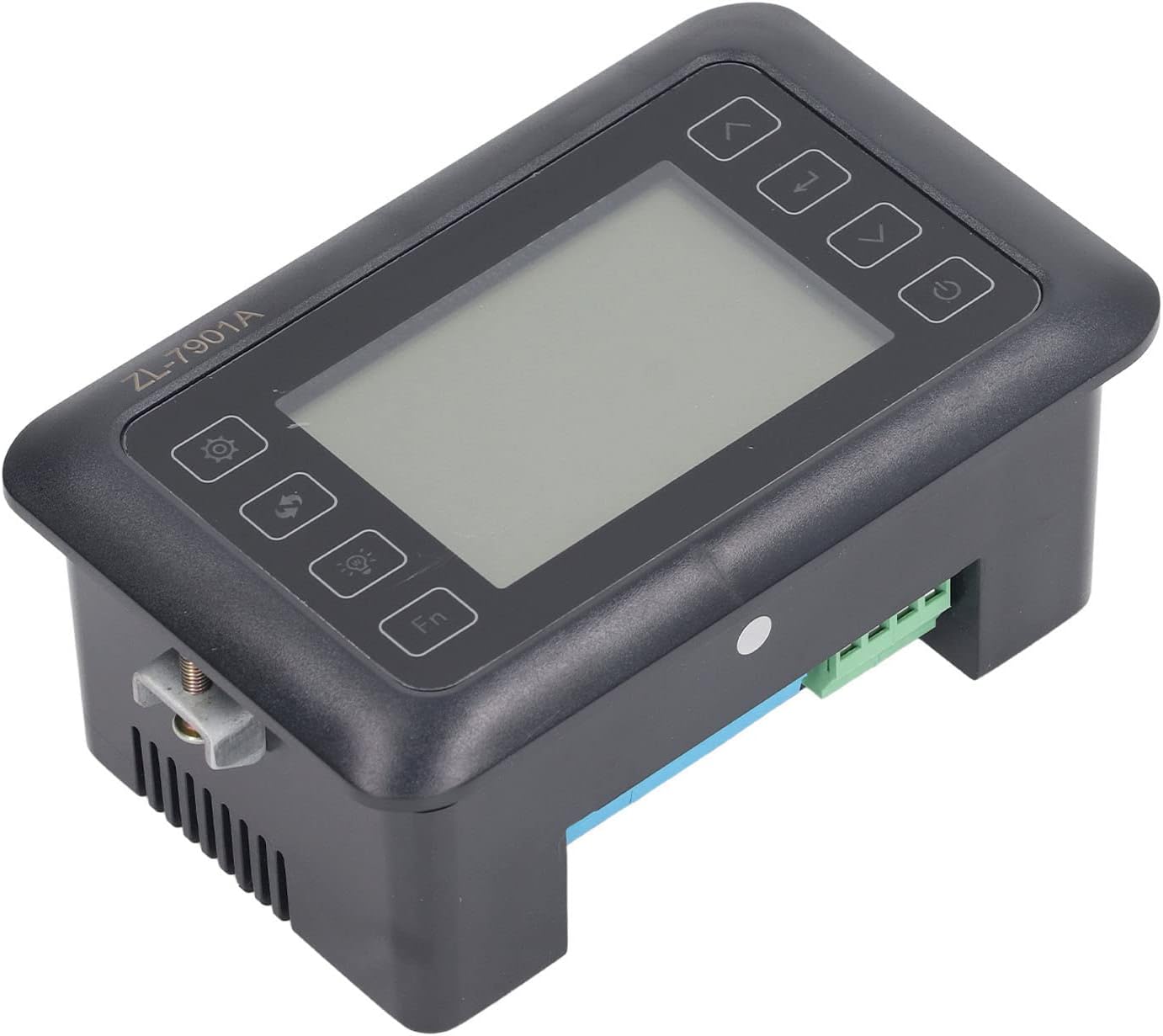
ምስል 4.3፡ አንግል view highlighting the various connection points on the controller's side.
After all connections are made, double-check them for correctness before applying power.
5. የአሠራር መመሪያዎች
5.1 ማብራት / ማጥፋት
የሚለውን ይጫኑ የኃይል አዝራር to turn the controller on or off. The display will illuminate upon power-on. The power button is located on the right side of the controller's front panel.
5.2 ማሳያview
The main display shows the current temperature and humidity readings. Additional indicators may show the status of heating, humidifying, and turning functions.
5.3 ማቀናበሪያ መለኪያዎች
- የሚለውን ይጫኑ የቅንብሮች አዝራር (gear icon) to enter the parameter setting mode. This button is on the left side of the controller's front panel.
- የሚለውን ተጠቀም Up (ወደላይ ቀስት) እና ወደታች (down arrow) buttons to navigate through different parameters (e.g., target temperature, target humidity, egg turning interval). These buttons are on the right side of the controller's front panel.
- የሚለውን ይጫኑ አዝራር አስገባ (return arrow icon) to select a parameter for editing. This button is on the right side of the controller's front panel.
- የሚለውን ተጠቀም Up እና ወደታች እሴቱን ለማስተካከል አዝራሮች.
- የሚለውን ይጫኑ አዝራር አስገባ እንደገና አዲሱን እሴት ለማረጋገጥ.
- Repeat for all desired parameters.
- Exit the setting mode by pressing the የቅንብሮች አዝራር እንደገና ወይም የጊዜ ማብቂያ እየጠበቁ።
ማስታወሻ፡- Consult the full product manual (if provided separately) for a complete list of parameters and their functions.
5.4 የተግባር አዝራሮች
- የብርሃን ቁልፍ (light bulb icon): Controls the internal light of the incubator (if connected). This button is on the left side of the controller's front panel.
- Fn ቁልፍ: Activates special functions or enters advanced settings. Refer to the detailed manual for specific Fn button operations. This button is on the left side of the controller's front panel.
6. ጥገና
6.1 ጽዳት
- Ensure the controller is powered off and disconnected from the power source before cleaning.
- Wipe the exterior of the controller with a soft, dry cloth.
- Do not use abrasive cleaners, solvents, or immerse the unit in water.
- Keep the sensor probes clean and free from debris to ensure accurate readings.
6.2 የዳሳሽ እንክብካቤ
Handle the temperature and humidity sensors with care. Avoid bending or damaging the cables. If readings appear inaccurate, gently clean the sensor tips. Do not attempt to disassemble the sensors.
7. መላ መፈለግ
| ችግር | ሊሆን የሚችል ምክንያት | መፍትሄ |
|---|---|---|
| ተቆጣጣሪው አይበራም። | የኃይል አቅርቦት የለም; የላላ ግንኙነት; የተሳሳተ የኃይል ገመድ. | Check power outlet; ensure all connections are secure; test power cable. |
| ትክክለኛ ያልሆነ የሙቀት/የእርጥበት ንባቦች። | Sensor dirty or damaged; sensor not properly placed; calibration needed. | Clean sensor; reposition sensor away from direct airflow/heat; refer to advanced settings for calibration (if available). |
| Heater/Humidifier not activating. | Output device not connected; setpoint not reached; faulty output device. | Verify wiring connections; check setpoint values; test heater/humidifier independently. |
| ማሳያ የስህተት ኮድ ያሳያል። | Sensor fault; internal error. | Note the error code and consult the full product manual or contact support. |
8. ዝርዝሮች
| ባህሪ | ዝርዝር |
|---|---|
| ሞዴል | ZL-7901A |
| የምርት ስም | Fydun |
| ግብዓት Voltage | 100V-240V AC |
| የመቆጣጠሪያ ዓይነት | Fully Automatic Digital Temperature and Humidity Control |
| ትክክለኛነት | High precision for both temperature and humidity |
| መተግበሪያ | Incubators for various poultry and bird eggs |
| በመጫን ላይ | የፓነል ተራራ |
9. ዋስትና እና ድጋፍ
Fydun is committed to providing quality products and excellent customer service. If you encounter any issues or have questions regarding your ZL-7901A Incubator Controller, please contact our customer service team.
For support, please refer to the contact information provided with your purchase or visit the official Fydun store on Amazon: Fydun Amazon Store.
Our professional customer service team is ready to assist you promptly.