
ምርት አልቋልview
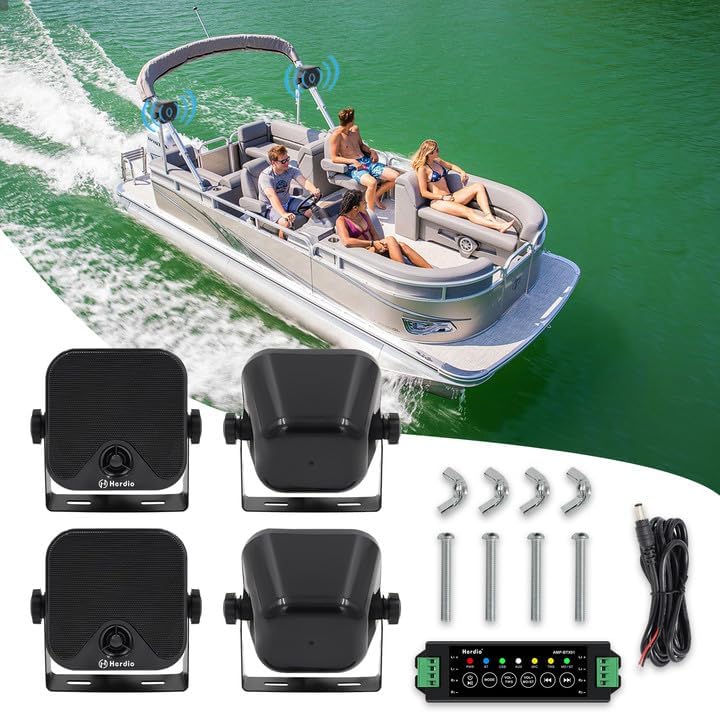
The Herdio 4 Inch 240W Marine Bluetooth Speakers are designed for outdoor environments, offering robust sound and waterproof durability. This system includes four 4-inch 2-way full-range speakers and a Bluetooth amplifier, suitable for various vehicles and outdoor settings.
Key features include Bluetooth 5.0 connectivity, IP66 waterproof rating, and a compact design for versatile mounting. The system provides a maximum output power of 240 Watts (60 Watts per speaker) with a frequency response of 80Hz-20kHz and 4 Ohms impedance.
በሣጥኑ ውስጥ ያለው
- 4 x Marine Speakers with Mounting Brackets
- 1 x ብሉቱዝ Amplifier (4-channel)
- 1 x 12V DC Power Cable
- 1 x Set of Bolts and Screws
ዝርዝሮች
| ባህሪ | ዝርዝር |
|---|---|
| የሞዴል ስም | SZJW-4-61BT |
| የድምጽ ማጉያ አይነት | Outdoor, Marine |
| የድምጽ ማጉያ መጠን | 4 ኢንች |
| ከፍተኛ የውጤት ኃይል | 240 Watts (60W per speaker) |
| የድግግሞሽ ምላሽ | 80Hz-20kHz |
| እክል | 4 ኦኤም |
| የግንኙነት ቴክኖሎጂ | ብሉቱዝ 5.0 |
| የብሉቱዝ ክልል | Up to 20 Meters (65.6 Feet) |
| የውሃ መቋቋም ደረጃ | IP66 የውሃ መከላከያ |
| ቁሳቁስ | ኤቢኤስ ፕላስቲክ |
| የምርት ልኬቶች | 4.3"D x 4.3"W x 4.3"H (በአንድ ድምጽ ማጉያ) |
| የእቃው ክብደት | 2.92 ኪሎግራም (6.43 ፓውንድ) |

ማዋቀር እና መጫን
Follow these steps to install and connect your Herdio Marine Bluetooth Speakers:
- የድምጽ ማጉያ መጫን፡
The speakers come with adjustable mounting brackets. Loosen the knobs on the sides of each speaker to remove the bracket. Secure the bracket to your desired surface using the provided screws. Once the bracket is fixed, place the speaker back into the bracket and tighten the knobs to secure it. The bracket allows for 180-degree rotation for optimal sound direction. - Speaker Wiring to Ampማስታገሻ ፦
Use a small screwdriver to loosen the terminals on the amplifier. Connect the speaker cables to the amplifier terminals. Ensure that the white wire (positive) and black wire (negative) from each speaker are connected to the corresponding L+ (Left Positive), L- (Left Negative), R+ (Right Positive), and R- (Right Negative) terminals on the ampየሚያነቃቃ። የ amplifier supports 4 channels. - የኃይል አቅርቦት ግንኙነት;
Connect the provided 12V DC power cable to the amplifier. The red wire from the power cable links to your 12V battery's positive terminal, and the black wire links to the negative terminal. Ensure a secure connection to prevent power interruptions. - የብሉቱዝ ማገናኘት
Once powered on, the amplifier's blue light will blink, indicating it is in pairing mode. On your device (smartphone, tablet, etc.), search for Bluetooth devices and select 'Herdio' to connect. A constant blue light on the amplifier indicates a successful connection.


Video 1: This video demonstrates the unboxing, wiring, and Bluetooth pairing process for the Herdio 4 Inch 240W Marine Bluetooth Speakers. It provides a visual guide for connecting the speakers to the amplifier and establishing a Bluetooth connection with a mobile device.
የአሠራር መመሪያዎች
የ amplifier features several buttons for controlling playback and settings:

- ኃይል/አጫውት/አፍታ አቁም አዝራር፡-
Long press (3 seconds) to power on/off. Short press to play or pause music. - ሁነታ አዝራር፡-
Long press (3 seconds) to restore factory settings. Short press to switch between Bluetooth (BT), USB, AUX, and MIC modes. - Volume Down/TWS Button:
Long press (3 seconds) to enter/exit TWS (True Wireless Stereo) mode. Short press to decrease the volume. - Volume Up/Mono Button:
Long press (3 seconds) to switch between stereo and mono sound output. Short press to increase the volume. - ቀዳሚው የትራክ/የኋላ ማጠንጠኛ አዝራር፡
Long press (3 seconds) for fast rewind. Short press to go to the previous song. - የሚቀጥለው ትራክ/ፈጣን ወደፊት አዝራር፡
Long press (3 seconds) for fast forward. Short press to go to the next song.
ጥገና
To ensure the longevity and optimal performance of your Herdio Marine Bluetooth Speakers, follow these maintenance guidelines:
- ማጽዳት፡ Regularly wipe the speakers with a soft, damp cloth to remove dirt and salt residue. Avoid using harsh chemicals or abrasive cleaners.
- የውሃ መጋለጥ; While the speakers are IP66 waterproof, prolonged submersion is not recommended. Ensure all connections are secure to maintain water resistance.
- ማከማቻ፡ When not in use for extended periods, store the speakers in a dry, cool place away from direct sunlight and extreme temperatures.
- የግንኙነት ፍተሻዎች፡- Periodically inspect all wiring and connections for any signs of wear, corrosion, or looseness. Tighten connections as needed.
መላ መፈለግ
If you encounter issues with your Herdio Marine Bluetooth Speakers, refer to the following common problems and solutions:
- ኃይል የለም፡
- Ensure the 12V DC power cable is securely connected to both the amplifier and the power source (battery).
- Check the power source for proper voltage and functionality. - ድምጽ የለም፡
- Verify that the speaker wires are correctly connected to the amplifier terminals (positive to positive, negative to negative).
- Confirm that the ampሊፋይ በርቶ ነው እና ድምጹ ከፍ ይላል።
- Check the audio source (Bluetooth device, USB, AUX) for proper playback and volume settings.
- ያረጋግጡ amplifier is in the correct input mode (BT, USB, AUX, MIC). - ብሉቱዝ አለመገናኘት;
- ያረጋግጡ amplifier is in Bluetooth mode (blue light blinking).
- Ensure your device's Bluetooth is enabled and within the 20-meter range.
- Try forgetting the device from your phone's Bluetooth settings and re-pairing.
- Restart both the ampሊፋይር እና የብሉቱዝ መሳሪያዎ። - የተዛባ ድምጽ;
- Reduce the volume on both the ampሊፋይር እና የድምጽ ምንጭዎ።
- Check speaker wire connections for any loose or corroded contacts.
- Ensure the speakers are not overloaded beyond their rated power.
ዋስትና እና ድጋፍ
The Herdio 4 Inch 240W Marine Bluetooth Speakers come with a Limited Warranty. For specific details regarding warranty coverage, terms, and conditions, please refer to the warranty information provided with your product packaging or contact Herdio customer support.
For technical assistance, troubleshooting beyond this manual, or inquiries about replacement parts, please visit the official Herdio webጣቢያ ወይም የደንበኞች አገልግሎት ክፍልን ያነጋግሩ።