1. መግቢያ
Thank you for choosing the KINGONE Universal Stylus. This stylus is designed to provide a precise and natural writing and drawing experience across a wide range of touchscreen devices. Please read this manual carefully to ensure proper use and optimal performance of your stylus.
2. የጥቅል ይዘቶች
Upon opening your KINGONE Universal Stylus package, you should find the following items:
- 1 x KINGONE Universal Active Capacitive Pen
- 1 x የተጠቃሚ መመሪያ
- 4 x Replacement Nibs (2*POM Nibs, 1*Conductive Fiber Cap, 1*Active Stylus Pen Cap)
- 1 x የዩኤስቢ ዓይነት-ሲ ኃይል መሙያ ገመድ

Image: The package contents, showing the stylus, charging cable, various nibs, and the user manual.
3. ማዋቀር እና የመጀመሪያ አጠቃቀም
3.1 ስታይለስን መሙላት
Before first use, fully charge your KINGONE Universal Stylus. Connect the provided USB Type-C charging cable to the stylus's charging port and to a compatible USB power source. The LED indicators will show the charging status.
- የኃይል መሙያ ጊዜ: ሙሉ ኃይል ለመሙላት በግምት 15 ደቂቃዎች።
- የአጠቃቀም ጊዜ፡- በሙሉ ኃይል እስከ 10 ሰአታት ቀጣይነት ያለው አጠቃቀም።
- ራስ-ሰር እንቅልፍ; The stylus will automatically enter sleep mode after 5 minutes of inactivity to conserve battery.

Image: The stylus connected to a Type-C charging cable, illustrating its fast charging feature.
3.2 ማብራት / ማጥፋት
The KINGONE Universal Stylus features an anti-touch ON/OFF switch. Simply touch the top of the stylus to power it on or off. No Bluetooth pairing is required for operation.
3.3 የባትሪ ደረጃ አመልካች
The stylus is equipped with three LED lights to indicate the battery level:
| ግዛት | የ LED ምልክት | Battery Level / Charge Power |
|---|---|---|
| የስራ ሁኔታ | A Light Flashes | ከ 5% በታች |
| A Light On | 5% - 30% | |
| A B Lights On | 30% - 70% | |
| A B C Lights On | 70% - 100% | |
| የኃይል መሙያ ሁኔታ | A Light Flashes | 5% - 30% |
| A B Light On, C Light Off | 30% - 70% | |
| A B C Light On | 70% - 99% | |
| ሙሉ በሙሉ ተሞልቷል። | A B C Light On | 100% |

Image: Detailed explanation of the LED indicators for battery status.
4. የአሠራር መመሪያዎች
4.1 Using the Active Stylus Pen Cap (POM Nib)
The active stylus pen cap, featuring a 1mm POM nib, is designed for precise writing, drawing, and detailed tasks. It offers an ultra-high accuracy experience with no delays or interruptions, mimicking the feel of writing on paper.
- Ensure the stylus is powered on.
- Simply touch the POM nib to your device's screen to interact.
- The stylus supports palm rejection, allowing you to rest your hand on the screen naturally while writing or drawing.

Image: The 1mm POM nib in action, providing a precise writing experience on a tablet.

Image: The removable active stylus pen cap in use, emphasizing its readiness for immediate use.
4.2 Using the Removable Conductive Fiber Cap
The conductive fiber cap is an alternative nib that does not require charging or powering on. It can be used on any device at any time, providing a convenient option for quick interactions or when the main active nib is not charged.
- Simply attach the conductive fiber cap to the stylus.
- Use it directly on your touchscreen device. No power is needed for this cap.

Image: The removable conductive fiber cap in use on a smartphone, highlighting its no-charge operation.
4.3 Magnetic Adsorption Function
The KINGONE Universal Stylus features a magnetic function, allowing it to conveniently attach to the side of compatible tablets for easy storage and portability. This is ideal for business trips, meetings, or everyday use.
- Simply place the stylus against the magnetic edge of your compatible tablet.
- ማስታወሻ፡- This magnetic attachment is for storage only; wireless charging is not supported.

Image: The stylus demonstrating its magnetic attachment feature on a tablet.
5. ተኳሃኝነት
The KINGONE Universal Stylus is designed for broad compatibility with various touchscreen devices, including:
- የ iOS መሳሪያዎች (አይፎን፣ አይፓድ)
- Android tablets and smartphones (e.g., Xiaomi Pad, Samsung, Redmi, OnePlus)
- Other tablets and smartphones running iOS or Android.
It works across multiple devices simultaneously without the need for Bluetooth connection.

Image: A display of multiple devices (tablets and smartphones) demonstrating the stylus's wide compatibility.
6. የኒብ መተካት
The KINGONE Universal Stylus comes with different types of nibs to suit various writing styles and needs. Replacing a nib is a simple process:
- Gently pull the existing nib straight out from the stylus tip.
- Select the desired replacement nib (POM nib or conductive fiber cap).
- Carefully insert the new nib straight into the stylus tip until it is securely in place.
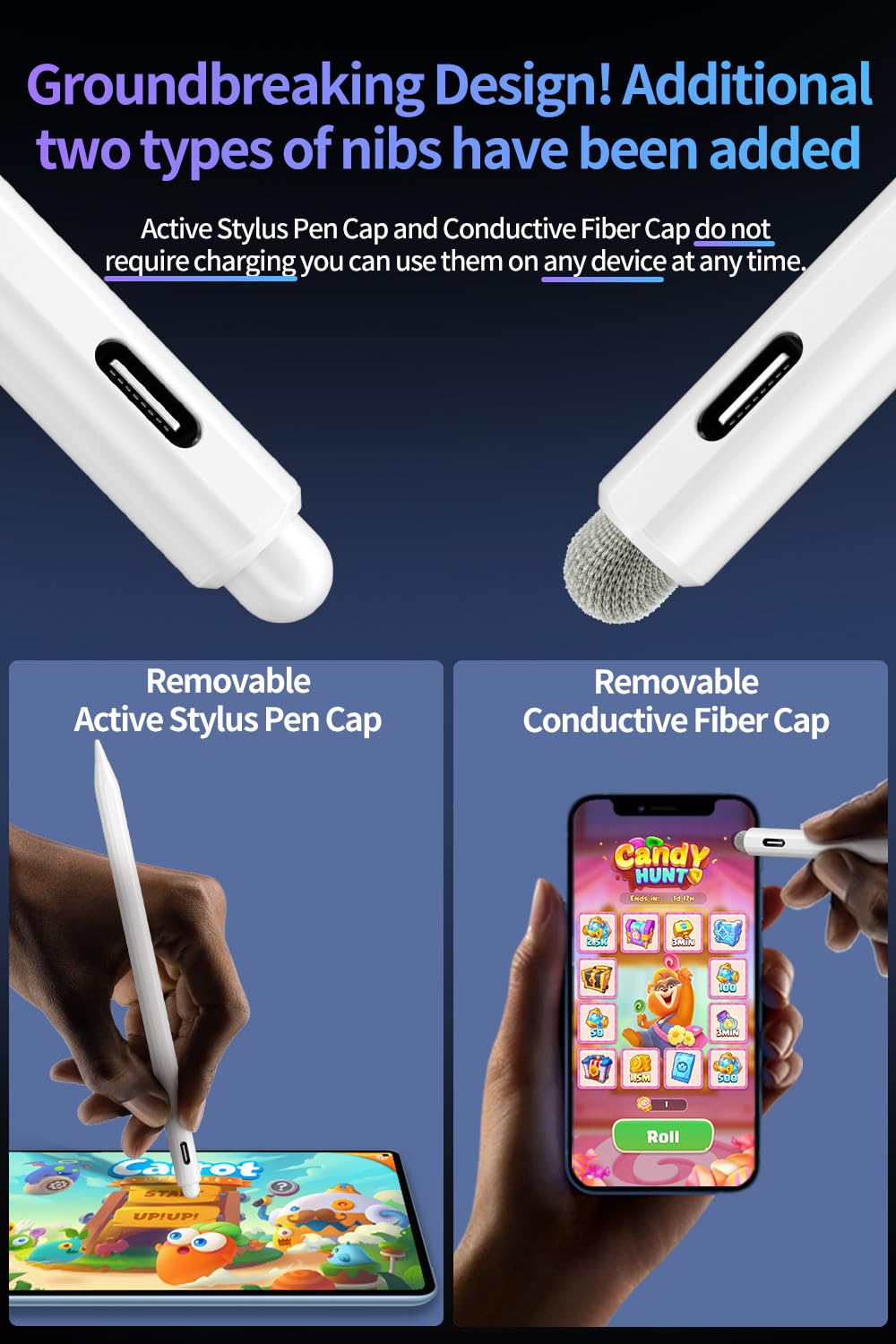
Image: The stylus displaying its two main types of removable nibs for different uses.
7. ጥገና
To ensure the longevity and optimal performance of your KINGONE Universal Stylus, follow these maintenance guidelines:
- ማጽዳት፡ Wipe the stylus body with a soft, dry, lint-free cloth. Avoid using harsh chemicals or abrasive materials.
- Nib Care: Keep the nibs clean and free from dust or debris. Replace worn-out nibs promptly to maintain precision.
- ማከማቻ፡ Store the stylus in a cool, dry place. Utilize its magnetic adsorption feature to attach it to a compatible tablet for secure storage when not in use.
- ከባድ ሁኔታዎችን ያስወግዱ; Do not expose the stylus to extreme temperatures, direct sunlight, or high humidity.
8. መላ መፈለግ
If you encounter issues with your KINGONE Universal Stylus, refer to the following common problems and solutions:
| ችግር | ሊሆን የሚችል ምክንያት | መፍትሄ |
|---|---|---|
| ስቲለስ ምላሽ እየሰጠ አይደለም። | Battery is low or depleted. Stylus is off. | Charge the stylus fully. Ensure the stylus is powered on by touching the top. |
| Inaccurate or delayed response | Worn-out nib. Screen protector interference. Device compatibility issue. | Replace the nib. Ensure your screen protector is stylus-friendly. Verify device compatibility (refer to Section 5). |
| መዳፍ አለመቀበል አይሰራም | Some older devices or specific apps may not fully support palm rejection. | Ensure your device and application support palm rejection. Adjust your hand position if necessary. |
| Stylus not magnetically attaching | Your device may not have magnetic adsorption capabilities. | The magnetic feature is for compatible devices only. This does not affect stylus functionality. |

Image: A comparison chart illustrating the advantages of the KINGONE stylus, which can aid in troubleshooting by highlighting expected performance.
9. ዝርዝሮች
Detailed technical specifications for the KINGONE Universal Stylus:
| ባህሪ | ዝርዝር መግለጫ |
|---|---|
| የምርት ስም | Kingone |
| ተስማሚ መሣሪያዎች | Tablet, iPhone, iPad, Android Smartphones |
| የእቃው ክብደት | 13 ግራም |
| ቁሳቁስ | Rubber (nib material not specified, but POM is mentioned for active nib) |
| የባትሪ ዓይነት | Lithium (internal) |
| የኃይል መሙያ ወደብ | የዩኤስቢ ዓይነት-ሲ |
| የኃይል መሙያ ጊዜ | ሙሉ ኃይል ለመሙላት በግምት 15 ደቂቃዎች |
| ቀጣይነት ያለው አጠቃቀም ጊዜ | በግምት. 10 ሰዓታት |
| ራስ-እንቅልፍ ተግባር | ከ 5 ደቂቃዎች እንቅስቃሴ-አልባነት በኋላ |
| Nibs Included | Active Stylus Pen Cap (POM Nib), Conductive Fiber Cap |
| ልዩ ባህሪያት | Magnetic Adsorption, Anti-touch ON/OFF Switch, Palm Rejection |
10. ዋስትና እና ድጋፍ
For warranty information and customer support, please refer to the documentation included with your purchase or contact KINGONE customer service through the retailer where the product was purchased. Keep your proof of purchase for warranty claims.