
1. መግቢያ
Thank you for choosing the TKWSER NV5180 Night Vision Binoculars. This device is designed to provide clear observation in low light conditions and complete darkness, making it ideal for night hunting, camping, wildlife monitoring, and security. Please read this manual carefully before using the device to ensure proper operation and to maximize its performance and lifespan.
2. ምርት አብቅቷልview እና ባህሪያት
The TKWSER NV5180 features a high-definition TFT LCD screen, powerful digital zoom, and an adjustable infrared illuminator to enhance your viewልምድ.
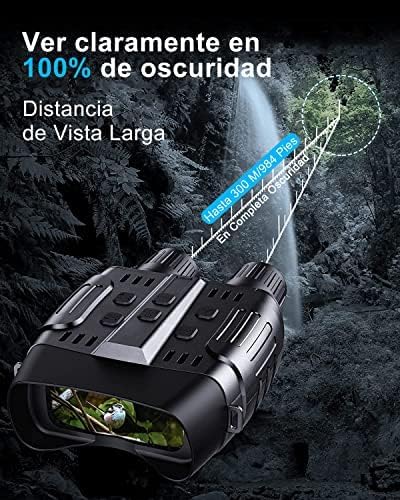
- Clear Night Vision: Observe targets up to 300 meters (984 feet) in 100% complete darkness with the 7-level infrared illuminator.
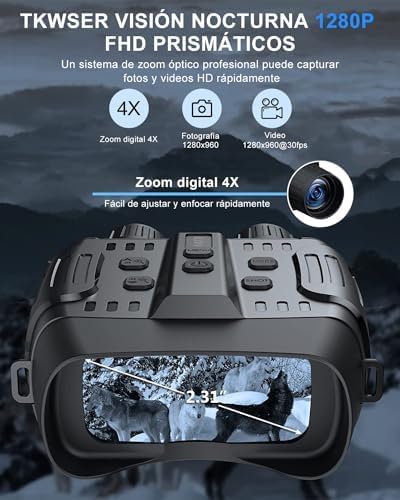
- ባለከፍተኛ ጥራት ማሳያ; Integrated 2.31-inch HD TFT LCD screen for comfortable viewing
- ፎቶ እና ቪዲዮ ቀረጻ፡ Record 1280x960 pixel images and 1280x960@30FPS videos.
- 4X ዲጂታል ማጉላት፡ Easily adjust and quickly focus on distant objects.
- ረጅም የባትሪ ህይወት; Up to 5-6 hours of continuous operation with IR illuminator on, or 7-8 hours without IR. Powered by 6x AA 1.5V alkaline batteries (not included).
- ማከማቻ፡ Includes a 32GB memory card, expandable from 4GB to 32GB.
- ሁለገብ አጠቃቀም፡- Suitable for night hunting, camping, night fishing, wildlife observation, search and rescue, and bird watching.


3. ማዋቀር
- የባትሪ ጭነት;
- የባትሪውን ክፍል ከመሣሪያው በታች ያግኙት።
- የክፍሉን ሽፋን ይክፈቱ.
- Insert 6x AA 1.5V alkaline batteries, ensuring correct polarity (+/-). Batteries are not included with the device.
- የባትሪውን ክፍል ደህንነቱ በተጠበቀ ሁኔታ ይዝጉ።
- የማህደረ ትውስታ ካርድ ማስገባት;
- Locate the memory card slot, typically on the side of the device.
- Insert the included 32GB SD card into the slot until it clicks into place. Ensure the card is oriented correctly.
- አብራ፡
- Press and hold the Power button (usually marked with an Ⓘ symbol) for a few seconds until the screen illuminates.
4. የአሠራር መመሪያዎች
4.1 መሠረታዊ አሠራር
- ማብራት/ማጥፋት፡ መሣሪያውን ለማብራት ወይም ለማጥፋት የኃይል አዝራሩን ተጭነው ይያዙ።
- ሁነታ ምርጫ፡- Use the Mode button to switch between Photo, Video, and Playback modes.
- Infrared (IR) Adjustment:
- In night vision mode, press the IR button to cycle through 7 levels of infrared illumination.
- Higher IR levels provide brighter images in darker conditions but consume more battery power.
- ዲጂታል ማጉላት፡
- Use the Zoom In/Out buttons (often marked with “+” and “-” or arrow symbols) to adjust the 4X digital zoom.
- በእጅ ትኩረት;
- Rotate the objective lens ring (located at the front of the binoculars) to achieve a sharp image. Adjust until the image on the screen is clear.
4.2 ፎቶዎችን እና ቪዲዮዎችን ማንሳት
- ፎቶ ማንሳት
- ወደ ፎቶ ሁነታ ቀይር።
- ርዕሰ-ጉዳይዎን በማያ ገጹ ላይ ክፈፍ ያድርጉት።
- Press the Shutter/OK button to take a picture.
- ቪዲዮዎችን መቅዳት
- ወደ ቪዲዮ ሁነታ ቀይር።
- Press the Shutter/OK button to start recording. A red indicator or timer will appear on the screen.
- ቀረጻውን ለማቆም የመዝጊያ/እሺ አዝራሩን እንደገና ይጫኑ።
4.3 መልሶ ማጫወት እና ቅንብሮች
- Viewሚዲያ፡
- Switch to Playback mode.
- Use the navigation buttons (Up/Down or Left/Right) to browse through your captured photos and videos.
- Press the Shutter/OK button to play a video.
- የቋንቋ ቅንብሮች፡-
- Access the menu (usually by pressing a dedicated Menu button).
- Navigate to the Language option and select your preferred language from the 12 available options.
5. ጥገና
- ማጽዳት፡ Use the included cleaning cloth to gently wipe the lenses and screen. Do not use abrasive materials or harsh chemicals.
- ማከማቻ፡ Store the binoculars in a cool, dry place, away from direct sunlight and extreme temperatures. If storing for extended periods, remove the batteries to prevent leakage.
- የባትሪ መተካት፡ Replace all 6x AA batteries simultaneously when the low battery indicator appears or performance degrades. Do not mix old and new batteries or different battery types.
- የውሃ መቋቋም; The device is designed to be waterproof (Type de poignée : étanche). However, avoid submerging it in water.
6. መላ መፈለግ
| ችግር | ሊሆን የሚችል ምክንያት | መፍትሄ |
|---|---|---|
| መሣሪያው አይበራም። | ዝቅተኛ ወይም የሞቱ ባትሪዎች; የተሳሳተ የባትሪ ጭነት. | Replace with fresh AA alkaline batteries; ensure correct polarity. |
| ምስሉ ደብዛዛ ወይም ትኩረት የለሽ ነው። | Incorrect manual focus adjustment. | Rotate the objective lens ring to adjust focus until the image is clear. |
| Cannot see clearly in darkness. | IR illuminator off or set to low level. | Increase the IR level using the IR button. Ensure batteries have sufficient charge. |
| ፎቶዎችን ማንሳት ወይም ቪዲዮዎችን መቅዳት አይቻልም። | Memory card full or not inserted correctly; incorrect mode selected. | Check memory card insertion; delete old files or replace card; ensure device is in Photo or Video mode. |
| አጭር የባትሪ ህይወት. | High IR usage; old batteries. | Reduce IR level if possible; replace batteries with new, high-quality alkaline batteries. |
7. ዝርዝሮች
| ባህሪ | ዝርዝር መግለጫ |
|---|---|
| የምርት ስም | TKWSER |
| የሞዴል ስም | NV5180 |
| የሞዴል ቁጥር | WFTKNV5180DE-AA1-2 |
| ቀለም | ጥቁር |
| ቁሳቁስ | ፕላስቲክ |
| ልኬቶች (L x W x H) | 17.8 x 7.5 x 13.7 ሴሜ (7 x 2.95 x 5.39 ኢንች) |
| የእቃው ክብደት | 1.17 ኪሎ ግራም (2.58 ፓውንድ) |
| ከፍተኛው ማጉላት | 40x |
| የዓላማ ሌንስ ዲያሜትር | 24 ሚሊሜትር |
| መስክ የ View | 70 ዲግሪዎች |
| የምሽት ራዕይ | አዎ |
| ዲጂታል ማጉላት | 4X |
| IR Illuminator Levels | 7 ጊርስ |
| Viewing Range (100% Darkness) | እስከ 300 ሜትር (984 ጫማ) |
| የማሳያ ማያ ገጽ | 2.31-inch HD TFT LCD |
| የምስል ጥራት | 1280x960 ፒክሰሎች |
| የቪዲዮ ጥራት | 1280x960@30FPS |
| የማከማቻ አቅም | 4GB to 32GB (32GB SD card included) |
| የኃይል ምንጭ | 6x AA 1.5V Alkaline Batteries (not included) |
| Battery Life (IR On) | 5-6 ሰዓታት |
| Battery Life (IR Off) | 7-8 ሰዓታት |
| የተካተቱ አካላት | Soft case, Neck strap, 32GB SD card, Data cable, User manual, Cleaning cloth |
| ዩፒሲ | 768553168195 |
| GTIN | 768553168195 |
8. ዋስትና እና ድጋፍ
For warranty information, technical support, or service inquiries, please refer to the product packaging or contact the manufacturer directly through their official webጣቢያ ወይም የደንበኛ አገልግሎት ሰርጦች. የግዢ ደረሰኝህን እንደ ግዢ ማረጋገጫ አቆይ።