
1. መግቢያ
Thank you for choosing the PEXMOR 24-Inch 36V 750W Front Wheel Electric Bike Conversion Kit. This manual provides essential information for the safe and efficient installation, operation, and maintenance of your new e-bike conversion kit. Please read this manual thoroughly before attempting installation or use, and retain it for future reference.
የደህንነት ማስጠንቀቂያዎች
- በሚያሽከረክሩበት ጊዜ ሁል ጊዜ የራስ ቁር እና ተገቢውን የደህንነት መሳሪያ ይልበሱ።
- ከእያንዳንዱ ጉዞ በፊት ሁሉም አካላት ደህንነቱ በተጠበቀ ሁኔታ መያዛቸውን ያረጋግጡ።
- Do not operate the kit in adverse weather conditions.
- ከአካባቢው የኢ-ብስክሌት ደንቦች እና ህጎች ጋር እራስዎን ይወቁ።
- ልጆችን እና የቤት እንስሳትን ከመጫኛ ቦታ ያርቁ።
2. የጥቅል ይዘቶች
ከዚህ በታች የተዘረዘሩት ሁሉም እቃዎች በጥቅልዎ ውስጥ መካተታቸውን ያረጋግጡ። ማንኛውም ክፍል ከጎደለ ወይም ከተበላሸ፣ እባክዎን የደንበኞች ድጋፍን ያነጋግሩ።
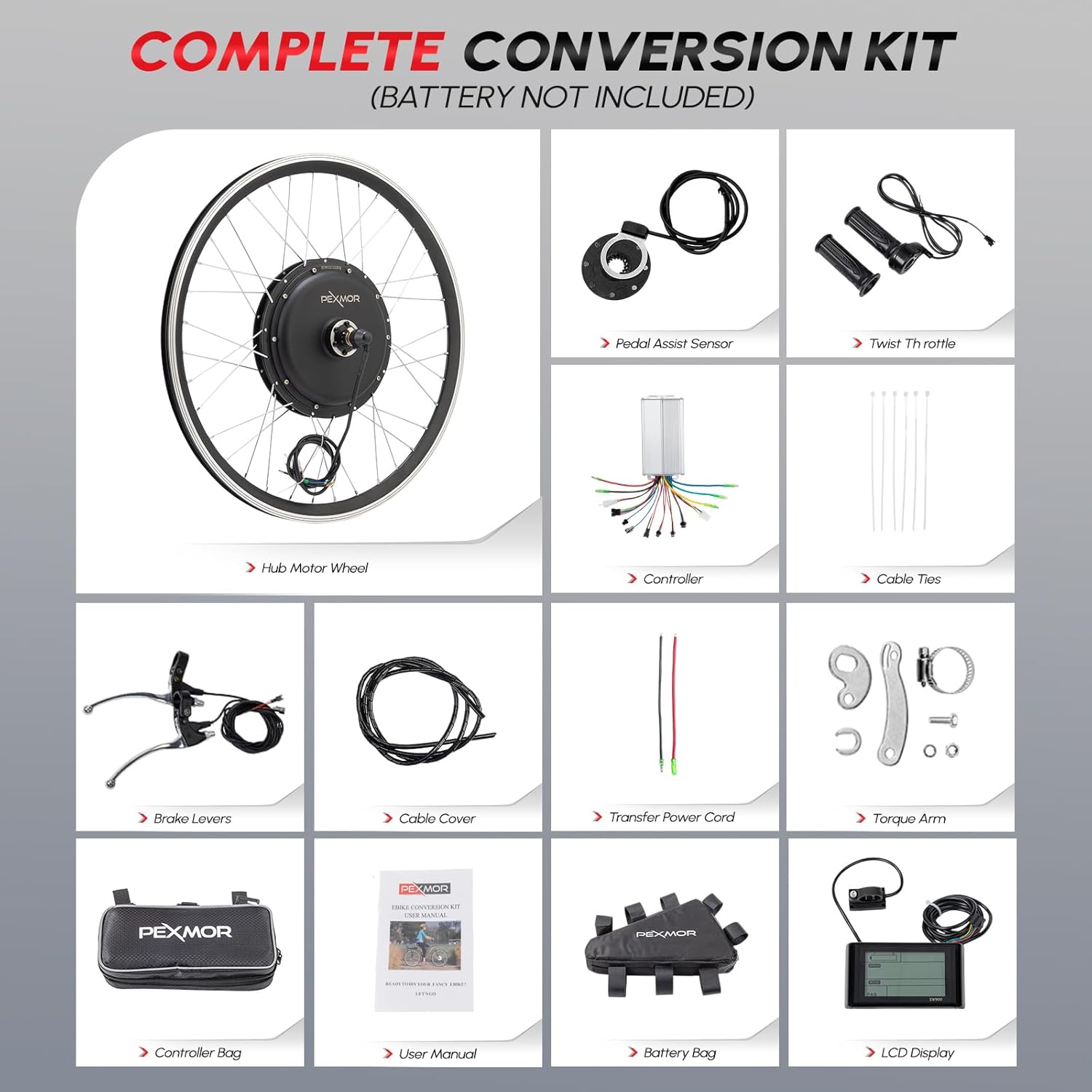
Image: All components of the PEXMOR Electric Bike Conversion Kit.
- 36V 750W Brushless Hub Motor Front Wheel
- 3-Mode Controller
- LCD Display (SW900)
- የተጠማዘዘ ዙር
- የብሬክ ሌቭስ
- የፔዳል ረዳት ስርዓት (PAS) ዳሳሽ
- የቶርኪ ክንድ
- የመቆጣጠሪያ ቦርሳ
- Battery Bag (Battery not included)
- የኬብል ማሰሪያዎች
- የኬብል ሽፋን
- Transfer Power Cord
- የመሳሪያ ስብስብ
- የተጠቃሚ መመሪያ
3. ዝርዝሮች
| ባህሪ | ዝርዝር መግለጫ |
|---|---|
| የምርት ስም | PEXMOR |
| የሞዴል ስም | 24Kit750-Fro91 |
| ቁሳቁስ | አሉሚኒየም |
| ዋትtage | 750 ዋት |
| ቀለም | ጥቁር |
| ቅጥ | 24 ኢንች |
| መጠን | 24 ኢንች |
| የክህሎት ደረጃ | መካከለኛ |
| ከፍተኛ ፍጥነት | 23.5 ማይል በሰአት (38 ኪሜ/ሰ) |
| Front Dropout Spacing | 100 ሚሜ / 3.93 ኢንች |
| ከፍተኛ የክብደት አቅም | 220 ፓውንድ |

Image: Detailed dimensions and specifications of the motor wheel.

Image: Diagram showing applicable front and rear fork dropout sizes.
4. ማዋቀር እና መጫን
Follow these steps carefully to install your PEXMOR Electric Bike Conversion Kit. It is recommended to watch the provided installation video for visual guidance.
Video: Comprehensive installation guide for the PEXMOR Electric Bike Conversion Kit. This video demonstrates the step-by-step process for installing all components, including the motor wheel, handlebar accessories, PAS sensor, and controller wiring.
4.1 Pre-installation Preparation and Checks
- Position the Bike: Put the bicycle upside down on a stable surface for easier access to the wheels and pedals.
- Remove Front Wheel: Loosen the nuts on the front wheel axle and carefully remove the existing front wheel from the bike fork.
- Remove Disc Brake: If your bike has a disc brake on the front wheel, carefully remove the disc brake rotor from the old wheel. You will transfer this to the new motor wheel.
- ይንቀሉ እና ያረጋግጡ፡ Open the kit box and carefully remove all components. Refer to the 'Package Contents' section to ensure all accessories are present and undamaged.
- Install Tire on Motor Wheel: Install your existing tire, inner tube, and rim liner onto the new motor wheel. Ensure the tire is seated correctly on the rim.
- ጎማዎችን ያፍኑ፦ Inflate the tire to the recommended pressure indicated on the tire sidew.
- Loosen Hexagonal Screws: Loosen the hexagonal screws on both sides of the motor wheel axle.
- Route Motor Cable: Carefully move the black motor cable into the designated notch on the motor axle. This is crucial for proper installation and to prevent cable damage.
4.2 Handlebar Component Installation
- Remove Original Throttle: Carefully remove the original throttle from your bike's handlebar.
- የብሬክ ማንሻዎች; You have the option to replace your original brake levers with the new e-bike specific brake levers provided in the kit, which include motor cut-off switches. If your original levers are compatible and you prefer to keep them, ensure they do not interfere with the new components.
- Install New Throttle: Slide the new twist throttle onto the handlebar.
- Tighten Throttle Screw: Secure the throttle by tightening its screw with the provided tool.
- Install LCD Display: Mount the LCD display onto the handlebar.
- Tighten Display Screw: Secure the display by tightening its screw. If your handlebar is thin, use the provided belt to ensure a snug fit.
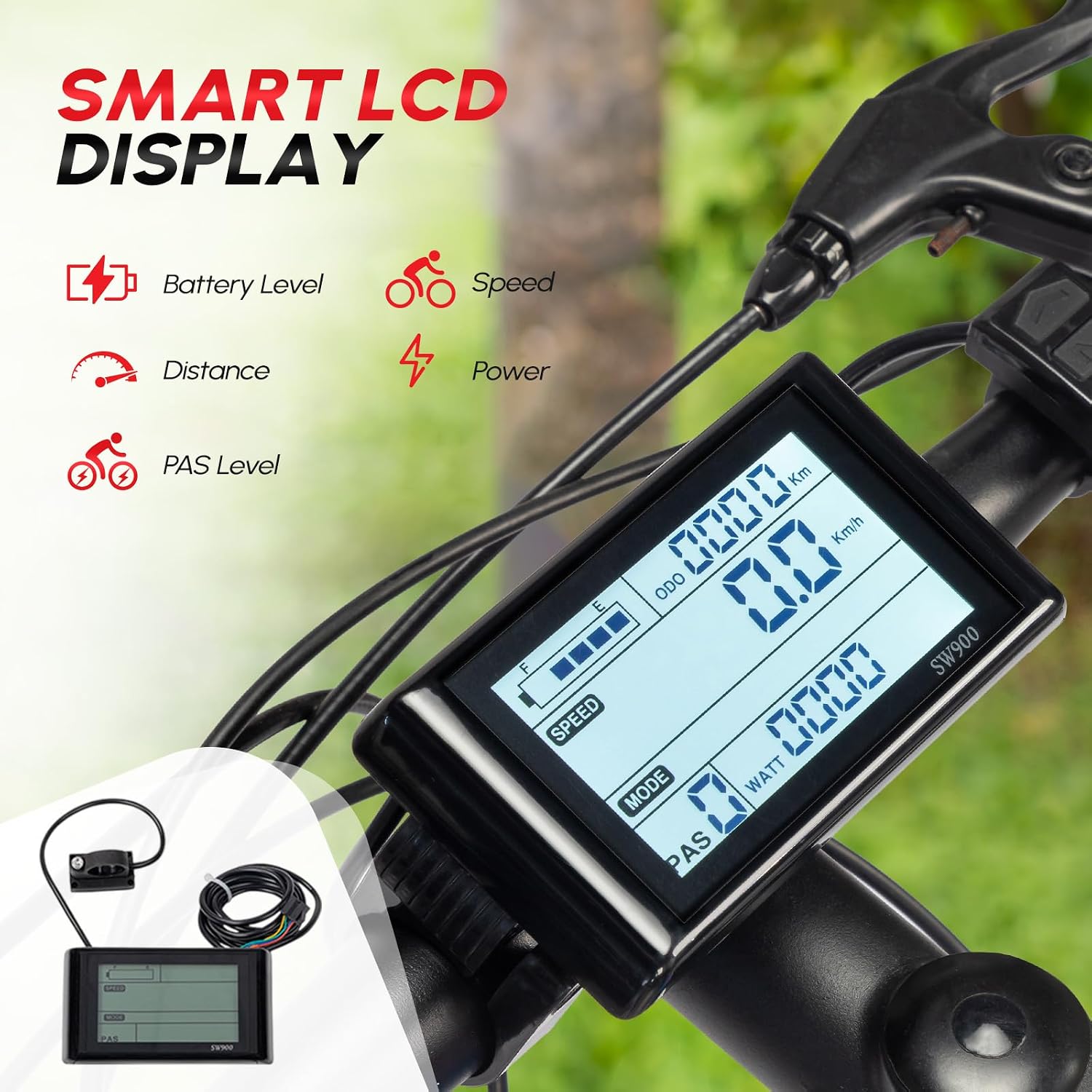
Image: The Smart LCD Display for monitoring riding information.
4.3 PAS (Pedal Assist System) Installation
- Loosen Pedal Shaft Screw: Use the appropriate tool to loosen the screw on the pedal shaft.
- Remove Dental Disc: Carefully remove the dental disc (chainring) from the pedal assembly.
- Remove Shaft: Remove the shaft from the bottom bracket.
- የPAS ዳሳሽ ይጫኑ፦ Install the PAS sensor. The magnetic disc component of the PAS sensor should be placed inside the bottom bracket.
- Tighten Shaft: Reinstall and tighten the shaft securely.
- Install Magnetic Disc: Install the magnetic disc onto the pedal shaft. Ensure the arrow direction on the magnetic disc points towards the forward direction of pedaling. It must not be reversed.
- ማዞሪያውን ያረጋግጡ፡ Make sure the magnetic disc rotates freely with the shaft.
- Secure PAS Sensor: If conditions permit, you may use adhesive or zip ties to further secure the PAS sensor in place.
- Reinstall Pedal Components: Reinstall the dental disc and foot pedal, ensuring all screws are tightened.
4.4 Controller Installation and Wiring
- Connect Accessories to Controller: Connect all accessories (motor, display, throttle, brake levers, PAS sensor) to the corresponding ports on the controller. Match the connectors carefully.
- Install and Fix Controller: Place the controller in a suitable location on your bike frame. You can use the provided controller bag or cable ties to fix it securely according to your preference.
- ባትሪ ማገናኘት; After all components are connected and secured, connect the battery to the controller to power the system.

Image: The 3-mode sine wave controller and its wiring connections.
5. የአሠራር መመሪያዎች
Your PEXMOR Electric Bike Conversion Kit offers multiple riding modes for a versatile experience.
5.1 የማሽከርከር ሁነታዎች

Image: The four available riding modes.
- ስሮትል ሁነታ፡ Use the twist throttle to control speed directly, similar to a motorcycle. This mode provides instant power.
- የፔዳል ረዳት ስርዓት (PAS) ሁነታ፡ The PAS system provides motor assistance as you pedal, making riding easier and extending your range. The LCD display allows you to select different PAS levels to adjust the amount of assistance.
- በእጅ ሁነታ: ብስክሌቱን እንደ ባህላዊ ብስክሌት ያለ ምንም የሞተር ድጋፍ ይንዱ።
- ቅድመ-ቅምጦች The controller may have preset power levels or modes that can be selected via the LCD display for different riding conditions or preferences.
5.2 LCD ማሳያ ተግባራት
The LCD display provides crucial information about your ride:
- የባትሪ ደረጃ፡ የቀረውን የባትሪ ክፍያ ያሳያል።
- ፍጥነት፡ የአሁኑን የመንዳት ፍጥነት ያሳያል።
- ርቀት፡ Tracks trip distance or total odometer reading.
- ኃይል፡- Indicates real-time motor power output.
- PAS ደረጃ፡ Shows the currently selected pedal assist level.
Refer to the specific LCD display manual (if provided separately) for detailed instructions on navigating menus and adjusting settings.
6. ጥገና
መደበኛ ጥገና የኢ-ብስክሌት መቀየሪያ ኪትዎ ረጅም ጊዜ የሚቆይ እና ጥሩ አፈፃፀም ያረጋግጣል።
- መደበኛ ምርመራዎች; Periodically inspect all bolts, nuts, and connections for tightness. Check tire pressure before each ride.
- ማጽዳት፡ Keep the motor, controller, and electrical connections clean and dry. Use a damp cloth for cleaning; avoid high-pressure water jets directly on electrical components.
- የባትሪ እንክብካቤ If using a separate battery, follow the manufacturer's instructions for charging and storage. Avoid fully discharging the battery.
- የብሬክ ፍተሻ፡- Regularly check brake pads and rotors for wear. Ensure brake levers engage smoothly and effectively cut motor power.
- የኬብል አስተዳደር Ensure all cables are neatly routed and secured to prevent snagging or damage.
7. መላ መፈለግ
If you encounter issues with your e-bike kit, refer to the following common troubleshooting tips. For more complex problems, contact customer support.
- ኃይል የለም፡ Check battery connection, ensure the battery is charged, and verify all electrical connections to the controller are secure.
- ሞተር የማይሳተፍበት; Ensure the PAS sensor is correctly installed and the magnetic disc is rotating with the pedal. Check throttle connection.
- ተመጣጣኝ ያልሆነ ኃይል; Inspect all wiring for loose connections or damage. Ensure the controller is securely mounted.
- የማይሰራ ማሳያ; Check the display's power connection and ensure it's securely attached to the handlebar.
- Brakes Not Cutting Power: Verify that the brake levers with motor cut-off switches are correctly installed and connected to the controller.
8. የደህንነት መመሪያዎች
Your safety is paramount. Adhere to these guidelines for a safe riding experience:
- Always wear a certified helmet and appropriate protective gear.
- Perform a pre-ride check before every use, including brakes, tires, and all electrical connections.
- ሁሉንም የትራፊክ ህጎች እና ደንቦችን ያክብሩ።
- አካባቢዎን ይንከባከቡ እና በመከላከያ መንገድ ይንዱ።
- በአልኮል ወይም በአደገኛ ዕፆች ተጽእኖ ስር ማሽከርከርን ያስወግዱ.
- ከ 220 ፓውንድ ከፍተኛውን የክብደት መጠን አይበልጡ.
9. ዋስትና እና ድጋፍ
Your PEXMOR Electric Bike Conversion Kit is designed for durability and performance. For any issues or inquiries, please refer to the following:
የመመለሻ ፖሊሲ
This product is eligible for a 30-day return policy, allowing for a refund or replacement. Please refer to your purchase platform's specific return instructions.
የደንበኛ ድጋፍ
For technical assistance, troubleshooting, or warranty claims, please contact PEXMOR customer support through the retailer where you purchased the product. Have your model name (24Kit750-Fro91) and UPC (810158426894) ready when contacting support.