
Sharp KC-35T7
Sharp Plasmacluster Humidifying Air Purifier
Model: KC-35T7
1. መግቢያ
ስለገዙ እናመሰግናለንasing the Sharp Plasmacluster Humidifying Air Purifier, Model KC-35T7. This manual provides essential information for the safe and efficient operation, maintenance, and troubleshooting of your new appliance. Please read this manual thoroughly before use and keep it for future reference.
This advanced air purifier is designed to improve your indoor air quality by reducing harmful gases such as formaldehyde and other Volatile Organic Compounds (VOCs). It features a powerful purification function, integrated humidification, and a convenient display for humidity and temperature.
2. የደህንነት መረጃ
ደህንነቱ የተጠበቀ አሰራርን ለማረጋገጥ እና ምርቱ ላይ ጉዳት እንዳይደርስ ወይም በራስዎ እና በሌሎች ላይ ጉዳት እንዳይደርስ ለመከላከል እባክዎ የሚከተሉትን የደህንነት ጥንቃቄዎች ይጠብቁ፡-
- Always use the appliance with the correct voltagበደረጃ አሰጣጥ መለያው ላይ እንደተገለጸው e.
- የአየር ማስገቢያውን ወይም መውጫውን የአየር ማስገቢያ ቀዳዳዎችን አይዝጉ።
- Do not insert fingers or objects into any openings.
- Unplug the appliance before cleaning, performing maintenance, or when not in use for extended periods.
- Do not operate the appliance near flammable gases or combustible materials.
- መሳሪያውን ከውሃ እና ከእርጥበት ያርቁ። መሳሪያውን በውሃ ውስጥ አያጥሉት።
- Ensure the water tank is properly installed before operating the humidification function. Use only clean tap water in the water tank.
- ይህ መሳሪያ ለደህንነታቸው ኃላፊነት ባለው ሰው ቁጥጥር ወይም መመሪያ ካልተሰጣቸው በስተቀር የአካል፣ የስሜት ወይም የአዕምሮ ችሎታዎች ወይም የልምድ እና የእውቀት እጥረት ላላቸው ሰዎች (ልጆችን ጨምሮ) ለመጠቀም የታሰበ አይደለም።
3. ክፍሎችን መለየት
Familiarize yourself with the main components of your Sharp Plasmacluster Humidifying Air Purifier:

ምስል 3.1: የፊት View የአየር ማጽጃው. This image displays the main body of the Sharp KC-35T7 air purifier, highlighting the control panel at the top, the air intake grille, and the Plasmacluster logo. The unit is white with black accents on the sides.
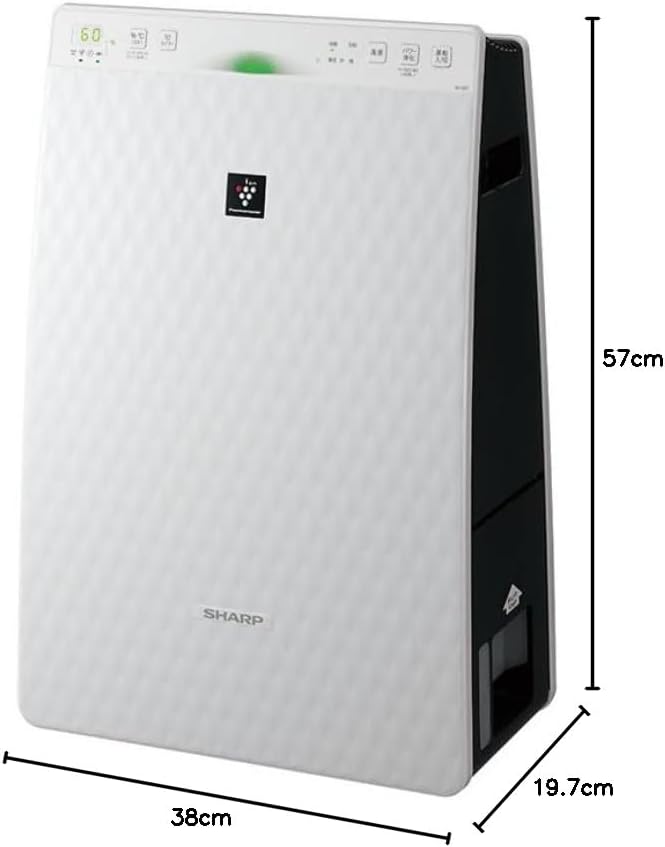
Figure 3.2: Air Purifier with Dimensions. ይህ ምስል የንድፈ ሀሳብን ያቀርባል view of the Sharp KC-35T7, illustrating its approximate dimensions: 38 cm (width), 19.7 cm (depth), and 57 cm (height). These measurements are crucial for proper placement and space planning.
ቁልፍ አካላት፡-
- የቁጥጥር ፓነል Located on the top, with buttons for power, mode selection, fan speed, and display.
- የአየር ማስገቢያ; Located on the front and sides, where air is drawn into the unit.
- የአየር መውጫ Located at the top, where purified and humidified air is released.
- የውሃ ማጠራቀሚያ; Removable tank for humidification, typically located on the side or back.
- ማጣሪያዎች፡- Internal filters (e.g., HEPA, deodorizing) for air purification.
4. ማዋቀር
Follow these steps for the initial setup of your air purifier:
- ማሸግ፡ Carefully remove the air purifier from its packaging. Retain the packaging materials for future transport or storage.
- የማጣሪያ ጭነት Open the rear panel of the unit. Remove all protective plastic bags from the filters (e.g., HEPA filter, deodorizing filter) and install them according to the markings inside the unit. Ensure they are securely in place. Close the rear panel.
- Fill Water Tank (for Humidification): Remove the water tank from the unit. Open the water tank cap and fill it with clean tap water up to the maximum fill line. Close the cap securely and reinsert the water tank into the unit until it clicks into place.
- አቀማመጥ፡- Place the air purifier on a flat, stable surface, ensuring there is adequate space (at least 20 cm) around the air intake and outlet for optimal airflow. Avoid placing it directly against a wall or near heat sources.
- የኃይል ግንኙነት; የኤሌክትሪክ ገመዱን ወደ ተስማሚ የኤሌክትሪክ ሶኬት ይሰኩት.
5. የአሠራር መመሪያዎች
Learn how to operate your Sharp Plasmacluster Humidifying Air Purifier:
ማብራት/ማጥፋት፡
- የሚለውን ይጫኑ ኃይል ክፍሉን ለማብራት ወይም ለማጥፋት በመቆጣጠሪያ ፓኔል ላይ ያለው አዝራር.
ሁነታ ምርጫ፡-
The unit typically offers several operating modes:
- ራስ-ሁናቴ The unit automatically adjusts fan speed and humidification based on detected air quality and humidity levels.
- የአየር ማጽጃ ሁነታ; Operates solely as an air purifier.
- Humidification Mode: Operates with humidification function active.
- Plasmacluster Spot Mode: Concentrates Plasmacluster ions for targeted deodorization or purification.
የሚለውን ይጫኑ ሁነታ button repeatedly to cycle through available modes.
የደጋፊ ፍጥነት ማስተካከያ፡
Adjust the fan speed to your preference:
- የሚለውን ይጫኑ የደጋፊ ፍጥነት button to select between Low, Medium, High, or Silent settings.
Humidity/Temperature Display:
The display shows current room humidity and temperature. This information helps you monitor your indoor environment and adjust settings as needed.
6. ጥገና
መደበኛ ጥገና ጥሩ አፈጻጸምን ያረጋግጣል እና የአየር ማጣሪያዎን ዕድሜ ያራዝማል። ከማጽዳትዎ በፊት ሁልጊዜ መሳሪያውን ይንቀሉት።
የማጣሪያ ጽዳት እና መተካት;
- ቅድመ ማጣሪያ፡ Clean the pre-filter (mesh filter) regularly, approximately once a month, or more often if used in a dusty environment. Use a vacuum cleaner to remove dust or wash it with water and mild detergent. Ensure it is completely dry before reinstallation.
- የ HEPA ማጣሪያ The HEPA filter cannot be washed. Replace it approximately every 2-5 years, depending on usage and air quality. Refer to the indicator light on the control panel for replacement timing.
- ሽታ ማድረጊያ ማጣሪያ፡ The deodorizing filter also cannot be washed. Replace it at the same interval as the HEPA filter.
Water Tank and Humidifying Filter Cleaning:
- የውሃ ማጠራቀሚያ; Clean the water tank weekly to prevent mold and bacteria growth. Rinse with clean water and use a soft brush or cloth to remove any residue.
- Humidifying Filter/Tray: Clean the humidifying filter and tray monthly. Remove any mineral deposits or slime using a soft brush and a mild descaling solution (e.g., citric acid solution) if necessary. Rinse thoroughly with clean water and ensure all parts are dry before reassembly.
የውጭ ጽዳት;
- Wipe the exterior of the unit with a soft, dry cloth. For stubborn stains, use a damp cloth with a mild detergent, then wipe dry. Do not use abrasive cleaners or solvents.
7. መላ መፈለግ
በአየር ማጽጃዎ ላይ ችግሮች ካጋጠሙዎት የሚከተሉትን የተለመዱ ችግሮች እና መፍትሄዎች ይመልከቱ፡
| ችግር | ሊሆን የሚችል ምክንያት | መፍትሄ |
|---|---|---|
| ዩኒት ኃይል የለውም። | የኃይል ገመዱ ደህንነቱ በተጠበቀ ሁኔታ አልተሰካም። ከውጪው የሚመጣ ኃይል የለም። | የኃይል ገመድ ግንኙነትን ያረጋግጡ. ከሌላ መሣሪያ ጋር የሙከራ መውጫ። |
| ምንም እርጥበት. | Water tank empty. Water tank not properly installed. Humidifying filter dirty. | Refill water tank. Reinstall water tank correctly. Clean humidifying filter. |
| ያልተለመደ ጫጫታ። | Filters not properly installed. Foreign object in unit. | Check filter installation. Unplug and inspect for foreign objects. |
| ደካማ የአየር ጽዳት። | Filters are dirty or clogged. Unit placed in an obstructed area. | Clean or replace filters. Ensure proper clearance around the unit. |
| ከዩኒቱ የሚመጣ ሽታ። | Deodorizing filter saturated. Water tank/humidifying filter dirty. | Replace deodorizing filter. Clean water tank and humidifying filter. |
እነዚህን መፍትሄዎች ከሞከሩ በኋላ ችግሩ ከቀጠለ፣ እባክዎ የደንበኛ ድጋፍን ያግኙ።
8. ዝርዝሮች
Detailed technical specifications for the Sharp Plasmacluster Humidifying Air Purifier KC-35T7:
| ባህሪ | ዝርዝር መግለጫ |
|---|---|
| የምርት ስም | ስለታም |
| የሞዴል ቁጥር | KC-35T7 |
| ቀለም | ነጭ |
| የምርት ልኬቶች (D x W x H) | 19.7 ሴሜ x 38 ሴሜ x 57 ሴ.ሜ |
| የጥቅል መጠኖች (L x W x H) | 63 ሴሜ x 43 ሴሜ x 26 ሴ.ሜ |
| የጥቅል ክብደት | 7.88 ኪ.ግ |
| ሌሎች ተግባራት | Humidification function, Plasmacluster technology, Humidity/Temperature display |
| ባትሪዎች ያስፈልጋሉ። | አይ |
9. ዋስትና እና ድጋፍ
Your Sharp Plasmacluster Humidifying Air Purifier is covered by a manufacturer's warranty. Please refer to the warranty card included in your product packaging for specific terms and conditions, including the warranty period and coverage details.
For technical assistance, service, or to inquire about replacement parts and filters, please contact Sharp customer support. Contact information can typically be found on the manufacturer's official webጣቢያ ወይም በግዢ ደረሰኝዎ ላይ።
When contacting support, please have your product model number (KC-35T7) and serial number (if applicable) ready.
Ask a question about this manual
Ask about setup, troubleshooting, compatibility, parts, safety, or missing instructions. Manuals+ will review the question and use this page’s manual context to help answer it.