
1. መግቢያ
ስለገዙ እናመሰግናለንasing the PRUNUS J-120 Retro Portable Radio. This device combines classic aesthetics with modern functionality, offering AM, FM, and SW radio reception, Bluetooth connectivity, and playback options via USB disk, TF card, and AUX input. This manual provides essential information for safe and efficient use of your radio.
2. የደህንነት መረጃ
- ራዲዮውን ለዝናብ፣ ለእርጥበት እና ለከፍተኛ ሙቀት አታጋልጥ።
- መሳሪያውን ለረጅም ጊዜ በቀጥታ የፀሐይ ብርሃን ወይም በሙቀት ምንጮች አጠገብ አያስቀምጡ።
- ክፍሉን እራስዎ ለመጠገን አይሰበስቡ ወይም አይሞክሩ. ሁሉንም አገልግሎቶች ብቁ ለሆኑ ባለሙያዎች ያመልክቱ።
- ሬዲዮን ከጠንካራ መግነጢሳዊ መስኮች ያርቁ።
- የቀረበውን የኃይል አስማሚ እና የኃይል መሙያ ገመድ ብቻ ይጠቀሙ።
3. የጥቅል ይዘቶች
እባክዎ ለሚከተሉት ዕቃዎች ሳጥኑ ላይ ምልክት ያድርጉ።
- PRUNUS J-120 ሬዲዮ (x1)
- የተጠቃሚ መመሪያ (x1)
- የኤሲ የኃይል ገመድ (x1)
- የዩኤስቢ ኃይል መሙያ ገመድ (x1)
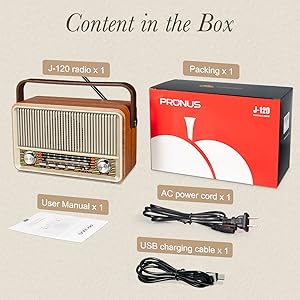
Image: Contents of the PRUNUS J-120 package.
4. ምርት አብቅቷልview
የPRUNUS J-120 ሬዲዮዎን መቆጣጠሪያዎች እና ወደቦች ይወቁ።
የፊት ፓነል መቆጣጠሪያዎች;
- የድምፅ ቁልፍ; Controls power ON/OFF and volume level.
- የማስተካከያ ቁልፍ፡ Adjusts radio frequency for AM/FM/SW bands.
- Band Selector Buttons: Switches between FM, AM, SW, Bluetooth, USB, TF, and AUX modes.
- መደወልን ይደውሉ የአሁኑን የሬዲዮ ድግግሞሽ ያሳያል።
የኋላ ፓነል ወደቦች;
- ቴሌስኮፒክ አንቴና፡ ለተሻሻለ የሬዲዮ አቀባበል።
- የኤሲ የኃይል ግቤት Connects to the AC power cord for wall power.
- የዲሲ 5V የኃይል መሙያ ወደብ (ዩኤስቢ-ሲ)፦ ውስጣዊውን ዳግም ሊሞላ የሚችል ባትሪ ለመሙላት።
- የዩኤስቢ ወደብ፡ For playing audio from a USB disk.
- የ TF ካርድ ማስገቢያ ከTF (MicroSD) ካርድ ኦዲዮ ለማጫወት።
- AUX ግቤት ጃክ ፦ ውጫዊ የድምጽ መሳሪያዎችን ለማገናኘት.

ምስል፡ ፊት ለፊት view of the PRUNUS J-120 radio with dimensions.
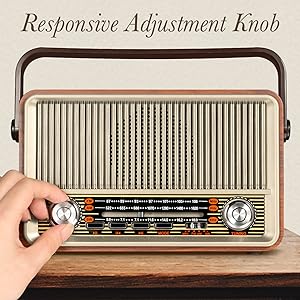
Image: Responsive Adjustment Knob.
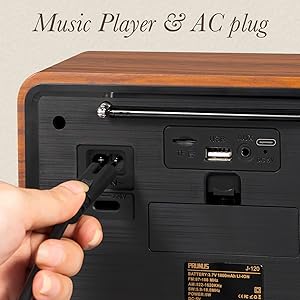
Image: AC power input and media ports.
5. ማዋቀር
5.1 ሬዲዮን ማብቃት
The PRUNUS J-120 offers two power options: AC power and a built-in rechargeable battery.
- የኤሲ ኃይል Connect the provided AC power cord to the AC input on the rear of the radio and plug it into a standard wall outlet.
- ዳግም ሊሞላ የሚችል ባትሪ፡ The radio has an internal 1800mAh rechargeable battery. To charge, connect the USB charging cable to the DC 5V charging port on the rear of the radio and a USB power source (e.g., computer, USB wall adapter). The charging indicator light will illuminate during charging.

Image: Two ways to supply power: AC plug-in and rechargeable battery.
Video: Demonstrates tuning the radio, connecting via Bluetooth, inserting a TF card, plugging in a USB disk, connecting an AUX cable, and charging the radio.
6. የአሠራር መመሪያዎች
6.1 ማብራት / ማጥፋት እና የድምጽ መቆጣጠሪያ
Rotate the Volume knob clockwise to turn the radio ON. Continue rotating to increase the volume. Rotate counter-clockwise to decrease volume and turn the radio OFF.
6.2 የሬዲዮ ሁነታ (AM/FM/SW)
- Press the corresponding band selector button (FM, AM, or SW) to choose your desired radio band.
- Extend the telescopic antenna for optimal reception, especially for FM and SW bands.
- Slowly rotate the Tuning knob to scan for stations. The tuning dial will indicate the frequency.

Image: Radio with extended antenna for great reception.
6.3 የብሉቱዝ ሁነታ
- Press the Bluetooth mode button. The radio will enter pairing mode, indicated by an audible prompt.
- በሞባይል መሳሪያዎ ላይ ብሉቱዝን ያንቁ እና የሚገኙ መሳሪያዎችን ይፈልጉ። ለማጣመር "PRUNUS J-120" ን ይምረጡ።
- አንዴ ከተጣመሩ በኋላ ከመሳሪያዎ ላይ ድምጽን በሬዲዮ ማጫወት ይችላሉ።

Image: Bluetooth connection setup.
6.4 USB Disk / TF Card Playback
- Insert a USB disk into the USB port or a TF (MicroSD) card into the TF card slot on the rear of the radio.
- Press the corresponding mode button (USB or TF) to switch to the playback mode.
- The radio will automatically detect and play audio files ከገባው የማከማቻ መሣሪያ.
6.5 AUX ግቤት
- Connect an external audio device (e.g., smartphone, MP3 player) to the AUX input jack on the rear of the radio using a 3.5mm audio cable (not included).
- Press the AUX mode button.
- ድምጽን ከውጫዊ መሳሪያዎ ያጫውቱ፣ እና ድምፁ በሬዲዮው ድምጽ ማጉያ በኩል ይወጣል።
7. ጥገና
- ማጽዳት፡ ሬዲዮውን ለስላሳ እና ደረቅ ጨርቅ ይጥረጉ. ገላጭ ማጽጃዎችን ወይም ፈሳሾችን አይጠቀሙ.
- የባትሪ እንክብካቤ የባትሪውን ዕድሜ ለማራዘም፣ ባትሪውን ሙሉ በሙሉ ደጋግሞ ከመሙላት ይቆጠቡ። ለረጅም ጊዜ አገልግሎት ላይ ባይውልም እንኳ ሬዲዮውን በመደበኛነት ቻርጅ ያድርጉ።
- ማከማቻ፡ When storing the radio for a long time, ensure it is fully charged and stored in a cool, dry place.
8. መላ መፈለግ
| ችግር | ሊሆን የሚችል ምክንያት | መፍትሄ |
|---|---|---|
| ሬዲዮ አይበራም። | Battery is depleted or AC power is not connected. | Connect the AC power cord or charge the internal battery. |
| ደካማ የሬዲዮ አቀባበል። | አንቴናው ያልተዘረጋ፣ ደካማ ምልክት ወይም ጣልቃ ገብነት የሌለው። | Extend the telescopic antenna fully. Try repositioning the radio. Avoid sources of electronic interference. |
| ብሉቱዝ አይገናኝም። | Radio not in pairing mode, device too far, or already connected to another device. | Ensure the radio is in Bluetooth mode and pairing. Move your device closer to the radio. Disconnect from other Bluetooth devices. |
| No sound from USB/TF/AUX. | Incorrect mode selected, file format not supported, or cable/device issue. | Ensure the correct mode (USB, TF, AUX) is selected. Check if audio files are in a supported format. Verify cable connections and external device functionality. |
9. ዝርዝሮች
| ባህሪ | ዝርዝር |
|---|---|
| የሞዴል ቁጥር | ጄ-120 |
| የምርት ልኬቶች | 9 x 3.9 x 5.2 ኢንች (L x W x H) |
| የእቃው ክብደት | 2.68 ፓውንድ |
| የግንኙነት ቴክኖሎጂ | ብሉቱዝ |
| መቃኛ ቴክኖሎጂ | AM/FM/SW |
| የሬዲዮ ባንዶች ይደገፋሉ | 3-Band (FM: 87-108MHz, AM: 522-1620KHz, SW: 5.9-18.0MHz) |
| የኃይል ምንጭ | Battery Powered (1800mAh rechargeable) / AC Power |
| የተካተቱ አካላት | Owner's Manual, AC Power Cord, USB Charging Cable |
10. ዋስትና እና ድጋፍ
The PRUNUS J-120 radio comes with a standard manufacturer's warranty. For specific warranty details, please refer to the warranty card included in your package or contact PRUNUS customer support.
If you encounter any issues or have questions regarding your product, please contact PRUNUS customer support through the retailer's platform or the official PRUNUS website. Please have your model number (J-120) and purchase information ready when contacting support.