
1. መግቢያ
This manual provides detailed instructions for the setup, operation, and maintenance of your Bmax B6 Power Mini PC. This compact desktop computer is designed for various applications, from office tasks to multimedia consumption, offering a balance of performance and space efficiency.

Image 1.1: The Bmax B6 Power Mini PC, showcasinግ የታመቀ ዲዛይኑ እና የፊት ወደቦቹ።
2. በሳጥኑ ውስጥ ያለው
ሁሉም እቃዎች መኖራቸውን ለማረጋገጥ እባክዎ የጥቅልዎን ይዘት ያረጋግጡ፡
- 1 x Bmax B6 Power Mini PC (16GB+1TB configuration)
- 1 x HDMI ገመድ
- 1 x የተጠቃሚ መመሪያ
- 1 x US Power Adapter
- 1 x VESA ማፈናጠጫ ከዊንች ጋር
3. ምርት አብቅቷልview
The Bmax B6 Power Mini PC is equipped with advanced components for efficient performance.

ምስል 3.1፡ አልቋልview of key features including processor, memory, storage, and connectivity.
3.1 ቁልፍ ባህሪያት
- ፕሮሰሰር፡ Intel Core i7-1060NG7, 4 Cores/8 Threads, up to 3.8GHz.
- ማህደረ ትውስታ፡ 16GB LPDDR4 ራም.
- ማከማቻ፡ 1TB NVMe SSD, with support for dual NVMe SSDs and expandable up to 2TB via 2.5" HDD (SATA cable included).
- ግራፊክስ፡ Intel Iris Xe Graphics, supporting 4K@60Hz output.
- የውጤት ማሳያ Supports three simultaneous displays via 2x HDMI 2.0 and 1x Full-Featured Type-C port.
- ገመድ አልባ ግንኙነት: Wi-Fi 6 (2.4G/5G 802.11a/b/g/n/ac) and Bluetooth 5.2.
- የገመድ ግንኙነት; 1x Gigabit Ethernet (RJ45).
- ወደቦች፡ 3x USB 3.0, 1x Full-Featured Type-C, 2x HDMI 2.0, 1x Earphone/Microphone Jack, 1x DC Power Input.
- ተጨማሪ ባህሪያት፡ VESA mount compatibility, Wake On LAN, PXE Boot, RTC Wake, Auto Power On, One-key Smart Recovery.

Image 3.2: Detailed diagram of the front and rear ports and their functions.
4. የማዋቀር መመሪያ
4.1 ማገናኛ ፔሪፈራል
- የግንኙነት ማሳያ; Use the provided HDMI cable to connect your monitor or TV to one of the HDMI ports on the Mini PC. Alternatively, use a compatible USB-C to display cable for the Type-C port.
- የቁልፍ ሰሌዳ እና መዳፊት ያገናኙ፡ Plug your USB keyboard and mouse into the available USB 3.0 ports. For wireless devices, ensure Bluetooth is enabled and pair them as per their instructions.
- አውታረ መረብን ያገናኙ (ከተፈለገ) For a wired internet connection, connect an Ethernet cable from your router or modem to the RJ45 port on the Mini PC.
- የግንኙነት ኃይል; Plug the US Power Adapter into the DC power input port on the Mini PC, then plug the adapter into a power outlet.
4.2 የመነሻ ኃይል በርቷል
- Ensure all peripherals are connected.
- በሚኒ ፒሲ ፊት ለፊት የሚገኘውን የኃይል ቁልፍ ተጫን።
- The system will boot up. Follow the on-screen instructions to complete the Windows setup process. It is recommended to keep the Ethernet cable unplugged during the first boot for faster setup if prompted.
5. የአሠራር መመሪያዎች
5.1 መሠረታዊ አሠራር
- ማብራት/ማጥፋት፡ Press the power button to turn on the PC. To turn off, use the Windows Shut Down option or press and hold the power button for 5 seconds.
- እንደገና ጀምር፥ Use the Windows Restart option.
- የእንቅልፍ ሁኔታ: Use the Windows Sleep option or briefly press the power button.
5.2 የማሳያ ውቅር
The Bmax B6 Power supports up to three 4K@60Hz displays simultaneously.
- Connect your displays to the available HDMI 2.0 ports and the Full-Featured Type-C port.
- In Windows, right-click on the desktop and select "Display settings" to configure multiple displays (extend, duplicate, or show only on one).

Image 5.1: Illustration of the Mini PC connected to multiple displays, demonstrating its multi-tasking capabilities.
5.3 የአውታረ መረብ ግንኙነት
- ዋይ ፋይ፡ ከገመድ አልባ አውታረመረብ ጋር ለመገናኘት በተግባር አሞሌው ላይ ያለውን የWi-Fi አዶ ጠቅ ያድርጉ፣ አውታረ መረብዎን ይምረጡ እና የይለፍ ቃሉን ያስገቡ።
- ኢተርኔት፡ If an Ethernet cable is connected, the PC will automatically establish a wired network connection.
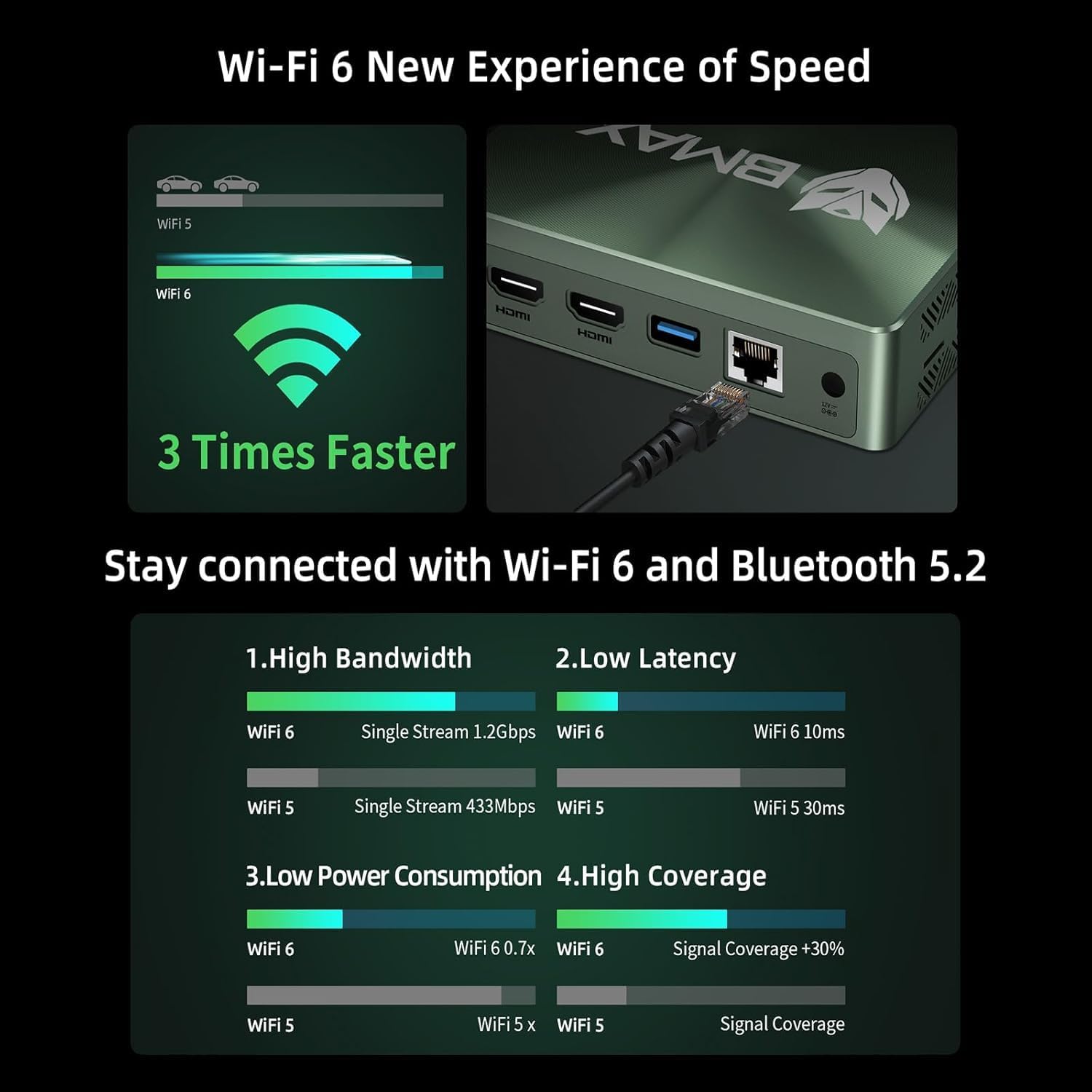
Image 5.2: Visual representation of Wi-Fi 6 and Bluetooth 5.2 capabilities, highlighting speed and connectivity benefits.
6. ጥገና
6.1 ጽዳት
- Ensure the Mini PC is powered off and unplugged before cleaning.
- ውጫዊውን ክፍል ለማጽዳት ለስላሳ እና ደረቅ ጨርቅ ይጠቀሙ.
- በአየር ማስገቢያዎች ውስጥ አቧራ እንዲከማች፣ የተጨመቀ አየር ይጠቀሙ። ነገሮችን ወደ አየር ማስገቢያዎቹ ውስጥ አያስገቡ።
6.2 የማከማቻ ማስፋፊያ
The Bmax B6 Power supports additional storage. You can install a second M.2 NVMe SSD or a 2.5-inch HDD/SSD.
- Refer to the detailed instructions in the included user manual for safe installation of additional storage devices.
- Ensure the device is powered off and unplugged before opening the chassis.

Image 6.1: Diagram illustrating the M.2 NVMe SSD slot and the option for expanded storage.
7. መላ መፈለግ
7.1 ምንም ኃይል የለም
- Check if the power adapter is securely connected to both the Mini PC and the power outlet.
- የኃይል ማመንጫው የሚሰራ መሆኑን ያረጋግጡ።
- የተለየ የኃይል መውጫ ይሞክሩ።
7.2 ምንም የማሳያ ውጤት የለም
- Verify that the HDMI or USB-C cable is securely connected to both the Mini PC and the monitor.
- ሞኒተሩ መብራቱን እና በትክክለኛው የግብዓት ምንጭ ላይ መዋቀሩን ያረጋግጡ።
- የተለየ የማሳያ ገመድ ይሞክሩ ወይም ካለ ይቆጣጠሩ።
7.3 System Recovery (One-key Smart Recovery)
If your Windows operating system encounters issues, the Bmax B6 Power features a "Smart Recovery" environment to restore factory settings.
- Step 1: Power On Mini PC.
- Step 2: Enter Recovery Mode. As soon as the screen lights up, immediately and repeatedly press the F9 key until the System Recovery menu appears.
- Step 3: Start the Recovery. ሁለት አማራጮች አሉዎት፡-
- Using Keyboard: Press the 'Y' key to begin the Factory Reset.
- Using Mouse: Click the [Restore System] button.
- Step 4: Set Up Windows Once Complete. You will be greeted by the initial Windows setup screen. Simply follow the on-screen instructions to set up your fresh system.

Image 7.1: Screenshot of the Bmax Smart Recovery environment, showing options for Factory Reset and Exit.
8. ዝርዝሮች
| ባህሪ | ዝርዝር |
|---|---|
| የምርት ስም | Bmax |
| የሞዴል ቁጥር | B6 ኃይል |
| ፕሮሰሰር | Intel Core i7-1060NG7 (4C/8T, up to 3.8 GHz) |
| ራም | 16 ጊባ LPDDR4 |
| ማከማቻ | 1 TB NVMe SSD (expandable up to 2 TB via 2.5" HDD/SSD) |
| ግራፊክስ | Intel Iris Xe ግራፊክስ (የተዋሃደ) |
| ከፍተኛው ማያ ገጽ ጥራት | 3840 x 2160 ፒክስል (4ኬ) |
| የማሳያ ውጤት | 2x HDMI 2.0, 1x Full-Featured Type-C (supports triple 4K@60Hz displays) |
| የገመድ አልባ ግንኙነት | Wi-Fi 6 (802.11a/b/g/n/ac)፣ ብሉቱዝ 5.2 |
| ባለገመድ ግንኙነት | 1x ጊጋቢት ኢተርኔት (RJ45) |
| የዩኤስቢ ወደቦች | 3x USB 3.0, 1x Full-Featured Type-C |
| ኦዲዮ | 1x Earphone/Microphone Jack |
| ስርዓተ ክወና | OS (Typically Windows, specific version may vary) |
| የእቃው ክብደት | 1.61 ፓውንድ |
| ቀለም | ጥቁር |
| ልዩ ባህሪያት | VESA Mount, Wake On LAN, PXE Boot, RTC Wake, Auto Power On, Smart Recovery |
9. ዋስትና እና ድጋፍ
Bmax provides comprehensive support for your Mini PC.
- ዋስትና፡- Your Bmax Mini PC comes with a 12-month warranty.
- ይመልሳል፡ A 30-day return policy is available.
- የደንበኛ አገልግሎት፡ 7x24-hour customer service support is provided.
- የቴክኒክ ድጋፍ; የዕድሜ ልክ የቴክኒክ ድጋፍ ይገኛል።
9.1 ድጋፍን እንዴት ማግኘት እንደሚቻል
For inquiries, system updates, or troubleshooting assistance, please contact customer service through your Amazon account:
- ወደ አማዞን ይግቡ።
- Go to "Your Account".
- ወደ "ትዕዛዞችዎ" ይሂዱ።
- Select the Bmax B6 Power Mini PC order and click "Ask Product Question".

Image 9.1: Information on contacting Bmax after-sales support via Amazon.