
1. መግቢያ
Thank you for choosing the SZELAM Projection Alarm Clock. This device combines a digital alarm clock with a rotatable time projector, an RGB night light, and convenient USB charging ports. This manual provides detailed instructions for setup, operation, and maintenance to ensure optimal performance and longevity of your product.

Image 1.1: The SZELAM Projection Alarm Clock displaying time on its mirror surface and projecting it onto a wall, with its RGB base light illuminated.
2. የጥቅል ይዘቶች
- SZELAM Projection Alarm Clock
- የዩኤስቢ ኃይል ገመድ
- የተጠቃሚ መመሪያ
3. ምርት አብቅቷልview
Familiarize yourself with the various components and features of your alarm clock.
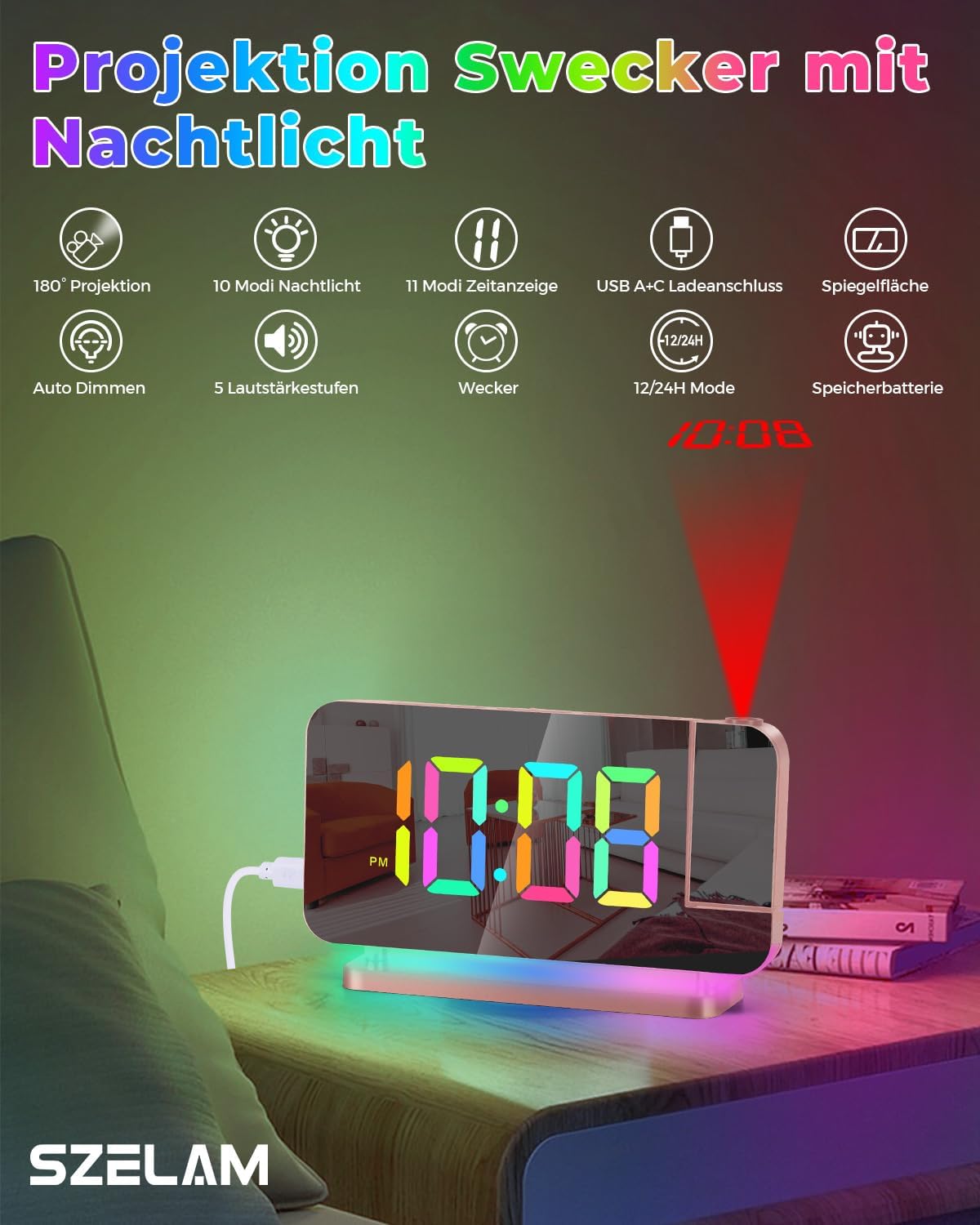
ምስል 3.1፡ አልቋልview of the alarm clock's features, including 180° projection, 10 night light modes, 11 time display modes, USB A+C charging ports, mirror surface, auto dimming, 5 volume levels, alarm function, 12/24H mode, and backup battery capability.
4. ማዋቀር
4.1 የኃይል ግንኙነት
- Connect the provided USB power cable to the USB-C input port on the back of the alarm clock.
- Plug the other end of the USB cable into a standard USB power adapter (not included) and then into a wall outlet.
- The clock display will illuminate, indicating it has power.
4.2 የመጀመሪያ ጊዜ አቀማመጥ
Upon initial power-up, the clock may display a default time. Refer to the 'Operating Instructions' section for detailed steps on setting the correct time and date.
5. የአሠራር መመሪያዎች
5.1 Time Display Settings
The clock features an 11-color RGB digital display with adjustable brightness.

Image 5.1: The clock display showcasing 11 different color modes for the time digits, along with options for auto dimming and 6 brightness levels.
- የማቀናበር ጊዜ፡ Press the 'SET' button to enter time setting mode. Use the '+' and '-' buttons to adjust hours and minutes. Press 'SET' again to confirm each step.
- የ12/24 ሰዓት ቅርጸት፡- In time setting mode, press the '12/24H' button to switch between 12-hour (with AM/PM indicator) and 24-hour formats.
- ብሩህነት አሳይ; Press the 'DIMMER' button repeatedly to cycle through 6 brightness levels or activate auto-dimming mode.
- የቀለም ማሳያ ሁነታዎች፡ Press the 'COLOR' button to cycle through 4 dynamic RGB colors and 7 fixed color modes for the digital display.
5.2 የማንቂያ ቅንብሮች
- ማንቂያ በማዘጋጀት ላይ፡ Press the 'ALARM' button to enter alarm setting mode. Use '+' and '-' to set the desired alarm time. Press 'ALARM' again to confirm.
- ማንቂያውን ማንቃት/ማሰናከል፡ Press the 'ALARM' button briefly outside of setting mode to toggle the alarm on or off. An alarm icon will appear/disappear on the display.
- የማሸለብ ተግባር When the alarm sounds, press the 'SNOOZE' button (usually a large button on top) to temporarily silence it for a set duration (e.g., 9 minutes). The alarm will sound again after the snooze period.
- የማቆሚያ ማንቂያ፡ To stop the alarm completely, press any other button (except 'SNOOZE') when it is sounding.
5.3 የፕሮጀክት ተግባር
The clock features a 180° rotatable projector to display time on your wall or ceiling.

Image 5.2: The 180° rotatable projector lens and examples of the four adjustable brightness levels for the projected time (Off, Dimmed, Medium, Bright).
- ትንበያን ማንቃት፡ Locate the projector lens on the side of the clock. Press the 'PROJECTOR' button to turn the projection on/off.
- የፕሮጀክሽን አንግል ማስተካከል፡ Manually rotate the projector lens up to 180° to direct the time display to your desired surface (wall or ceiling).
- የትንበያ ብሩህነት ማስተካከል፡ Press the 'PROJECTOR' button repeatedly to cycle through 4 brightness levels for the projected time.
- Flipping Projected Time: If the projected time appears upside down, press the 'FLIP' button (often combined with the projector button) to rotate the display 180°.
5.4 የሌሊት መብራት አሠራር
The alarm clock includes a built-in LED night light with multiple color modes.

Image 5.3: The clock's base illuminated with various dynamic RGB night light modes, demonstrating the 10 available color options and 5 adjustable brightness levels.
- ማብራት/ማጥፋት፡ Press the 'LIGHT' button to turn the night light on or off.
- ቀለሞችን መለወጥ; Press the 'LIGHT' button repeatedly to cycle through 3 dynamic RGB colors and 7 fixed color modes.
- ብሩህነትን ማስተካከል; Use the '+' and '-' buttons when the night light is active to adjust its brightness through 5 levels.
5.5 የዩኤስቢ ኃይል መሙያ ወደቦች
The clock is equipped with two USB output ports for charging external devices.
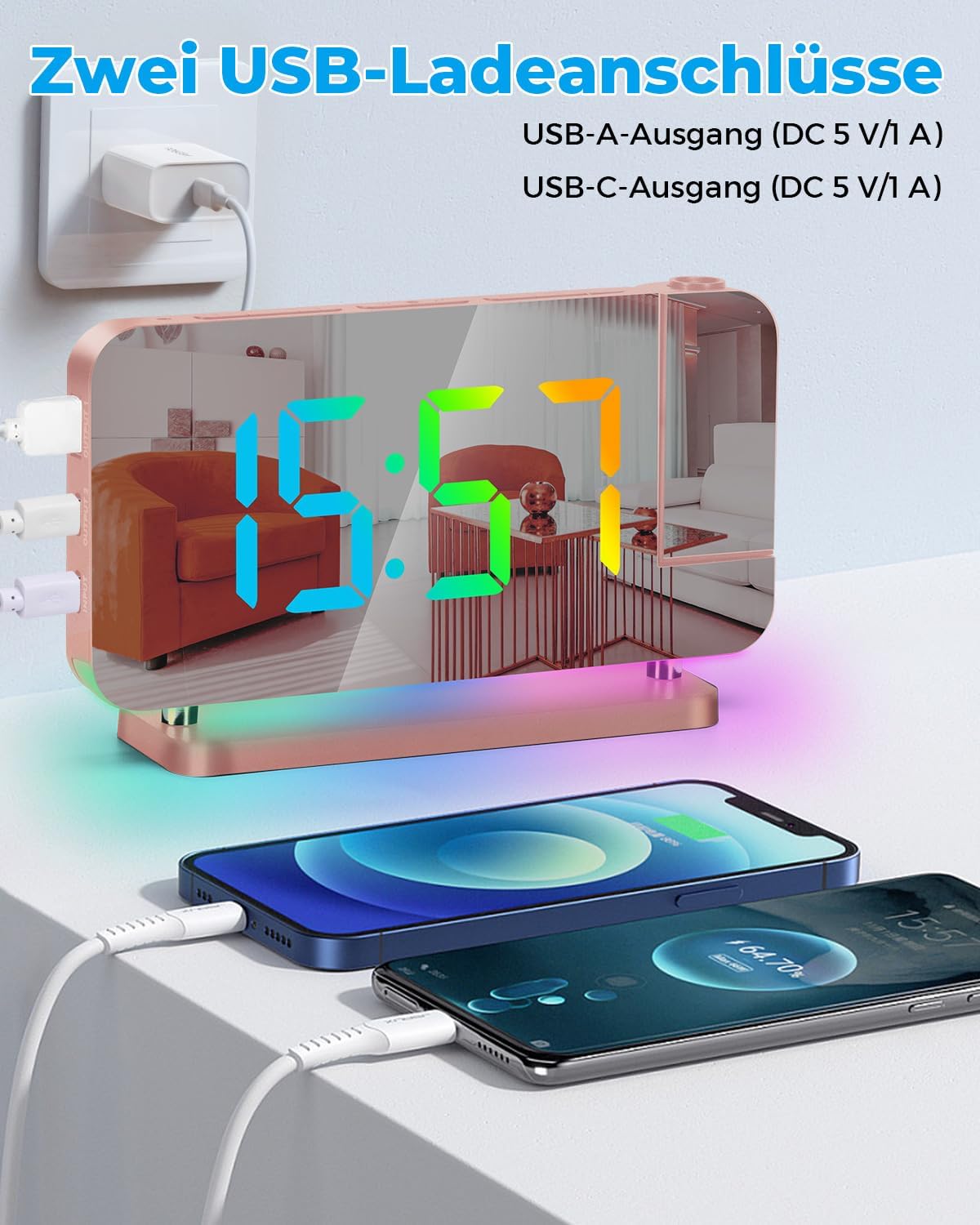
Image 5.4: The alarm clock featuring two USB charging ports, one USB-A and one USB-C, both providing 5V/1A output, shown charging two smartphones simultaneously.
- The clock includes one USB Type-C output port and one USB Type-A output port.
- Connect your electronic devices (e.g., smartphone, tablet) to these ports using their respective charging cables.
- Each port provides a 5V/1A output, allowing you to charge two devices simultaneously.
5.6 Mirror Display Function
The 7.4-inch LED display surface also functions as a mirror.

Image 5.5: The 7.4-inch LED mirror display of the alarm clock being used as a convenient makeup mirror.
- The acrylic mirror design allows the clock to double as a makeup mirror when not actively displaying time or when the display is dimmed.
6. ጥገና
- ማጽዳት፡ Use a soft, dry cloth to clean the surface of the clock. For stubborn marks on the mirror display, lightly dampen the cloth with water and wipe gently. Avoid abrasive cleaners or solvents.
- አቀማመጥ፡- ሰዓቱን በቀጥታ ከፀሀይ ብርሀን ፣ ከመጠን በላይ ሙቀት ወይም እርጥበት በማይኖርበት ጠፍጣፋ መሬት ላይ ያድርጉት።
- ኃይል፡- Always use the provided USB cable and a compatible power adapter. Disconnect power during thunderstorms or when not in use for extended periods.
7. መላ መፈለግ
| ችግር | ሊሆን የሚችል ምክንያት | መፍትሄ |
|---|---|---|
| የሰዓት ማሳያ ጠፍቷል ወይም ብልጭ ድርግም የሚል ነው። | ምንም ኃይል ወይም ልቅ ግንኙነት. | የዩኤስቢ ገመዱ ደህንነቱ በተጠበቀ ሁኔታ መገናኘቱን እና የኃይል አስማሚው በሚሰራ ሶኬት ውስጥ መሰካቱን ያረጋግጡ። |
| Projection is blurry or too dim. | Incorrect distance or brightness setting. | Adjust the distance of the clock from the projection surface (effective distance 1.64-11.4 feet / 0.5-3m). Press the 'PROJECTOR' button to increase brightness. |
| ማንቂያ አይሰማም። | ማንቂያ አልነቃም ወይም በስህተት አልተቀናበረም። | Verify the alarm time is set correctly and the alarm icon is visible on the display. |
| የዩኤስቢ ባትሪ መሙያ ወደቦች እየሰሩ አይደሉም። | መሣሪያው ተኳሃኝ አይደለም ወይም የኬብል ችግር። | Ensure your device is compatible with 5V/1A charging. Try a different USB cable. Confirm the clock is powered on. |
| Time display colors are not changing. | ትክክል ያልሆነ ሁነታ ተመርጧል። | Press the 'COLOR' button repeatedly to cycle through the available color modes. |
8. ዝርዝሮች
| ባህሪ | ዝርዝር |
|---|---|
| የምርት ስም | SZELAM |
| የማሳያ ዓይነት | Digital LED (7.4-inch) |
| ትንበያ | 180° Rotatable, 4 Brightness Levels, 0.5-3m Effective Distance |
| Time Display Colors | 11 modes (4 dynamic RGB + 7 fixed), 6 Brightness Levels + Auto Dimming |
| የምሽት ብርሃን ቀለሞች | 10 modes (3 dynamic RGB + 7 fixed), 5 Brightness Levels |
| ወደቦች መሙላት | 1x USB-C Output (5V/1A), 1x USB-A Output (5V/1A) |
| የኃይል ምንጭ | ባለገመድ ኤሌክትሪክ |
| ቁሳቁስ | አክሬሊክስ |
| መጠኖች (በግምት) | ለትክክለኛ ልኬቶች የምርት ማሸጊያዎችን ይመልከቱ። |
| ክብደት | 1 Ounce (approximate) |
| የክፍል አይነት | መኝታ ቤት |
9. ዋስትና እና ድጋፍ
This product is covered by a standard manufacturer's warranty. For specific warranty details, please refer to the warranty card included with your purchase or contact SZELAM customer support. If you encounter any issues or have questions regarding your SZELAM Projection Alarm Clock, please reach out to our customer service team for assistance.
Contact information for support can typically be found on the product packaging or the official SZELAM webጣቢያ.