
መግቢያ
Thank you for choosing the Vieta Pro Karaoke Party Microphone. This device combines a high-quality microphone with an integrated speaker, designed for an engaging karaoke experience. It features True Wireless technology, allowing two microphones to connect to a single device, and offers various sound modes and connectivity options.
የጥቅል ይዘቶች
- Vieta Pro Karaoke Party Microphone with Integrated Speaker
- የኃይል መሙያ ገመድ (ዩኤስቢ-ሲ)
- የተጠቃሚ መመሪያ

Image: The retail box of the Vieta Pro Karaoke Party Microphone, showing the product and its features.
ምርት አልቋልview
Familiarize yourself with the main components and controls of your Vieta Pro Karaoke Party Microphone.

ምስል፡ ፊት ለፊት view of the Vieta Pro Karaoke Party Microphone, highlighting the control buttons for power, volume, mode, and Bluetooth.
መቆጣጠሪያዎች እና ወደቦች;
- የኃይል ቁልፍ፡- ለማብራት/ለማጥፋት ተጭነው ይያዙ። ሁነታዎችን ለመቀየር አጭር ይጫኑ።
- የድምጽ አዝራሮች (+/-): የድምፅ ማጉያውን መጠን ያስተካክሉ።
- ሁነታ አዝራር (ኤም)፦ Cycle through sound effects or modes.
- የብሉቱዝ አዝራር፡- የብሉቱዝ ማጣመርን ያስጀምሩ።
- ዩኤስቢ-ሲ ወደብ መሣሪያውን ለመሙላት.
- 3.5mm Audio Jack (Input): ውጫዊ የድምጽ ምንጮችን ያገናኙ.
- 3.5mm Audio Jack (Output): የጆሮ ማዳመጫዎችን ወይም የውጭ ድምጽ ማጉያዎችን ያገናኙ ፡፡
- የብርሃን ሁነታ ቁልፍ Change or turn off LED lighting effects.
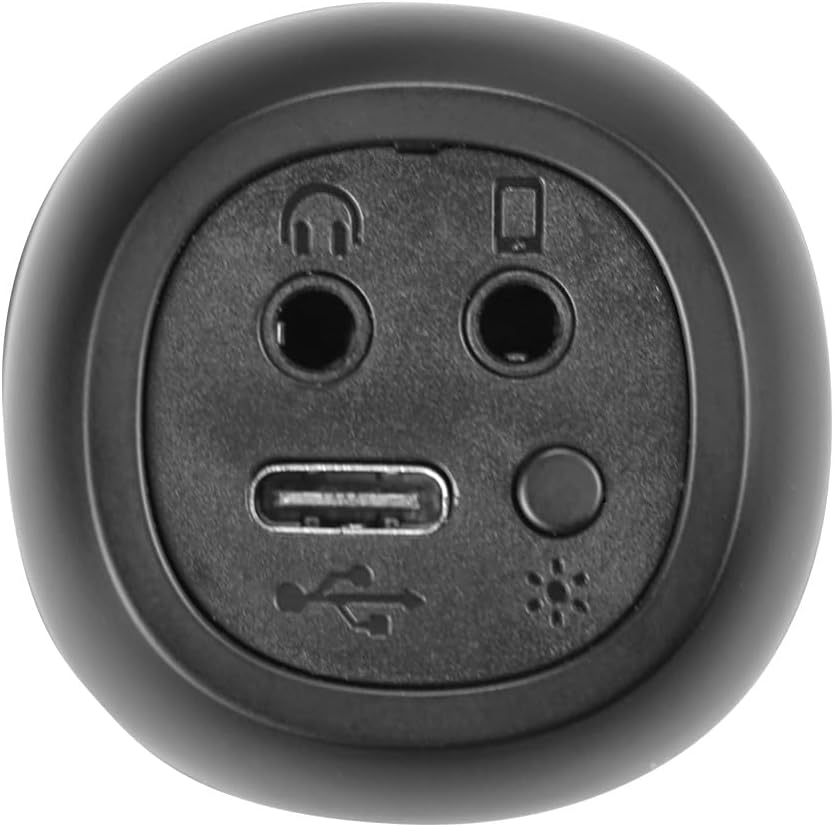
ምስል፡ መቀራረብ view of the bottom of the microphone, showing the USB-C charging port, 3.5mm audio input/output jacks, and the light mode button.
ማዋቀር እና ግንኙነት
1. ማይክሮፎኑን መሙላት
Before first use, fully charge the microphone. Connect the provided USB-C cable to the microphone's USB-C port and the other end to a USB power adapter (not included) or a computer's USB port. The battery indicator light will show charging status.
2. ማብራት / ማጥፋት
ተጭነው ይያዙት። የኃይል አዝራር for approximately 3 seconds to turn the microphone on or off. A sound prompt will indicate the power status.
3. የብሉቱዝ ማጣመር
- Turn on the microphone. It will automatically enter Bluetooth pairing mode, indicated by a flashing Bluetooth light.
- በስማርትፎንዎ፣ በጡባዊዎ ወይም በኮምፒውተርዎ ላይ ብሉቱዝን ያንቁ እና የሚገኙ መሳሪያዎችን ይፈልጉ።
- Select "Vieta Pro Karaoke Party" from the list of devices.
- Once connected, a sound prompt will confirm successful pairing, and the Bluetooth light will stop flashing.
4. True Wireless Connection (Connecting Two Microphones)
To use two Vieta Pro Karaoke Party microphones simultaneously with one device:
- Ensure both microphones are powered on and not connected to any other Bluetooth device.
- On one microphone (this will be the primary), double-press the የብሉቱዝ ቁልፍ. It will enter True Wireless pairing mode.
- The primary microphone will search for the second microphone. Once connected, a sound prompt will confirm the True Wireless connection.
- Now, connect the primary microphone to your device via Bluetooth as described in step 3. Both microphones will now output audio from your device.

Image: Two individuals holding and using Vieta Pro Karaoke Party Microphones, demonstrating the True Wireless feature.
5. ባለገመድ ግንኙነት (AUX)
Connect an external audio source (e.g., MP3 player) to the microphone using a 3.5mm audio cable (not included) plugged into the 3.5mm audio input jack.
የአሠራር መመሪያዎች
1. የድምጽ መጠን ማስተካከል
የሚለውን ተጠቀም ጥራዝ + እና ጥራዝ - buttons on the microphone to adjust the speaker output volume. You can also control the volume from your connected device.
2. Changing Sound Modes/Effects
የሚለውን ይጫኑ ሁነታ አዝራር (ኤም) repeatedly to cycle through the four available sound configuration modes or voice effects. Experiment to find your preferred sound.
3. Voice Reduction Feature
This feature allows you to reduce the vocal track of a song, making it easier to sing along. To activate or deactivate this feature, refer to the specific instructions in the full manual or experiment with the ሁነታ አዝራር (ኤም) or a dedicated button if present (not explicitly detailed in provided data, but mentioned as a feature).
4. መቅዳት
The microphone supports one-touch recording. Connect the microphone to a compatible recording device (e.g., smartphone with a recording app) via Bluetooth or the 3.5mm output jack. Press the dedicated ቀረጻ አዝራር (if available, or refer to the full manual for specific button assignment) to start and stop recording.
5. የ LED የመብራት ውጤቶች
የሚለውን ይጫኑ የብርሃን ሁነታ አዝራር (located near the ports at the bottom) to change the LED lighting patterns or turn them off.

Image: Close-up of the Vieta Pro Karaoke Party Microphone's speaker grille, showing the integrated LED lighting effects.
ጥገና
- ማጽዳት፡ Use a soft, dry cloth to clean the microphone's surface. Do not use abrasive cleaners or solvents.
- ማከማቻ፡ ማይክሮፎኑን በቀጥታ ከፀሀይ ብርሀን እና ከከፍተኛ ሙቀት ርቆ በቀዝቃዛና ደረቅ ቦታ ያከማቹ።
- የባትሪ እንክብካቤ የባትሪ ዕድሜን ለማራዘም በተደጋጋሚ ባትሪውን ሙሉ በሙሉ ከመሙላት ይቆጠቡ። ምንም እንኳን ለረጅም ጊዜ ጥቅም ላይ ባይውልም መሣሪያውን በመደበኛነት ኃይል ይሙሉ።
- የውሃ መጋለጥ; ይህ መሳሪያ ውሃ የማይገባ ነው። ለውሃ ወይም ለከፍተኛ እርጥበት መጋለጥን ያስወግዱ.
መላ መፈለግ
| ችግር | ሊሆን የሚችል ምክንያት | መፍትሄ |
|---|---|---|
| ኃይል የለም | ባትሪው ተሟጧል። | የዩኤስቢ-ሲ ገመድ ተጠቅመው ማይክሮፎኑን ቻርጅ ያድርጉ። |
| በብሉቱዝ መገናኘት አልተቻለም | Bluetooth is off on the device; microphone is already connected to another device; microphone is out of range. | Ensure Bluetooth is enabled on your device. Disconnect from other devices. Move microphone closer to your device (within 10 meters). Restart both devices. |
| ምንም የድምፅ ውፅዓት የለም። | Volume is too low; microphone is muted; incorrect input source. | Increase volume on both the microphone and your connected device. Check if the microphone is in the correct operating mode. |
| True Wireless connection fails | One or both microphones are already paired; microphones are too far apart. | Ensure both microphones are unpaired from other devices. Place them close to each other during True Wireless pairing. Follow True Wireless pairing steps carefully. |
ዝርዝሮች
| ባህሪ | ዝርዝር |
|---|---|
| የሞዴል ስም | Karaoke Party |
| የምርት ስም | ቪዬታ ፕሮ |
| የግንኙነት ቴክኖሎጂ | ትሩ ገመድ አልባ፣ ብሉቱዝ |
| የማገናኛ አይነት | ዩኤስቢ-ሲ ፣ 3.5 ሚሜ ጃክ |
| የኃይል ውፅዓት | 18 ዋ |
| የባትሪ ህይወት | እስከ 10 ሰዓታት ድረስ |
| የባትሪ ዓይነት | 1 ሊቲየም-አዮን (የተጨመረ) |
| የድግግሞሽ ክልል | ከ 50 እስከ 15,000 ኸርዝ |
| እክል | 600 ኦኤም |
| የዋልታ ንድፍ | ባለአንድ አቅጣጫ |
| ተስማሚ መሣሪያዎች | የግል ኮምፒተር, ስማርትፎን |
| ልዩ ባህሪያት | Volume Control, 1-Touch Recording, Lighting Modes, Battery Indicator, Radio |
| ክብደት | 337 ግራም |
| ቁሳቁስ | ፕላስቲክ |
ዋስትና እና ድጋፍ
For warranty information and technical support, please contact the manufacturer, FRAMASON AUDIO SA, or your local retailer. Keep your proof of purchase for any warranty claims.
Manufacturer: FRAMASON AUDIO SA


