
መግቢያ
Thank you for choosing the TECKNET Wireless Rechargeable Silent Mouse. This manual provides detailed instructions to help you get the most out of your new device. Please read it carefully before use and keep it for future reference.
የጥቅል ይዘቶች
- TECKNET Wireless Rechargeable Silent Mouse
- የዩኤስቢ ተቀባይ
- የዩኤስቢ-ሲ ኃይል መሙያ ገመድ
- የተጠቃሚ መመሪያ (ይህ ሰነድ)
ምርት አልቋልview
ከመዳፊት ክፍሎች ጋር እራስዎን ይወቁ፡
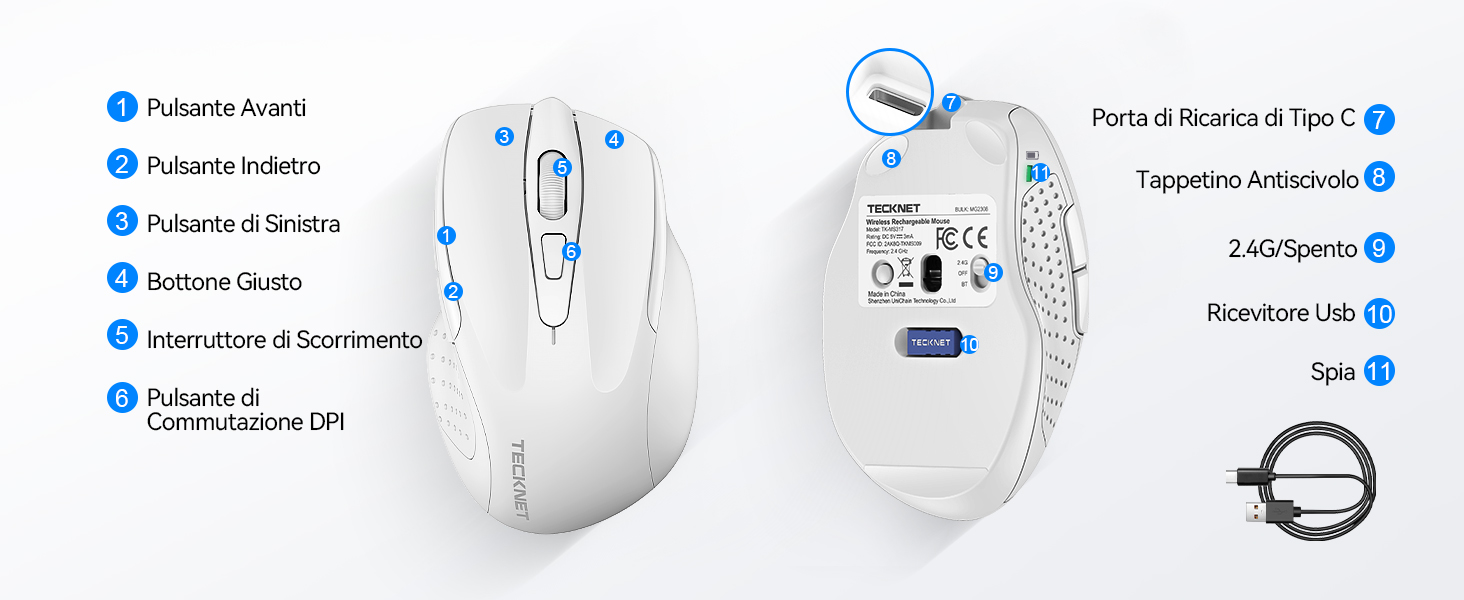
ምስል 1፡ የመዳፊት ክፍሎች ዲያግራም
- የማስተላለፊያ አዝራር
- የኋላ አዝራር
- የግራ አዝራር
- የቀኝ አዝራር
- የሸብልል ጎማ
- የዲፒአይ መቀየሪያ ቁልፍ
- ዓይነት-ሲ ባትሪ መሙያ ወደብ
- ፀረ-ተንሸራታች ፓድ
- 2.4G/Off Switch
- የዩኤስቢ ተቀባይ ማከማቻ
- አመልካች ብርሃን
የማዋቀር መመሪያዎች
1. አይጤውን በመሙላት ላይ
ለመጀመሪያ ጊዜ ጥቅም ላይ ከመዋሉ በፊት መዳፊቱን ሙሉ በሙሉ መሙላት ይመከራል። የተሰጠውን የዩኤስቢ-ሲ የኃይል መሙያ ገመድ ከመዳፊቱ ዓይነት-ሲ የኃይል መሙያ ወደብ እና ሌላኛውን ጫፍ ከዩኤስቢ የኃይል ምንጭ (ለምሳሌ የኮምፒውተር ዩኤስቢ ወደብ፣ የዩኤስቢ ግድግዳ አስማሚ) ጋር ያገናኙ።

The mouse features a 700mAh built-in battery, providing extended usage on a single charge. The indicator light will show charging status.
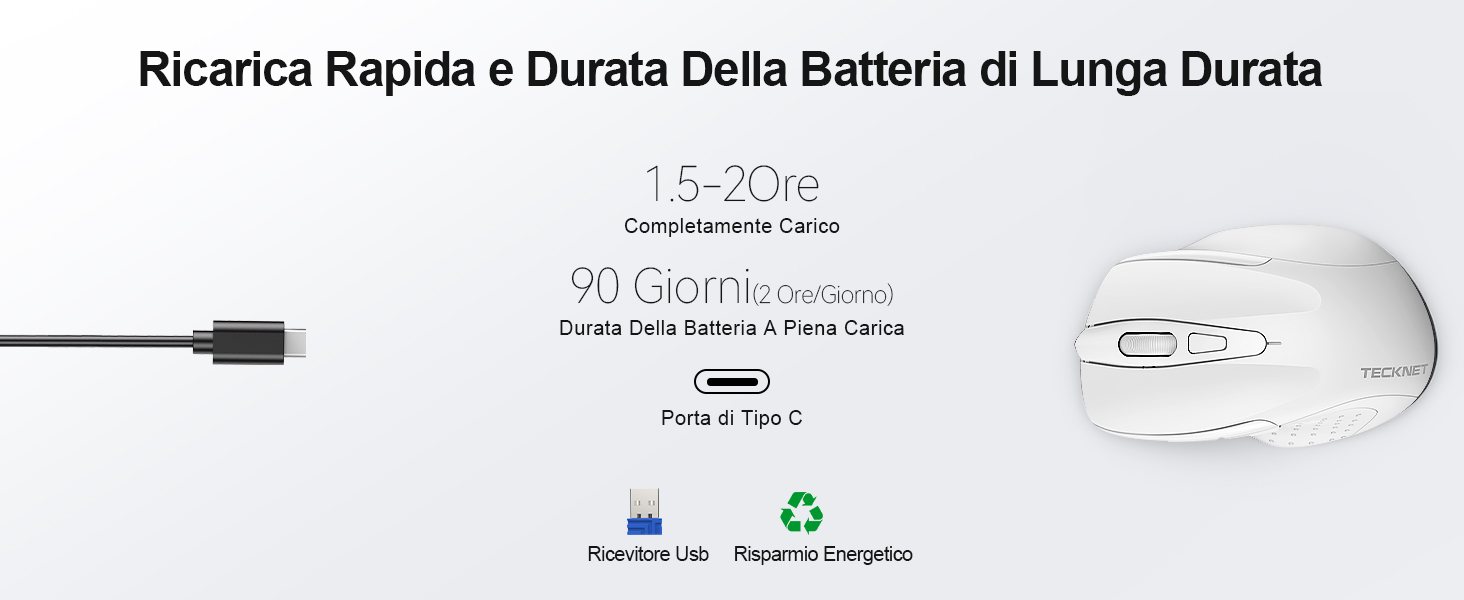
A full charge takes approximately 1.5-2 hours and can last up to 90 days (based on 2 hours/day usage).
2. የዩኤስቢ ተቀባይን በማገናኘት ላይ
The mouse uses a 2.4GHz wireless connection for reliable data transmission.
- በመዳፊት ግርጌ ላይ ባለው ክፍል ውስጥ የተቀመጠውን የዩኤስቢ ተቀባይ ያግኙ።
- Plug the USB receiver into an available USB port on your computer (PC, laptop, Chromebook, etc.).
- Turn on the mouse using the 2.4G/Off switch located on the underside.
- Your computer should automatically detect and install the necessary drivers. The mouse is plug-and-play, requiring no additional software.

The effective working distance is up to 15 meters.

Ensure the mouse is switched on after plugging in the receiver.
የአሠራር መመሪያዎች
የዲፒአይ ማስተካከያ
The mouse features 6 adjustable DPI levels (800/1200/1600/2400/3200/4800) to suit various tasks, from precise targeting to fast gaming movements. Press the DPI switch button (Component 6 in Figure 1) to cycle through the DPI settings.

Adjust DPI for optimal cursor speed and precision.
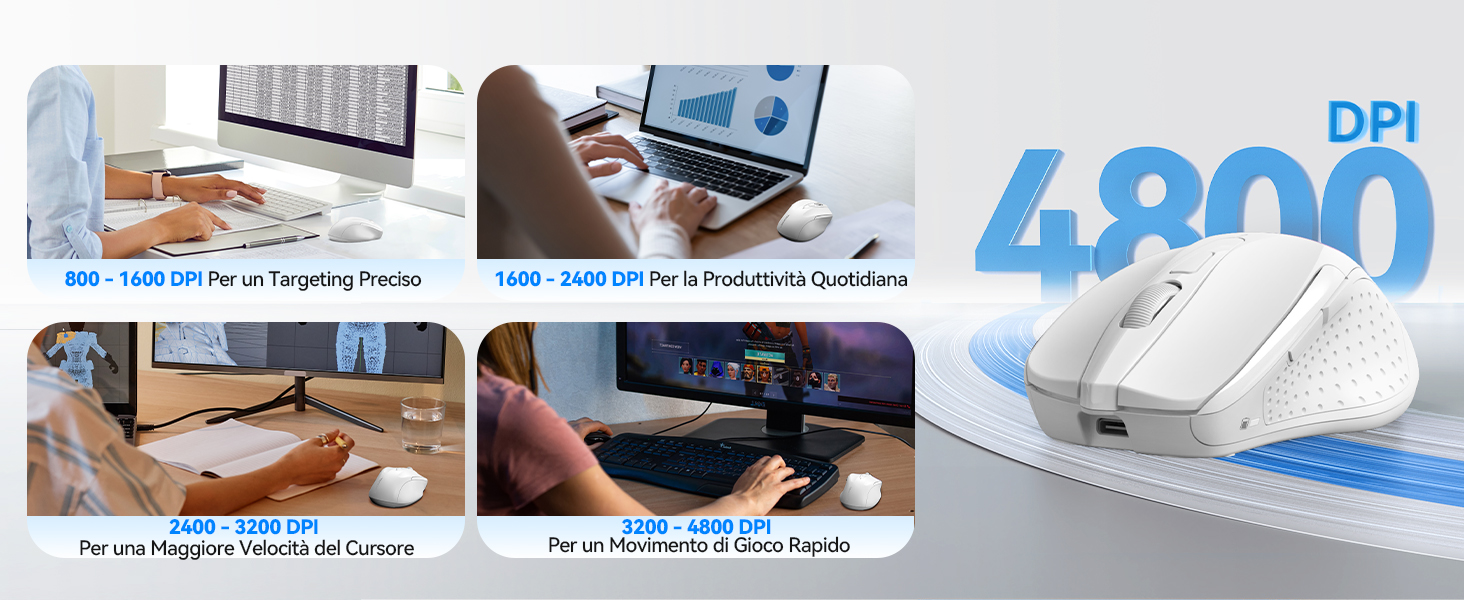
DPI settings for different usage scenarios.
ጸጥ ያለ የጠቅታ ባህሪ
The mouse is designed for silent operation, reducing click noise by up to 90%. This allows for a quiet working environment without disturbing others.

Enjoy a quiet working experience.
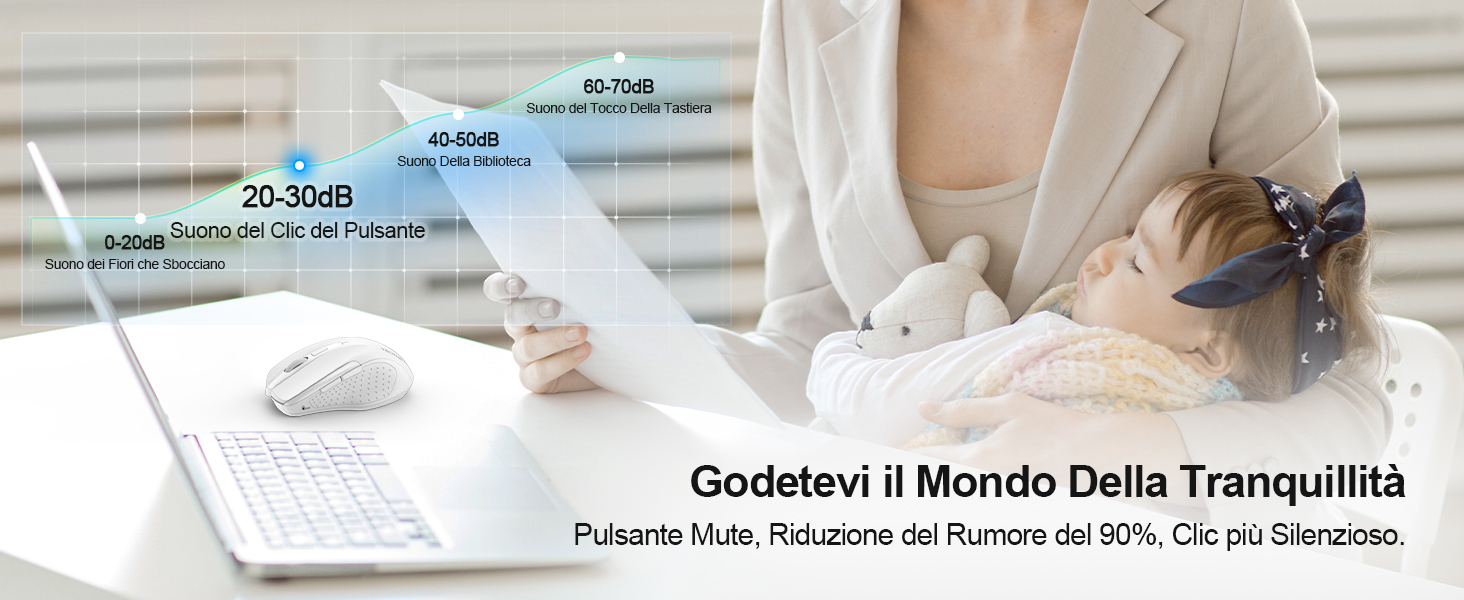
Sound level comparison demonstrating reduced click noise.
Ergonomic ንድፍ
The mouse is ergonomically designed to fit the natural curvature of your hand, reducing muscle pressure by up to 30% and ensuring comfortable use for extended periods. Soft natural rubber grips on the sides provide a secure and comfortable hold.

Ergonomic shape for comfortable use.
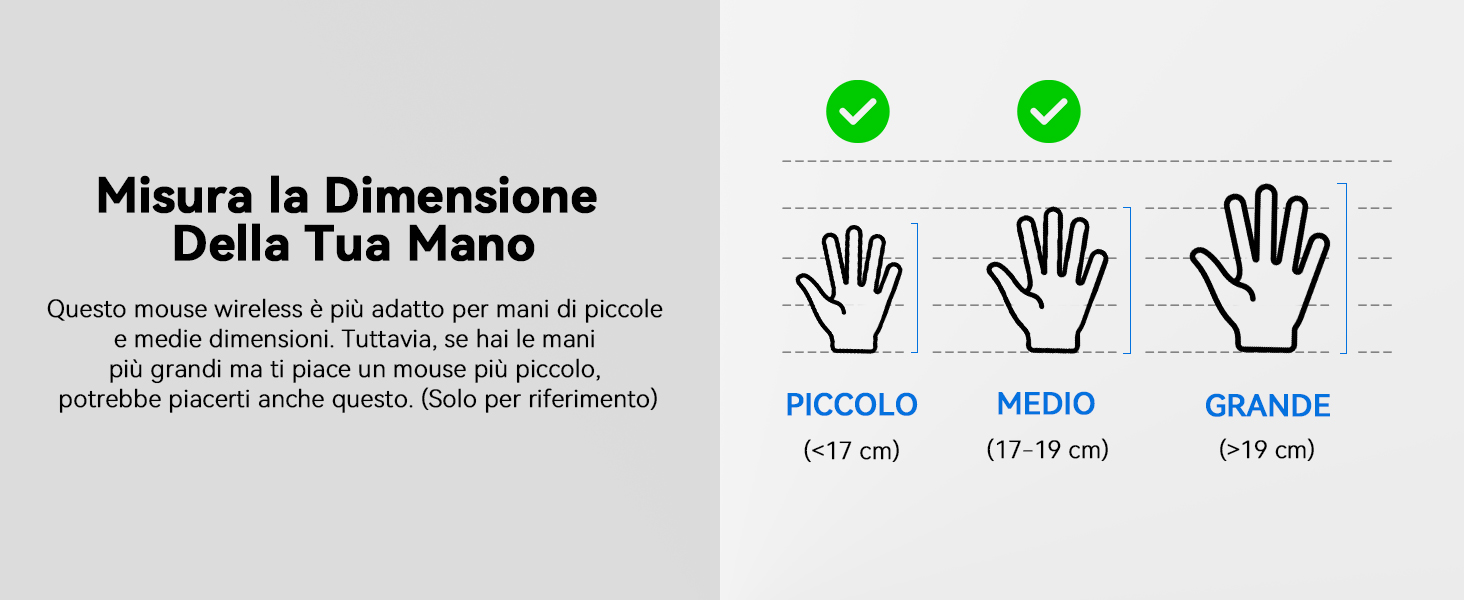
This mouse is suitable for small to medium hand sizes. Refer to the guide for reference.
የኃይል ቁጠባ ባህሪዎች
The mouse includes intelligent power-saving features:
- ራስ-ሰር እንቅልፍ ሁነታ; If inactive for 10 seconds, the mouse enters standby mode. After 10 minutes of inactivity, it enters deep sleep mode to conserve battery.
- የመቀስቀስ ተግባር; አይጤውን ከእንቅልፍ ሁኔታ ለማነቃቃት ማንኛውንም ቁልፍ ይጫኑ።
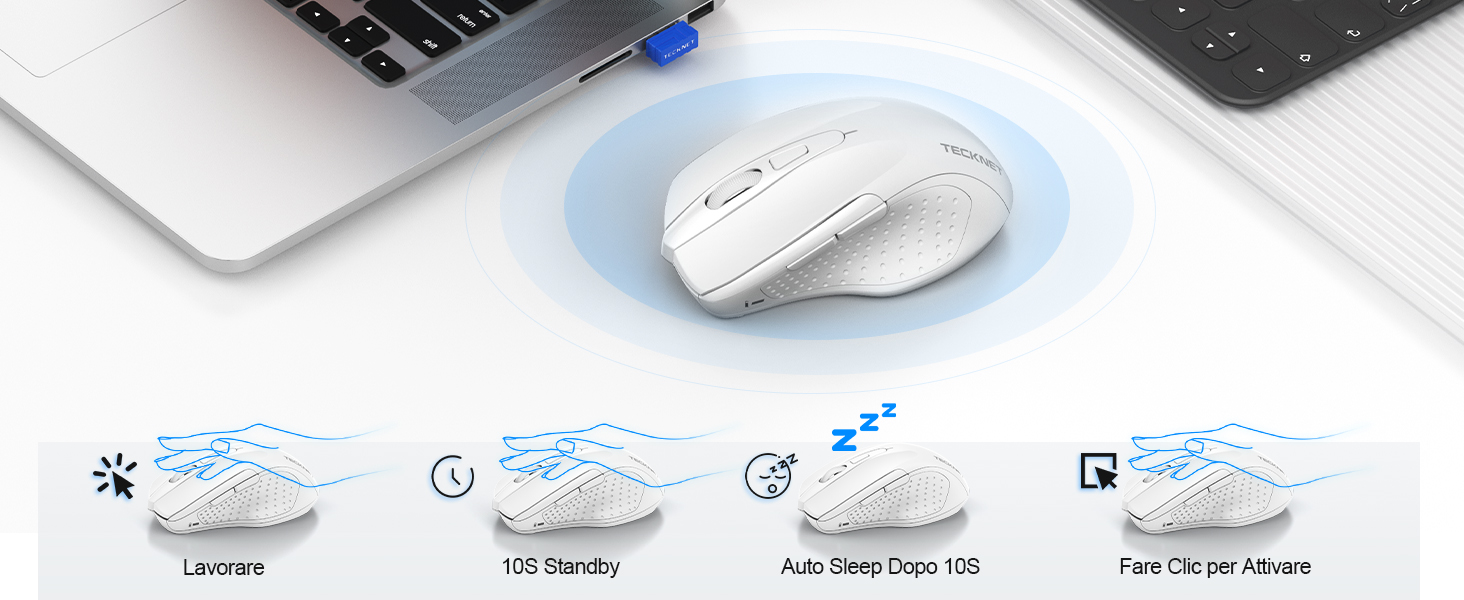
Power saving modes for extended battery life.
ጥገና
- ማጽዳት፡ አይጤውን ለማጽዳት ለስላሳ እና ደረቅ ጨርቅ ይጠቀሙ. ለግትር ቆሻሻ, ትንሽ መamp ጨርቅ መጠቀም ይቻላል፣ ይህም እርጥበት ወደ መሳሪያው እንዳይገባ ያረጋግጣል።
- በመሙላት ላይ፡ Recharge the mouse when the indicator light signals low battery. Avoid completely draining the battery frequently to prolong its lifespan.
- ማከማቻ፡ When not in use for extended periods, turn off the mouse and store the USB receiver in its designated compartment.
መላ መፈለግ
| ችግር | ሊሆን የሚችል ምክንያት | መፍትሄ |
|---|---|---|
| አይጥ ምላሽ እየሰጠ አይደለም። | Low battery; USB receiver not connected; Mouse switched off; Driver issue. | Charge the mouse; Ensure USB receiver is securely plugged in; Turn on the mouse; Try a different USB port; Restart computer. |
| የማያቋርጥ ግንኙነት ወይም መዘግየት | Interference from other wireless devices; Distance from receiver; Obstructions. | Move closer to the receiver; Remove obstructions; Avoid using near other 2.4GHz devices; Try a different USB port. |
| Cursor movement is erratic or imprecise | የቆሸሸ የኦፕቲካል ዳሳሽ; ተስማሚ ያልሆነ ገጽ; የተሳሳተ የዲፒአይ ቅንብር። | Clean the optical sensor; Use a mouse pad or a smooth, non-reflective surface; Adjust DPI settings. |
| Mouse does not charge | Faulty charging cable; Faulty USB port; Mouse issue. | Try a different USB-C cable; Try a different USB power source; Contact customer support if the issue persists. |
ዝርዝሮች
| የምርት ስም | TECNET |
| የሞዴል ቁጥር | TK-MS009 |
| ቀለም | ነጭ |
| የግንኙነት ቴክኖሎጂ | 2.4GHz ገመድ አልባ (USB ተቀባይ) |
| ልዩ ባህሪያት | Rechargeable, Long Battery Life, Silent Click, Ergonomic Design |
| የእንቅስቃሴ ማወቂያ ቴክኖሎጂ | ኦፕቲካል |
| የአዝራሮች ብዛት | 6 |
| የእጅ አቀማመጥ | ቀኝ እጅ |
| ተስማሚ መሣሪያዎች | Laptop, PC, Chromebook, Computer |
| ስርዓተ ክወናዎች | Windows 11/10/8.1/8/7/Vista/XP, Linux, Mac OS (side buttons not available on Mac OS) |
| አማካይ የባትሪ ህይወት | 1050 Hours (approx. 1-2 months on 2-hour charge) |
| ከፍተኛ ትብነት | 4800 ዲፒአይ |
| ገመድ አልባ ክልል | 15 ሜትር |
| ልኬቶች (L x W) | 10.6L x 6.8 ዋ ሴሜ |
| ቁሳቁስ | ፕላስቲክ |
ዋስትና እና ድጋፍ
TECKNET offers a የ 36-ወር ዋስትና for registered users. If you encounter any issues during the use of your mouse, please contact our professional customer service team as soon as possible. We are committed to assisting you in resolving any problems.
For support, please visit the official TECKNET webጣቢያ ወይም ከምርት ማሸጊያ ጋር የቀረበውን የእውቂያ መረጃ ይመልከቱ።
የመስመር ላይ መርጃዎች፡-