
1. ምርት አብቅቷልview
This manual provides instructions for the Govee Smart Lighting System, a bundle including Govee Smart Light Bulbs and Govee Smart LED Light Bars. This system offers versatile lighting solutions with smart control capabilities, music synchronization, and voice assistant compatibility.
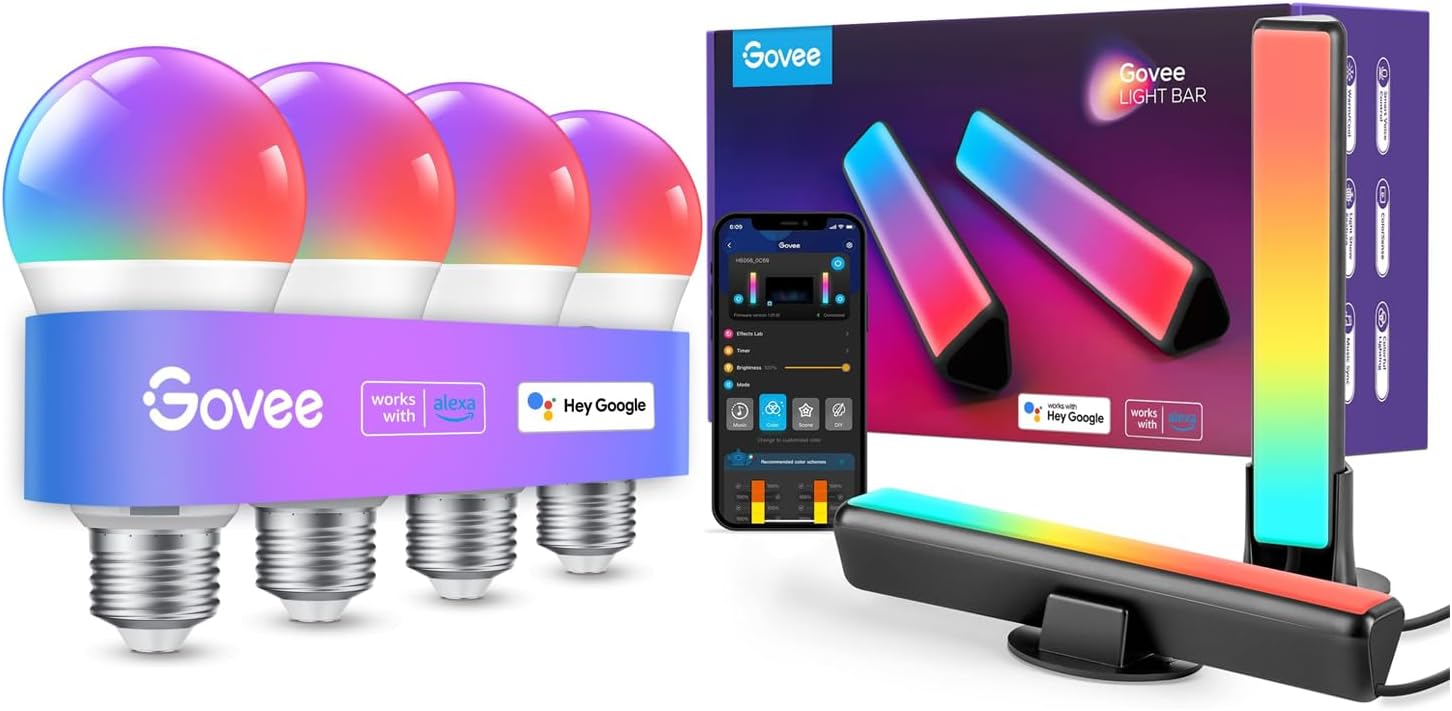
Figure 1.1: Govee Smart Light Bulbs and LED Light Bars, showcasing the complete bundle with packaging and app interface.
2. ማዋቀር እና መጫን
2.1 ማሸግ እና የመጀመሪያ ምርመራ
Carefully remove all components from the packaging. Verify that all items listed in the product contents are present and undamaged. The bundle includes Govee Smart Light Bulbs and Govee Smart LED Light Bars.
2.2 Installing Govee Smart Light Bulbs
- ከመጫንዎ በፊት የመብራት መሳሪያው ኃይል መጥፋቱን ያረጋግጡ።
- Screw the Govee Smart Light Bulb into a standard E26 light socket.
- Turn on the power to the light fixture. The bulb should flash, indicating it is in pairing mode.
2.3 Installing Govee Smart LED Light Bars
The Govee Smart LED Light Bars offer versatile placement options. They can be laid flat, stood vertically, or mounted behind a monitor or TV.
- Choose your desired placement:
- ጠፍጣፋ; Place the light bars horizontally on a surface.
- Stand Vertically: Attach the included stands to the light bars and place them upright.
- Mount Behind Monitor/TV: Use the included brackets to secure the light bars to the back of your display. Ensure the surface is clean and dry before applying adhesive mounts, if applicable.
- Connect the light bars to the power adapter and plug it into a power outlet.
2.4 Connecting to Govee Home App
- አውርድ የ Govee መነሻ መተግበሪያ ከመተግበሪያ መደብር (iOS) ወይም ከGoogle Play መደብር (አንድሮይድ)።
- Open the Govee Home App and create an account or log in.
- አዲስ መሳሪያ ለመጨመር ከላይ በቀኝ ጥግ ላይ ያለውን የ"+" አዶ ይንኩ።
- Select "Light Bulbs" or "Light Bars" from the device list. The app will automatically scan for nearby Govee devices.
- Follow the on-screen instructions to connect your devices to your Wi-Fi network. Ensure your Wi-Fi network is 2.4GHz.

Figure 2.1: Govee Home App interface demonstrating smart app control features like segmented color control and brightness adjustment for the light bars.
2.5 Pairing with Voice Assistants (Alexa/Google Assistant)
- Ensure your Govee devices are successfully connected to the Govee Home App and your Wi-Fi network.
- Open the Alexa App or Google Home App on your smartphone.
- ለአሌክሳ፦ Go to "Skills & Games," search for "Govee Home," enable the skill, and link your Govee account.
- ለጉግል ረዳት Go to "Set up device," then "Works with Google," search for "Govee Home," and link your Govee account.
- Once linked, discover devices. Your Govee lights should now be controllable via voice commands.

ምስል 2.2፡ አንድ የቀድሞample of hands-free voice control using an Alexa device to adjust Govee lighting.
3. ኦፕሬሽን
3.1 የGovee Home መተግበሪያ ቁጥጥር
The Govee Home App provides comprehensive control over your smart lighting system.
- አብራ/አጥፋ እና ብሩህነት፡- Easily toggle lights on or off and adjust brightness levels.
- የቀለም ምርጫ፡- Choose from 16 million colors and various white light temperatures (RGBICWW technology).
- የተከፋፈለ ቁጥጥር፦ For light bars, control individual segments of the light bar to create multi-color effects.
- DIY ሁነታ፡ Create and save your own custom lighting effects and scenes.
- የብርሃን መርሃ ግብሮች፡ Set timers for lights to turn on/off automatically, or to simulate sunrise/sunset.
- የቡድን ቁጥጥር; Group multiple Govee devices together to control them simultaneously.

ምስል 3.1: ዘፀamples of multiple dynamic scenes that can be set using the Govee Home App to match different moods and activities.

Figure 3.2: Illustration of the convenient timer feature, allowing users to schedule lights for waking up or going to sleep.
3.2 የድምጽ መቆጣጠሪያ
Once paired with Alexa or Google Assistant, you can use simple voice commands to control your Govee lights hands-free.
- " አሌክሳ, የሳሎን ክፍል መብራቶችን አብራ."
- "Hey Google, dim the bedroom lights to 50%."
- "Alexa, change the light bar color to blue."
- "Hey Google, set the kitchen lights to warm white."

Figure 3.3: A user interacting with an Alexa device to control the Govee light bar using voice commands.
3.3 የሙዚቃ ማመሳሰል
The Govee light bars feature a built-in high-sensitivity microphone that allows them to react to music, movie, and gaming audio, creating an immersive sound and light experience.
- Open the Govee Home App and select your light bars.
- Navigate to the "Music" mode.
- Choose from various music modes (e.g., Vivid, Rhythm, Strike, Vibrate) to synchronize the lights with ambient sounds.

Figure 3.4: Govee lights syncing with music, controlled via the Govee Home App's music mode.

Figure 3.5: Govee light bars reacting to music, enhancing the atmosphere for users.

Figure 3.6: Govee light bars enhancing a gaming setup with dynamic lighting effects.
4. ጥገና
To ensure the longevity and optimal performance of your Govee Smart Lighting System, follow these simple maintenance guidelines:
- ማጽዳት፡ Gently wipe the light bulbs and light bars with a soft, dry cloth. Do not use abrasive cleaners, solvents, or harsh chemicals, as these can damage the surface or electronic components.
- ከማጽዳትዎ በፊት ኃይልን ያጥፉ; Always disconnect the light bars from power and ensure light bulbs are off and cool before cleaning.
- የውሃ መጋለጥን ያስወግዱ; These devices are designed for indoor use. Do not expose them to water or high humidity.
- ማከማቻ፡ If storing the devices for an extended period, keep them in a cool, dry place away from direct sunlight.
5. መላ መፈለግ
If you encounter issues with your Govee Smart Lighting System, refer to the following common problems and solutions:
| ችግር | ሊሆን የሚችል ምክንያት | መፍትሄ |
|---|---|---|
| መሣሪያው ከ Wi-Fi ጋር አልተገናኘም። | የተሳሳተ የWi-Fi የይለፍ ቃል፤ 5GHz የWi-Fi አውታረ መረብ፤ መሳሪያው ከራውተሩ በጣም ርቆ። | የ2.4GHz የWi-Fi የይለፍ ቃል ትክክል መሆኑን ያረጋግጡ። መሣሪያውን ወደ ራውተር ቅርብ ያድርጉት። ራውተር እና መሳሪያውን እንደገና ያስጀምሩ። |
| Lights not responding to app/voice commands. | Device offline; app not updated; voice assistant not linked correctly. | Check Wi-Fi connection. Update Govee Home App. Relink Govee skill/service in Alexa/Google Home app. |
| Music Sync not working. | Microphone obstructed; low volume; incorrect mode selected. | Ensure light bar microphone is clear. Increase music volume. Select appropriate music mode in the app. |
| Lights flickering or inconsistent. | Loose connection; power supply issue; firmware outdated. | Check all physical connections. Try a different power outlet. Check Govee Home App for firmware updates. |
If the problem persists, please contact Govee Customer Support for further assistance.
6. የምርት ዝርዝሮች
| ባህሪ | ዝርዝር |
|---|---|
| የምርት ስም | ጎቪ |
| የሞዴል ቁጥር (ጥቅል) | B0CSSZ3VMG |
| የብርሃን ዓይነት | LED |
| ልዩ ባህሪ | Color Changing (RGBICWW) |
| ዋትtage | 8 ዋት |
| ተቀጣጣይ አቻ ዋትtage | 40 ዋት |
| የግንኙነት ቴክኖሎጂ | ዋይ ፋይ፣ ብሉቱዝ |
| የመቆጣጠሪያ ዘዴ | App (Govee Home), Voice (Alexa, Google Assistant) |
| የቤት ውስጥ / የውጭ አጠቃቀም | የቤት ውስጥ |
| የተካተቱ አካላት | Govee Smart Light Bulbs, Govee Smart LED Light Bars |
| መጀመሪያ የሚገኝ ቀን | ጥር 19 ቀን 2024 |
7. ዋስትና እና ድጋፍ
7.1 የዋስትና መረጃ
የGovee ምርቶች አብዛኛውን ጊዜ የተወሰነ ዋስትና አላቸው። እባክዎን በምርት ማሸጊያዎ ውስጥ የተካተተውን የዋስትና ካርድ ይመልከቱ ወይም ኦፊሴላዊውን Govee ይጎብኙ። webለዝርዝር የዋስትና ውሎች እና ሁኔታዎች ጣቢያ። ለዋስትና ጥያቄዎች የግዢ ደረሰኝዎን እንደ ግዢ ማረጋገጫ ያቆዩት።
The product has a return policy of 30 days for refund/replacement, as per Amazon's buybox winner information.
7.2 የደንበኛ ድጋፍ
For technical support, troubleshooting assistance, or warranty inquiries, please contact Govee Customer Support:
- የጎቪ ኦፊሴላዊ Webጣቢያ፡ ጎብኝ www.gowee.com ለተደጋጋሚ ጥያቄዎች፣ ለድጋፍ ጽሑፎች እና ለእውቂያ መረጃ።
- Govee Home መተግበሪያ፡- Access support directly through the app's "Feedback" or "Help" section.
- የኢሜል ድጋፍ ወደ ጎቪው ይመልከቱ webበጣም የቅርብ ጊዜ የድጋፍ ኢሜይል አድራሻ ጣቢያ።
When contacting support, please have your product model number (B0CSSZ3VMG) and purchase details ready.