
1. መግቢያ
The HIKMICRO ECO-V Handheld Thermography Camera is a versatile thermal imaging device designed for various professional applications. It offers thermal, bi-spectrum image fusion, and visible light modes to meet diverse business needs. This manual provides essential information for the safe and effective operation of your ECO-V camera.
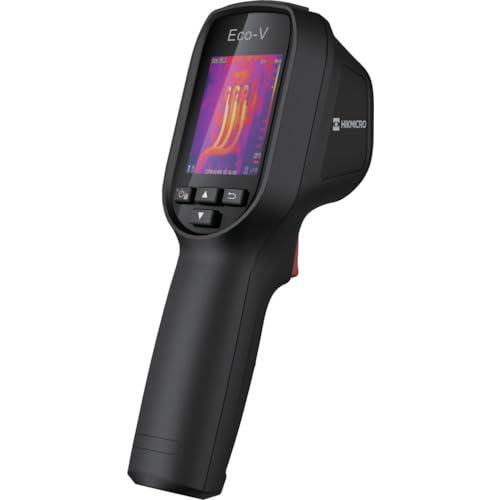
Figure 1: HIKMICRO ECO-V Handheld Thermography Camera
2. የደህንነት መረጃ
ይህንን ምርት ከመጠቀምዎ በፊት ሁሉንም የደህንነት ማስጠንቀቂያዎች እና መመሪያዎች ያንብቡ እና ይረዱ። እነዚህን መመሪያዎች አለመከተል የኤሌክትሪክ ንዝረት፣ እሳት ወይም ከባድ ጉዳት ሊያስከትል ይችላል።
አጠቃላይ የደህንነት ጥንቃቄዎች
- እንደ ተቀጣጣይ ፈሳሾች፣ ጋዞች ወይም አቧራ ባሉ ፈንጂዎች ውስጥ መሳሪያውን አይጠቀሙ።
- መሳሪያውን ከውሃ እና ከሌሎች ፈሳሾች ያርቁ.
- መሣሪያውን ለመክፈት ወይም ለመለወጥ አይሞክሩ. ሁሉንም አገልግሎቶች ብቁ ለሆኑ ባለሙያዎች ያመልክቱ።
- Use only HIKMICRO-approved accessories.
- Avoid direct exposure of the thermal lens to strong light sources (e.g., sun, laser) as this may damage the detector.
የባትሪ ደህንነት
- The device contains a built-in Lithium-ion battery. Do not expose the battery to excessive heat, direct sunlight, or fire.
- Do not puncture, open, or disassemble the battery.
- Charge the battery only with the provided USB cable and a compatible power adapter.
- በአካባቢያዊ ደንቦች መሠረት ባትሪዎችን ያስወግዱ።
3. የጥቅል ይዘቶች
The HIKMICRO ECO-V package includes the following items:
- HIKMICRO Handheld Thermography Camera ECO-V
- የዩኤስቢ ዓይነት- C ገመድ
- Quick Start Guide (not explicitly mentioned but standard)
- Calibration Certificate (not explicitly mentioned but standard)
Video 3.1: Unboxing the HIKMICRO M-Series (similar to ECO-V, showing typical package contents and device appearance).
4. መሣሪያ አብቅቷልview
Familiarize yourself with the physical components and interface of your HIKMICRO ECO-V camera.
መልክ እና በይነገጽ
The ECO-V features a compact, ergonomic design for comfortable handheld use. Key components include the thermal lens, optical lens, laser indicator, white light, trigger button, navigation buttons, and a 2.4-inch display.
Video 4.1: This video demonstrates the physical appearance and interface of a HIKMICRO M-Series camera, which shares similar design elements and interface components with the ECO-V.
5. ማዋቀር
5.1 መሳሪያውን መሙላት
Before initial use, fully charge the device's built-in Lithium-ion battery.
- Connect the provided USB Type-C cable to the device's USB port.
- Connect the other end of the USB cable to a compatible power adapter (5V2A recommended) and plug it into a power outlet.
- The charging indicator will show red during charging and turn green when fully charged.
Video 5.1: This HIKMICRO ECO operation video demonstrates the charging process for the device.
5.2 ማብራት / ማጥፋት
To power on the device, press and hold the power button for more than 6 seconds. To power off, press and hold the power button again until the device shuts down.
Video 5.2: This HIKMICRO ECO operation video demonstrates how to power on the device.
6. የአሠራር መመሪያዎች
This section covers the basic and advanced operational features of your ECO-V camera.
6.1 Image Capture and Display
To capture a thermal image, aim the camera at the target and press the trigger button. The captured image will be saved to the internal EMMC storage. To view saved images, navigate to the 'Albums' section in the menu.
Video 6.1: This HIKMICRO ECO operation video demonstrates image capture and viewing saved snapshots.
6.2 የመለኪያ መሳሪያዎች
The ECO-V provides various measurement tools to analyze thermal images:
- ሆትስፖት፡ Automatically identifies and displays the highest temperature point.
- ቀዝቃዛ ቦታ፦ Automatically identifies and displays the lowest temperature point.
- የመሃል ቦታ፡ በማያ ገጹ መሃል ላይ ያለውን የሙቀት መጠን ያሳያል።
Video 6.2: This HIKMICRO ECO operation video demonstrates the use of measurement tools like hot, cold, and center spots.
6.3 SuperIR Image Enhancement
SuperIR technology enhances the thermal image resolution, providing more detail for analysis. You can enable or disable this feature in the settings menu.
Video 6.3: This HIKMICRO ECO operation video demonstrates how to enable and use the SuperIR image enhancement feature.
6.4 የምስል ሁነታዎች
The ECO-V supports multiple image modes for different inspection needs:
- ሙቀት፡- የሙቀት ምስልን ብቻ ያሳያል።
- ውህደት፡ Blends the thermal and visible light images for enhanced detail.
- ፒአይፒ (ሥዕል-በሥዕል): Overlays a smaller thermal image on a visible light image.
- ኦፕቲካል፡ Displays only the visible light image.
Video 6.4: This HIKMICRO B10S product video demonstrates switching between different image modes, including Thermal, Fusion, PIP, and Optical.
6.5 Parallax Correction
When using fusion modes, adjust the parallax correction based on the distance to the target to ensure accurate alignment between thermal and visible images.
Video 6.5: This HIKMICRO B10S product video demonstrates how to adjust parallax correction for accurate image fusion.
6.6 Palette Adjustment
Select from various color palettes (e.g., White Hot, Black Hot, Rainbow, Ironbow) to visualize temperature differences more effectively. This can be adjusted in the settings menu.
Video 6.6: This HIKMICRO B10S product video demonstrates how to adjust color palettes.
6.7 Emissivity and Distance Settings
For accurate temperature measurements, it is crucial to set the correct emissivity value for the target material and the distance to the target. Refer to the general emissivity reference table in the specifications section.
Video 6.7: This HIKMICRO ECO operation video demonstrates setting emissivity and distance for accurate temperature readings.
6.8 ሌዘር ጠቋሚ
The built-in laser pointer helps to precisely identify the measurement target. It can be enabled or disabled in the settings menu.
Video 6.8: This HIKMICRO ECO operation video demonstrates how to enable and use the laser pointer.
6.9 ከፍተኛ ሙቀት ማንቂያ
Set a high temperature alarm threshold to be notified when temperatures exceed a predefined limit. This feature is useful for identifying potential overheating issues.
Video 6.9: This HIKMICRO B10S product video demonstrates how to set a high temperature alarm.
6.10 Hotspot Connection
The ECO-V can connect to a mobile device via Wi-Fi hotspot for live viewing and data transfer. Enable the Wi-Fi hotspot function in the device settings and connect your mobile device.
Video 6.10: This HIKMICRO M-Series video demonstrates how to establish a hotspot connection with a mobile device.
6.11 HIKMICRO Viewer App Connection
Download the HIKMICRO Viewer app on your mobile device to access live view, manage images and videos, and generate reports. Connect the device to your phone via Wi-Fi.
Video 6.11: This HIKMICRO Pocket series video demonstrates connecting the device to the HIKMICRO Viewer app for various functions.
7. ጥገና
7.1 ጽዳት
- የመሳሪያውን አካል በለስላሳ፣ d ይጥረጉamp ጨርቅ. ገላጭ ማጽጃዎችን ወይም ፈሳሾችን አይጠቀሙ.
- Gently clean the lenses with a lens cleaning cloth. Avoid touching the lens surface with bare hands.
7.2 ማከማቻ
- መሳሪያውን በቀጥታ ከፀሀይ ብርሀን እና ከከፍተኛ ሙቀት ርቆ በቀዝቃዛና ደረቅ ቦታ ያከማቹ።
- ረዘም ላለ ጊዜ ከተከማቸ፣ ባትሪው በከፊል መሙላቱን ያረጋግጡ (50%) እና የባትሪ ጤናን ለመጠበቅ በየጥቂት ወሩ መሙላት።
8. መላ መፈለግ
If you encounter issues with your HIKMICRO ECO-V, refer to the following common problems and solutions:
| ችግር | ሊሆን የሚችል ምክንያት | መፍትሄ |
|---|---|---|
| መሣሪያው አይበራም። | ባትሪ ዝቅተኛ፤ የመሣሪያ ችግር | Charge the battery; Contact support |
| ትክክለኛ ያልሆነ የሙቀት ንባቦች | Incorrect emissivity/distance settings; Dirty lens | Adjust emissivity/distance; Clean the lens |
| Cannot connect to Wi-Fi hotspot | Incorrect password; Hotspot not enabled | Verify password; Enable hotspot in settings |
9. ዝርዝሮች
Detailed technical specifications for the HIKMICRO ECO-V camera:
| ባህሪ | ዝርዝር መግለጫ |
|---|---|
| ሞዴል | ኢኮ-ቪ |
| የመለኪያ የሙቀት ክልል | -20 ° ሴ እስከ 550 ° ሴ |
| Minimum Temperature Display | 0.1 ° ሴ |
| መስክ የ View (FOV) | 50° × 50° |
| የቦታ ጥራት (IFOV) | 8.89 ሚ.ሜ |
| የሚሠራ የሙቀት ክልል | -10 ° ሴ እስከ 50 ° ሴ |
| የማከማቻ ሙቀት ክልል | -40 ° ሴ እስከ 70 ° ሴ |
| የማሳያ መጠን | 2.4 ኢንች |
| የኃይል ምንጭ | አብሮ የተሰራ የሊቲየም-አዮን ባትሪ |
| የባትሪ አሠራር ጊዜ | 8 ሰዓታት |
| ዋይ ፋይ | አይገኝም |
| የጥበቃ ደረጃ | IP54 |
| በይነገጽ | የዩኤስቢ ዓይነት-ሲ |
| ፒክስል ፒች | 12μm |
| Measuring Wavelength | 7.5-14μm |
| NETD | < 40 mK (@ 25°C፣ F#=1.0) |
| የትኩረት ርዝመት | 1.35 ሚ.ሜ |
| Aperture | F1.0 |
| አነስተኛ የትኩረት ርቀት | 0.1፣0.33ሜ (XNUMX ጫማ) |
| የፍሬም መጠን | 25Hz |
| የትኩረት ስርዓት | ከትኩረት ነፃ |
| ሚዲያ መቅዳት | EMMC (4GB) |
| የምስል ማከማቻ አቅም | 30,000 ምስሎች |
| ምስል File ቅርጸት | BMP (includes measurement data) |
| የሙቀት ምስል ጥራት | 96×96 (9,216 pixels) |
| Visible Image Resolution | 640×480 |
| ትክክለኛነት | ±2°C or ±2% (whichever is greater), when ambient temperature is 15°C to 35°C and target temperature is 0°C or above. |
| ቁሶች | ፖሊካርቦኔት, ABS ሙጫ |
| ክብደት | 360 ግ |
General Emissivity Reference
| ቁሳቁስ | ኢሚሲዝም |
|---|---|
| የሰው ቆዳ | 0.98 |
| PCB | 0.91 |
| የሲሚንቶ ኮንክሪት | 0.95 |
| ሴራሚክስ | 0.92 |
| ላስቲክ | 0.95 |
| ቀለም መቀባት | 0.93 |
| እንጨት | 0.85 |
| ጡብ | 0.96 |
| አሸዋ | 0.90 |
| አፈር | 0.92 |
| ጥጥ | 0.98 |
| ካርቶን | 0.90 |
| ነጭ ወረቀት | 0.96 |
| ውሃ | 0.96 |
10. ዋስትና እና ድጋፍ
HIKMICRO products are covered by a limited warranty. For detailed warranty terms and conditions, please refer to the official HIKMICRO webጣቢያ ወይም የአካባቢዎን አከፋፋይ ያነጋግሩ።
የደንበኛ ድጋፍ
If you require technical assistance, troubleshooting, or have questions about your ECO-V camera, please contact HIKMICRO customer support through their official webበምርት ማሸጊያዎ ውስጥ የቀረበው ጣቢያ ወይም የእውቂያ መረጃ።