
1. መግቢያ
Thank you for choosing the EasySMX T37 Wireless Switch Pro Controller. This manual provides detailed instructions for setting up, operating, maintaining, and troubleshooting your controller. Please read this manual carefully before use to ensure optimal performance and longevity of your device. This controller is compatible with Nintendo Switch, Switch Lite, and Switch OLED consoles.
2. ምርት አብቅቷልview
The EasySMX T37 is a wireless gamepad designed for an enhanced gaming experience on Nintendo Switch systems. It features an ergonomic design, dual turbo vibration, and 6-axis gyro motion control.

ምስል 2.1፡ ፊት view of the EasySMX T37 Wireless Switch Pro Controller, showcasinግ የእሱ ergonomic ቅርፅ እና የአዝራር አቀማመጥ።
3. ማዋቀር
3.1 ከኒንቴንዶ ስዊች ጋር ማጣመር
- የኒንቴንዶ ቀይር ኮንሶልዎን ያብሩ።
- ከ HOME ምናሌ ውስጥ ይምረጡ ተቆጣጣሪዎች > ያዝ/እዝ ይቀይሩ.
- On the EasySMX T37 controller, press and hold the የማመሳሰል አዝራር (located on the top edge of the controller) for 3 seconds until the LED indicators start flashing rapidly.
- Once the controller is successfully paired, the player LED(s) on the bottom of the controller will light up solid.
3.2 መቆጣጠሪያውን መሙላት
Connect the provided USB-C charging cable to the USB-C port on the controller and the other end to a USB power source (e.g., Switch dock, USB wall adapter, computer USB port). The LED indicators will show charging status and turn off when fully charged.
4. የአሠራር መመሪያዎች
4.1 መሰረታዊ ቁጥጥሮች
The controller features standard button layouts for Nintendo Switch compatibility:
- A/B/X/Y አዝራሮች፡- የድርጊት አዝራሮች።
- ዲ-ፓድ፡ አቅጣጫዊ ግቤት።
- የግራ/ቀኝ አናሎግ ስቲኮች፡ Movement and camera control.
- የL/R/ZL/ZR አዝራሮች፡ ትከሻ እና ቀስቅሴ አዝራሮች.
- መነሻ አዝራር፡- Returns to the Switch HOME Menu.
- የቀረጻ አዝራር፦ ቅጽበታዊ ገጽ እይታዎችን ይወስዳል።
- PLUS (+) / MINUS (-) አዝራሮች፡ የጀምር/ምረጥ ተግባራት።

Image 4.1: A user holding the EasySMX T37 controller, demonstrating the comfortable grip and accessible button placement during gameplay.
4.2 ቱርቦ ተግባር
The Turbo function allows for rapid, automatic pressing of a button, useful in action or arcade games.
- ቱርቦን ያንቁ፡ የተፈለገውን የእርምጃ አዝራር (A/B/X/Y/L/R/ZL/ZR) ተጭነው ይያዙት፣ ከዚያም ይጫኑት የቱርቦ ቁልፍ (T button). The button will now auto-fire.
- የቱርቦ ፍጥነትን አስተካክል በመያዝ ላይ ሳለ የቱርቦ ቁልፍ፣ ያንቀሳቅሱ የቀኝ አናሎግ ስቲክ ወደ ላይ ወይም ወደ ታች to cycle through three speeds: 5 shots/s, 12 shots/s, and 20 shots/s.
- ቱርቦን አቦዝን Repeat the activation step (hold the action button, then press the Turbo button) or press and hold the የቱርቦ ቁልፍ for 5 seconds to clear all Turbo settings.
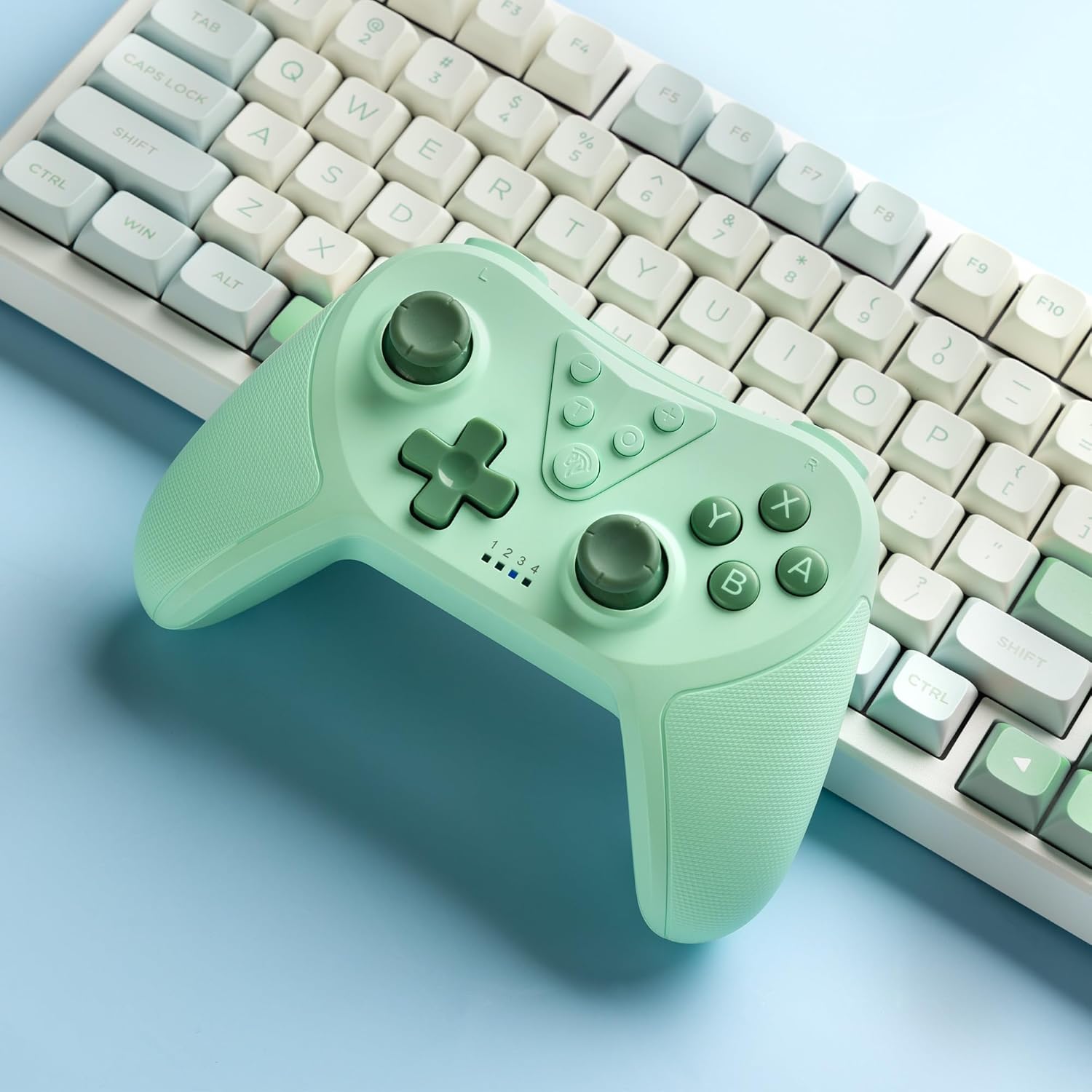
Image 4.2: Illustration of the Turbo function on the EasySMX T37 controller, showing the three adjustable speeds: 5, 12, and 20 shots per second.
4.3 የንዝረት ማስተካከያ
The controller features dual motors for adjustable vibration feedback, enhancing immersion in games.
- የንዝረት ጥንካሬን ያስተካክሉ፡ ተጭነው ይያዙት። የቱርቦ ቁልፍ፣ ከዚያ ያንቀሳቅሱ የግራ አናሎግ ዱላ ወደ ላይ ወይም ወደ ታች to cycle through four vibration levels: 0% (off), 30%, 70%, and 100%.

Image 4.3: Visual representation of the Dual Vibration feature on the EasySMX T37 controller, indicating four intensity levels from 0% to 100%.
4.4 ባለ 6-ዘንግ ጋይሮ እንቅስቃሴ መቆጣጠሪያ
The built-in 6-axis gyroscope provides precise motion sensing, allowing for intuitive control in games that support motion input.

Image 4.4: Illustration depicting the 6-Axis Gyro Motion Control feature of the EasySMX T37 controller, showing how it interacts with a game on the Nintendo Switch screen.
5. ጥገና
- ማጽዳት፡ መቆጣጠሪያውን ለማጽዳት ለስላሳና ደረቅ ጨርቅ ይጠቀሙ። ጠበኛ ኬሚካሎችን ወይም ሻካራ ቁሳቁሶችን ከመጠቀም ይቆጠቡ።
- ማከማቻ፡ መቆጣጠሪያውን በቀጥታ ከፀሀይ ብርሀን እና ከከፍተኛ ሙቀት ርቆ በቀዝቃዛና ደረቅ ቦታ ያከማቹ።
- የባትሪ እንክብካቤ የባትሪውን ዕድሜ ለማራዘም መቆጣጠሪያውን ብዙ ጊዜ ሙሉ በሙሉ ከመሙላት ይቆጠቡ። ለረጅም ጊዜ ጥቅም ላይ ባይውልም እንኳ በመደበኛነት ኃይል ይሙሉት።
- ጠብታዎችን ያስወግዱ፡ መቆጣጠሪያውን ከመውደቅና ከውጤቶች ይጠብቁ፣ ይህም የውስጥ ክፍሎችን ሊጎዳ ይችላል።
6. መላ መፈለግ
6.1 መቆጣጠሪያው እየተገናኘ አይደለም
- ተቆጣጣሪው መሙላቱን ያረጋግጡ።
- Verify the Switch console is updated to the latest system version.
- በክፍል 3.1 ውስጥ ያሉትን ደረጃዎች በመከተል መቆጣጠሪያውን እንደገና ለማጣመር ይሞክሩ።
- If issues persist, try resetting the controller by inserting a thin object into the small reset hole (if present, usually on the back) for a few seconds.
6.2 Buttons Unresponsive or Lagging
- ተቆጣጣሪው ሙሉ በሙሉ መሙላቱን ያረጋግጡ።
- Move closer to the Switch console to ensure a strong wireless connection.
- በአዝራሮቹ ዙሪያ ያሉ ማንኛውንም አካላዊ እንቅፋቶች ወይም ፍርስራሾችን ያረጋግጡ።
- መቆጣጠሪያውን እንደገና ያጣምሩ።
6.3 መቆጣጠሪያው ኃይል እየሞላ አይደለም
- የዩኤስቢ-ሲ ገመድ ከመቆጣጠሪያው እና ከኃይል ምንጩ ጋር ደህንነቱ በተጠበቀ ሁኔታ መገናኘቱን ያረጋግጡ።
- የተለየ የዩኤስቢ-ሲ ገመድ ወይም የኃይል አስማሚ ለመጠቀም ይሞክሩ።
- የኃይል ምንጩ ተግባራዊ መሆኑን ያረጋግጡ።
7. ዝርዝሮች
- ሞዴል፡ T37
- ግንኙነት፡ ገመድ አልባ (ብሉቱዝ)
- ተኳኋኝነት ኔንቲዶ ስዊች፣ ስዊች ላይት፣ ስዊች OLED
- ባህሪያት፡ Dual Turbo Function, Adjustable Vibration, 6-Axis Gyro Motion Control, Ergonomic Design
- Product Identifier (ASIN): B0CTTWN84L
8. ዋስትና እና ድጋፍ
For warranty information, technical support, or further assistance, please refer to the official EasySMX webበቀጥታ የደንበኛ ድጋፋቸውን ያግኙ ወይም ያግኙ። የግዢ ደረሰኝዎን ለዋስትና ጥያቄዎች ያስቀምጡ።