
1. መግቢያ
This manual provides essential information for the safe and efficient operation of your Sharp GX-BT190 Portable Bluetooth Speaker. Please read it thoroughly before using the device and retain it for future reference.
2. የደህንነት መረጃ
- ድምጽ ማጉያውን ለከፍተኛ ሙቀት፣ ቀጥተኛ የፀሐይ ብርሃን ወይም ከፍተኛ እርጥበት አያጋልጥ።
- ድምጽ ማጉያውን አይበታተኑ፣ አይጠግኑ ወይም አይቀይሩ። ይህ ዋስትናውን ሊያሳጣ እና የደህንነት አደጋዎችን ሊያስከትል ይችላል።
- Ensure the charging port cover is securely closed when using the speaker near water to maintain its IP67 rating.
- የቀረበውን የኃይል መሙያ ገመድ ወይም የተረጋገጠ አቻ ይጠቀሙ።
- ተናጋሪውን ከልጆች እና ከቤት እንስሳት ያርቁ.
- የመስማት ችግርን ለመከላከል በከፍተኛ ድምጽ ደረጃ ለረጅም ጊዜ ማዳመጥን ያስወግዱ።
3. የጥቅል ይዘቶች
- Sharp GX-BT190 Portable Bluetooth Speaker
- የዩኤስቢ ባትሪ መሙያ ገመድ
- ላንያርድ
- መመሪያ መመሪያ
4. ምርት አብቅቷልview

ፊት ለፊት view of the Sharp GX-BT190 speaker, showing the central speaker grille with the Sharp logo and the LED light ring.

ጎን view of the Sharp GX-BT190 speaker, highlighting the textured speaker grille and the integrated lanyard.
የኋላ view of the Sharp GX-BT190 speaker, showing the control buttons and the sealed charging port cover.
መቆጣጠሪያዎች እና አመላካቾች፡-
- የኃይል ቁልፍ፡- ለማብራት/ለማጥፋት ተጭነው ይያዙ።
- የድምጽ መጨመሪያ / ቀጣይ ትራክ አዝራር (+)፦ ድምጽ ለመጨመር አጭር ፕሬስ፣ ለቀጣይ ትራክ በረጅሙ ተጫን።
- ድምጽ ወደ ታች / ቀዳሚ የትራክ አዝራር (-): ድምጽን ዝቅ ለማድረግ አጭር ተጫን፣ ለቀደመው ትራክ በረጅሙ ተጫን።
- የማጫወት/ለአፍታ አቁም / የጥሪ አዝራር (►||): Short press to play/pause, answer/end calls. Long press to reject calls.
- Mode / Light Button (M): Short press to cycle through LED light modes. Long press to turn off LED lights.
- የዩኤስቢ-ሲ ኃይል መሙያ ወደብ፡- For charging the speaker. Ensure the rubber cover is sealed when not charging.
- የ LED አመልካች፡- የኃይል መሙያ ሁኔታን እና የብሉቱዝ ማጣመር ሁኔታን ያሳያል።
5. ማዋቀር
5.1 ድምጽ ማጉያውን መሙላት
- Open the rubber cover on the back of the speaker to access the USB-C charging port.
- Connect the provided USB charging cable to the speaker's USB-C port.
- የዩኤስቢ ገመድ ሌላኛውን ጫፍ ከዩኤስቢ ኃይል አስማሚ (ያልተካተተ) ወይም ከኮምፒዩተር ዩኤስቢ ወደብ ጋር ያገናኙ።
- የ LED አመልካች ባትሪ በሚሞላበት ጊዜ ያበራል እና አንዴ ሙሉ በሙሉ ከሞላ ይጠፋል።
- Close the rubber cover securely after charging to maintain the speaker's waterproof rating.
5.2 ማብራት / ማጥፋት
- ለማብራት፡- Press and hold the Power button for approximately 3 seconds. You will hear an audible prompt, and the LED indicator will flash.
- ለማጥፋት፡- Press and hold the Power button for approximately 3 seconds. You will hear an audible prompt, and the LED indicator will turn off.
5.3 የብሉቱዝ ማጣመር
- Ensure the speaker is powered on and the LED indicator is flashing, indicating it is in pairing mode.
- በተንቀሳቃሽ መሣሪያዎ ላይ ብሉቱዝን ያንቁ እና የሚገኙ መሳሪያዎችን ይፈልጉ።
- Select "GX-BT190" from the list of devices.
- ከተጣመረ በኋላ የ LED አመልካች መብረቅ ያቆማል እና ጠንካራ ሆኖ ይቆያል እና የማረጋገጫ ድምጽ ይሰማሉ።
- መሳሪያው በክልል ውስጥ ከሆነ እና ብሉቱዝ የነቃ ከሆነ ድምጽ ማጉያው ሲበራ በራስ-ሰር ከመጨረሻው የተጣመረ መሳሪያ ጋር እንደገና ይገናኛል።
5.4 እውነተኛ ገመድ አልባ ስቴሪዮ (TWS) ማጣመር
TWS allows you to pair two GX-BT190 speakers together for a stereo audio experience.

Two Sharp GX-BT190 speakers, one red and one blue, positioned together, illustrating the True Wireless Stereo (TWS) pairing feature.
- Ensure both GX-BT190 speakers are powered on and not connected to any Bluetooth device.
- On one of the speakers (this will be the primary speaker), double-press the Power button. The speaker will enter TWS pairing mode.
- ሁለቱ ድምጽ ማጉያዎች በራስ-ሰር ይፈልጉና እርስ በእርስ ይገናኛሉ። የTWS ማጣመር ሲሳካ የማረጋገጫ ድምጽ ይሰማሉ።
- Once TWS paired, connect your mobile device to the primary speaker via Bluetooth as described in section 5.3.
- TWSን ለማቋረጥ፣ በሁለቱም ድምጽ ማጉያዎች ላይ የኃይል አዝራሩን ሁለቴ ይጫኑ።
6. አሠራር
6.1 ኦዲዮን በማጫወት ላይ
- አጫውት/ ለአፍታ አቁም፡ አጫውት/አፍታ አቁም የሚለውን ቁልፍ ተጫን።
- ድምጽ ጨምር የ'+' አዝራሩን በአጭሩ ይጫኑ።
- ጥራዝ ታች የ'-' አዝራሩን በአጭሩ ይጫኑ።
- ቀጣይ ትራክ፡ የ'+' አዝራሩን ለረጅም ጊዜ ይጫኑ።
- ቀዳሚ ትራክ የ'-' አዝራሩን ለረጅም ጊዜ ይጫኑ።
6.2 ከእጅ-ነጻ ጥሪ
- ጥሪ መልስ፡- ገቢ ጥሪ ሲደውል የ"አጫውት/አቁም" ቁልፍን በአጭሩ ይጫኑ።
- ጥሪን ጨርስ፡ በጥሪ ጊዜ አጫውት/አፍታ አቁም የሚለውን ቁልፍ ተጫን።
- ጥሪን ውድቅ አድርግ፡ ገቢ ጥሪ ሲደወል አጫውት/አፍታ አቁም የሚለውን በረጅሙ ተጫን።
6.3 LED Mood Lights
- Short press the 'M' (Mode/Light) button to cycle through the 6 available LED mood light modes.
- Long press the 'M' button to turn off the LED lights.
6.4 Waterproof and Dustproof Usage (IP67)

The Sharp GX-BT190 speaker partially submerged in water, demonstrating its IP67 waterproof and dustproof capabilities.
The GX-BT190 speaker is rated IP67, meaning it is protected from dust ingress and can withstand immersion in water up to 1 meter for 30 minutes. To ensure this protection:
- Always ensure the rubber cover for the charging port is fully and securely sealed before exposing the speaker to water or dust.
- ተናጋሪውን ለረጅም ጊዜ ወይም ከተጠቀሰው ጥልቀት በላይ ሆን ብለው አያጥፉት።
- ውሃ ከተነፈሰ በኋላ፣ ድምጽ ማጉያውን ከመሙላትዎ በፊት ለስላሳ ጨርቅ ያድርቁት።
7. ጥገና
7.1 ጽዳት
- ድምጽ ማጉያውን ለስላሳ ፣ መamp ጨርቅ.
- ሻካራ ማጽጃዎችን፣ አልኮልን ወይም ኬሚካዊ ፈሳሾችን አይጠቀሙ።
- Ensure the speaker is dry before charging or storing.
7.2 ማከማቻ
- ድምጽ ማጉያውን በቀጥታ ከፀሀይ ብርሀን እና ከከፍተኛ ሙቀት ርቆ በቀዝቃዛና ደረቅ ቦታ ያከማቹ።
- ለረጅም ጊዜ ከተከማቸ የባትሪውን ጤና ለመጠበቅ በየጊዜው ባትሪውን (ለምሳሌ በየ 3 ወሩ) ይሙሉ።
8. መላ መፈለግ
| ችግር | መፍትሄ |
|---|---|
| ተናጋሪው አይበራም። | ባትሪው መሙላቱን ያረጋግጡ። ድምጽ ማጉያውን ከኃይል ምንጭ ጋር በዩኤስቢ ገመድ ያገናኙ። |
| በብሉቱዝ በኩል ማጣመር አይቻልም። | Ensure the speaker is in pairing mode (LED flashing). Turn off and on Bluetooth on your device. Move the speaker closer to your device. Clear previous Bluetooth connections on your device. |
| ምንም ድምጽ ወይም ዝቅተኛ ድምጽ የለም. | Increase the volume on both the speaker and your connected device. Ensure the speaker is properly paired. |
| ደካማ የድምፅ ጥራት። | Move the speaker closer to your device. Ensure there are no obstructions between the speaker and your device. Try playing a different audio source. |
| TWS ማጣመር አልተሳካም። | Ensure both speakers are GX-BT190 models and are not connected to any other Bluetooth device. Try powering both speakers off and on, then re-attempt TWS pairing. |
9. ዝርዝሮች

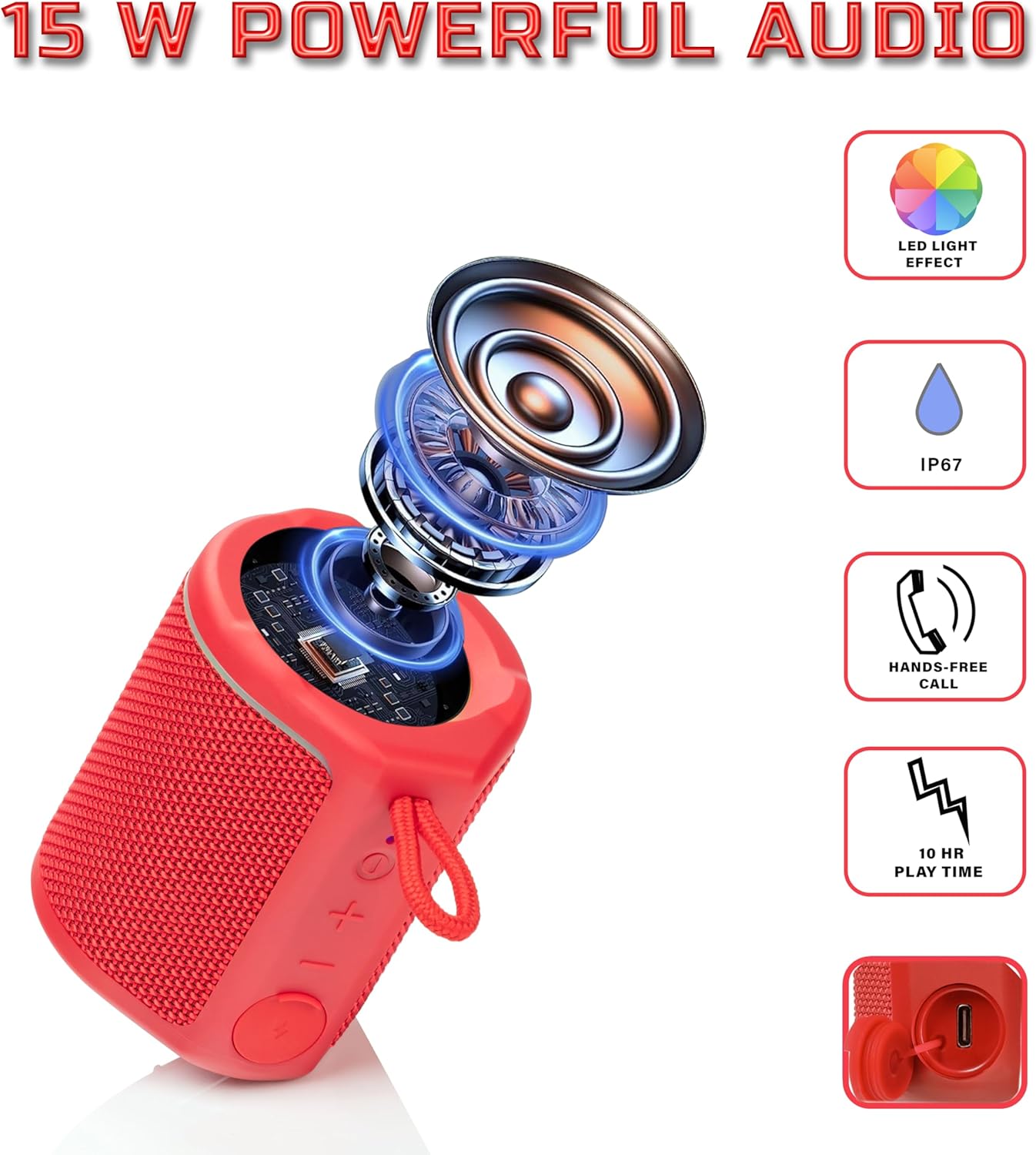
Diagram illustrating the internal components of the Sharp GX-BT190 speaker, including the speaker driver, and highlighting features like LED light effect, IP67 rating, hands-free call function, and battery life.
| ባህሪ | ዝርዝር |
|---|---|
| የሞዴል ቁጥር | GX-BT190 |
| የግንኙነት ቴክኖሎጂ | ብሉቱዝ |
| የድምጽ ማጉያ ከፍተኛ የውጤት ኃይል | 10 ዋት |
| የውሃ መከላከያ ደረጃ | IP67 |
| የባትሪ ህይወት | እስከ 15 ሰዓታት ድረስ |
| የባትሪ ዓይነት | 1 ሊቲየም አዮን (የተጨመረ) |
| የባትሪ አቅም | 1200 ሚአሰ |
| የምርት ልኬቶች (D x W x H) | 7.5 x 7.5 x 7.5 ሴሜ (በግምት) |
| የእቃው ክብደት | 226.8 ግ (8 አውንስ) |
| ገመድ አልባ ክልል | እስከ 33 ጫማ |
| ተጨማሪ ባህሪያት | LED Light, True Wireless Stereo (TWS), Hands-Free Calling |
10. ዋስትና
The Sharp GX-BT190 Portable Bluetooth Speaker comes with a 1-Year Limited Warranty from the date of purchase. This warranty covers manufacturing defects under normal use. It does not cover damage caused by misuse, accidents, unauthorized modifications, or normal wear and tear. Please retain your proof of purchase for warranty claims.
11. ድጋፍ
For technical assistance, warranty inquiries, or further information regarding your Sharp GX-BT190 speaker, please contact Sharp Inc. customer support:
- የአምራች ዕውቂያ፡- Sharp Inc
- ስልክ፡ 1-800-BE-SHARP