
1. መግቢያ
This manual provides essential information for the safe and efficient use of your Google TV 7000 Series 4K Ultra HD LED Television. Please read these instructions thoroughly before operating the device and retain them for future reference.
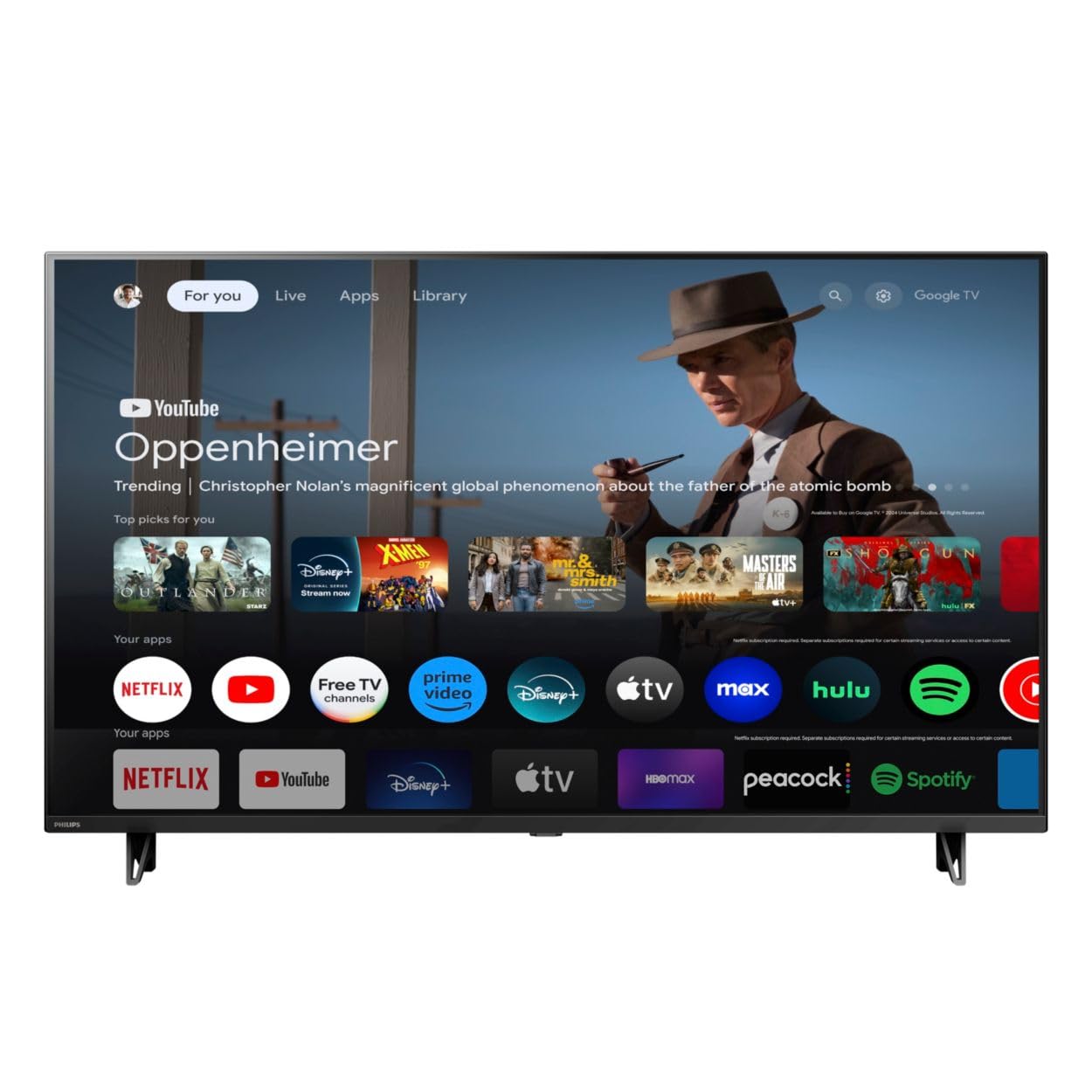
ፊት ለፊት view of the Google TV 7000 Series 4K Ultra HD LED Television, showcasing በውስጡ ቀጭን ጠርዝ እና ማሳያ.
2. ማዋቀር
2.1 Unboxing እና ጥቅል ይዘቶች
ሁሉንም እቃዎች ከማሸጊያው በጥንቃቄ ያስወግዱ። ሁሉም ክፍሎች መኖራቸውን ያረጋግጡ፡
- Google TV 7000 Series Television
- የርቀት መቆጣጠሪያ
- ለርቀት መቆጣጠሪያ ባትሪዎች
- የጠረጴዛ ማቆሚያ
- Screws for tabletop stand
- ፈጣን ጅምር መመሪያ
- የተጠቃሚ መመሪያ (ይህ ሰነድ)
2.2 የማገናኘት ኃይል
Connect the power cord to the TV's power input, then plug the other end into a wall outlet. Ensure the power outlet is easily accessible.
2.3 የውጭ መሳሪያዎችን ማገናኘት
Your television supports various connectivity options:
- ኤችዲኤምአይ: Connect devices like Blu-ray players, game consoles, or set-top boxes to the HDMI ports. This model features Audio Return Channel (HDMI 2).
- ዩኤስቢ፡ Use the USB port for media playback or connecting compatible accessories.
- ኢተርኔት፡ የተረጋጋ ባለገመድ የኢንተርኔት ግንኙነት እንዲኖርዎት፣ የኤተርኔት ገመድን ከ LAN ወደብ ጋር ያገናኙ።
- የጆሮ ማዳመጫ ወደ ውጪ: ለግል ማዳመጥ የጆሮ ማዳመጫዎችን ያገናኙ።
- ዲጂታል ኦዲዮ ውጪ (ኦፕቲካል)፡- ከውጭ የኦዲዮ ስርዓቶች ጋር ለመገናኘት.
- CVBS+ Audio L/R በ፡ የቆዩ የአናሎግ መሳሪያዎችን ለማገናኘት.
2.4 የመጀመሪያ ማዋቀር
መጀመሪያ ሲበራ ቴሌቪዥኑ በመጀመርያው የማዋቀር ሂደት ውስጥ ይመራዎታል። ይህ የሚያጠቃልለው፡-
- የቋንቋ ምርጫ
- Connecting to a Wi-Fi network or using Ethernet
- Signing in with your Google account to access Google TV features and apps
- Scanning for available channels (ATSC, NTSC)
2.5 የመጫኛ አማራጮች
You can place your TV on a tabletop using the included stand or mount it on a wall.
- የጠረጴዛ ማቆሚያ; Attach the tabletop stand using the provided screws as per the quick start guide.
- የግድግዳ ተራራ For wall mounting, use a VESA compatible mount (600 x 400 mm). Consult a professional for wall mounting to ensure safety and proper installation.
3. የአሠራር መመሪያዎች
3.1 የርቀት መቆጣጠሪያ በላይview
The remote control allows you to navigate the Google TV interface, adjust settings, and control playback. It supports voice control for Google Assistant.
3.2 መሰረታዊ ተግባራት
- ኃይል፡- ቴሌቪዥኑን ለማብራት ወይም ለማጥፋት የኃይል ቁልፉን ይጫኑ።
- መጠን፡- የድምጽ ደረጃውን ለማስተካከል የድምጽ ቁልፎቹን ይጠቀሙ።
- ቻናሎች፡ Use the channel buttons to switch between TV channels.
- ግቤት፡ የተፈለገውን የግቤት ምንጭ (HDMI፣ USB፣ ወዘተ) ይምረጡ።
3.3 የጉግል ቲቪ በይነገጽ አሰሳ
Use the directional pad and 'OK' button on your remote to navigate the Google TV home screen. The home screen provides access to your installed apps, recommended content, and settings.
3.4 ስማርት ባህሪያት
- Chromecast አብሮ የተሰራ፡- Cast content from your compatible mobile devices or computer directly to your TV.
- አብሮ የተሰራ ጎግል ረዳት፡- Press the Google Assistant button on your remote to use voice commands for searching content, controlling smart home devices, getting information, and more.
- የዥረት መተግበሪያዎች፡- Access popular streaming services like Netflix, YouTube, Discovery+, Tubi TV, and Prime Video directly from the Google TV interface.
3.5 የምስል እና የድምጽ ቅንብሮች
የእርስዎን ያብጁ viewበቴሌቪዥን ቅንብሮች ምናሌ በኩል የመስማት እና የማዳመጥ ልምድ፡
- Picture Style: Choose from various preset picture modes or customize settings like brightness, contrast, color, and sharpness. Features include Dynamic contrast, Film mode, Blue stretch, and Custom Color management.
- የኤችዲአር ድጋፍ The TV supports HDR10 and HLG for enhanced contrast and color with compatible content.
- የጨዋታ ሁኔታ፡ Optimize picture settings for gaming to reduce input lag.
- የድምጽ ቅጥ፡ Select sound presets or adjust bass and treble. Features include Dolby Audio and Auto Volume Leveling.
- ምጥጥነ ገጽታ፡ Adjust the screen aspect ratio (e.g., Automatic, 4:3, Movie Expand, Full).
3.6 ግንኙነት
Your TV offers various ways to connect to networks and devices:
- ዋይ ፋይ፡ በይነመረብን ለመድረስ ከቤትዎ አውታረ መረብ ጋር ገመድ አልባ ይገናኙ።
- ብሉቱዝ፡ Connect compatible Bluetooth devices such as headphones or game controllers.
- ኢተርኔት፡ Provides a stable wired internet connection.
4. ጥገና
4.1 የስክሪን እና የቲቪ አካልን ማጽዳት
- ከማጽዳትዎ በፊት ሁልጊዜ ቴሌቪዥኑን ይንቀሉ.
- ስክሪኑን እና የቴሌቪዥን ክፍሉን በቀስታ ለማጽዳት ለስላሳ፣ ደረቅ፣ ከንጣፍ ነፃ የሆነ ጨርቅ ይጠቀሙ።
- ለግትር ምልክቶች፣ በትንሹ መampጨርቁን በውሃ ወይም በልዩ ማያ ገጽ ማጽጃ። ማጽጃውን በቀጥታ ወደ ማያ ገጹ ላይ በጭራሽ አይረጩ።
- ሻካራ ማጽጃዎችን፣ ሰምዎችን ወይም ፈሳሾችን ከመጠቀም ይቆጠቡ።
4.2 የሶፍትዌር ዝመናዎች
Your Google TV may receive automatic software updates to improve performance and add new features. Ensure your TV is connected to the internet to receive these updates. You can also manually check for updates in the settings menu.
4.3 የርቀት መቆጣጠሪያ እንክብካቤ
Replace batteries when the remote control's response becomes sluggish. Do not mix old and new batteries or different types of batteries. Keep the remote control away from moisture and direct sunlight.
5. መላ መፈለግ
በቴሌቪዥንዎ ላይ ችግሮች ካጋጠሙዎት የሚከተሉትን የተለመዱ መፍትሄዎች ይመልከቱ።
| ችግር | ሊሆን የሚችል መፍትሄ |
|---|---|
| ኃይል የለም | የኃይል ገመዱ በቴሌቪዥኑም ሆነ በግድግዳው መውጫ ላይ ደህንነቱ በተጠበቀ ሁኔታ መሰካቱን ያረጋግጡ። መውጫው ተግባራዊ መሆኑን ያረጋግጡ። |
| ምንም ምስል የለም, ግን ድምጽ አለ | ትክክለኛው የግቤት ምንጭ መመረጡን ያረጋግጡ። የውጫዊ መሣሪያ ግንኙነቶችን ይፈትሹ. |
| ምንም ድምጽ የለም, ግን ምስል አለ | የድምጽ መጠኑን ያረጋግጡ እና ድምጸ-ከል ሁኔታውን ያረጋግጡ። ውጫዊ የድምጽ ስርዓቶች በትክክል መገናኘታቸውን እና መብራታቸውን ያረጋግጡ። |
| የርቀት መቆጣጠሪያ አይሰራም | ባትሪዎቹን ይተኩ. በርቀት መቆጣጠሪያው እና በቴሌቪዥኑ IR ዳሳሽ መካከል ምንም እንቅፋቶች አለመኖራቸውን ያረጋግጡ። |
| የአውታረ መረብ ግንኙነት ችግሮች | Restart your router and modem. Reconnect to the Wi-Fi network or check the Ethernet cable connection. |
| Picture quality issues (e.g., pixelation) | Check the signal strength for broadcast channels. For streaming content, ensure a stable internet connection. Adjust picture settings. |
5.1 የፋብሪካ ዳግም ማስጀመር
If problems persist, a factory reset may resolve them. This will erase all personal settings and installed apps, returning the TV to its original factory state. Consult the on-screen menu for the factory reset option, usually found under System or Device Preferences in Settings.
6. ዝርዝሮች
Key technical specifications for the Google TV 7000 Series 4K Ultra HD LED Television:
| ባህሪ | ዝርዝር መግለጫ |
|---|---|
| የስክሪን መጠን | 43 ኢንች |
| የማሳያ ቴክኖሎጂ | LCD UltraHD Display, LED Backlight |
| ጥራት | 4ኪ (2160ፒ) |
| የማደስ ደረጃ | 120 PMR (Picture Motion Rate) |
| የኤችዲአር ቅርጸት ይደገፋል | HDR10፣ HLG |
| ስርዓተ ክወና | አንድሮይድ 11 (ጉግል ቲቪ) |
| የግንኙነት ቴክኖሎጂ | ብሉቱዝ፣ ኢተርኔት፣ ዩኤስቢ፣ ዋይ-ፋይ |
| የድምጽ ባህሪያት | Dolby Audio, Auto Volume Leveling |
| ልዩ ባህሪያት | Chromecast Built-in, Google Assistant Built-in, Game Mode, Digital Noise Reduction, MPEG artifact reduction, Dynamic contrast |
| የምርት ልኬቶች (D x W x H) | 9.8" ዲ x 37.9" ዋ x 23.9" ኤች |
| የእቃው ክብደት | 14.99 ፓውንድ £ |
| VESA ማውንት ስታንዳርድ | 600 x 400 ሚ.ሜ |
| አምራች | ፊሊፕስ |
| የሞዴል ቁጥር | 43PUL7652/F7 |
| ዩፒሲ | 609585254893 |
7. ዋስትና እና ድጋፍ
7.1 የዋስትና መረጃ
This product comes with a Limited Warranty. Please refer to the warranty card included in your package or contact the manufacturer for specific terms and conditions regarding coverage and duration.
7.2 የደንበኛ ድጋፍ
For technical assistance, troubleshooting beyond this manual, or warranty claims, please contact the manufacturer, Philips, or your retailer. Have your model number (43PUL7652/F7) and serial number ready when contacting support.