
1. መግቢያ
The Pronomic DX-50 USB MKII is a professional 4-channel DJ mixer designed for a wide range of applications, including discos, parties, restaurants, and presentations. Its user-friendly design ensures that both experienced and less experienced users can fully utilize its features. This manual provides detailed instructions for setting up, operating, and maintaining your mixer.
Key features include a recording function, integrated Bluetooth interface, USB player with transport controls, and multiple input channels.
2. ጠቃሚ የደህንነት መመሪያዎች
- መመሪያዎችን ያንብቡ፡- ምርቱን ከመጠቀምዎ በፊት ሁሉንም የደህንነት እና የአሠራር መመሪያዎችን ያንብቡ።
- መመሪያዎችን ማቆየት; ለወደፊት ማጣቀሻ የደህንነት እና የአሰራር መመሪያዎችን ያስቀምጡ.
- ትኩረት ይስጡ ማስጠንቀቂያዎች፡- በምርቱ ላይ ያሉትን ሁሉንም ማስጠንቀቂያዎች እና የአሠራር መመሪያዎችን ያክብሩ።
- መመሪያዎችን ተከተል፡- ሁሉንም የአሠራር እና የአጠቃቀም መመሪያዎችን ይከተሉ።
- ውሃ እና እርጥበት; Do not use this apparatus near water (e.g., bathtub, washbowl, kitchen sink, laundry tub, wet basement, or swimming pool).
- የአየር ማናፈሻ; የአየር ማናፈሻ ክፍተቶችን አያግዱ። በአምራቹ መመሪያ መሰረት ይጫኑ.
- ሙቀት፡ እንደ ራዲያተሮች፣ ሙቀት መመዝገቢያዎች፣ ምድጃዎች፣ ወይም ሌሎች መሳሪያዎችን (ያጠቃልለው) ካሉ የሙቀት ምንጮች አጠገብ አይጫኑ። ampማሞቂያዎች) ሙቀትን ያመነጫሉ.
- የኃይል ምንጮች፡- Use only power sources specified by the manufacturer.
- የኃይል ገመድ ጥበቃ የኤሌክትሪክ ገመዱን ከመራመድ ወይም ከመቆንጠጥ ይከላከሉ, በተለይም በፕላጎች, ምቹ መያዣዎች እና ከመሳሪያው የሚወጡበት ቦታ.
- ማጽዳት፡ በደረቅ ጨርቅ ብቻ አጽዳ.
- አገልግሎት መስጠት፡ ሽፋኖችን መክፈት ወይም ማስወገድ ለአደገኛ ጥራዝ ሊያጋልጥዎ ስለሚችል ይህን ምርት እራስዎ ለማቅረብ አይሞክሩtagሠ ወይም ሌሎች አደጋዎች. ሁሉንም አገልግሎቶች ብቁ ለሆኑ የአገልግሎት ሰራተኞች ያመልክቱ።
3. የጥቅል ይዘቶች
Please check that all items listed below are included in your package. If any items are missing or damaged, contact your dealer immediately.
- Pronomic DX-50 USB MKII DJ Mixer
- Power Adapter (AC 12V)
- USB Stick (32 GB, if included in your specific bundle)
- የተጠቃሚ መመሪያ (ይህ ሰነድ)
4. ምርት አብቅቷልview
Familiarize yourself with the various controls and connections on your DX-50 USB MKII mixer.
4.1 የፊት ፓነል መቆጣጠሪያዎች
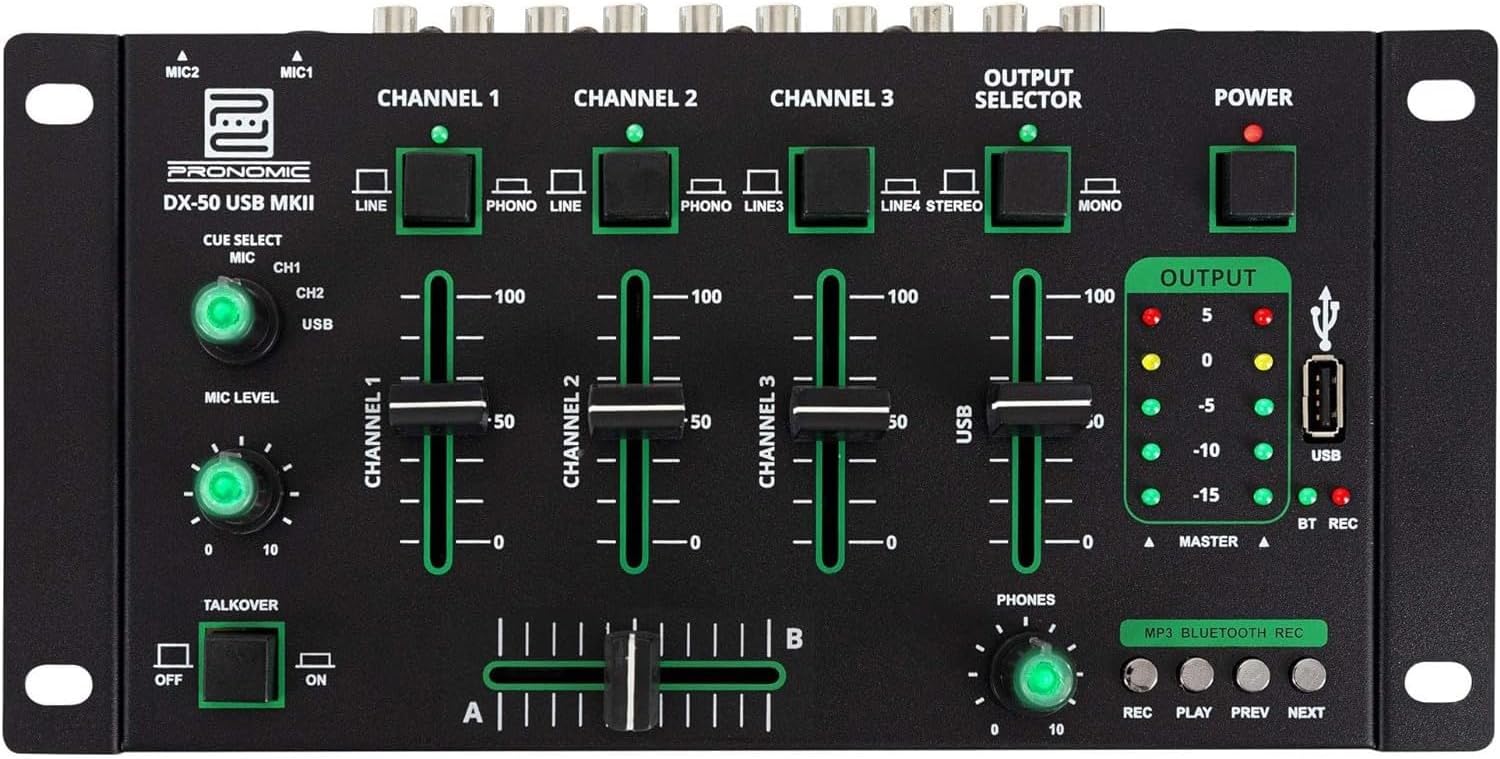
- MIC 1/2 Inputs: Connect microphones.
- Channel 1-4 Input Selectors: Switch between LINE, PHONO, or USB/Bluetooth inputs for each channel.
- የሰርጥ ፋዳዎች Adjust the volume level for each channel.
- CUE Select Buttons: Route specific channels to the headphone output for monitoring.
- MIC Level Knob: Adjust the volume of the microphone inputs.
- Talkover Switch: Activates the talkover function, which automatically lowers music volume when speaking into the microphone.
- Output Selector: Choose between Stereo or Mono master output.
- የኃይል መቀየሪያ ማደባለቅን ያበራል/ያጠፋል።
- የውጤት ደረጃ ሜትሮች፡- LED indicators showing the master output level.
- የዩኤስቢ ወደብ፡ Connect a USB drive for MP3 playback and recording.
- MP3/Bluetooth/REC Player Controls: Buttons for Play/Pause, Previous, Next, and Record functions for the integrated player.
- Phones Level Knob: የጆሮ ማዳመጫውን የውጤት መጠን ያስተካክላል።
- ክሮስፋደር (ኤ/ቢ): Blends between channels assigned to A and B.
4.2 የኋላ ፓነል ግንኙነቶች

- የኤሲ 12 ቮልት የኃይል ግብዓት፡ የቀረበውን የኃይል አስማሚ እዚህ ያገናኙ።
- የስልኮች ውፅዓት፡- የጆሮ ማዳመጫዎችን ለማገናኘት 6.3 ሚሜ መሰኪያ።
- MASTER OUT L/R (RCA): Connect to your main ampማንሻ ወይም የተጎላበተው ድምጽ ማጉያዎች.
- Channel 1 & 2 Inputs (RCA Line/Phono): Connect turntables (Phono) or other line-level devices (CD players, media players). Use the front panel selector to switch.
- Channel 3 & 4 Inputs (RCA Line): Connect line-level devices.
- MIC 1 & 2 Inputs (6.3mm Jack): Connect microphones.
5. ማዋቀር
Follow these steps to set up your Pronomic DX-50 USB MKII mixer:
- የኃይል ግንኙነት; Ensure the mixer's power switch is in the OFF position. Connect the supplied AC 12V power adapter to the "AC 12V" input on the rear panel of the mixer. Plug the adapter into a suitable power outlet.
- Master Output Connection: Connect the "MASTER OUT L/R" RCA outputs on the rear panel to the inputs of your ampማንሻ ወይም የተጎላበተው ድምጽ ማጉያዎች.
- የግቤት መሣሪያ ግንኙነት፡-
- ተርንቴብልስ፡ Connect turntables to the "CHANNEL 1" or "CHANNEL 2" RCA inputs. Set the corresponding input selector on the front panel to "PHONO".
- ሲዲ ማጫወቻዎች/መስመር መሳሪያዎች፡- Connect CD players, media players, or other line-level devices to "CHANNEL 1", "CHANNEL 2", "CHANNEL 3", or "CHANNEL 4" RCA inputs. Set the corresponding input selector on the front panel to "LINE".
- ማይክሮፎኖች፡- Connect microphones to the "MIC 1" or "MIC 2" 6.3mm jack inputs on the rear panel.
- የጆሮ ማዳመጫ ግንኙነት; Connect your headphones to the "PHONES" 6.3mm jack on the rear panel.
- USB Drive (Optional): If using a USB drive for playback or recording, insert it into the "USB" port on the front panel.
- አብራ፡ Once all connections are made, switch the mixer's power switch to the ON position. The power indicator LED will illuminate.
6. የአሠራር መመሪያዎች
6.1 መሰረታዊ ድብልቅ
- ግቤትን ይምረጡ፡- For each channel, use the input selector switch (LINE/PHONO/USB/BT) to choose the desired audio source.
- Adjust Channel Volume: Use the vertical faders for each channel to adjust its individual volume level.
- ዋና ውፅዓት፡- Monitor the "OUTPUT" LED meters and adjust the master volume knob (if present, otherwise rely on channel faders and amplifier volume) to achieve a suitable overall output level without clipping.
- ክሮስፋደር Use the crossfader to smoothly transition between channels assigned to A and B. Channels 1 and 2 are typically assigned to the crossfader.
6.2 የማይክሮፎን አጠቃቀም
- Connect your microphone to one of the MIC inputs on the rear panel.
- Adjust the "MIC LEVEL" knob on the front panel to control the microphone's volume.
- Talkover Function: Activate the "TALKOVER" switch to automatically reduce the volume of the music when you speak into the microphone. This is useful for announcements.
6.3 የዩኤስቢ መልሶ ማጫወት እና ቀረጻ
- የዩኤስቢ መልሶ ማጫዎቻ MP3 የያዘ የዩኤስቢ ድራይቭ ያስገቡ files into the "USB" port. Select "USB" as the input source for the dedicated USB channel. Use the "PLAY/PAUSE", "PREV", and "NEXT" buttons to control playback.
- የዩኤስቢ መቅጃ; Press the "REC" button to start recording the master output to the connected USB drive. Press "REC" again to stop recording. Ensure your USB drive has sufficient free space and is formatted correctly (FAT32 is commonly supported).
6.4 የብሉቱዝ ግንኙነት
- ብሉቱዝን ያንቁ፡ Select "BT" as the input source for the dedicated Bluetooth channel. The mixer will enter pairing mode.
- መሣሪያ አጣምር፡ On your Bluetooth-enabled device (smartphone, tablet, etc.), search for available Bluetooth devices. Select "Pronomic DX-50 USB MKII" (or similar name) from the list to pair.
- ኦዲዮን አጫውት፡ Once paired, you can play audio from your device through the mixer. Control playback from your device or using the mixer's transport controls (if supported by your device).
6.5 በጆሮ ማዳመጫዎች ክትትል
- Connect headphones to the "PHONES" output.
- Use the "CUE SELECT" buttons to choose which channels you want to monitor in your headphones without affecting the main output.
- Adjust the "PHONES" level knob to set your desired headphone volume.
7. ጥገና
- ማጽዳት፡ ከማጽዳትዎ በፊት ኃይሉን ያላቅቁ። የማደባለቅን ወለል ለማጽዳት ለስላሳ እና ደረቅ ጨርቅ ይጠቀሙ። ፈሳሽ ማጽጃዎችን፣ ኤሮሶሎችን ወይም መሟሟቶችን አይጠቀሙ።
- ማከማቻ፡ ማቀፊያውን በቀጥታ ከፀሀይ ብርሀን እና ከከፍተኛ ሙቀት ርቆ በቀዝቃዛና ደረቅ ቦታ ያከማቹ።
- የፋደር እና የኖብ እንክብካቤ፡ Avoid excessive force when operating faders and knobs. Periodically check for dust or debris accumulation around moving parts.
- የኬብል አስተዳደር Ensure cables are not kinked or strained, which can lead to damage.
8. መላ መፈለግ
| ችግር | ሊሆን የሚችል ምክንያት | መፍትሄ |
|---|---|---|
| ኃይል የለም | Power adapter not connected; Power switch off; Faulty power outlet. | Check power adapter connection; Ensure power switch is ON; Try a different power outlet. |
| No sound from main output | Master volume too low; Amplifier/speakers off or disconnected; Incorrect input selection; Channel faders down. | Increase master volume; Check amplifier/speaker connections and power; Verify correct input selected for channels; Raise channel faders. |
| ከጆሮ ማዳመጫዎች ድምፅ የለም | Headphone volume too low; Headphones not connected; No CUE selected. | Increase PHONES level; Connect headphones properly; Press CUE button for desired channel. |
| ብሉቱዝ አይጣመርም። | ማደባለቅ በማጣመር ሁነታ ላይ አይደለም፤ መሳሪያው በጣም ሩቅ ነው፤ ጣልቃ ገብነት። | Ensure BT input is selected; Bring device closer; Restart mixer and device. |
| የዩኤስቢ መልሶ ማጫወት አይሰራም | የዩኤስቢ ድራይቭ በትክክል አልገባም፤ የተሳሳተ file format; USB drive not formatted correctly. | የዩኤስቢ ድራይቭን እንደገና ያስገቡ፤ ያረጋግጡ files are MP3; Format USB drive to FAT32. |
9. ዝርዝሮች
| ሞዴል | Pronomic DX-50 USB MKII |
| የሰርጦች ብዛት | 4 |
| የግንኙነት ቴክኖሎጂ | ብሉቱዝ ፣ ዩኤስቢ |
| የድምጽ ግቤት | RCA (line/phono), 6.3mm microphone, Bluetooth, USB |
| የውጤት ማገናኛ አይነት | RCA (Master Out), 6.3mm (Phones) |
| የኃይል ምንጭ | Electric Cable (AC 12V adapter) |
| Dimensions (without corner brackets and controls) | 222 x 129 x 28 ሚሜ (ስፋት x ጥልቀት x ቁመት) |
| Total Dimensions (with corner brackets and controls) | 267 x 136 x 51 ሚሜ (ስፋት x ጥልቀት x ቁመት) |
| ክብደት | 790 ግ |
10. ዋስትና እና ድጋፍ
ለዋስትና መረጃ እና የቴክኒክ ድጋፍ፣ እባክዎ ከግዢዎ ጋር የቀረበውን ሰነድ ይመልከቱ ወይም ቸርቻሪዎን ያነጋግሩ። ለማንኛውም የዋስትና ጥያቄዎች የግዢ ማረጋገጫዎን ያስቀምጡ።
For further assistance, you may also visit the official Pronomic webጣቢያ ወይም የደንበኞች አገልግሎት ክፍልን ያነጋግሩ።