
1. መግቢያ
Thank you for choosing the MONODEAL DV68 Bone Conduction Headphones. These headphones are designed to provide a comfortable and safe listening experience, especially during sports and outdoor activities. Utilizing advanced bone conduction technology and Bluetooth 5.3, they deliver clear audio while keeping your ears open to ambient sounds. The integrated smart light enhances visibility and safety during nighttime use.
2. የጥቅል ይዘቶች
እባክዎን ጥቅሉን ለሚከተሉት ነገሮች ያረጋግጡ፡
- MONODEAL DV68 Bone Conduction Headphones
- መግነጢሳዊ ኃይል መሙያ ገመድ
- የተጠቃሚ መመሪያ
- Earplugs (optional, for enhanced sound isolation)
3. ምርት አብቅቷልview
Familiarize yourself with the components of your MONODEAL DV68 headphones.
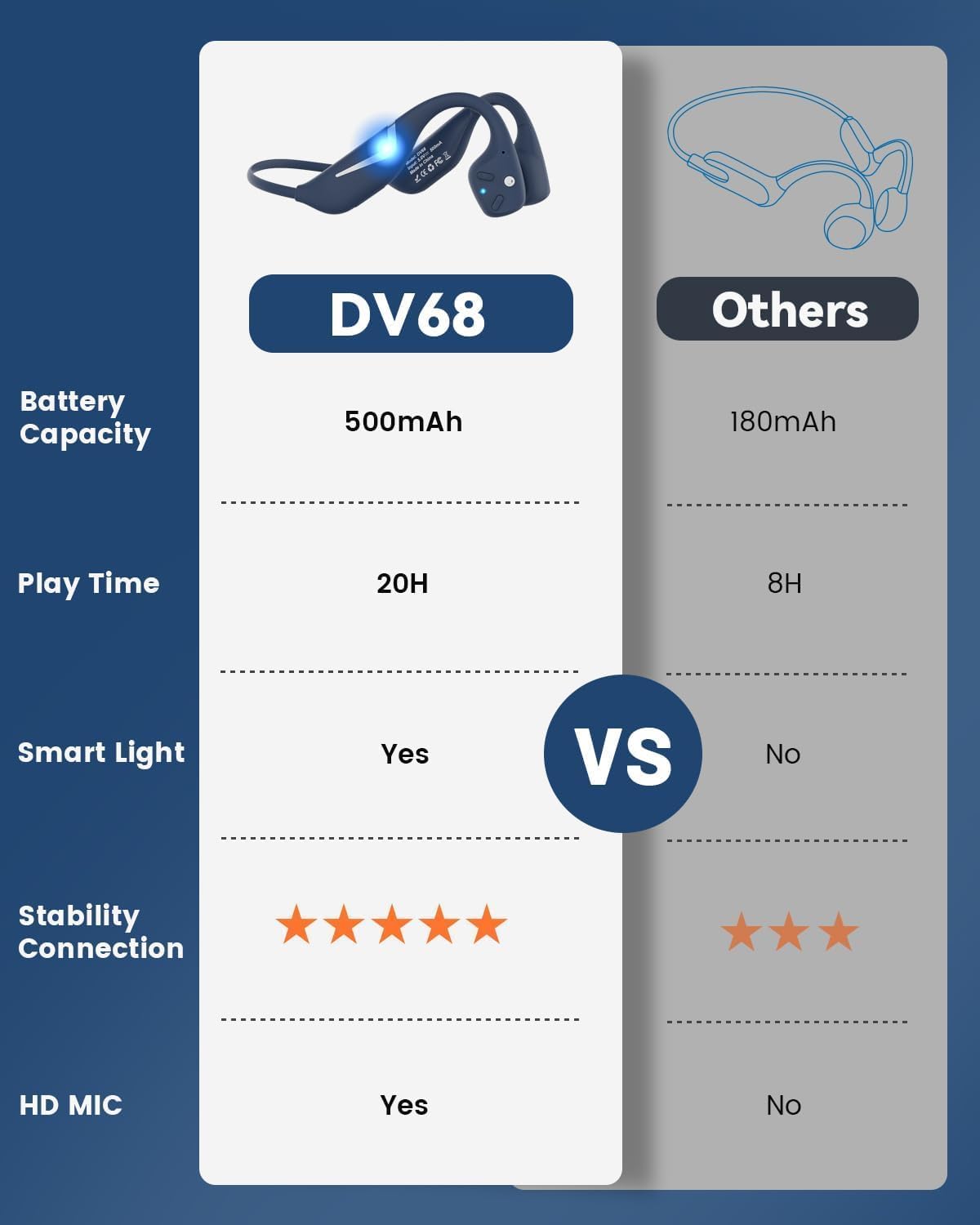
Figure 3.1: MONODEAL DV68 Bone Conduction Headphones, showing the overall design.

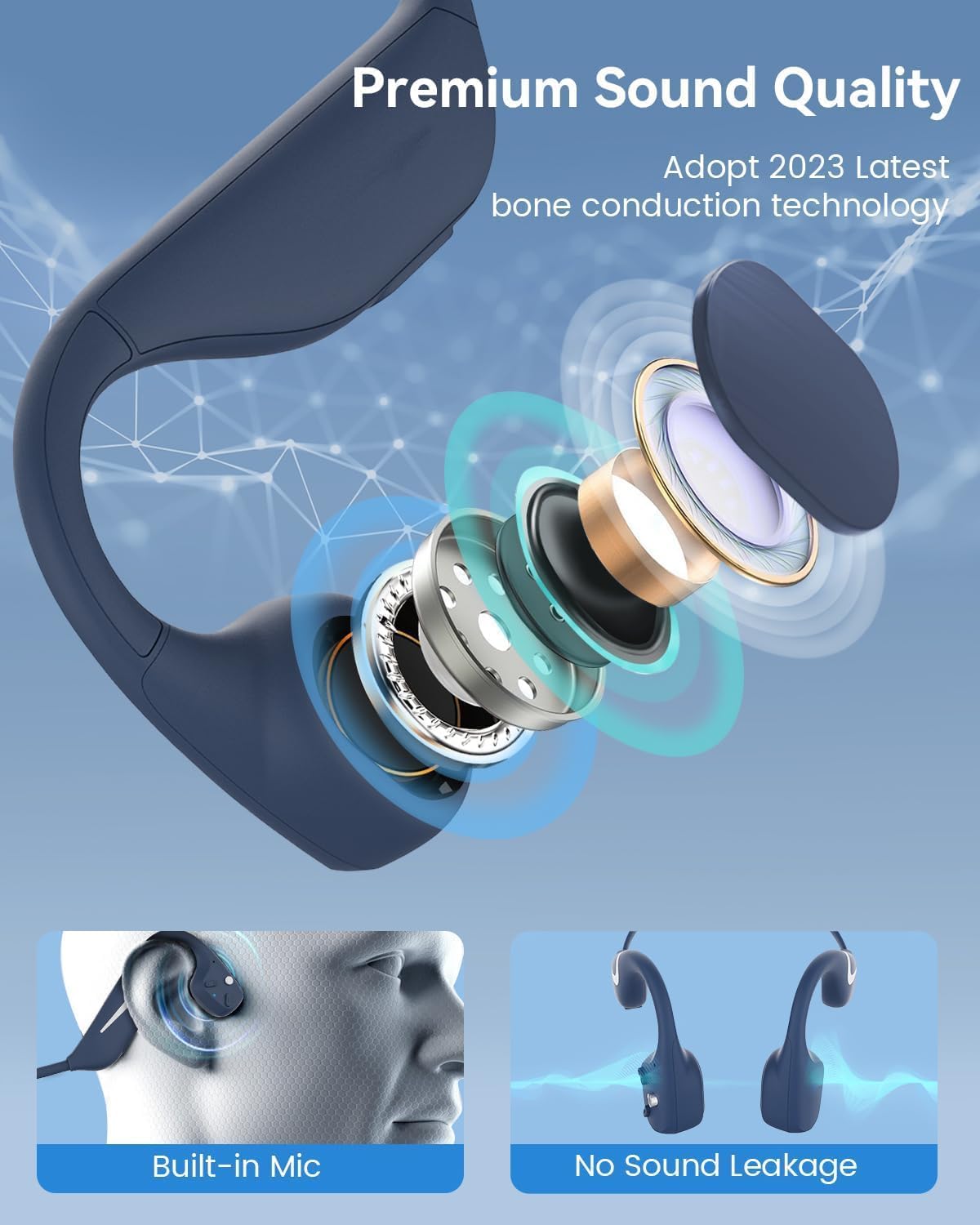
ምስል 3.2፡ ፈነዳ view illustrating the bone conduction transducer and built-in microphone.
3.1 መቆጣጠሪያዎች እና ወደቦች
ምስል 3.3: ጎን view of the headphones highlighting the control buttons.

ምስል 3.4: መቀራረብ view of the magnetic charging port.
The headphones feature physical buttons for power, volume, and playback control. The magnetic charging port is located on one of the ear pieces for convenient charging.
4. ዝርዝሮች
| ባህሪ | ዝርዝር መግለጫ |
|---|---|
| የሞዴል ቁጥር | ዲቪ68 |
| የብሉቱዝ ስሪት | 5.3 |
| የባትሪ አቅም | 500 ሚአሰ |
| የጨዋታ ጊዜ | እስከ 20 ሰዓታት ድረስ |
| የውሃ መቋቋም ደረጃ | IP67 (Sweat, rain, and splash resistant) |
| ክብደት | 34 ግራም |
| የድግግሞሽ ክልል | 20 Hz - 20,000 ኸርዝ |
| የግንኙነት ቴክኖሎጂ | ገመድ አልባ (ብሉቱዝ) |
| የድምጽ ሾፌር ዓይነት | የአጥንት አመራር |
| ልዩ ባህሪያት | Smart LED Light, Built-in Microphone, Multipoint Pairing |

ምስል 4.1 - ተጠናቀቀview of key features including Open-Ear design, IP67 Waterproofing, 500mAh Battery, Bluetooth V5.3, Lightweight, HD Microphone, Multipoint Pairing, and RGB Light.
5. ማዋቀር
5.1 የጆሮ ማዳመጫዎችን መሙላት
ከመጠቀምዎ በፊት የጆሮ ማዳመጫዎን ሙሉ በሙሉ ይሙሉ።
- የማግኔቲክ ቻርጅ ገመዱን በጆሮ ማዳመጫዎች ላይ ካለው የኃይል መሙያ ወደብ ያገናኙ።
- የኬብሉን ሌላኛውን ጫፍ ከዩኤስቢ ኃይል አስማሚ (ያልተካተተ) ወይም ከኮምፒዩተር ዩኤስቢ ወደብ ጋር ያገናኙ።
- The LED indicator will show the charging status. A full charge typically takes approximately 2 hours.

Figure 5.1: Illustration of 20-hour battery life and quick charge feature (10 minutes charging for 2 hours playtime).
5.2 የብሉቱዝ ማጣመር
የጆሮ ማዳመጫዎን ከመሳሪያ ጋር ለማገናኘት፡-
- የጆሮ ማዳመጫዎች መጥፋታቸውን ያረጋግጡ።
- የ LED አመልካች ቀይ እና ሰማያዊ እስኪበራ ድረስ የኃይል አዝራሩን ተጭነው ይያዙት፣ ይህም የማጣመሪያ ሁነታን ያሳያል።
- በመሳሪያዎ ላይ (ስማርትፎን፣ ታብሌት፣ ኮምፒውተር) ብሉቱዝን አንቃ እና የሚገኙ መሳሪያዎችን ፈልግ።
- Select "MONODEAL DV68" from the list of found devices.
- ከተገናኘ በኋላ የ LED አመልካች ወደ ጠንካራ ሰማያዊ ወይም ብልጭ ድርግም የሚል ቀስ ብሎ ወደ ሰማያዊ ይለወጣል.
The headphones support multipoint pairing, allowing connection to two devices simultaneously. Refer to your device's Bluetooth settings for managing multiple connections.
6. የአሠራር መመሪያዎች
6.1 ማብራት / ማጥፋት
- አብራ፡ የኃይል አዝራሩን ለ 3 ሰከንዶች ተጭነው ይያዙ።
- ኃይል ዝጋ: የኃይል አዝራሩን ለ 5 ሰከንዶች ተጭነው ይያዙ።
6.2 የሙዚቃ መልሶ ማጫወት
- አጫውት/ ለአፍታ አቁም፡ ባለብዙ-ተግባር ቁልፍን አንዴ ይጫኑ ፡፡
- ቀጣይ ትራክ፡ የድምጽ + አዝራሩን ለ 2 ሰከንዶች ተጭነው ይያዙት።
- ቀዳሚ ትራክ የድምጽ መጠን - አዝራሩን ለ 2 ሰከንዶች ተጭነው ይያዙት።
- ድምጽ ጨምር የድምጽ መጠን + ቁልፍን ይጫኑ።
- ጥራዝ ታች የድምጽ መጠን - አዝራርን ይጫኑ.
6.3 የጥሪ አስተዳደር
- መልስ/ጥሪ ጨርስ፡ ባለብዙ-ተግባር ቁልፍን አንዴ ይጫኑ ፡፡
- ጥሪን ውድቅ አድርግ፡ የባለብዙ ተግባር አዝራሩን ለ 2 ሰከንዶች ተጭነው ይያዙ።
- የድምፅ ረዳት የብዙ ተግባር ቁልፍን ሁለቴ ይጫኑ።
6.4 Smart LED Light
The headphones feature a smart LED light for enhanced visibility during nighttime activities.
- መብራት አብራ/ አጥፋ፡ Refer to the specific button combination in your quick start guide (usually a dedicated light button or a long press of a volume button).
- The light can cycle through different colors (e.g., blue, green, red) to increase your safety and visibility.

Figure 6.1: A runner demonstrating the smart LED light feature for night safety.
7. ጥገና
7.1 ጽዳት
To maintain hygiene and product longevity:
- After sweating or intense workouts, gently wipe the headphones with a damp ጨርቅ ወይም እርጥብ መጥረግ.
- ኃይለኛ ኬሚካሎችን ወይም ሻካራ ማጽጃዎችን ከመጠቀም ይቆጠቡ።
7.2 ማከማቻ
- የጆሮ ማዳመጫዎቹን ቀዝቃዛና ደረቅ ቦታ፣ ከፀሐይ ብርሃን እና ከፍተኛ የሙቀት መጠን ራቅ አድርገው ያስቀምጡ።
- When not in use, it is recommended to store them in their original packaging or a protective case.
7.3 የውሃ መቋቋም
The MONODEAL DV68 headphones are IP67 rated, meaning they are resistant to sweat, rain, and splashes. However, they are not suitable for swimming or submersion in water.

Figure 7.1: A person exercising with the headphones, demonstrating their IP67 water resistance against sweat and rain. Note: Not for swimming.
8. መላ መፈለግ
በጆሮ ማዳመጫዎችዎ ላይ ችግሮች ካጋጠሙዎት የሚከተሉትን የተለመዱ መፍትሄዎች ይመልከቱ፡
- ኃይል የለም፡
የጆሮ ማዳመጫዎቹ ሙሉ በሙሉ መሞላቸውን ያረጋግጡ። ከኃይል መሙያ ገመድ እና ከኃይል ምንጭ ጋር ያገናኙዋቸው። - ማጣመር አይቻልም፡
Make sure the headphones are in pairing mode (LED flashing red and blue). Turn off Bluetooth on other nearby devices that may have previously connected. Try restarting both the headphones and your device. - ዝቅተኛ ድምጽ የለም
Check the volume levels on both the headphones and your connected device. Ensure the headphones are properly positioned on your cheekbones. If using earplugs, ensure they are correctly inserted. - የሚቆራረጥ ግንኙነት;
Ensure your device is within the Bluetooth range (up to 15 meters) and there are no significant obstacles between the headphones and your device. Avoid strong electromagnetic interference. - ደካማ የጥሪ ጥራት፡
Ensure the microphone is not obstructed. Move to an area with better network reception for your phone.
9. ዋስትና እና ድጋፍ
9.1 የዋስትና መረጃ
MONODEAL provides a የ 2 ዓመት ዋስትና for the DV68 Bone Conduction Headphones from the date of purchase. This warranty covers manufacturing defects and ensures the product meets its specified performance. Please retain your proof of purchase for warranty claims.
9.2 የደንበኛ ድጋፍ
For further assistance, technical support, or warranty inquiries, please contact MONODEAL customer service through the retailer where you purchased the product or visit the official MONODEAL webየእውቂያ መረጃ ለማግኘት ጣቢያ.