
1. መግቢያ
Thank you for choosing the LHKNL TG-T069 Rechargeable Headlamp. This manual provides detailed instructions for the safe and efficient use of your headlamp. The TG-T069 features a super bright LED, motion sensor functionality, multiple lighting modes, and a rechargeable battery, making it ideal for various outdoor and indoor activities.

Image 1.1: LHKNL TG-T069 Rechargeable Headlamps (Black and Orange)
This image displays both the black and orange versions of the LHKNL TG-T069 headlamp፣ ትርኢትasing their design and illuminated state.
2. የደህንነት መመሪያዎች
- Do not look directly into the LED light. The high intensity light can cause temporary vision impairment or eye damage.
- ጭንቅላቱን ያስቀምጡamp ልጆች በማይደርሱበት.
- Do not attempt to disassemble, repair, or modify the headlamp. ይህ ዋስትናውን ይሽራል እና ጉዳት ወይም ጉዳት ሊያስከትል ይችላል.
- Dispose of batteries according to local regulations. Do not expose batteries to fire or extreme temperatures.
- የጭንቅላት መጋለጥን ያስወግዱamp ወደ ከፍተኛ ሙቀት ወይም ቅዝቃዜ.
- የውሃ መከላከያን ለመጠበቅ ባትሪ በማይሞላበት ጊዜ የኃይል መሙያ ወደብ ሽፋን ደህንነቱ በተጠበቀ ሁኔታ መዘጋቱን ያረጋግጡ።
3. የጥቅል ይዘቶች
እባክዎን ጥቅሉን ለሚከተሉት ነገሮች ያረጋግጡ፡
- 1 x LHKNL TG-T069 Rechargeable Headlamp (ጥቁር)
- 1 x LHKNL TG-T069 Rechargeable Headlamp (ብርቱካናማ)
- 2 x የዩኤስቢ ባትሪ መሙያ ገመዶች
- 1 x የተጠቃሚ መመሪያ
4. ምርት አብቅቷልview
Familiarize yourself with the components of your LHKNL TG-T069 Headlamp:
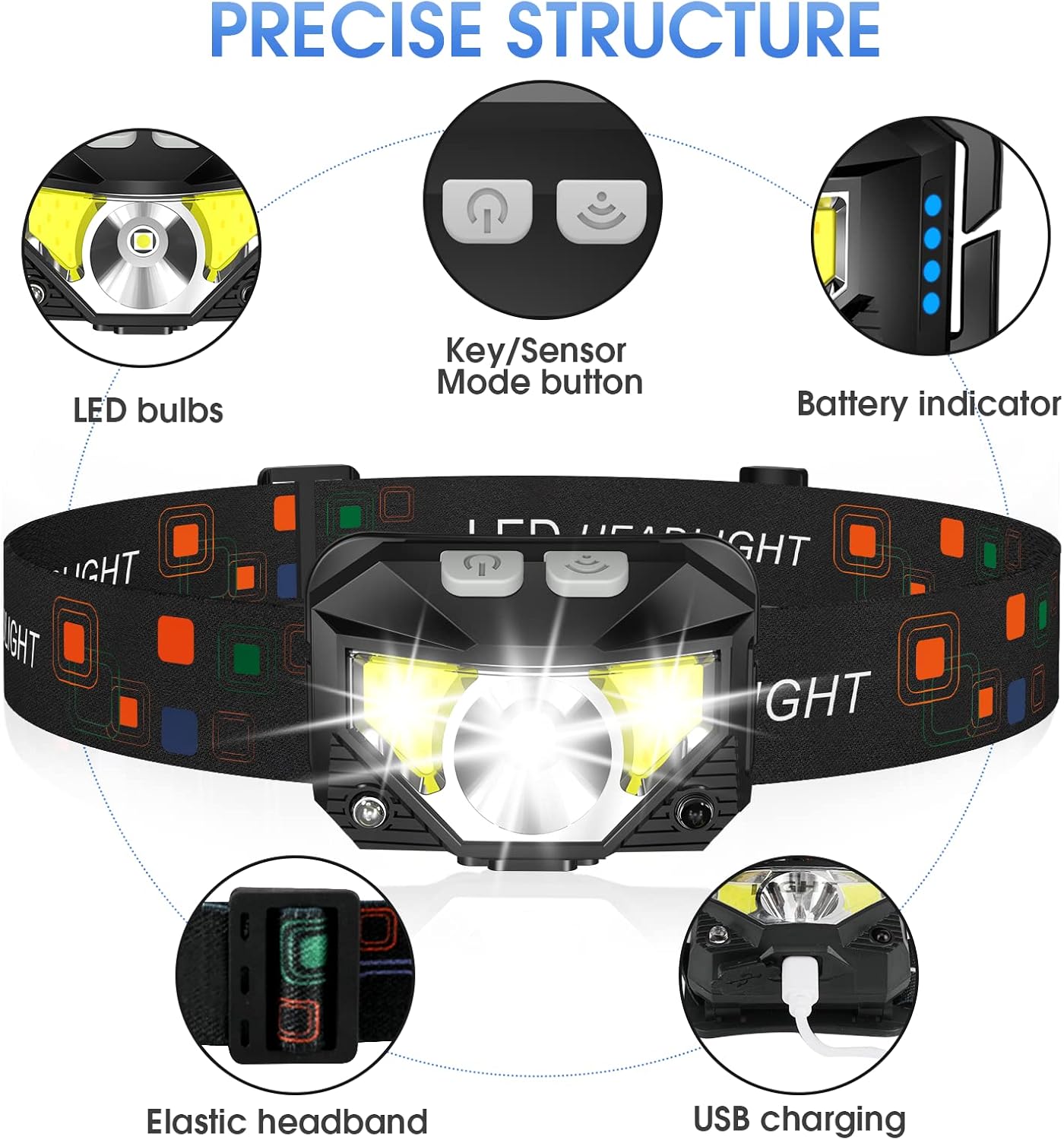
Image 4.1: LHKNL TG-T069 Headlamp አካላት
This diagram illustrates the key components of the headlamp, including the LED bulbs, the combined Key/Sensor Mode button, the battery indicator lights, the elastic headband, and the USB charging port.
- የ LED አምፖሎች Main and side LED lights for various illumination needs.
- Key/Sensor Mode Button: Controls power, lighting modes, and activates motion sensor.
- የባትሪ አመልካች፡- የቀረውን የባትሪ ኃይል ያሳያል።
- Elastic Headband: Adjustable for a comfortable and secure fit.
- የዩኤስቢ ኃይል መሙያ ወደብ አብሮ የተሰራውን ባትሪ ለመሙላት.
5. ማዋቀር
5.1 የመጀመሪያ ደረጃ መሙላት
Before first use, it is recommended to fully charge your headlamp.
- Locate the USB charging port on the side of the headlamp.
- Open the protective cover of the USB port.
- Connect the provided USB charging cable to the headlamp and a suitable USB power source (e.g., wall adapter, computer USB port, power bank).
- የባትሪው አመልካች መብራቶች የኃይል መሙያ ሁኔታን ለማሳየት ይበራሉ። ሁሉም መብራቶች ሙሉ በሙሉ ሲሞሉ ጠንካራ ይሆናሉ።
- Once fully charged, disconnect the cable and securely close the USB port cover to maintain water resistance.
5.2 የራስጌ ማሰሪያውን ማስተካከል
The elastic headband is adjustable to fit various head sizes, for both adults and children.
- ጭንቅላትን ያስቀምጡamp በራስህ ላይ.
- Adjust the sliding buckle on the headband until it feels snug and comfortable, without being too tight.
- Lamp head can be rotated up to 60 degrees to direct the light where needed. Adjust the angle as desired.
6. የአሠራር መመሪያዎች
6.1 Key Mode Operation
The main button controls the standard lighting modes.

Image 6.1: Key Mode and Motion Sensor Button Functions
This image highlights the two main control buttons: the Key Mode button for cycling through light modes and the Sensor Mode button for activating motion control.
- Power On/Mode Cycle: Press the Key Mode button once to turn on the headlamp. Subsequent presses will cycle through the following modes:
Main Strong Beam → Main Weak Beam → Side Strong Beam → Side Weak Beam → Red Beam → SOS Red Strobe. - Power Off (Long Press): ጭንቅላትን ለማጥፋትamp directly from any mode, press and hold the Key Mode button for approximately 3 seconds. This eliminates the need to cycle through all modes to turn off the device.
6.2 የእንቅስቃሴ ዳሳሽ ኦፕሬሽን
The motion sensor allows for hands-free control of specific lighting modes.
- የእንቅስቃሴ ዳሳሽ አግብር፡ Press the Sensor Mode button once. The indicator light for the motion sensor will illuminate.
- Cycle Sensor Modes: While in motion sensor mode, press the Key Mode button to cycle between:
Sensor Main Beam → Sensor Side Beam. - እጅ-ነጻ ማብራት/ማጥፋት፦ Wave your hand in front of the headlamp's sensor to turn the light ON or OFF.
- የእንቅስቃሴ ዳሳሽ አቦዝን፡ Press the Sensor Mode button again to exit motion sensor mode.

Image 6.2: All 8 Working Modes
This image visually represents all eight available lighting modes, including both manual and motion-sensor activated options, demonstrating the versatility of the headlamp.
7. መሙላት
The LHKNL TG-T069 Headlamp is equipped with a powerful 1500mAh built-in rechargeable battery. It can be charged and used simultaneously.
- Use the provided USB cable to connect the headlamp to a 5V USB power source.
- The battery indicator lights will show the charging progress.
- A full charge typically provides 4-10 hours of usage, depending on the selected mode.
- Always ensure the USB port cover is sealed after charging to maintain the IPX4 waterproof rating.
8. ጥገና
8.1 ጽዳት
- ጭንቅላትን ይጥረጉamp አካል ለስላሳ፣ መamp ጨርቅ. ገላጭ ማጽጃዎችን ወይም ፈሳሾችን አይጠቀሙ.
- የኃይል መሙያ ወደብ ከአቧራ እና ከቆሻሻ የጸዳ መሆኑን ያረጋግጡ።
8.2 ማከማቻ
- ጭንቅላትን ያስቀምጡamp ከፀሐይ ብርሃን ርቆ በቀዝቃዛና ደረቅ ቦታ ውስጥ።
- ለረጅም ጊዜ ማከማቻ ከሆነ፣ የባትሪውን ጤና ለመጠበቅ በየ3-6 ወሩ ባትሪውን ይሙሉ።
9. መላ መፈለግ
| ችግር | ሊሆን የሚችል ምክንያት | መፍትሄ |
|---|---|---|
| ዋናamp አይበራም። | ባትሪው ተሟጧል። | ጭንቅላትን መሙላትamp ሙሉ በሙሉ። |
| ብርሃን ብልጭ ድርግም ይላል ወይም ደብዛዛ ነው። | ዝቅተኛ ባትሪ. | ጭንቅላትን መሙላትamp. |
| የእንቅስቃሴ ዳሳሽ ምላሽ አይሰጥም። | Motion sensor mode not activated or sensor obstructed. | Ensure the Sensor Mode button is pressed. Clear any obstructions in front of the sensor. |
| ዋናamp እየሞላ አይደለም. | የተሳሳተ ገመድ ወይም የኃይል ምንጭ. | Try a different USB cable or power adapter. Ensure the cable is securely connected. |
10. ዝርዝሮች
| ባህሪ | ዝርዝር መግለጫ |
|---|---|
| ሞዴል | ቲጂ-ቲ069 |
| የብርሃን ምንጭ ዓይነት | LED |
| ብሩህነት | እስከ የ 1100 ጨረር |
| የኃይል ምንጭ | በባትሪ የተጎላበተ (እንደገና ሊሞላ የሚችል) |
| የባትሪ ዓይነት | Lithium Ion (1500mAh built-in) |
| የእቃው ክብደት | 1.87 አውንስ (53 ግ ገደማ) |
| የውሃ መቋቋም ደረጃ | IPX4 (ውሃ መከላከያ) |
| ልዩ ባህሪያት | Long Press Function, Motion Sensor, 8 Lighting Modes |
| ቁሳቁስ | ላስቲክ ወይም ላስቲክ |
| አምራች | LHKNL |
11. ዋስትና እና ድጋፍ
LHKNL products are designed for reliability and performance. For any questions, technical support, or warranty claims, please contact LHKNL customer service through the retailer where the product was purchased or visit the official LHKNL webየእውቂያ መረጃ ለማግኘት ጣቢያ.
እባክዎ ለዋስትና ዓላማዎች የግዢ ማረጋገጫዎን ያቆዩ።