
1. መግቢያ
ስለገዙ እናመሰግናለንasing the Snakebyte GAMEPAD RGB S Wireless Controller. This controller is designed to enhance your gaming experience on Nintendo Switch, Switch 2, Switch OLED, and Switch Lite consoles. It features Hall Effect sticks for precision, customizable RGB lighting, programmable back buttons, and a turbo function. Please read this manual carefully to ensure proper use and maintenance of your device.
2. የደህንነት መረጃ
For detailed safety instructions, please refer to the official safety document provided by Snakebyte. A PDF document titled "Informations de sécurité (PDF)" is available for download. Always follow basic safety precautions when using electronic devices.
- መቆጣጠሪያውን ለከፍተኛ ሙቀት ወይም እርጥበት አያጋልጡት።
- መቆጣጠሪያውን ለጠንካራ ተጽእኖዎች ከመጣል ወይም ከመጫን ይቆጠቡ።
- ትናንሽ ልጆች በማይደርሱበት ቦታ ያስቀምጡ.
- መቆጣጠሪያውን ለመበተን ወይም ለመቀየር አይሞክሩ.
- የቀረበውን ወይም የሚመከረውን የኃይል መሙያ ገመድ ብቻ ይጠቀሙ።
3. የጥቅል ይዘቶች
ሁሉም እቃዎች በጥቅሉ ውስጥ መኖራቸውን ያረጋግጡ፡-
- Snakebyte GAMEPAD RGB S Wireless Controller
- የዩኤስቢ-ሲ ኃይል መሙያ ገመድ
- የትምህርት መመሪያ (ይህ ሰነድ)
4. ምርት አብቅቷልview
The Snakebyte GAMEPAD RGB S features a transparent design with integrated RGB lighting and ergonomic grips. Key components include:
- Hall Effect Analog Sticks: For precise control and extended durability, preventing stick drift.
- ዲ-ፓድ፡ Standard directional input.
- የተግባር አዝራሮች (A፣ B፣ X፣ Y)፦ መደበኛ የጨዋታ ግብዓት።
- የትከሻ አዝራሮች (L፣ R) እና ቀስቅሴዎች (ZL፣ ZR): ለተለያዩ የጨዋታ ውስጥ እርምጃዎች።
- Programmable Back Buttons (M1, M2): Two additional buttons on the rear for custom macros or remapping.
- ቱርቦ አዝራር፡- Enables rapid fire functionality.
- መነሻ አዝራር፡- ወደ ኮንሶሉ መነሻ ማያ ገጽ ይመለሳል።
- የቅጽበታዊ ገጽ እይታ አዝራር፡ ቅጽበታዊ ገጽ እይታዎችን ያነሳል።
- የፕላስ (+) እና የመቀነስ (-) አዝራሮች፡- መደበኛ የምናሌ አሰሳ።
- RGB Lighting Strips: Integrated into the controller's transparent casing.
- ዩኤስቢ-ሲ ወደብ የውስጥ ባትሪ ለመሙላት.
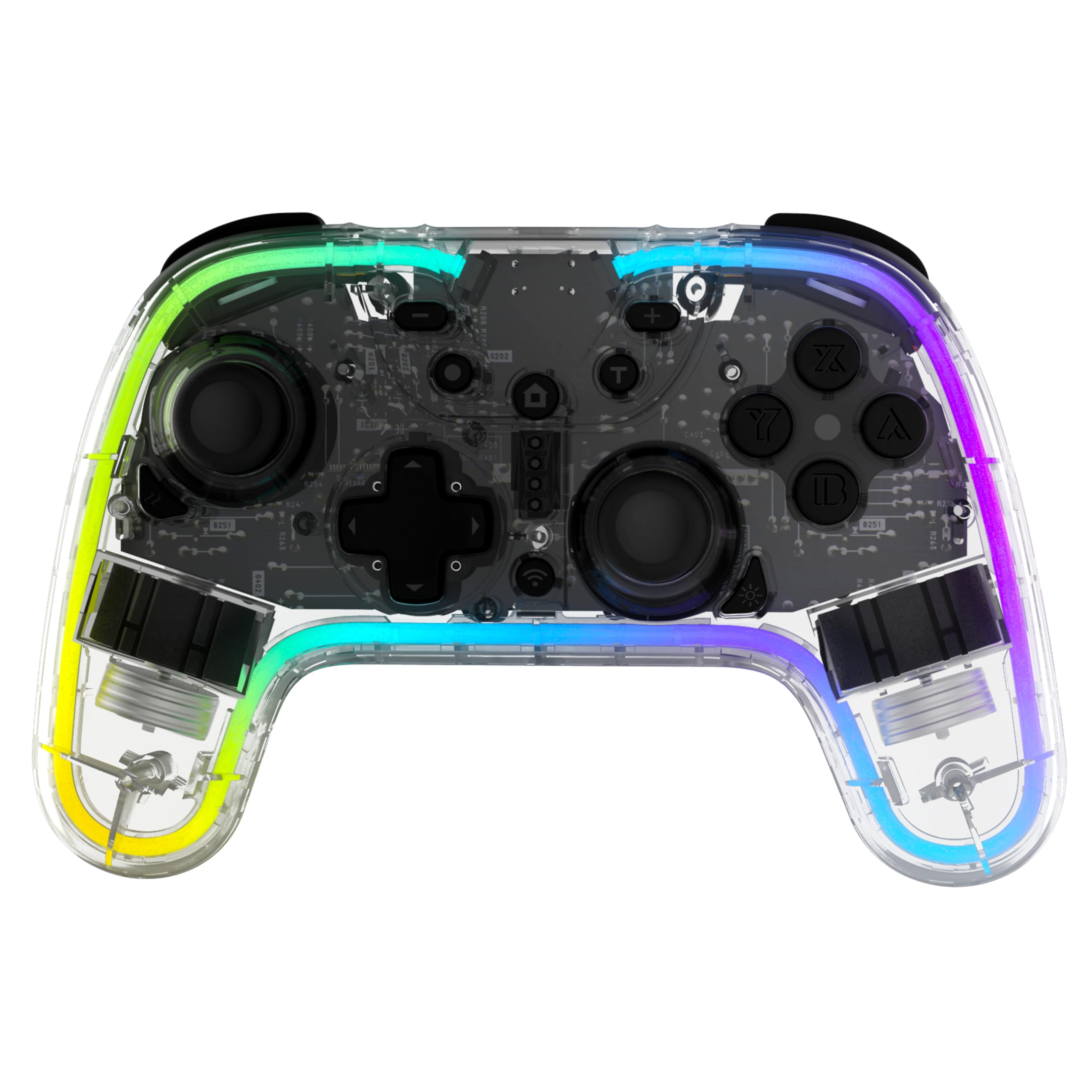
ምስል፡ ፊት ለፊት view of the Snakebyte GAMEPAD RGB S Wireless Controller, showcasing its transparent design and button layout.

Image: A collection of Snakebyte GAMEPAD RGB S controllers rendered in vibrant neon colors on a black background, showing multiple transparent, layered designs in yellow, purple, and blue.
5. ማዋቀር
5.1 መቆጣጠሪያውን መሙላት
- Connect the supplied USB-C cable to the charging port on the top of the controller.
- Connect the other end of the USB-C cable to a USB power source (e.g., Nintendo Switch dock, USB wall adapter, or computer USB port).
- The controller's indicator lights will show charging status. A full charge typically takes 2-3 hours.
- Once fully charged, the indicator lights will change or turn off. The controller offers 6-10 hours of gameplay on a full charge.
5.2 ከኒንቴንዶ ስዊች ጋር ማጣመር
The controller is compatible with Nintendo Switch, Switch 2, Switch OLED, and Switch Lite.
- በኒንቴንዶ ቀይር ኮንሶልዎ ላይ ወደ መነሻ ምናሌ ይሂዱ።
- ይምረጡ "ተቆጣጣሪዎች", ከዚያም "መያዝ/ትዕዛዝ ቀይር".
- ተጭነው ይያዙት። የግንኙነት ቁልፍ (usually a small button on the top or back of the controller) for 3 seconds until the indicator lights begin to flash rapidly.
- Once the controller is detected by the Switch, press the L and R buttons simultaneously on the controller as prompted by the console.
- The controller will vibrate briefly, and one or more player indicator lights will remain solid, indicating successful pairing.
- You can also wake up the console using the Home button on the controller once it's paired.
6. ኦፕሬሽን
6.1 RGB የመብራት መቆጣጠሪያ
The controller features customizable RGB lighting with 6 fixed colors and 3 dynamic modes, each with 4 brightness levels.
- የቀለም/ሁነታዎችን መቀየር፡ Refer to the specific button combination in your controller's quick start guide (often a dedicated button or a combination with the Turbo button).
- ብሩህነትን ማስተካከል; Use the designated button combination to cycle through the 4 brightness levels.

Image: Light painting photography with rainbow colors showing motion trails of illuminated objects on a dark background, creating curved streaks of vivid colors across the frame, representing the RGB lighting.
6.2 Programmable Back Buttons (M1, M2)
The two back buttons (M1 and M2) can be configured for macros or remapping. Note: GR/GL buttons on Switch 2 are not assignable.
- To Remap a Button:
- ተጭነው ይያዙት። የፕሮግራም አዝራር (usually a small button on the back or bottom) until the indicator light flashes.
- Press the back button (M1 or M2) you wish to program.
- Press the button on the front of the controller you want to assign to the back button.
- የሚለውን ይጫኑ የፕሮግራም አዝራር again to save. The indicator light will stop flashing.
- To Create a Macro: (If supported, specific instructions may vary)
- ተጭነው ይያዙት። የፕሮግራም አዝራር ጠቋሚው መብራቱ እስኪበራ ድረስ.
- Press the back button (M1 or M2) you wish to program.
- Input the sequence of buttons you want to record as a macro.
- የሚለውን ይጫኑ የፕሮግራም አዝራር again to save. The indicator light will stop flashing.
6.3 የንዝረት ተግባር
The controller features dual vibration intensity. The vibration level can be adjusted to suit your preference.
- የንዝረት ማስተካከያ፡ Refer to the specific button combination in your controller's quick start guide (often a combination with the Turbo button or a dedicated button).
6.4 ቱርቦ ቁልፍ
The Turbo button allows for rapid, repeated input of a chosen button. The speed is adjustable across 3 levels.
- ቱርቦን በማንቃት ላይ
- ተጭነው ይያዙት። የቱርቦ ቁልፍ.
- While holding Turbo, press the action button (e.g., A, B, X, Y, L, R, ZL, ZR) you wish to apply turbo to.
- Release both buttons. The selected action button will now activate turbo when pressed.
- የቱርቦ ፍጥነት ማስተካከል;
- በመያዝ ላይ ሳለ የቱርቦ ቁልፍ, move the right analog stick up or ወደ ታች to cycle through the 3 speed levels.
- ቱርቦን በማጥፋት ላይ
- ተጭነው ይያዙት። የቱርቦ ቁልፍ.
- While holding Turbo, press the action button that has turbo activated.
- Release both buttons. Turbo will be deactivated for that specific button.
- ሁሉንም የቱርቦ ቅንብሮች ለማጽዳት፣ ተጭነው ይያዙት እና ይያዙት የቱርቦ ቁልፍ ለ 5 ሰከንድ.

Image: Abstract digital art featuring a glowing red geometric shape on a dark background with smoke effects, highlighting the Turbo button area of the controller.
7. ጥገና
- ማጽዳት፡ መቆጣጠሪያውን ለማጽዳት ለስላሳ እና ደረቅ ጨርቅ ይጠቀሙ። ጠጣር ኬሚካሎችን ወይም ሻካራ ቁሳቁሶችን አይጠቀሙ።
- ማከማቻ፡ መቆጣጠሪያውን በማይጠቀሙበት ጊዜ ከፀሐይ ብርሃን በቀጥታ ራቅ ባለ ቀዝቃዛና ደረቅ ቦታ ያስቀምጡት።
- የሶፍትዌር ማሻሻያ The controller's firmware can be updated via the Snakebyte website if necessary to ensure compatibility and optimal performance. Visit the official Snakebyte support page for instructions and update files.
8. መላ መፈለግ
| ችግር | መፍትሄ |
|---|---|
| መቆጣጠሪያው አይበራም። | መቆጣጠሪያው ሙሉ በሙሉ መሙላቱን ያረጋግጡ። የዩኤስቢ-ሲ ገመድን በመጠቀም ከኃይል ምንጭ ጋር ያገናኙት። |
| መቆጣጠሪያው ከስዊች ጋር አይጣመርም። |
|
| የግቤት መዘግየት ወይም ግንኙነት መቋረጥ። |
|
| Hall Effect sticks are not precise. |
|

Image: A detailed diagram illustrating the internal mechanism of Hall Effect analog sticks, emphasizing their anti-drift technology.
9. ዝርዝሮች
| የሞዴል ቁጥር | SB922558 |
| ተኳኋኝነት | Nintendo Switch, Switch 2, Switch OLED, Switch Lite |
| ግንኙነት | ገመድ አልባ |
| የባትሪ ዓይነት | 1 ሊቲየም-አዮን (የተጨመረ) |
| የባትሪ ህይወት | እስከ 6-10 ሰአታት |
| የኃይል መሙያ ወደብ | ዩኤስቢ-ሲ |
| ልኬቶች (L x W x H) | 13.7 x 6.3 x 16.5 ሴ.ሜ |
| ክብደት | 308 ግራም |
| ልዩ ባህሪያት | RGB Lighting, Hall Effect Sticks, Programmable Back Buttons, Turbo Function, Vibration Function |
10. ዋስትና እና ድጋፍ
Snakebyte products are designed for quality and reliability. For warranty information, technical support, or service inquiries, please visit the official Snakebyte webጣቢያ ወይም የደንበኛ ድጋፍን ያግኙ። ለዋስትና ጥያቄዎች የግዢ ማረጋገጫዎን ያስቀምጡ።
ኦፊሴላዊ Webጣቢያ፡ www.snakebyte.com (This is a placeholder, please verify the actual support URL ካለ)
