
1. መግቢያ
Thank you for choosing the Hoco HC17 Mini Portable Speaker. This manual provides essential information for the safe and efficient operation of your device. Please read it carefully before use and retain it for future reference.
2. የደህንነት መረጃ
- ድምጽ ማጉያውን ለከፍተኛ ሙቀት፣ ቀጥተኛ የፀሐይ ብርሃን ወይም ከፍተኛ እርጥበት አያጋልጥ።
- ተናጋሪውን ለጠንካራ ተጽእኖዎች ከመጣል ወይም ከማስገዛት ተቆጠብ።
- መሳሪያውን እራስዎ አይበታተኑ፣ አይጠግኑ ወይም አይቀይሩ። ለእርዳታ ብቁ የሆኑ የአገልግሎት ባለሙያዎችን ያነጋግሩ።
- ድምጽ ማጉያውን ከውሃ እና ከሌሎች ፈሳሾች ያርቁ.
- የቀረበውን የኃይል መሙያ ገመድ ወይም የተረጋገጠ አቻ ይጠቀሙ።
3. የጥቅል ይዘቶች
ሁሉም እቃዎች በጥቅሉ ውስጥ መኖራቸውን ያረጋግጡ፡-
- Hoco HC17 Mini Portable Speaker
- የዩኤስቢ ባትሪ መሙያ ገመድ
- የተጠቃሚ መመሪያ (ይህ ሰነድ)

Image: The Hoco HC17 Mini Portable Speaker shown in its retail packaging, highlighting its compact size and clip design.
4. ምርት አብቅቷልview
The Hoco HC17 is a compact and versatile portable speaker designed for on-the-go audio. It features Bluetooth 5.3 connectivity, a built-in microphone for hands-free calls, and multiple playback options including FM radio, TF card, and USB flash drive support. Its clip design enhances portability.

ምስል: ዝርዝር view of the grey Hoco HC17 speaker, showcasing its textured grille, control buttons, and integrated carabiner clip.

Image: A display of the Hoco HC17 speaker available in multiple vibrant color options, each with a metallic carabiner clip.
5. ማዋቀር
5.1 ድምጽ ማጉያውን መሙላት
- የቀረበውን የዩኤስቢ ኃይል መሙያ ገመድ ከድምጽ ማጉያው የኃይል መሙያ ወደብ ጋር ያገናኙ።
- የዩኤስቢ ገመድ ሌላኛውን ጫፍ ከዩኤስቢ ኃይል አስማሚ (ያልተካተተ) ወይም ከኮምፒዩተር ዩኤስቢ ወደብ ጋር ያገናኙ።
- የኃይል መሙያ አመልካች መብራቱ ይበራል። ሙሉ በሙሉ ከተሞላ በኋላ ብርሃኑ ቀለሙን ሊቀይር ወይም ሊጠፋ ይችላል።
- ሙሉ ክፍያ እስከ 2 ሰአታት የሚቆይ የጨዋታ ጊዜ ይሰጣል።
5.2 ማብራት / ማጥፋት
- To power on: Press and hold the Power button for a few seconds until you hear an audible prompt or see an indicator light.
- ለማጥፋት፦ የድምጽ ማጉያው እስኪጠፋ ድረስ የኃይል አዝራሩን ለጥቂት ሰከንዶች ተጭነው ይያዙት።
5.3 የብሉቱዝ ማጣመር
- Ensure the speaker is powered on and in Bluetooth pairing mode (usually indicated by a flashing LED).
- በመሳሪያዎ (ስማርትፎን፣ ታብሌት፣ ወዘተ) ላይ ብሉቱዝን አንቃ እና የሚገኙ መሳሪያዎችን ፈልግ።
- Select "HC17" from the list of found devices.
- አንዴ ከተጣመረ በኋላ፣ ተናጋሪው በሚሰማ ጥያቄ ያረጋግጣል፣ እና የ LED አመልካች ብልጭ ድርግም ማለት ያቆማል።
- ድምጽ ማጉያው ሲበራ በክልል ውስጥ ከሆነ በራስ-ሰር ከመጨረሻው የተጣመረ መሳሪያ ጋር እንደገና ይገናኛል።
5.4 TF Card / USB Flash Drive Playback
- Insert a TF card or USB flash drive (with supported audio files) into the corresponding slot on the speaker.
- ተናጋሪው የማከማቻ መሣሪያውን በራስ-ሰር ያገኛል እና ሙዚቃ መጫወት ይጀምራል።
- Use the speaker's control buttons to navigate tracks and adjust volume.
5.5 ኤፍኤም ሬዲዮ ኦፕሬሽን
- Switch the speaker to FM radio mode (this might be a dedicated button or a mode cycle button).
- Press the Play/Pause button to initiate an automatic station scan. The speaker will save available stations.
- Use the Next/Previous track buttons to switch between saved FM stations.
6. ተናጋሪውን መስራት
6.1 የሙዚቃ መልሶ ማጫወት መቆጣጠሪያዎች
- አጫውት/ ለአፍታ አቁም፡ Play/Pause የሚለውን ቁልፍ አንዴ ተጫን።
- ቀጣይ ትራክ፡ የ"+" ቁልፍን ተጫን።
- ቀዳሚ ትራክ "-" የሚለውን ቁልፍ ተጫን።
- ድምጽ ጨምር የ"+" አዝራሩን ተጭነው ይያዙ።
- ጥራዝ ታች የ"-" አዝራሩን ተጭነው ይያዙ።
6.2 ከእጅ-ነጻ ጥሪ
በብሉቱዝ ወደ ስማርትፎን ሲገናኙ፡-
- ጥሪ መልስ፡- ገቢ ጥሪ ሲደወል የ"Play/Pause" አዝራሩን አንድ ጊዜ ይጫኑ።
- ጥሪን ጨርስ፡ በጥሪ ጊዜ አጫውት/አፍታ አቁም የሚለውን ቁልፍ አንድ ጊዜ ተጫን።
- ጥሪን ውድቅ አድርግ፡ ገቢ ጥሪ ሲደውል የPlay/Pause አዝራሩን ለ2 ሰከንዶች ተጭነው ይያዙት።
- አብሮ የተሰራው ማይክሮፎን ግልጽ የሆነ ግንኙነት እንዲኖር ያስችላል።
7. ጥገና
- ማጽዳት፡ የተናጋሪውን ገጽ ለማጽዳት ለስላሳና ደረቅ ጨርቅ ይጠቀሙ። የማጽጃ ማጽጃዎችን ወይም ማሟሟቶችን አይጠቀሙ።
- ማከማቻ፡ የድምጽ ማጉያውን በቀጥታ ከፀሀይ ብርሀን እና ከከፍተኛ ሙቀት ርቆ ለረጅም ጊዜ በማይሰራበት ቀዝቃዛና ደረቅ ቦታ ያከማቹ።
- የባትሪ እንክብካቤ የባትሪ ዕድሜን ለማራዘም በተደጋጋሚ ባትሪውን ሙሉ በሙሉ ከመሙላት ይቆጠቡ። በአገልግሎት ላይ ባይሆንም ተናጋሪውን በመደበኛነት ኃይል ይሙሉ።
8. መላ መፈለግ
| ችግር | ሊሆን የሚችል ምክንያት | መፍትሄ |
|---|---|---|
| ተናጋሪው አይበራም። | ዝቅተኛ ባትሪ. | ድምጽ ማጉያውን ሙሉ በሙሉ ይሙሉ። |
| በብሉቱዝ በኩል ማጣመር አይቻልም። | ድምጽ ማጉያ በማጣመር ሁነታ ላይ አይደለም፤ የመሣሪያው ብሉቱዝ ጠፍቷል፤ በጣም ርቆ ይገኛል። | ድምጽ ማጉያው በማጣመር ሁነታ ላይ መሆኑን ያረጋግጡ። በመሳሪያዎ ላይ ብሉቱዝን ያብሩ። ድምጽ ማጉያውን ወደ መሳሪያው (በ10 ሜትር ውስጥ) ያንቀሳቅሱት። |
| በመልሶ ማጫወት ጊዜ ምንም ድምፅ የለም። | Volume too low; speaker not connected; incorrect source. | Increase volume on both speaker and connected device. Re-pair Bluetooth. Ensure correct input source (Bluetooth, TF, USB, FM) is selected. |
| ደካማ የኤፍኤም ሬዲዮ አቀባበል። | ደካማ ምልክት; የአካባቢ ጣልቃገብነት. | Move to an open area. Try rescanning for stations. |
9. ዝርዝሮች
- ሞዴል፡ HC17
- የብሉቱዝ ስሪት፡ 5.3
- የድምጽ ማጉያ ክፍል፡ 45 ሚሜ
- የባትሪ አቅም፡- 500mAh
- የጨዋታ ጊዜ፡ እስከ 2 ሰዓታት ድረስ
- ግንኙነት፡ Bluetooth, FM, TF Card, USB Flash Drive
- አብሮ የተሰራ ማይክሮፎን; አዎ (ለእጅ ነፃ ጥሪ)
- መጠኖች፡- Approximately 13.3D x 8.5W x 4.9H centimetres
- የተካተቱ አካላት፡- USB Charger (cable)
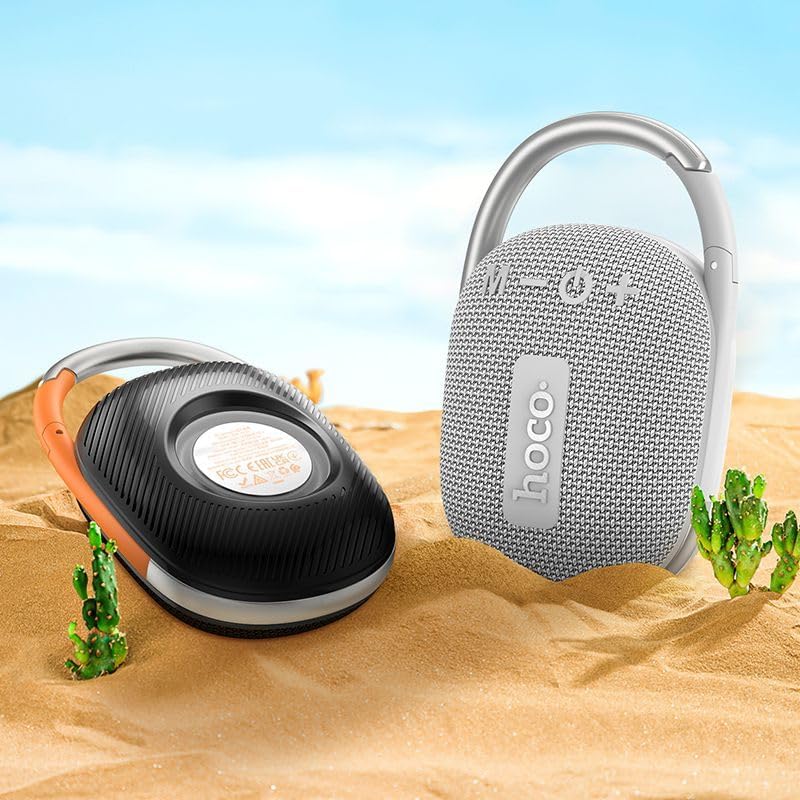
Image: The Hoco HC17 speaker positioned on sand with small cacti, illustrating its portability and suitability for outdoor use.
10. ዋስትና እና ድጋፍ
This product comes with a standard manufacturer's warranty. For detailed warranty terms and conditions, please refer to the warranty card included with your purchase or contact your retailer. For technical support or service inquiries, please contact the point of purchase or the official Hoco support channels.