
1. መግቢያ
The LONGER Ray5 5W Laser Engraver is a versatile and high-precision tool designed for both hobbyists and professionals. Equipped with a cutting-edge 240MHz ESP32 chipset, it offers impressive speeds and superior compatibility. Its advanced laser technology ensures intricate designs and detailed patterns on a wide range of materials. This manual provides essential information for setting up, operating, and maintaining your laser engraver, ensuring safe and efficient use.

Figure 1: The LONGER Ray5 5W Laser Engraver, showcasing its design and an example of an engraved wooden piece.
2. የደህንነት መረጃ
Operating a laser engraver requires strict adherence to safety protocols. The LONGER Ray5 5W is a Laser Class II device, and while it includes built-in safety features, user vigilance is paramount.
- የዓይን መከላከያ; Always wear the provided protective goggles when the laser is in operation. The laser beam can cause severe eye damage.
- መከላከያ ሽፋን; Ensure the protective cover is in place during operation to contain the laser beam within the specific area of the material.
- የአደጋ ጊዜ መዘጋት፡ The machine is equipped with an emergency shutdown button. Familiarize yourself with its location and use it immediately in case of any malfunction or emergency.
- Motion Protection: The device features motion protection, which automatically shuts down the laser if abnormal movements are detected during operation.
- የሙቀት መከላከያ; Overheating detection and temperature monitoring are integrated. The machine will automatically stop if it detects a flame or if the engraving area overheats.
- የአየር ማናፈሻ; Operate the engraver in a well-ventilated area to dissipate fumes and smoke generated during the engraving or cutting process.
- ክትትል፡ Never leave the laser engraver unattended while it is operating.

ምስል 2 - ተጠናቀቀview of the LONGER Ray5's integrated safety features, including eye protection, thermal monitoring, motion detection, and the power button.
3. ማዋቀር
The LONGER Ray5 5W laser engraver is designed for easy assembly. All necessary tools and detailed guides are included in the package. Follow the step-by-step instructions provided in the Quick Start Guide to assemble the frame, attach the laser module, and connect the control unit.
- ማሸግ፡ Carefully unpack all components and verify against the packing list.
- የክፈፍ ስብስብ Assemble the main frame components using the provided screws and tools. Ensure all connections are secure.
- የሌዘር ሞዱል ጭነት፡ Mount the laser module onto the gantry. Ensure it slides smoothly along the axis.
- የመቆጣጠሪያ አሃድ ግንኙነት; Connect the control unit to the main frame and the laser module.
- የኃይል ግንኙነት; Connect the power adapter to the control unit and plug it into a suitable power outlet.
- የመጀመሪያ ኃይል በርቷል፡ Press the power button on the control unit. The 3.5-inch touch screen will illuminate, indicating the device is ready.
- የትኩረት ማስተካከያ፡- Adjust the laser focus according to the material thickness. The laser module typically has a focus adjustment knob.

Figure 3: All components of the LONGER Ray5 5W Laser Engraver laid out, ready for assembly.
4. የአሠራር መመሪያዎች
The LONGER Ray5 5W offers multiple connectivity options and a user-friendly interface for seamless operation.
4.1 የግንኙነት አማራጮች
- የዩኤስቢ ግንኙነት፡- Connect directly to your computer via USB for real-time control using compatible software.
- TF ካርድ፡ የጭነት ዲዛይን files onto a TF card for offline engraving, allowing operation without a continuous computer connection.
- የ WiFi ግንኙነት; Connect the engraver to your local WiFi network for wireless control and file ማስተላለፍ
- የሞባይል መተግበሪያ Utilize the dedicated mobile application for convenient control and monitoring from your smartphone or tablet.
4.2 የሶፍትዌር ተኳሃኝነት
The engraver is compatible with popular laser engraving software:
- LaserGRBL፡ Recommended for Windows users, offering a straightforward interface for basic engraving tasks.
- Lightburn A powerful and versatile software compatible with Windows, macOS, and Linux, providing advanced control and design capabilities.

Figure 4: The LONGER Ray5 supports multiple software platforms and connection modes for flexible operation.
4.3 Engraving Process
- ንድፍ መፍጠር; Create or import your design using LaserGRBL, LightBurn, or the mobile app.
- የቁሳቁስ አቀማመጥ፡- Place your material within the 400x400mm working area. Ensure it is flat and securely positioned.
- የትኩረት ማስተካከያ፡- Fine-tune the laser focus for optimal engraving quality based on your material.
- ቅድመview and Positioning: Use the touch screen or software to preview the engraving path and adjust the laser's starting position. The 3.5-inch touch screen allows for intuitive control and real-time monitoring.
- መሳል ይጀምሩ Initiate the engraving process. The LONGER Ray5 can achieve speeds up to 10,000mm/min, ensuring efficient project completion.

Figure 5: The 3.5-inch color touch screen provides intuitive control and real-time monitoring of the engraving process.
4.4 Material Compatibility and Settings
The LONGER Ray5 5W is capable of engraving and cutting a variety of materials with high precision (0.08x0.08mm laser spot, 0.01mm accuracy). Refer to the table below for recommended settings. These are starting points and may require fine-tuning based on specific material variations and desired results.
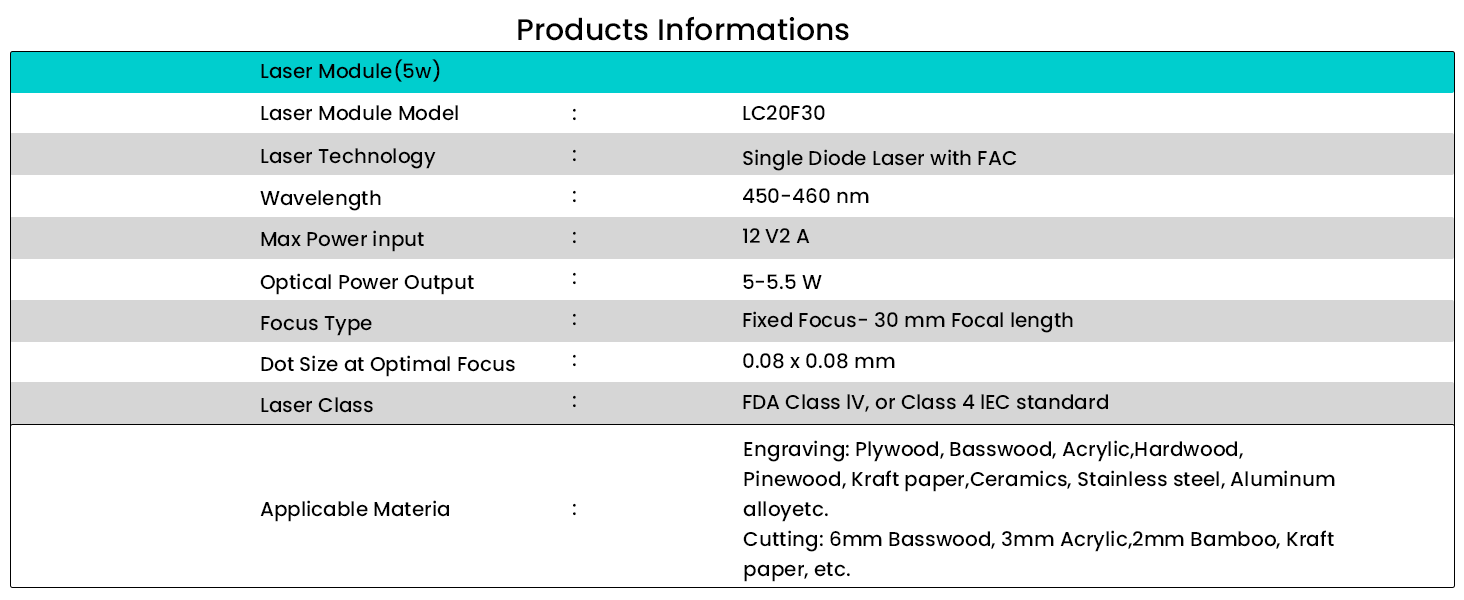
Figure 6: Recommended settings for various materials, including basswood, plywood, stainless steel, leather, and acrylic.
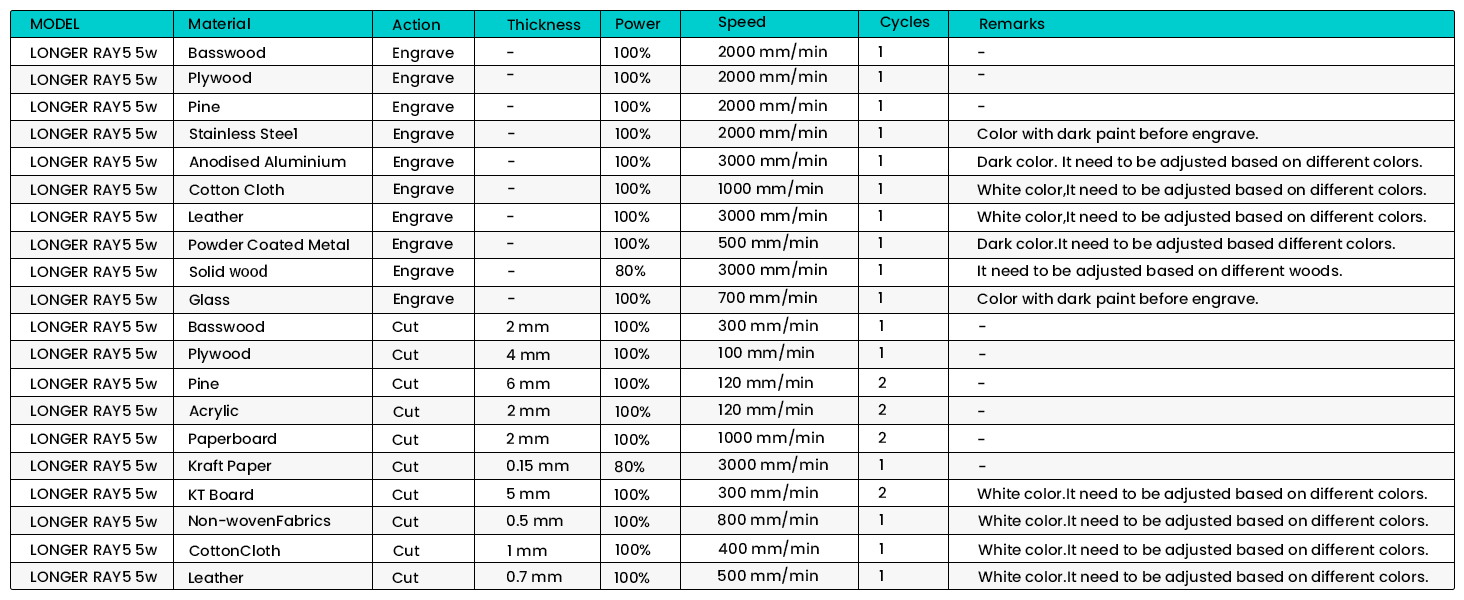
Figure 7: The LONGER Ray5 5W is compatible with a wide range of materials, including wood, leather, metal, and acrylic.
5. ጥገና
Regular maintenance ensures the longevity and optimal performance of your LONGER Ray5 5W Laser Engraver.
- ማጽዳት፡ Regularly clean the laser lens and the working area to prevent debris buildup, which can affect laser performance and engraving quality. Use a soft, lint-free cloth.
- ቀበቶ ውጥረት; Periodically check the tension of the timing belts. They should be taut but not overly tight to ensure smooth and accurate movement of the laser module.
- ቅባት፡ Apply a small amount of lubricant to the guide rails and lead screws as recommended in the detailed product manual to ensure smooth motion.
- የጽኑዌር ዝማኔዎች ፦ Check the official Longer website for any available firmware updates to ensure your device has the latest features and performance improvements.
6. መላ መፈለግ
If you encounter issues with your LONGER Ray5 5W, refer to the common troubleshooting steps below:
| ችግር | ሊሆን የሚችል ምክንያት | መፍትሄ |
|---|---|---|
| ሌዘር አይተኩስም ወይም ደካማ አይደለም | Incorrect focus, low power setting, dirty lens, loose connection. | Adjust laser focus. Increase power setting in software. Clean the laser lens. Check all cable connections. |
| Engraving is blurry or uneven | Material not flat, incorrect focus, loose belts, excessive speed. | Ensure material is flat and secured. Re-adjust focus. Check and tighten timing belts. Reduce engraving speed. |
| Machine not moving or skipping steps | Loose motor cables, obstructed movement, software error. | Check motor cable connections. Clear any obstructions on the rails. Restart the software and engraver. |
| Cannot connect via WiFi/App | Incorrect network settings, firewall issues, app outdated. | Verify WiFi credentials. Check router settings. Update the mobile app. Try USB connection as an alternative. |
7. ዝርዝሮች
| ባህሪ | ዝርዝር |
|---|---|
| የምርት ልኬቶች | 12.2 x 23.6 x 5.9 ኢንች |
| የንጥል ሞዴል ቁጥር | 5W |
| የእቃው ክብደት | 8.26 ፓውንድ |
| አምራች | ረዘም ያለ |
| የትውልድ ሀገር | ቻይና |
| የመጀመሪያ ቀን ይገኛል። | መጋቢት 28 ቀን 2024 ዓ.ም |
| ሌዘር ሞዱል ሞዴል | LC20F30 |
| ሌዘር ቴክኖሎጂ | Single Diode Laser with FAC |
| የሞገድ ርዝመት | 450-460 nm |
| ከፍተኛው የኃይል ግቤት | 12V 2A |
| Optical Power Output | 5-5.5 ዋ |
| የትኩረት አይነት | Fixed Focus - 30 mm Focal length |
| Dot Size at Optimal Focus | 0.08 x 0.08 ሚ.ሜ |
| ሌዘር ክፍል | FDA ክፍል IV፣ ወይም ክፍል 4 IEC ደረጃ |
| Applicable Engraving Materials | Plywood, Basswood, Acrylic, Hardwood, Pinewood, Kraft paper, Ceramics, Stainless steel, Aluminum alloy, etc. |
| Applicable Cutting Materials | 6mm Basswood, 3mm Acrylic, 2mm Bamboo, Kraft paper, etc. |

Figure 8: Detailed technical specifications of the LONGER Ray5 5W laser module.
8. ዋስትና እና ድጋፍ
LONGER is committed to providing excellent customer support. The LONGER Ray5 5W Laser Engraver comes with a standard manufacturer's warranty. For specific warranty terms and conditions, please refer to the warranty card included in your product packaging or visit the official Longer webጣቢያ.
Should you require any assistance with installation, operation, maintenance, or troubleshooting, our dedicated support team is available 24/7. You can reach them through the contact information provided in your product documentation or on the Longer official webጣቢያ.
For additional resources and community support, consider visiting the Longer Store on Amazon or relevant online forums dedicated to laser engraving.