
YanLan G7
YanLan G7 Wired Gaming Mouse User Manual
Model: G7 | Brand: YanLan
መግቢያ
Thank you for choosing the YanLan G7 Wired Gaming Mouse. This high-performance mouse is designed for precision and comfort, featuring 7 programmable buttons, adjustable DPI settings, and vibrant RGB LED lighting. This manual will guide you through the setup, operation, and maintenance of your new gaming mouse.

Image: The YanLan G7 Wired Gaming Mouse, showcasing its ergonomic design and colorful RGB lighting from a top-down perspective.
1. ማዋቀር
The YanLan G7 Wired Gaming Mouse is a plug-and-play device, requiring no additional drivers for basic functionality. Follow these simple steps to get started:
- የዩኤስቢ ገመዱን ያገናኙ; በኮምፒተርዎ ላይ የሚገኝ የዩኤስቢ ወደብ (ዴስክቶፕ ወይም ላፕቶፕ) ያግኙ።
- Plug in the Mouse: Insert the USB connector of the G7 mouse into the USB port.
- የስርዓት እውቅና Your operating system (Windows, Mac OS) will automatically detect and install the necessary generic drivers. This process usually takes a few seconds.
- ለመጠቀም ዝግጁ፡- Once recognized, the mouse's LED lighting will illuminate, and it will be ready for immediate use.

Image: The YanLan G7 Wired Gaming Mouse connected to a laptop, illustrating its design with a metal panel and galvanized wings.
2. የአሠራር መመሪያዎች
2.1 የአዝራር ተግባራት
The G7 mouse features 7 buttons for enhanced control and customization:
- የግራ ጠቅታ አዝራር፡- መደበኛ የመጀመሪያ ደረጃ ጠቅታ ተግባር።
- በቀኝ ጠቅ ያድርጉ አዝራር; መደበኛ ሁለተኛ ደረጃ ጠቅታ ተግባር።
- የሽብለላ ጎማ (መካከለኛ ጠቅታ): For scrolling and middle-click actions.
- የዲፒአይ ማስተካከያ አዝራር፡- Cycles through DPI settings (see section 2.2).
- አስተላልፍ አዝራር፡- Typically used for navigating forward in web አሳሾች ወይም file አሳሾች.
- ተመለስ አዝራር፡- Typically used for navigating backward in web አሳሾች ወይም file አሳሾች.
- Seventh Button: This button's specific function may vary or be programmable depending on software, if available. Default is often a double-click or macro key.
2.2 የዲፒአይ ማስተካከያ
The G7 mouse allows you to adjust its sensitivity (DPI - Dots Per Inch) on the fly. This is useful for different tasks, such as precise aiming in games or fast navigation across multiple monitors.
- የዲፒአይ ደረጃዎች፡- The mouse supports four adjustable DPI levels: 1200, 1800, 2400, and 3600 DPI.
- እንዴት ማስተካከል እንደሚቻል፡- የወሰኑትን ይጫኑ የዲፒአይ ማስተካከያ አዝራር (usually located behind the scroll wheel) to cycle through the available DPI settings. Each press will switch to the next DPI level.
- ምስላዊ አመልካች፡- The RGB lighting may change color or pattern to indicate the current DPI setting, though this is not explicitly stated, it is a common feature.
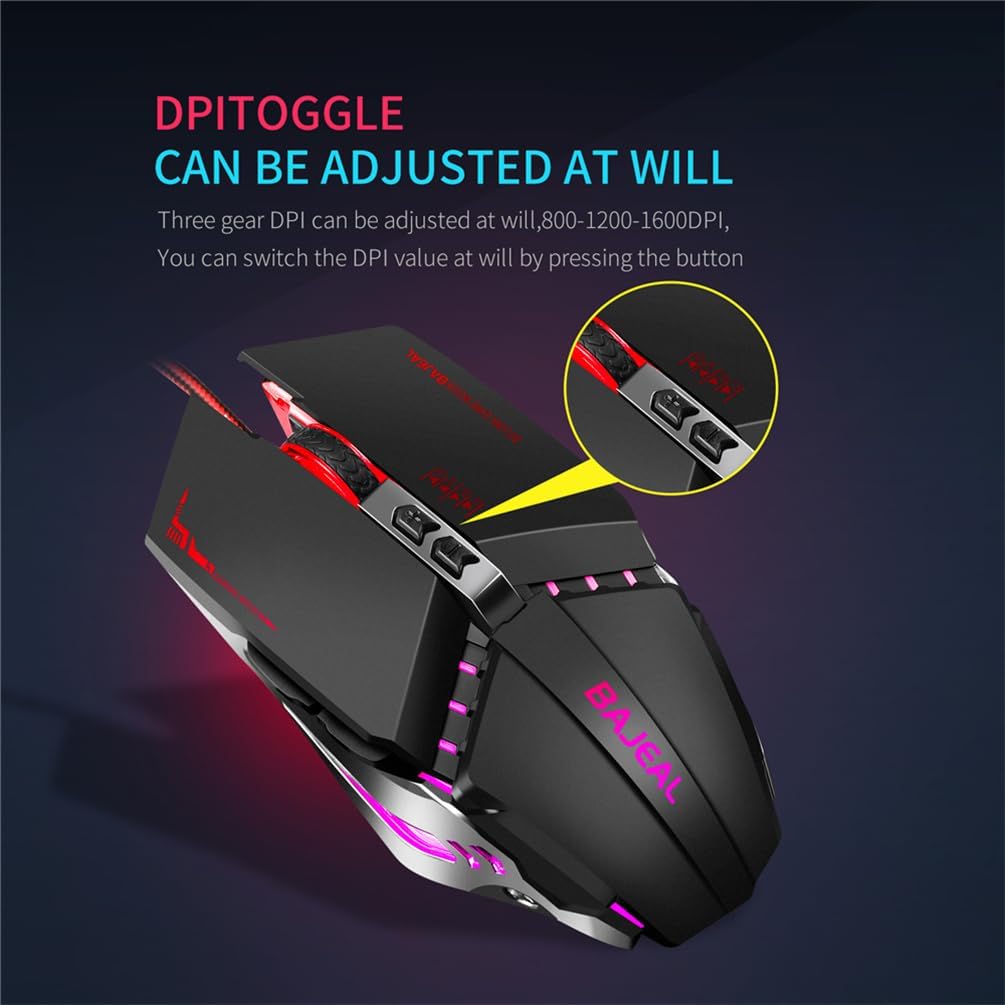
ምስል፡ መቀራረብ view of the YanLan G7 Wired Gaming Mouse highlighting the DPI toggle button. Note: The image text indicates 800-1200-1600 DPI, while the product description specifies 1200-1800-2400-3600 DPI.
2.3 RGB LED መብራት
The G7 mouse features dynamic RGB LED lighting, enhancing its aesthetic appeal. The lighting effects are typically pre-programmed and cycle automatically. There are no user-adjustable settings for the RGB lighting directly on the mouse.
3. ጥገና
To ensure the longevity and optimal performance of your YanLan G7 mouse, follow these simple maintenance guidelines:
- ወለሉን ማጽዳት; የአይጡን ውጫዊ ክፍል ለማጽዳት ለስላሳ፣ ደረቅ፣ ከላጣ ነፃ የሆነ ጨርቅ ይጠቀሙ። ለጠንካራ ቆሻሻ፣ ትንሽ ቆሽትampጨርቁን በውሃ. ኃይለኛ ኬሚካሎችን ወይም ሻካራ ማጽጃዎችን ያስወግዱ.
- የኦፕቲካል ዳሳሽ ማጽዳት; Periodically inspect the optical sensor on the underside of the mouse for dust or debris. Use a cotton swab or compressed air to gently clean the sensor area.
- የኬብል እንክብካቤ; የዩኤስቢ ገመዱን በደንብ ማጠፍ ወይም ማጠፍ ያስወግዱ። አይጡን ገመዱ እንዳይሰበር ወይም እንዳይበላሽ በሚከላከል መንገድ ያስቀምጡት።
- ፈሳሾችን ያስወግዱ; Do not expose the mouse to liquids. If liquid spills on the mouse, immediately disconnect it from your computer and allow it to dry completely before reconnecting.
4. መላ መፈለግ
If you encounter any issues with your YanLan G7 mouse, refer to the following common problems and solutions:
| ችግር | ሊሆን የሚችል መፍትሄ |
|---|---|
| መዳፊት ምላሽ እየሰጠ አይደለም። |
|
| የጠቋሚ እንቅስቃሴ የተሳሳተ ወይም ዝላይ ነው። |
|
| አዝራሮች በትክክል እየሰሩ አይደሉም። |
|
| የRGB መብራት እየሰራ አይደለም። |
|
5. ዝርዝሮች
| ሞዴል | G7 |
| የምርት ስም | YanLan |
| የዲፒአይ ቅንብሮች | 1200/1800/2400/3600 ዲፒአይ |
| የአዝራሮች ብዛት | 7 |
| የግንኙነት አይነት | ባለገመድ ዩኤስቢ |
| የኬብል ርዝመት | 1.5 ሜትር |
| የምርት ክብደት | 140 ግራም |
| ቀለም | ጥቁር |
| ልኬቶች (L x W x H) | 130 ሚሜ x 76 ሚሜ x 42 ሚሜ |
| ተስማሚ ስርዓቶች | Windows XP, Vista, 7, 8, 10, ME, 2000, Mac OS (or latest versions) |
| ልዩ ባህሪያት | RGB LED Lighting, Ergonomic Design, Durable Micro-switch, Optical Tracking |
6. ዋስትና እና ድጋፍ
Information regarding product warranty and customer support is not provided in the available product details. Please refer to your purchase documentation or contact the retailer for specific warranty terms and support options.
Ask a question about this manual
Ask about setup, troubleshooting, compatibility, parts, safety, or missing instructions. Manuals+ will review the question and use this page’s manual context to help answer it.